It is fun to make a toy vehicle with Lego, but it is even more fun to make one that actually works. [PeterSripol] made two Lego submarines, and you can see them in the video below. There isn’t a lot of build information, but watching the subs fire missiles and then getting destroyed by depth charges is worth something.
One of the subs is larger and uses a rudder to steer. It was apparently harder to control than the other smaller sub which used two motors thrusting opposite one another to steer. Looks like fun.
Leapfrog make some pretty awesome kids electronics. Especially admirable is the low cost, the battery life, and the audio quality of these devices. This circuit bending hack takes advantage of those audio circuits by turning the Alphabet Pal into your lead vocalist. The performance in the demo video begins with some impressive tricks, but just wait for it because by the end the little purple caterpillar proves itself an instrument worthy of a position beside that fancy Eurorack you’ve been assembling.
The image above provides a great look inside the beastie. [Jason Hotchkiss] mentions he’s impressed by the build quality, and we have to agree. Plus, look at all of those inputs — this is begging to leave toyland and join the band. With an intuitive sense that can only be gained through lots of circuit-bending experience, he guessed that the single through-hole resistor on the PCB was used to dial in the clock speed. That made it easy to throw in a trimpot for pitch-bending and he moved on to figure out individual note control.
All of those caterpillar feet are arranged in a keyboard matrix to detect button presses. After pulling out the oscilloscope for a bit of reverse engineering, [Jason] grabbed a PIC microcontroller and added it to the same solder points as the stock ribbon connector. The result is that the buttons on the feet still work, but now the Alphabet Pal also has MIDI control.
Take a look at the writeup for full details, and the video after the break to hear it in action. If you’re a fan of circuit-bent toys, this pretty pink keyboard hack always impressed us, especially the spring reverb that was added!
We often hear it said that today’s kids don’t go out and play as much as they did in the past, but honestly, it’s hard to really blame them. Have you seen some of the games they have now? It’s going to take something a little more exciting than a game of stickball to get them off the couch when they’ve got 4K and VR game systems to play with.
Circuit to control ATX PSU
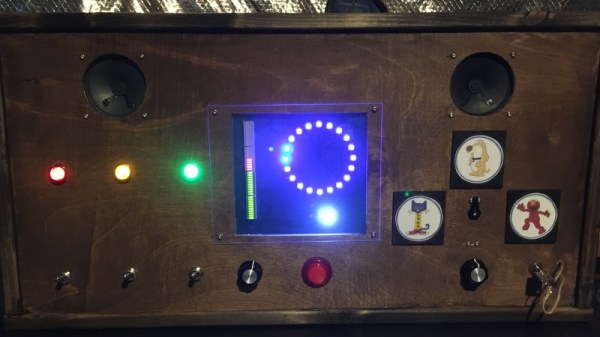
Which is exactly why [Bobek] is building his kids a time machine. Not a literal one, of course. The Flux Capacitor technology required has yet to be mastered. But it does allow the player to “travel” through time through videos which are played by punching in specific codes they have to unlock by solving puzzles in the real world. Then again, keeping keeping kids active and mentally engaged might as well be “going back in time” in some people’s eyes.
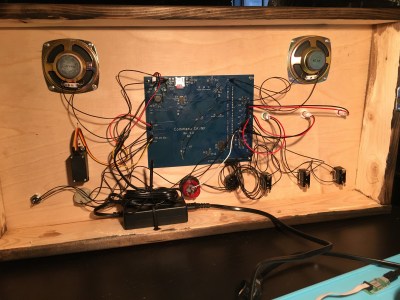
By the looks of things, [Bobek] still has a little work to do on the project, but it’s far enough along that we can get an idea. Inside the bottom of the heavy duty plastic case he’s installed an ATX power supply and a Raspberry Pi 3, and an top of that, there’s a metal plate that holds the power button, an RGB backlit keyboard, and a Vacuum Florescent Display.
After powering on the system, the kids punch in the codes they’ve earned on the keyboard. If accepted, it starts the corresponding presentation which goes over the sights and sounds of the time period they’ve unlocked. In the video after the break you can see [Bobek] test the device with a small display hanging off the end of an HDMI cable, but presumably the system will eventually get an integrated display. The kids could also plug it into the TV, but at that point you might be going full circle.
Before 3D printers, there was LEGO. And the little bricks are still useful for putting something together on the quick. Proof is YouTuber [Matthias Wandel]’s awesome bottle cap shooter build that uses rudimentary DIY computer vision to track you and then launch a barrage of plastic pieces at you.
This is an amazing project that has a bit of something for everyone. Lets start with the LEGO. [Matthias Wandel] starts with making a crossbow designed launcher and does an awesome job with showing us how it works in a video. The mechanism is an auto reloading and firing system that can be connected to a stepper motor. Next comes the pan and tilt mechanism which allows the turret to take better aim at moving targets: more LEGO and stepper motors.
The target tracker uses color matching in a program that curiously uses no OpenCV. It compares consecutive frame and then filters out red objects – the largest red dot is it. Since using a fisheye lens on the Raspbery Pi camera adds distortion, [Matthias Wandel] uses a jig made with more Legos to calibrate the image.
The final testing involved having his own child walk around the room being hunted but the autonomous machine. Kids do love toys even if they are trying to shoot bottle caps at them.
Given how many adults will go out of their way to avoid spending any extended amount of time in the kitchen, it’s pretty amazing how much children love playing in their miniature versions. Especially since they tend to be pretty simple: usually they’re little more than different sized boxes made out of MDF to represent the refrigerator, oven, and microwave. Of course, some kids are fortunate enough to have hackers and makers for parents.
[Brian Lough] wanted to get his two year old daughter her own play kitchen, but wasn’t terribly impressed with anything on the market. So he decided to start with the IKEA Duktig and add in his own personal touches to turn the stark white playset into something that would really get his daughter’s imagination going. With the liberal application of RGB LEDs and microcontrollers, her kitchen is sure to be envy of the sandbox.
Being the class act that he is, [Brian] starts his write-up acknowledging the various IKEA Duktig hacks and modifications that served as inspiration for his own build. Most of the prior art out there relates to making the microwave and oven a bit more exciting with the addition of lights and sounds, which ultimately ended up being the way he approached his daughter’s version as well.
For the oven, [Brian] decided to add some big arcade buttons over the door which would change the color of the RGB LEDs inside. He thought this association would be a good way to help his daughter learn her colors, since she’ll be able to see the oven change color when she presses the corresponding button. He also added a knob to control the intensity of the light, meant to be analogous to the temperature control in a real oven.
The modifications to the microwave are a bit more extensive, including a “timer” made out of a TM1637 LED display in a 3D printed panel complete with a buzzer to indicate when the plastic food has been thoroughly illuminated. [Brian] even made it so the LEDs in the NeoPixel ring light up in a spinning pattern to cast some shadows and simulate movement. He notes that the microwave was actually a bit overwhelming to his daughter at first, but after a couple months of getting used to the functions, she enjoys it as much as the oven.
What do you get when you combine an old optical drive, some empty soda bottles, and a microcontroller? Well…nothing, really. That’s still just a pile of rubbish. But if you add in a battery, an RC receiver, and some motors, you’re getting dangerously close to a fun little toy to kick around the pond as [Antonio Rizzo] recently demonstrated.
A couple of plastic bottles lashed together make up the hull of the boat, and [Antonio] has used the internal frame of an old optical drive bent at a 90 degree angle to hold the two small DC motors. In a particularly nice touch, the drive’s rubber anti-vibration bushings are reused as motor mounts, though he does admit it was just dumb luck that the motors were a perfect fit.
For the electronics, [Antonio] has paired a custom motor controller up with the uChip, a diminutive Arduino-compatible microcontroller in a narrow DIP-16 package. Wireless communication is provided by an off-the-shelf cPPM receiver such as you might see used in a small plane or quadcopter.
The whole build is powered by a common 18650 lithium-ion battery, which could also be easy enough to recover from the trash given how common they are in laptop batteries; though if you threw a new cell into this build we wouldn’t hold it against you. Everything is put into a high-tech plastic sandwich bag to provide minimum of waterproofing with the minimum of effort.
Visitors to the Wizarding World of Harry Potter at Universal Studios are able to cast “spells” by waving special interactive wands in the air. Hackers like us understand that there must be some unknown machinations happening behind the scenes to detect how the wands are moving, but for the kids wielding them, it might as well be real magic. So when his son asked to have a Harry Potter themed birthday party, [Adam Thole] decided to try recreating the system used at Universal Studios in his own home.
Components used in the IR streaming camera
The basic idea is that each wand has a reflector in the tip, which coupled with strong IR illumination makes them glow on camera. This allows for easy gesture recognition using computer vision techniques, all without any active components in the wand itself.
[Adam] notes that you can actually buy the official interactive wands from the Universal Studios online store, and they’d even work with his system, but at $50 USD each they were too expensive to distribute to the guests at the birthday party. His solution was to simply 3D print the wands and put a bit of white prismatic reflective tape on the ends.
With the wands out of the way, he turned his attention to the IR imaging side of the system. His final design is a very impressive 3D printed unit which includes four IR illuminators, a Raspberry Pi Zero with the NoIR camera module. [Adam] notes that his software setup specifically locks the camera at 41 FPS, as that triggers it to use a reduced field of view by essentially “zooming in” on the image. If you don’t request a FPS higher than 40, the camera will deliver a wider image which didn’t have any advantage in this particular project.
The last part of the project was taking the video stream from his IR camera and processing it to detect the bright glow of a wand’s tip. For each frame of the video the background is first removed and then any remaining pixel that doesn’t exceed a set brightness level if ignored. The end result is an isolated point of light representing the tip of the wand, which can be fed into Open CV’s optical flow function to show [Adam] what shape the user was trying to make. From there, his software just needs to match the shape with one of the stock “spells”, and execute the appropriate function (such as changing the color of the lights in the room) with Home Assistant.
Overall, it’s an exceptionally well designed system considering the goal was simply to entertain a group of children for a few hours. We almost feel bad for the other parents in the neighborhood; it’s going to take more than a piñata to impress these kids after [Adam] had them conjuring the Dark Arts at his son’s party.