Smart Bulb WiFi Server Hosts “Banned” Literature

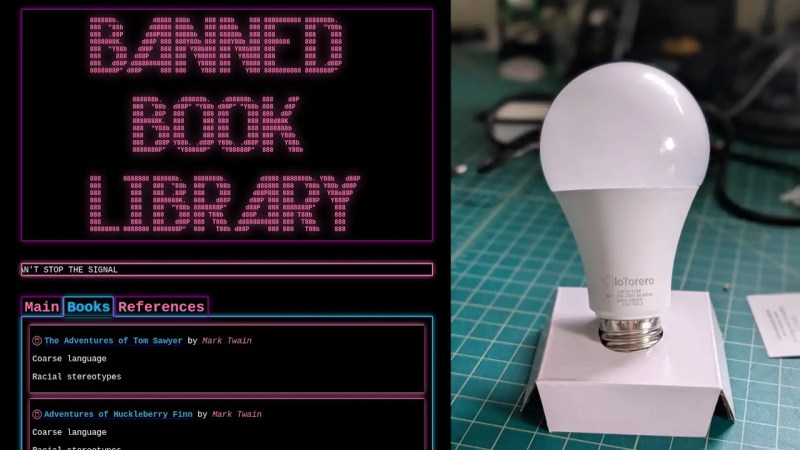
Let’s stop for a moment and pause to consider the smart bulb. Imagine going back 20 years and telling yourself that people will be putting computers capable of acting as web servers into light bulbs just so they can control them from their telephone instead of hitting the switch. The whole thing seems crazy — but its great, because it enables hacks like this one where [RickOOOOOO] takes a commercially-available ESP32 smart bulb, and hacks it into a local file server and digital library for banned books.

The word “banned” gets bandied about a lot — but assured, there’s nothing getting served up by [RickOOOOOO]’s bulb that’s going to help somebody will ill-intent build an improvised explosive device.  No, at least as conceived here, it appears to be full of easily-available e-books that were pulled from school libraries in the USA, which may-or-may not meet your personal definition of ‘banned’. Whatever you want to call them, we appreciate the idea that a student could hypothetically replace one of the bulbs at school with a hacked version serving up that sort of content. a bulb in such a school with a bulb hacked to host that sort of content–in minecraft, naturally.

In any case, the hardest part of the hack was carving the ESP32C3 in the bulb out of the IoToreo bulb enough to access it. Unfortunately having done so, [Rick] wasn’t able to get an SDcard interface soldered on, so he’s stuck with just 4MB for books and webserver. That means only a few epubs can fit on the bulb, but it’s better than those books being unavailable.

Like the solarpunk message board we featured recently, which also ran on an ESP32, the bulb broadcasts a public network that uses a captive portal to take you to the web interface of the library. From there, users can browse books– including learning from where they were banned and why–and admins can access a password-protected control panel. One neat work-in-progress feature on the control panel is that the bulb can still be used as a smart bulb, so you can try and match the light to its surroundings. In Minecraft, because of course we would never encourage kids to change light bulbs. Perish the thought!

Speaking of Minecraft, you can run a server on a lightbulb, too. Or DOOM, because of course even the light bulbs run DOOM now. What a time to be alive!

Using NFC To Power Devices Instead Of Qi

It shouldn’t be any surprise that NFC and similar RFID implementations are capable of providing power to a receiver, since this is after all how RFID tags can work without a battery. The question is more whether you can do more with NFC than just briefly power some low-power circuitry to spit out some data. This is the topic of a recent [Denki Otaku] video.

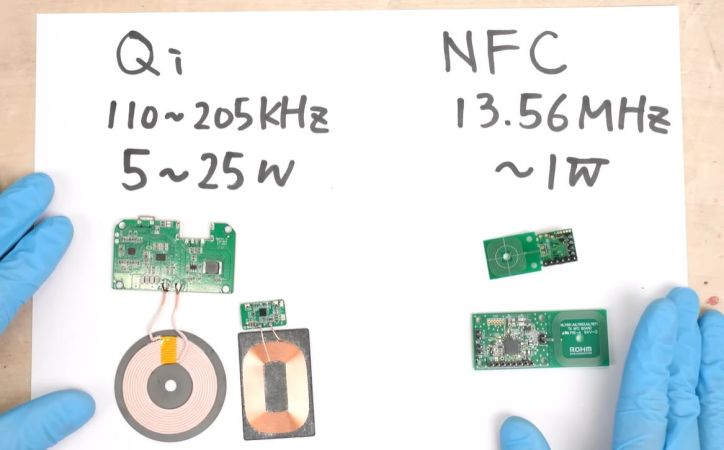
Although both Qi and NFC use electromagnetic induction, they differ in the frequency and correspondingly the maximum power that they can deliver to a receiver. For NFC this is around a Watt, with the used NFC module supporting up to 250 mW, which already sets the rough scope of what one can expect from an NFC-powered device. That said, an NFC transmitter and receiver can be significantly smaller than those for Qi due to the much higher frequency.

An additional benefit of NFC is that it offers more freedom to the user in its protocol in terms of user data, which is useful for applications where you don’t just want to power a device. In the video an MCU and IMU are powered along with an OLED display, which demonstrates wireless charging as well as data transfer of the IMU data to a second MCU.

The benefits of NFC over Qi would thus be the smaller antenna size, and depending on the used NFC implementation also charging and data transfer at the same time.

Continue reading “Using NFC To Power Devices Instead Of Qi”

DIY Smart Button Gets Surprisingly Complicated

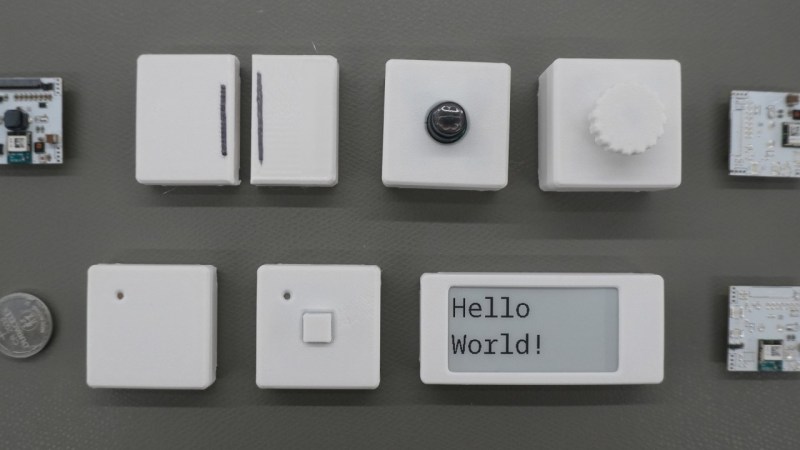
There’s a reason that the standards specifications for various wireless communications protocols are extremely long and detailed. [Made by Dennis] found this out first hand when he decided to build a wireless button from scratch.

The major issues with wireless devices is one of power consumption. If reliable power is available from a wall plug or solar panel, this isn’t as serious of a concern. But [Dennis] is using batteries for his buttons, so minimizing power consumption is a priority. He’s going with the nRF52, a microcontroller designed for low power and which has a built in wireless radio, and configuring it in a way that uses the least amount of energy possible.

From there, [Dennis] turns to the wireless communication. He goes into detail about how the microcontroller is woken up, how it sends its data packets to another wireless-enabled microcontroller, and how they handle handshakes and acknowledgements of data. For something as simple as a button press, it gets quickly more complicated especially when adding some basic encryption and security to the communications protocol.

With all the design decisions out of the way, the system can be built. [Dennis] has created custom PCBs for his devices, and also included some expansion I/O for other sensors and peripherals beyond just a pushbutton. All of the schematics and code are available on the project’s GitHub page and the STL files can be found at Printables.

For those new to offline home automation or who are turning away from cloud-based services lately, there are some easy entry points that don’t require much extra hardware or expenditure.

Continue reading “DIY Smart Button Gets Surprisingly Complicated”

How HP Calculators Communicate Over Infrared

For most people, calculators are cheap and simple devices used for little more than addition and the odd multiplication job. However, when you get into scientific and graphical calculators, the feature sets get a lot more interesting. For example, [Ready? Z80] has this excellent explainer on how HP’s older calculators handle infrared communications.

The video focuses on the HP 27S Scientific Calculator, which [Ready? Z80] found in an op-shop for just $5. Introduced in 1988, the HP-27S had the ability to dump screen data over an infrared link to a thermal printer to produce paper records of mundane high-school calculations or important engineering math. In the video, [Ready? Z80] explains the communication method with the aid of Hewlett-Packard’s own journal publication from October 1987, which lays out of the details of “the REDEYE Protocol.” Edgy stuff.

It’s pretty straightforward to understand, with the calculator sending out bursts of data in six to eight pulses at a time, modulated onto a 32.768 KHz square wave as is the norm. [Ready? Z80] then goes a step further, whipping up custom hardware to receive the signal and display the resulting data on a serial terminal. This is achieved with a TEC-1G single-board computer, based on the Z80 CPU, because that’s how [Ready? Z80] does things.

We’ve seen other great stuff from this channel before, too. For example, if you’ve ever wanted to multitask on the Z80, it’s entirely possible with the right techniques.

Continue reading “How HP Calculators Communicate Over Infrared”

Converting A Nebra Cryptocurrency Miner To A Meshcore Repeater

After the swivel by Helium Inc. towards simply running distributed WiFi hotspots after for years pushing LoRaWAN nodes, much of the associated hardware became effectively obsolete. This led to quite a few of these Nebra LoRa Miners getting sold off, with the [Buy it Fix it] channel being one of those who sought to give these chunks of IP-67-rated computing hardware a new life.

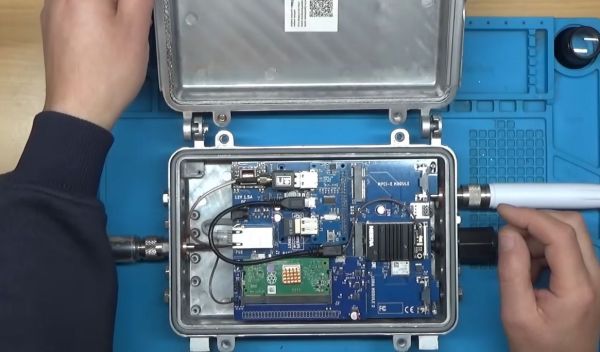
Originally designed to be part of the Helium Network Token (HNT) cryptocurrency mining operation, with users getting rewarded by having these devices operating, they contain fairly off-the-shelf hardware. As can be glanced from e.g. the Sparkfun product page, it’s basically a Raspberry Pi Compute Module 3+ on a breakout board with a RAK 2287 LoRa module. The idea in the video was to convert it into a Meshcore repeater, which ought to be fairly straightforward, one might think.

Unfortunately the unit came with a dead eMMC chip on the compute module, the LoRa module wasn’t compatible with Meshcore, and the Nebra breakout board only covers the first 24 pins of the standard RPi header on its pin header.

Continue reading “Converting A Nebra Cryptocurrency Miner To A Meshcore Repeater”

Demonstrating The Sheer Lack Of Security In First Gen Cellular Networks

Modern cellular networks are built to serve millions upon millions of users, all while maintaining strict encryption across all communications. But earlier cellular networks were by no means so secure, as [Nostalgia for Simplicity] demonstrates in a recent video.

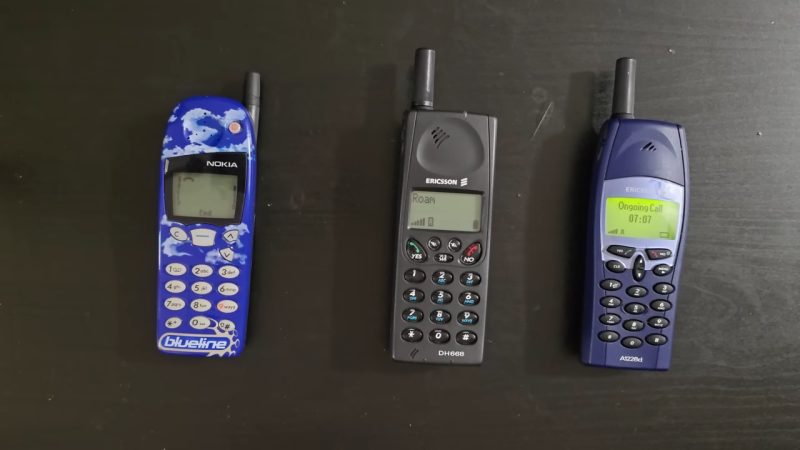
The video begins with an anecdote — our narrator remembers a family member who could listen in on other’s conversations on the analog AMPS phone network. This was easily achieved simply by entering a code that would put an Ericsson handset into a test mode, in which it could be switched to tune in any desired AMPS channel. Since the communications were transmitted in a purely analog manner, with no encryption of any sort, any conversation on such a network was basically entirely open for anyone to hear. The video shows a recreation of this method, using a software-defined radio to spin up a low-power, very local AMPS network. A phone call is carried out between two handsets, with a third handset able to listen in just by using the special test mode.

If you’re particularly keen to build your own first-generation AMPS phone network, just know that it’s not really allowed due to rules around spectrum allocations. Still, it’s entirely possible as we’ve covered before. It doesn’t even take much hardware in our modern SDR era.

Continue reading “Demonstrating The Sheer Lack Of Security In First Gen Cellular Networks”

A hand holding the Zoyi ZT-QB9 Smart Clamp meter

Review And Demo Of The Zoyi ZT-QB9 Smart Clamp Meter

Over on YouTube [Kiss Analog] reviews the New Zoyi ZT-QB9 Smart Clamp meter.

If you’re putting together an electronics lab from scratch you absolutely must get a multimeter to start. A typical multimeter will be able to do current measurements but it will require you to break the circuit you’re measuring and interface it to your meter using its mechanical probes.

A good choice for your second, or third, multimeter is a clamp-based one. Many of the clamp meters have the clamp probe available for current measurements while still allowing you to use the standard 4mm banana jack probes for other measurements, particularly voltage and resistance.

If you’re curious to know more about how clamp meters work the answer is that they rely on some physics called the Hall Effect, as explained by the good people at Fluke.

In the video the following clamp meters are seen: Zoyi ZT-QB9, PROVA 11, and Hioki CM4375. If you’re in the market for a clamp meter you might also like to consider the EEVblog BM036 or a clamp meter from Fluke.

We have of course posted about clamp meters before. Check out Frnisi DMC-100: A Clamp Meter Worth Cracking Open or ESP32 Powers DIY Smart Energy Meter if you’d like to know more. Have your own trusty clamp meter? Don’t need no stinkin’ clamp meter? Let us know in the comments!

Continue reading “Review And Demo Of The Zoyi ZT-QB9 Smart Clamp Meter”