Interactive Game Board Helps Toddler Learn Colors And Shapes

Most parents would do anything to enrich their kids’ worlds and teach them what they need to know. Hacker parents often take it one step further by modifying the kid’s world to allow them to work past a disability. To wit we have an interactive game board to help a toddler learn her shapes and colors.

The toddler in question is [Becca], and her needs are special because of the progressive nature of the blindness that will result from her Usher Syndrome. [Becca] will need visual acuity testing much earlier than most toddlers, but a standard eye chart is meaningless to kids before they get their letters. This is where Lea shapes come in – a set of four shapes that are used to make visual testing a game and help practitioners assess what a child can and cannot see.

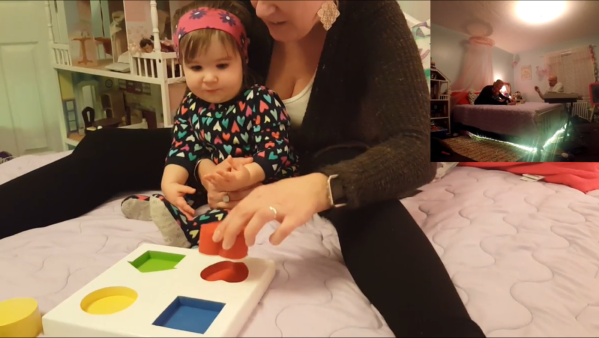
[Jake] and his wife [Beth] were advised to familiarize [Becca] with the shapes, but all she wanted to do was eat the printed sheet. In order to make the task more entertaining, [Jake] built an interactive board where brightly colored Lea shapes trigger the room lights to change to the same color as the block when it’s inserted into the correct spot on the board, as a visual reward. Reed switches, magnets, and an Arduino comprise the game logic, and the board communicates to the Philips Hue smart bulbs over an NRF24L01. The video below also shows some cool under-bed lights and a very engaged [Becca] learning her shapes and colors.

As we expected when we last covered his efforts to help [Rebecca], [Jake] has leveraged the Raspberry Pi he used as a hub for the stairwell lighting project. We’re looking forward to seeing what else he comes up with, and to see how [Becca] is thriving.

Continue reading “Interactive Game Board Helps Toddler Learn Colors And Shapes”

Jean-Luc PYcARD Is A Pocketable Python Development Platform

It’s a good thing that a ridiculous pun and a screenprint of Jean-Luc Picard on the bottom of the board is enough to qualify for the 2017 Hackaday Sci-Fi Contest, because [bobricius]’s Python-plus-Arduino card and environmental sensor potpourri is very cool.

The PCB design itself is great. It’s got a gigantic LED array, cutout for a wrist strap, and an onboard USB plug so you can program it just by sticking it in your computer; it shows up as a USB mass storage device when you plug it in. The files that show up on the “drive” are Micropython code that you can edit, save, and then run directly on the device. You can hardly beat that for convenience.

And there’s a full complement of sensors: not one but two temperature and humidity sensors, including our recent favorite BME280, which also reads barometric pressure. (We suspect that makes it a tri-corder.) There’s a real-time clock, a buzzer, and some buttons. Want to add more sensors? I2C ports are broken out for your convenience.

Besides having Star Trek flair, this board would give the various educational platforms a run for their money: Micro:bit, we’re looking at you. Very cool indeed!

Keep The Peace In The Bedroom With A Snore Stopping Sleep Mask

Despite what my wife says, I have absolutely no evidence that I snore. After all, I’ve never actually heard me snoring. But I’ll take her word for it that I do, and that it bothers her, so perhaps I should be a sport and build this snore-detecting vibrating sleep mask so she can get a few winks more.

Part wearable tech and part life hack, [mopluschen]’s project requires a little of the threadworker’s skill. The textile part of the project is actually pretty simple, and although [mopluschen] went with a custom mask made from fabric and foam shoulder pads, it should be possible to round up a ready-made mask that could be easily modified. The electronics are equally simple – an Arduino with a sound sensor module and a couple of Lilypad Vibe boards. The mic rides just above the snore resonating chamber and the vibrators are right over the eyes. When your snore volume exceeds a preset threshold, the motors wake you up.

Whether this fixes the underlying problem or just evens the score with your sleep partner is debatable, but either way there’s some potential here. And not just for snore-correction – a similar system could detect a smoke alarm and help rouse the hearing impaired. But if the sewing part of this project puts you off, you should probably check out [Jenny List]’s persuasive argument that sewing is not just for cosplayers anymore.

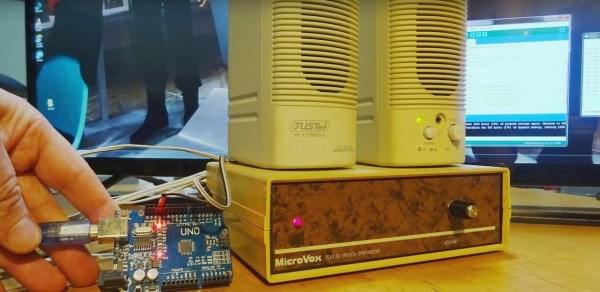
MicroVox driven by Arduino Uno

MicroVox Puts The 80’s Back Into Your Computer’s Voice

[Monta Elkins] got it in his mind that he wanted to try out an old-style speech synthesizer with the SC-01 (or SC-01A) chip, one that uses phonemes to produce speech. After searching online he found a MicroVox text-to-speech synthesizer from the 1980s based around the chip, and after putting together a makeshift serial cable, he connected it up to an Arduino Uno and tried it out. It has that 8-bit artificial voice that many of us remember fondly and is fairly understandable.

The SC-01, and then the SC-01A, were made by Votrax International, Inc. In addition to the MicroVox, the SC-01 and SC-01A were used in the Heath Hero robot, the VS-100 synthesizer add-on for TRS-80s, various arcade games such as Qbert and Krull, and in a variety of other products. Its input determines which phonemes to play and where it shines is in producing good transitions between them to come up with decent speech, much better than you’d get if you just play the phonemes one after the other.

microvox-manualThe MicroVox has a 25-pin RS-232 serial port as well as a parallel port and a speaker jack. In addition to the SC-01A, it has a 6502 under the hood. [Monta] was lucky to also receive the manual, and what a manual it is! In addition to a list of the supported phonemes and words, it also contains the schematics, parts list and details for the serial port which alone would make for fun reading. We really liked the taped-in note seen in this screenshot. It has a hand-written noted that says “Factory Corrected 10/18/82”.

Following along with [Monta] in the video below, he finds the serial port’s input buffer chip datasheet online and verifies the voltage levels. Next he opens up the case and uses dips switches to set baud rate, data bits, parity, stop bits and so on. After hooking up the speakers, putting together a makeshift cable for RX, TX and ground, and writing a little Arduino code, he sends it text and out comes the speech.

Continue reading “MicroVox Puts The 80’s Back Into Your Computer’s Voice”

Smaller Cheaper Arduino

Well, honestly, [Michael Mayer’s] STM8 Arduino (called Sduino) isn’t actually much to do with the Arduino, except in spirit. The STM8 is an 8-bit processor. It is dirt cheap and has some special motor control features that are handy. There’s a significant library available for it. However, it can be a pain to use the library and set up the build.

Just like how the Arduino IDE provides libraries and a build system for gcc, Sduino provides similar libraries and a build system for the sdcc compiler that can target the STM8. However, if you are expecting the Arduino’s GUI or a complete knock off of the Arduino library, you won’t get that.

Continue reading “Smaller Cheaper Arduino”

Nespresso Capsule Detector

Nespresso fans rejoice! If you like coffee (of course you do) and are a Nespresso fan, chances are you are one of two types of persons: the ones that chosen one type of capsule and stick to it or the ones that have a jar full of mixed capsules and lost track which coffee is which. Of course, there is a third, rarer, OCDish, kind. The ones that have every capsule organized neatly by color in a proper holder, full of style. In any case, if you forgot which color is which coffee because you threw the case away and forgot about it here’s an interesting weekend project for you: the Nespresso Capsule Detector.

[circuit.io team] made a neat Arduino-based project that can detect which capsule is which using an RGB color detector and display information about it on an LCD display. It’s a pretty simple project to make. If you have a 3D printer you can print the case, if not it’s fairly easy to come up with a working casing for the electronics and capsule.

The operation is simple, just drop the capsule in the hole and the Nespresso Capsule Detector will tell you which type it is, its intensity, its flavor tones and the optimal cup size for the coffee in question. We are just not sure if it can detect the Nespresso weddingbots correctly, but who knows?

Have a look:

Continue reading “Nespresso Capsule Detector”

Beautiful Linear RGB Clock

Yup, another clock project. But here, [Jan] builds something that would be more at home in a modern art museum than in the dark recesses of a hacker cave. It’s not hard to read the time at all, it’s accurate, and it’s beautiful. It’s a linear RGB LED wall clock.

7512951486134540347You won’t have to learn the resistor color codes or bizarre binary encodings to tell what time it is. There are no glitzy graphics here, or modified classic timepieces. This project is minimal, clean, and elegant. Twelve LEDs display the hours, six and nine LEDs take care of the minutes in add-em-up-coded decimal. (It’s 3:12 in the banner image.)

The technical details are straightforward: WS2812 LEDs, an Arduino, three buttons, and a RTC. You could figure that out by yourself. But go look through the log about building the nice diffusing plexi and a very clean wall-mounting solution. It’s the details that separate this build from what’s hanging on our office wall. Nice job, [Jan].