All Projections Suck, So Play Risk On A Globe Instead

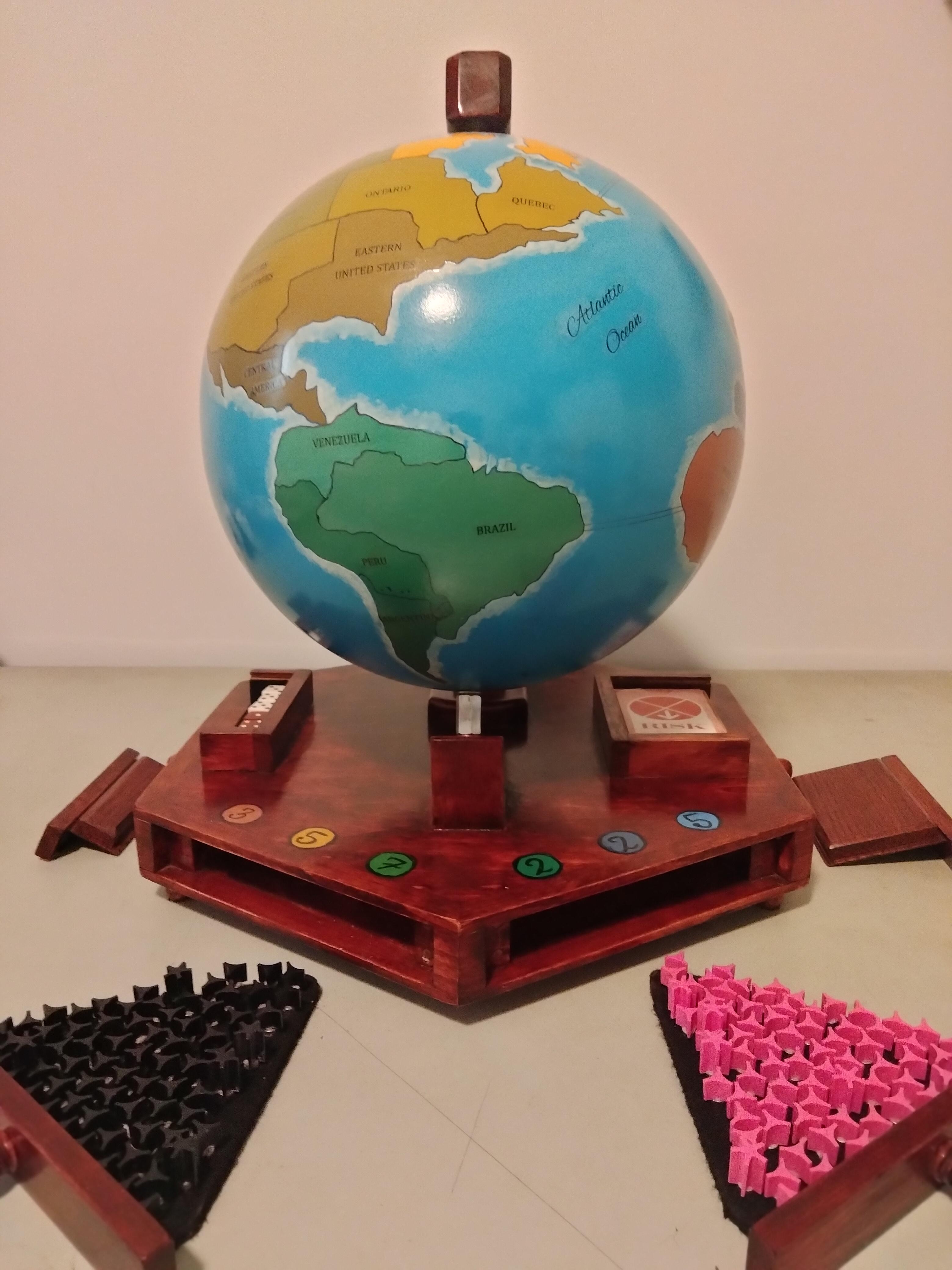
The worst thing about the getting people together is when everyone starts fighting over their favourite map projection– maybe you like the Watterman Butterfly, but your cousin really digs Gall-Peters, and that one Uncle who insists on defending Mercator after a couple of beers. Over on Instructables [madkins9] has an answer to that problem that will still let you play a rousing game of Risk– which will surely not drag on into the night and cause further drama– skip the projection, and put the game on a globe. 
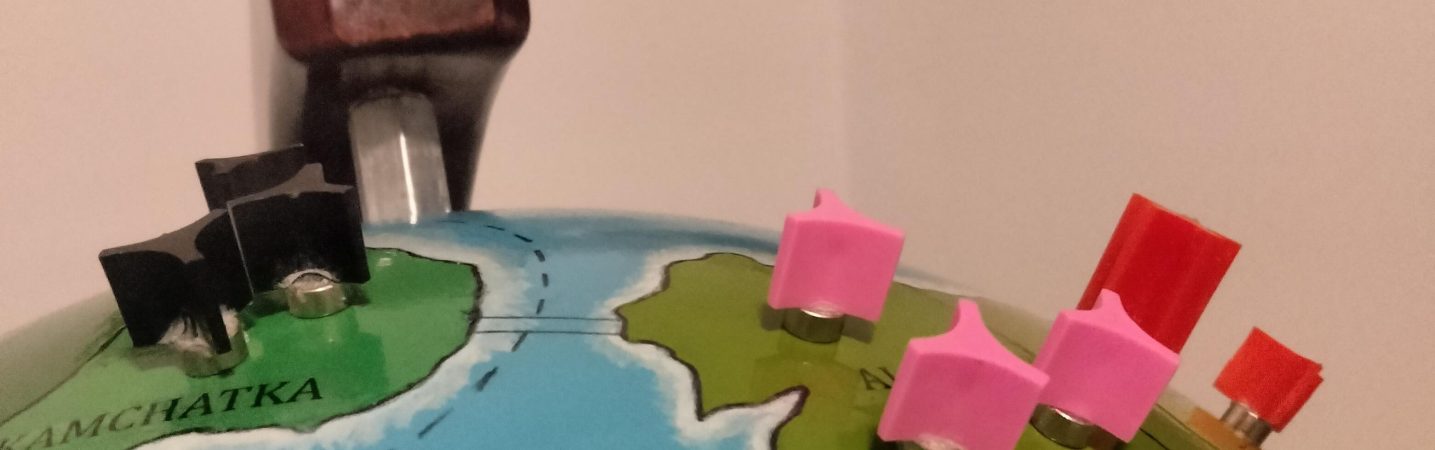
The pieces are from a 1960s version. The abstract tokens have a certain charm the modern ones lack.

Most globes, being cardboard, aren’t amenable to having game pieces cling to them. [madkins9] thus fabricates a steel globe from a pair of pre-purchased hemispheres. Magnets firmly affixed to the bases of all game pieces allow them to stick firmly to the spherical play surface. In a “learn from my mistakes” moment, [madkins] suggests that if you use two pre-made hemispheres, as he did, you make sure they balance before welding and painting them.

While those of us with less artistic flair might be tempted to try something like a giant eggbot, [madkins] was able to transfer the Risk world map onto his globe by hand. Many coats of urethane mean it should be well protected from the clicking or sliding magnet pieces, no matter how long the game lasts. In another teachable moment, he suggests not using that sealer over sharpie. Good to know.

Once gameplay is finished, the wooden globe stand doubles as a handsome base to hold all the cards and pieces until the next time you want to end friendships over imaginary world domination. Perhaps try a friendly game of Settlers of Catan instead. 
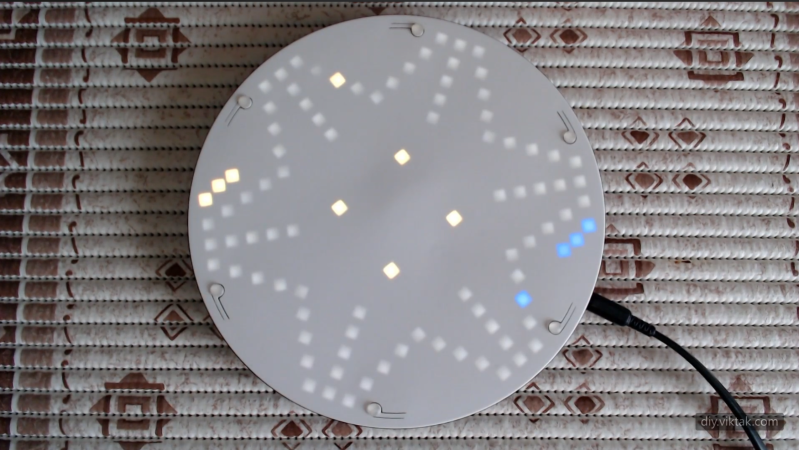
A circular 3D-printed board is shown, with a roughly star-shaped pattern of white LEDs glowing through the surface. Yellow and green LEDs are also visible through the surface at a few points.

Adding Electronics To A Classic Game

Like many classic board games, Ludo offers its players numerous opportunities to inflict frustration on other players. Despite this, [Viktor Takacs] apparently enjoys it, which motivated him to build a thoroughly modernized, LED-based, WiFi-enabled game board for it (GitHub repository).

The new game board is built inside a stylish 3D-printed enclosure with a thin white front face, under which the 115 LEDs sit. Seven LEDs in the center represent a die, and the rest mark out the track around the board and each user’s home row. Up to six people can play on the board, and different colors of the LEDs along the track represent their tokens’ positions. To prevent light leaks, a black plastic barrier surrounds each LED. Each player has one button to control their pieces, with a combination of long and short presses serving to select one of the possible actions.

The electronics themselves are mounted on seven circuit boards, which were divided into sections to reduce their size and therefore their manufacturing cost. For component placement reasons, [Viktor] used a barrel connector instead of USB, but for more general compatibility also created an adapter from USB-C to a barrel plug. The board is controlled by an ESP32-S3, which hosts a server that can be used to set game rules, configure player colors, save and load games, and view statistics for the game (who rolled the most sixes, who sent other players home most often, etc.).

If you prefer your games a bit more complex, we’ve also seen electronics added to Settlers of Catan. On a rather larger scale, there is also this LED-based board game which invites humans onto the board itself. Continue reading “Adding Electronics To A Classic Game”

What’s Black, White, And Red On 20 Sides?

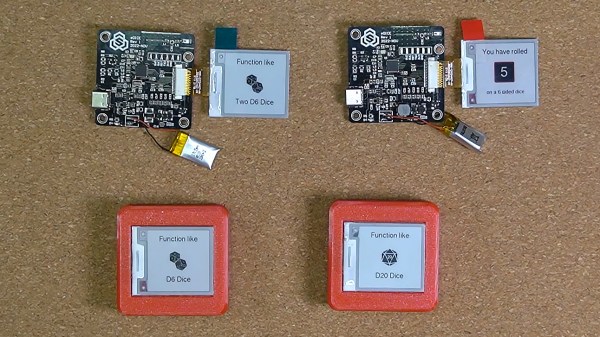
You won’t need to pack a full set of dice for your next game with this DIY Multifunctional Eink Gadget. [Sasa Karanović] brings us a fun device that combines a few essential aspects of tabletop gaming, D6, D12, and D20 dice rolling and a hero dashboard. While they have grand plans for a BLE networked future application, we admire the restraint to complete a V1 project before allowing scope-creep to run amok. Well played!

For this project, [Sasa] realized it needed to be battery powered and just choosing the right display for a battery powered application can be daunting. Even if you aren’t building this project, the video after the break includes a nice intro to electronic ink and low power microcontrollers for the uninitiated. We even see a graph of the completed board’s power draw from the button wake up, display refresh, and low power sleep. The project has some neat tips for building interaction into case design with the use of the display and a flexible bezel as integrated buttons. Continue reading “What’s Black, White, And Red On 20 Sides?”

Wood game piece being carved by a CNC mill with a hacked rotary axis

This $12 CNC Rotary Axis Will Make Your Head Spin

[legolor] brings us a great, cheap rotary axis to add to your small 3 axis CNC mills. How are you going to generate G-Code for this 4th axis? That’s the great part, and the hack, that [legolor] really just swapped the Y axis for the rotation. To finish the workflow and keep things cheap accessible to all there’s a great trick to “unwrap” your 3D model so your CAM software of choice thinks it’s still using a linear Y axis and keeps your existing workflow largely intact. While this requires an extra step in Blender to do the unwrapping, we love the way this hack changes as little of the rest of your process as possible. The Blender script might be useful for many other purposes too.

Wood game pieces carved from wood by a CNC mill with a hacked rotary axis

The results speak for themselves too! We thought the 3D printed parts were suspect in a CNC setup, but for the small scale of game pieces and milling wood, the setup is stable enough to produce a surprisingly accurate and detailed finish. If you want to try the same approach with something larger or a tougher material, [legolor] has a suggestion of a tailstock setup that’s still under $100 USD. Continue reading “This $12 CNC Rotary Axis Will Make Your Head Spin”

Dungeons And Dragons Board Game From The 1980s Holds A TMS1100

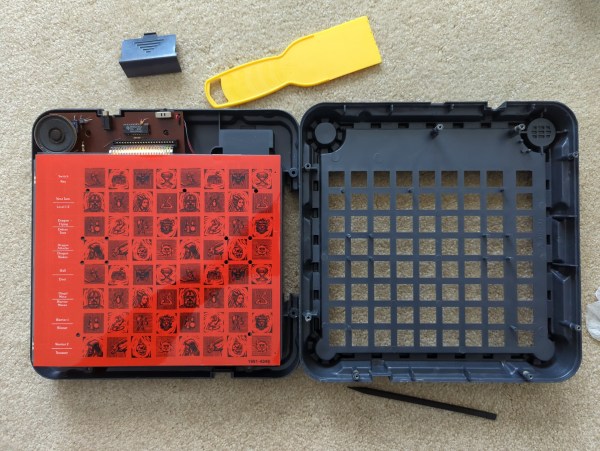
Today is a little tour back to the early 1980s when Mattel released the DUNGEONS & DRAGONS Computer Labyrinth Game. [Cameron Kaiser] was dealing with a few boxes of old stuff when he came across the game. Luckily for us, he decided to do a complete teardown and a comprehensive review more than 40 years after it came out.

The game itself is pretty simple. You and a friend are characters on the board, navigating an eight-by-eight maze. As you move through the labyrinth, a microcontroller emits twelve audio cues telling you what you’ve run into (walls, doors, treasure, and so on). The eight buttons on the side allow you to hear the different tones to know what they mean, as we imagine even the most well-written manual might struggle to describe that. In addition, the pieces are diecast metal, which allows the game to detect where the pieces have been placed. Continue reading “Dungeons And Dragons Board Game From The 1980s Holds A TMS1100”

2022 Cyberdeck Contest: RPG Character Tracker

While it would be a mistake to think there are any firm rules for what constitutes a cyberdeck, we can at least identify some common traits that would seem to give us a baseline description. For example, most deck builds we’ve seen have been fully-functional Linux computers, more often than not powered by some Raspberry Pi variant. But that doesn’t mean there isn’t room in the community for less computational powerful decks, or builds that are so bespoke that they can only perform a few selected tasks.

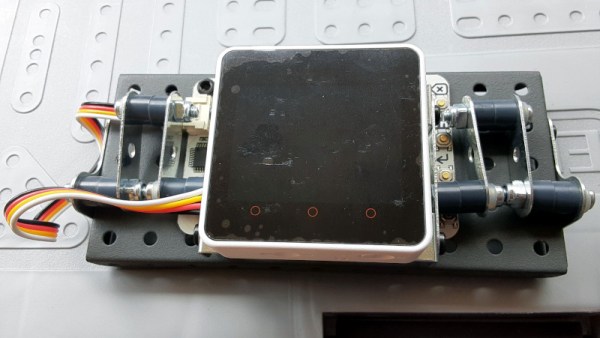
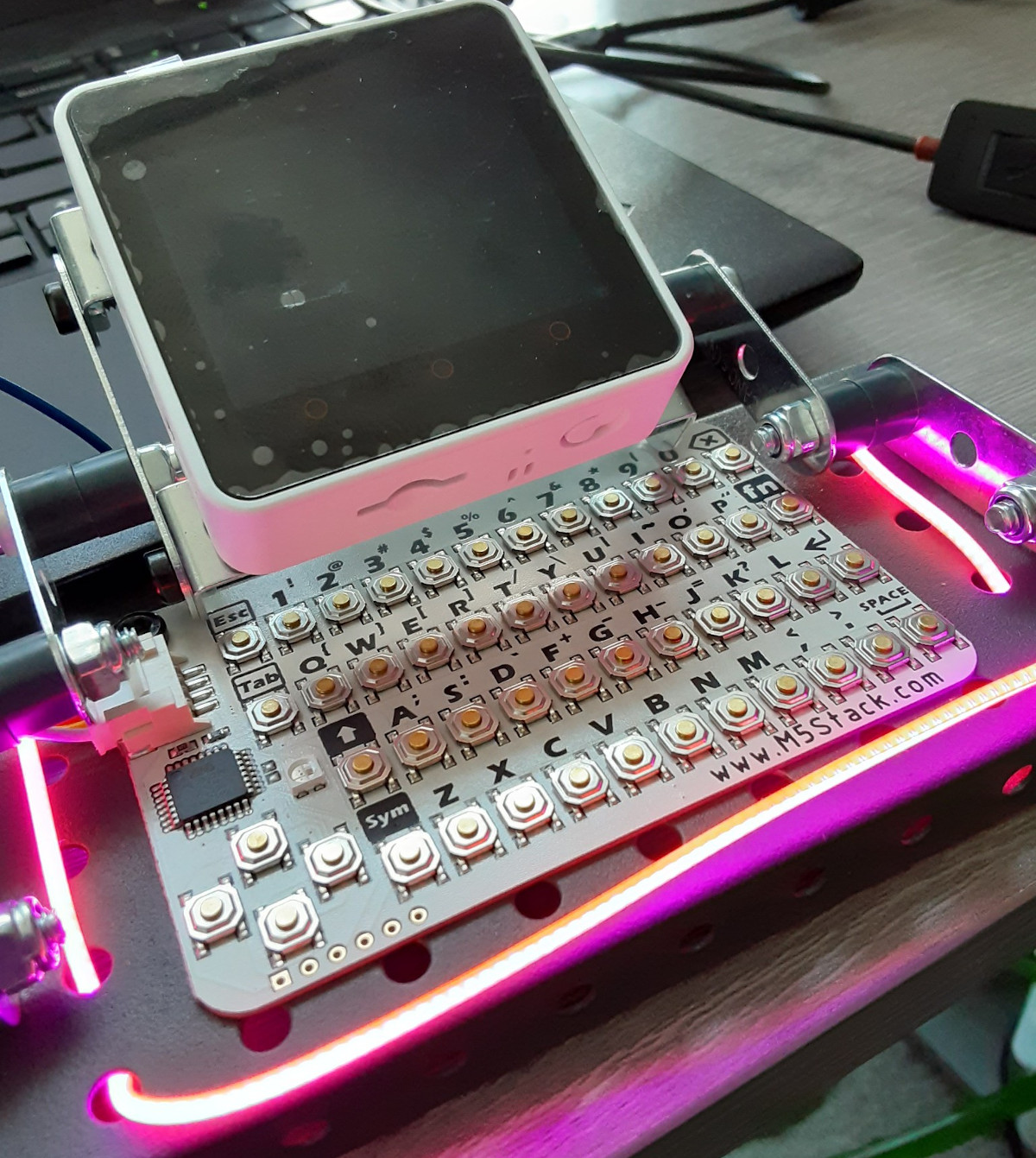
As a perfect example, take a look at the RPG Character Tracker from [Melissa Matos]. You won’t find a Raspberry Pi here, nor a full operating system. Instead, we’ve got a M5Stack Core2 and an I2C CardKB Mini Keyboard wrapped up in a foldable frame made from Erector Set pieces. Add in a little LED lighting for that cyberpunk feel, and the stage is set.

So what does this diminutive build do? Well, apparently nothing right now. [Melissa] just got the hardware together and has only recently started aligning all the 1s and 0s to do her bidding. But what it’s supposed to do is clear enough: it’s intended to be an electronic companion to complex RPG tabletop games to help with things such as character creation. Sounds like it will also have a “roll dice” mode that will save you the trouble of having to crawl under the table when one of your D20s goes rogue.

While such a device could be useful for many different games, it should come as no surprise to hear that [Melissa] is currently targeting the cyberpunk Shadowrun.

Although we were particularly taken with the online tool that let you generate 3D printed organizers for all your tabletop gaming needs, we’d definitely rather have digital companions like this which would make those plastic baggies full of parts obsolete.

Making Music With A Go Board Step Sequencer

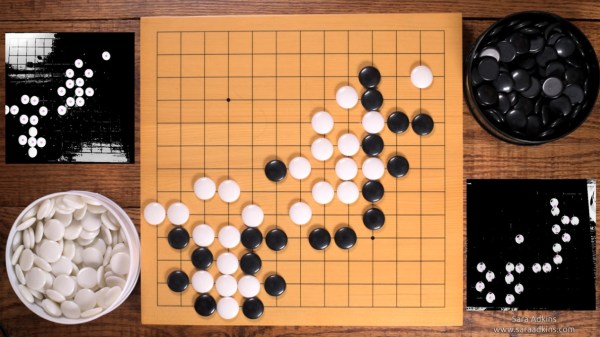
Ever wonder what your favorite board game sounds like? Neither did we. Thankfully [Sara Adkins] did, and created a step sequencer called Let’s Go that uses the classic board game Go as input.

In the game Go, two players place black and white tokens on a grid, vying for control of the board. As the game progresses, the configuration of game pieces gets more complex and coincidentally begins to resemble Conway’s Game of Life (or a weird QR Code). Sara saw music in the evolving arrangement of circles and transformed the ancient board game into a modern instrument so others could hear it too.

To an observer, [Sara’s] adaptation looks fairly indistinguishable from the version played in China 2,500 years ago — with the exception of an overhead webcam and nearby laptop, of course. The laptop uses OpenCV to digitize the board layout. It feeds that information via Open Sound Control (OSC) into popular music creation software Max MSP (though an open-source version could probably be implemented in Pure Data), where it’s used to control a step sequencer. Each row on the board represents an instrumental voice (melodic for white pieces, percussive for black ones), and each column corresponds to a beat.

Every new game is a new piece of music that starts out simple and gradually increases in complexity. The music evolves with the board, and adds a new dimension for players to interact with the game. If you want to try it out yourself, [Sara] has the project fully documented on her website, and all of the code is available on GitHub. Now we’re just left wondering what other games sound like — [tinkartank] already answered that question for chess, but what about Settlers of Catan?

Continue reading “Making Music With A Go Board Step Sequencer”