Diaphragm Air Engine

One of the tricky parts of engineering in the physical world is making machines work with the available resources and manufacturing technologies. [Tom Stanton] has designed and made a couple of air-powered 3D printed engines but always struggled with the problem of air leaking past the 3D-printed pistons. Instead of trying to make an air-tight piston, he added a rubber membrane and a clever valve system to create a diaphragm air engine.

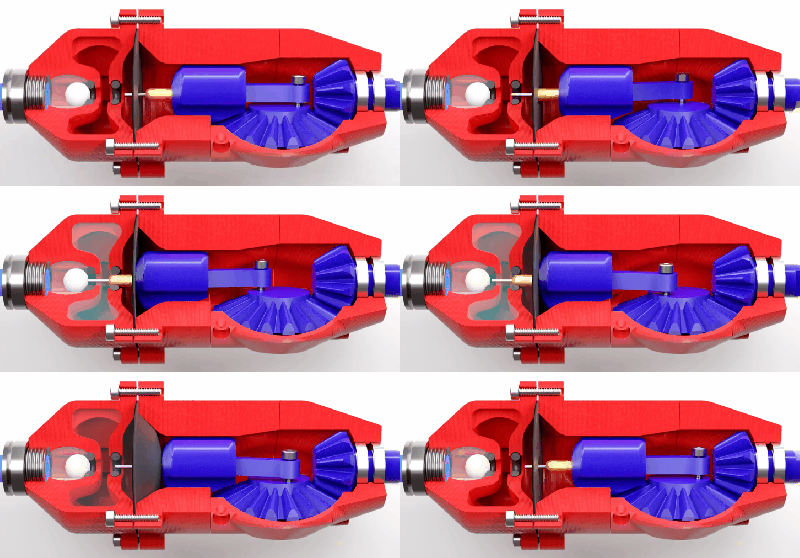
This GIF is worth 115 words

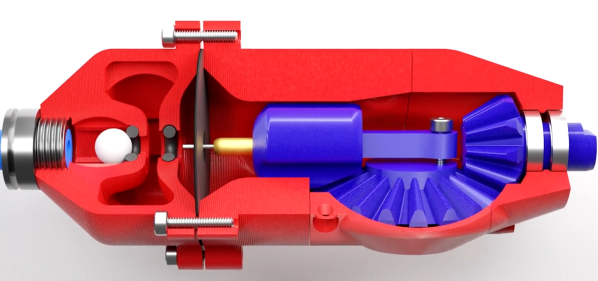
A round rubber diaphragm with a hole in the center creates a seal with the piston at the top of its stroke. A brass sleeve and pin protrude through the diaphragm, and the sleeve seals create a plug with an o-ring, while the pin pushes open a ball which acts as the inlet valve to pressurize an intermediate chamber. As the piston retracts, the ball closes the inlet valve, the outlet valve of the intermediate chamber is opened, forcing the diaphragm to push against the piston. The seal between the piston and diaphragm holds until the piston reaches its bottom position, where the pressurized air is vented past the piston and out through the gearbox. For full details see the video after the break.

It took a few iterations to get the engine to run. The volume of the intermediate chamber had to increase and [Tom] had to try a few different combinations of the sleeve and pin lengths to get the inlet timing right. Since he wanted to use the motor on a plane, he compared the thrust of the latest design with that of the previous version. The latest design improved efficiency by 366%. We look forward to seeing it fly! Continue reading “Diaphragm Air Engine”

Simple Tips For Better 3D-Printed Enclosures

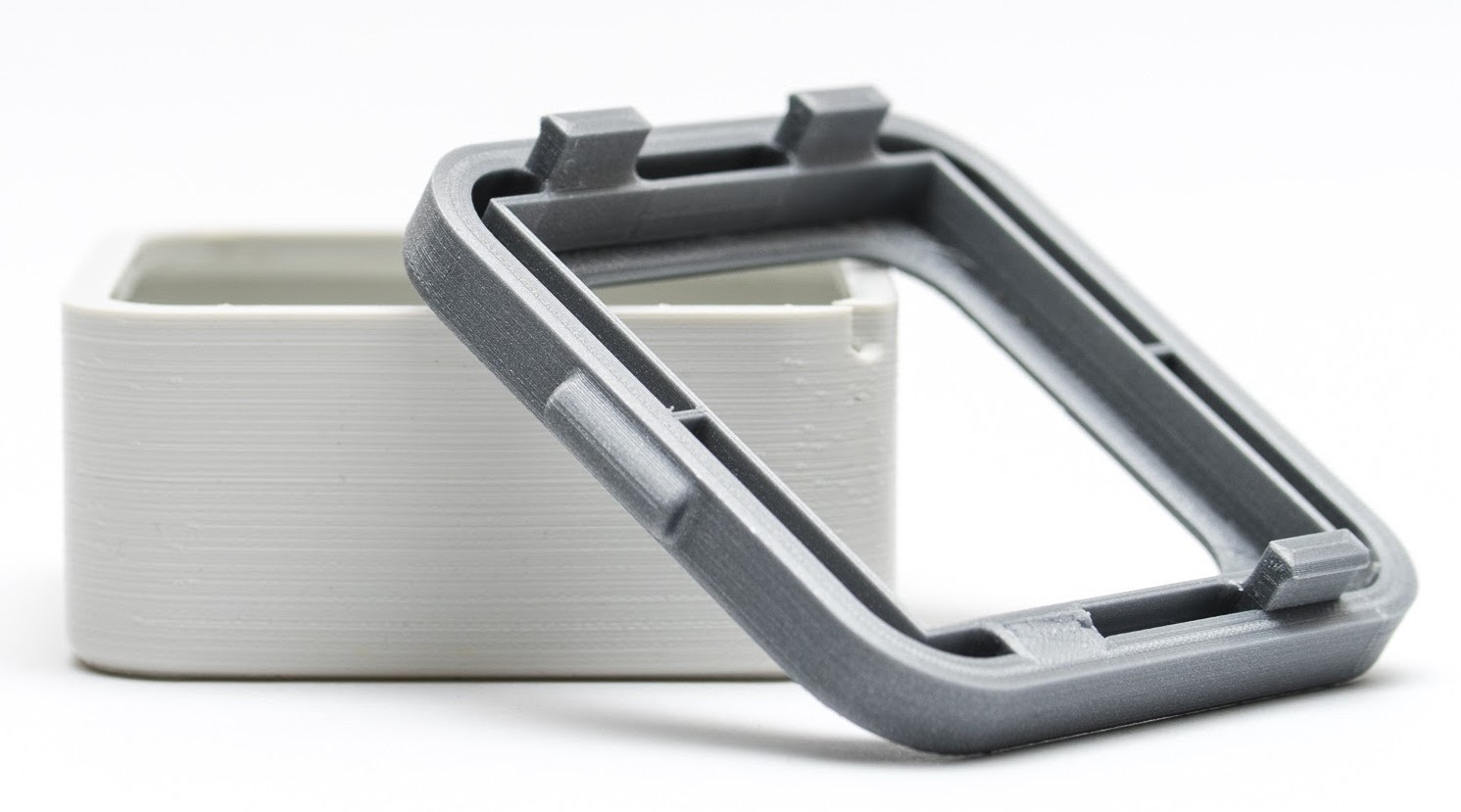
3D printing can be great for making enclosures, and following some simple guidelines can help the whole process go much smoother. 3D Hubs has an article on designing printed enclosures that has clear steps and tips to get enclosures coming out right the first time. 3D Hubs offers 3D printing and other services, and the article starts with a short roundup of fabrication methods but the rest is a solid set of tips applicable to anyone.

The first recommendation is to model the contents of the enclosure as a way to help ensure everything fits as it should, and try to discover problems as early as possible during the design phase, before anything gets actually printed. We’ve seen how a PCB that doesn’t take the enclosure into account risks needing a redesign, because there are some issues an enclosure just can’t fix.

The rest of their advice boils down to concrete design guidelines about wall thickness (they recommend 2 mm or more), clearances (allow a minimum of 0.5 mm between internal components and enclosure), and how to size holes for fasteners, clips, or ports. These numbers aren’t absolute minimums, but good baseline values to avoid surprises.

One final useful tip is that using a uniform wall thickness throughout the enclosure is general good practice. While this isn’t strictly necessary for successful 3D printing, it will make life easier if the enclosure ever moves to injection molding. Want to know more? Our own Bob Baddeley has an excellent primer on injection molding, and his been-there-done-that perspective is invaluable.

Get Over Your Fears

Some projects are just too complex, that’s for sure. But I’d be willing to bet that some things you think are too difficult actually aren’t, and it may be that all you need to get over your personal hurdle is a good demonstration. Here come three cases in point.

I was looking at the new Raspberry Pi Compute Module last weekend. They have a whole bunch of high-speed traces: things like Gigabit Ethernet, HDMI, and those crazy-fast SDI serial camera interfaces. I have no experience in high-speed design and layout at all, and frankly it gives me the willies. But the Raspberries also shipped me an IO demo board, and concomitant KiCAD design files, with the review board. Looking at it, they were just wires — maybe pairwise length-matched and impedance controlled — but also just wires. Opening up the KiCAD board file and clicking on the traces just like I do with my own designs, I’m a lot less scared. That was a revelation for me.

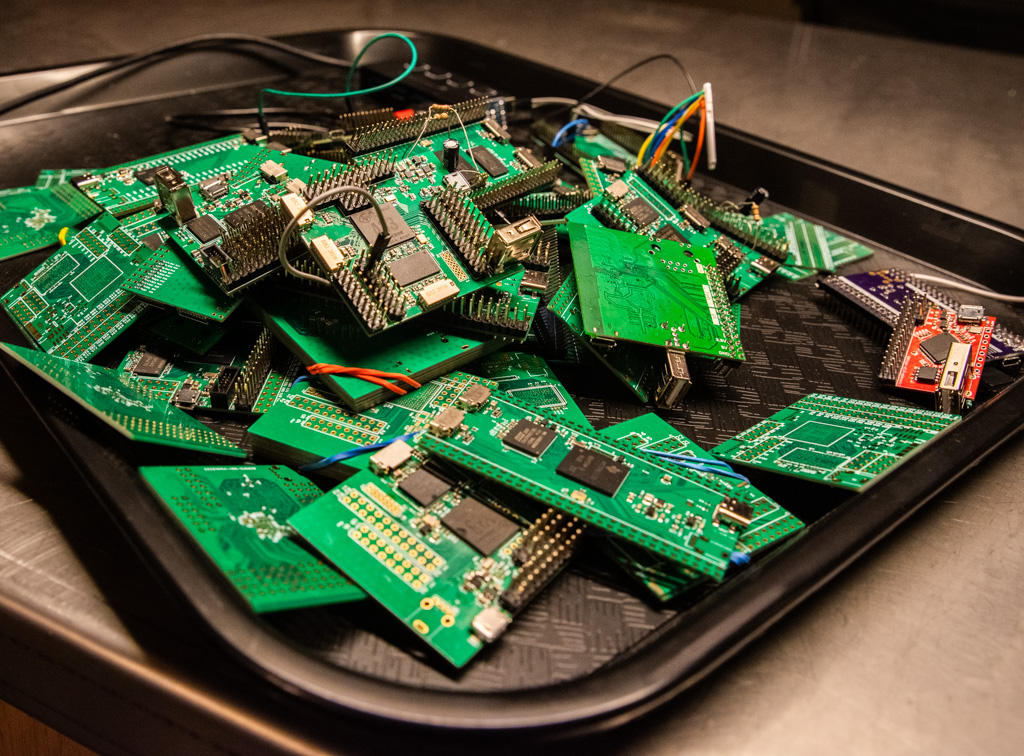
In a great writeup of his experience building ten different Linux single-board-computers from scratch, Jay Carlson had a similar effect on me. I would never have considered breaking out the hotplate for some CPU-and-DRAM action, and I’ve never had to lay out a PCB with a high density BGA chip before either. I’m not quite into Dunning-Kruger territory yet; I still have a healthy respect for the layout intricacies in fanning out a tight BGA CPU into a DRAM. But Jay’s frank assessments of what is easy and what is hard make it all seem within the realm of the doable.

As Mike and I were talking on the podcast about Jay’s work, Mike came clean about his fear of BGAs. I’ve done enough reflow-plate soldering, with parts that have a lead pitch that’s a factor of two finer than the 0.8 mm pitch BGAs in question, so it doesn’t seem implausible to me. And I’m 100% sure Mike could pull it off too, but he is in need of a BGA guru. Any good hobbyist videos out there?

Being a nerdy type, I’m much more focused on the knowledge and the inspiration, but maybe the courage is equally important — at least I think I undervalue it. I don’t need to lay out HDMI lines, or build a from-scratch Linux box, but I am no longer afraid that I couldn’t, and that’s because I’ve seen detailed examples of fellow hackers who’ve done the same. I might not get it right on the first shot, but I’m not afraid to try, and I wouldn’t have said the same before looking over other folks’ shoulders. Forza e corragio!

Current Sensor Makes Intriguing Use Of Concrete

Getting a product to market isn’t all about making sure that the product does what it’s supposed to. Granted, most of us will spend most of our time focusing on the functionality of our projects and less on the form, fit, or finish of the final product, especially for one-off builds that won’t get replicated. For those builds that do eventually leave the prototyping phase, though, a lot more effort goes into the final design and “feel” of the product than we might otherwise think. For example, this current sensor improves its feel by making use of cast concrete in its case.

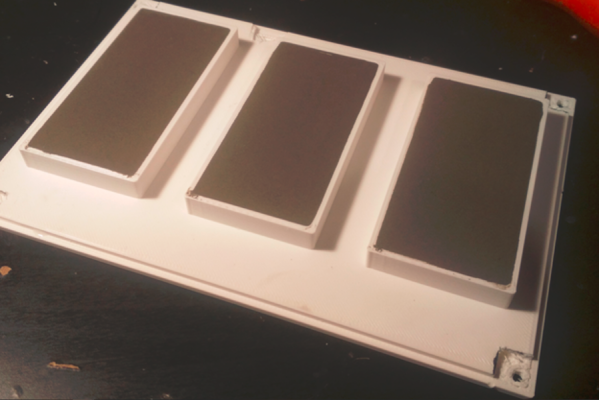
The current sensor in this build is not too much out of the ordinary. [kevarek] built the sensor around the MCA1101-50-3 chip and added some extra features to improve its electrostatic discharge resistance and also to improve its electromagnetic compatibility over and above the recommended datasheet specifications. The custom case is where this one small detail popped out at us that we haven’t really seen much of before, though. [kevarek] mixed up a small batch of concrete to pour into the case simply because it feels better to have a weightier final product.

While he doesn’t mention building this current sensor to sell to a wider audience, this is exactly something that a final marketable product might have within itself to improve the way the device feels. Heavier things are associated, perhaps subconsciously, with higher quality, and since PCBs and plastic casings don’t weigh much on their own many manufacturers will add dummy weights to improve the relationship between weight and quality. Even though this modification is entirely separate from the function of the product, it’s not uncommon for small changes in design to have a measurable impact on performance, even when the original product remains unmodified.

Thanks to [Saabman] for the tip!

Mirror, Mirror, On Your Cam, Show Us What You’ve Drawn By Hand

Working and learning from home may be the new norm, and if IKEA shelves are any indication, folks are tricking out their home office with furniture, gadgets, and squishy chairs. While teleconferencing has proven to be an invaluable tool, paper documents aren’t going down with out a fight.

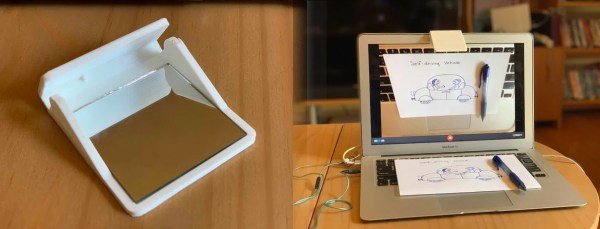
Unfortunately dedicated document cameras require significant space and monies, so they’re impractical if you only share once in a while. [John Umekubo] didn’t want students and teachers hobbled by the same costs and inconveniences, so he modeled a mirror holder that slides over a laptop’s webcam and directs the view downward.

[John]’s adventures started with a Twitter post, as seen below, but the responses were so encouraging that he published his design on Thingiverse for everyone. There’s also a version that can be laser cut out of cardboard, though we imagine a pair of scissors would work in a pinch. He admits there’s already a consumer model, but wasn’t planning to sell them anyway. Like us, he wants to get people to share their work.

We recently covered a simpler version of the same idea in use at Northwestern University, and we’ve seen a similar hack that gives a split-screen effect to sketch and maintain eye contact. If you want to share the view in your room, we have a Raspberry Pi streaming option that’s worth checking out.

Continue reading “Mirror, Mirror, On Your Cam, Show Us What You’ve Drawn By Hand”

The Egg-laying Wool-Milk Pig

Last week, I wrote about two recent projects of mine that serve as cautionary tales in keeping projects simple — you probably can’t simplify everything, so it’s worth the time to find out which simplifications have the most bang for the buck. This week, I’d like to share a tale of lack of design focus.

German has the eierlegende Wollmilchsau: a mystical animal that lays eggs, while producing wool, milk, and meat to boot. It’s a little bit like the English “jack of all trades, master of none” except that the eierlegende Wollmilchsau doesn’t do each job badly, it plainly can’t exist. This is obviously a bad way to start a design.

The first surfboard that I made by myself was supposed to be an eierlegende Wollmilchsau. It was going to be a longboard, because we had months with smaller waves that just weren’t all that suitable for shortboarding, but it was also going to turn sharply off the rails like a shortboard. To help it turn, it was going to have tons of camber (bend like a banana), and small fins. And along the way, I thought I’d make it thin to cut through the water.

Of course what I ended up with, not helped by my heavy fiberglassing hand, was a plow that dug into the water, would turn unexpectedly when you managed to get it onto the rails, and couldn’t pick up a small wave to save its life due to the camber and aforementioned plowing. I surfed it anyway, as a matter of pride, but I had no illusions of it being anything but the the worst board I owned. And that’s comparing it to the $30 used rasta-graphic plank that had been taking on water for at least five years, unrepaired, and was rotting out from the inside. At least it had design focus.

My surfboard didn’t suffer from feature creep, where you start piling on features until the project crumbles from overload, but rather from wanting to have my cake and eat it too. Or from failing to realize that certain design goals were necessarily tradeoffs. The “raily” behavior that I wanted when it was in bigger waves was necessarily “diggy” in small waves. Good boards trade off these features, and getting the balance between them is the art of shaping a board.

So when you start up a new project, think about which facets of your design are jointly achievable, and which are necessarily tradeoffs. Ignoring tradeoffs is a recipe for disaster, designing an eierlegende Wollmilchsau. But viewed constructively, it’s exactly these nuanced decisions that separates the simply possible from the truly marvelous. May you identify your trades, and make them well!

Keep It Simple, Smartly

“Keep it simple” sounds like such good advice, but what exactly is the “it”; what parts of a project should you try to keep simple? You can’t always make everything simple, can you? Are all kinds of “simplicity” equally valuable, or are there aspects of a design where simplicity has multiplier effects on the rest of the project?

I ran into two seemingly different, but surprisingly similar, design problems in the last couple weeks, and I realized that focusing on keeping one aspect of the project simple had a multiplier effect on the rest — simplifying the right part of the problem made everything drastically easier.

EA Axon Great plane, but heavy!

The first example was a scratch-built airplane design. I’d made a few planes over the summer, focusing on plans on the Interwebs that emphasize simplicity of the actual build. Consequently, the planes were a bit heavy, maybe not entirely aerodynamic, and probably underpowered. And this is because the effort you expend building the plane doesn’t fundamentally have anything to do with flight. Keeping the build simple doesn’t necessarily get you a good plane.

Weight, on the other hand, is central. Wings produce lift, whether measured in grams or ounces, and anything heavier just isn’t gonna fly. But reducing weight has a multiplier effect. Less weight means smaller and lighter motors and batteries. Structures don’t need to be as stiff if they’re not subject to heavier bending forces. And, important to the noob pilot, planes with less weight per wing area fly slower, giving me (ahem, the noob pilot) more reaction time when something goes sideways. Trying to simplify the design by trimming weight has knock-on effects all around.

My latest fully-DIY design threw out anything that brought weight along with it, including some parts I thought were necessary for stiffness or crash resistance. But with the significantly lowered weight, these problems evaporated without needing me to solve them — in a way, the complexity of design was creating the problems that the complexity of design was supposed to solve. Ditching it meant that I had a slow plane, with simple-to-build wings, that’s capable of carrying a lightweight FPV camera. Done and done! Simply.

Nope. Too complex.

At the same time, I’m building a four-axis CNC foam cutter. I’ve built many 3D printers, and played around with other folks’ DIY CNC machines, so I had a few design ideas in my head starting out. My first iteration of an XY axis for the machine runs on metal angle stock with a whopping eight skate bearings per axis. It’s strong and rigid, and clumsy and overkill, in a bad way for this machine.

3D printers want to move a relatively light tool head around a small volume, but relatively quickly. CNC mills need to be extremely rigid and shoulder heavy side loads, subject to some speed constraints. A foam cutter has none of these needs. The hot wire melts the foam by radiation, so there are no loads on the machine because it doesn’t even contact the workpiece. And because it cuts by melting, it has to go slow. These are the places in the design where simplification will bear the most fruit.

I write this in retrospect, or at least from the perspective of a second prototype. I wanted the first design to hold the cutting filament taut, hence the rigid frame. But separating the tension from the motion, by using a lightweight external bow to keep the filament tight, meant that the machine could be dead simple. I could use smaller plastic sliders instead of complex bearings, on thin rods instead of bulky rails. In a day after having this realization, I got twice as far as I had on the previous machine design in a week, and it takes up a lot less space in my basement.

So take your KISS to the next level. Brainstorm a while about the binding constraints on your design, and what relaxing any of them can do. Do any particular simplifications enable further simplifications? Those are the ones that you want to start with. Keep it simple, smartly. And because it’s not always easy to find these multiplier effects, tell your friends!