Portable RetroPie Builds On The Shoulders Of Giants

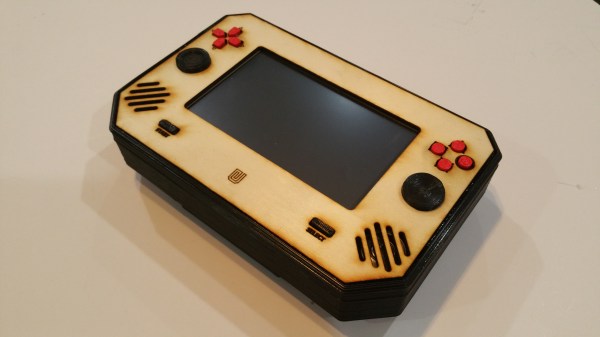
For anyone wanting to get that shot of nostalgia without the hassle of finding an NES Classic, the Retropie project is a great starting point. Of course, it’s not too noteworthy to grab a Raspberry Pi, throw a pre-built distribution on it, and plug in an SNES to USB converter. What is noteworthy, however, is building a Retropie that’s portable and that has the quality and polish of the latest build from [fancymenofcornwood].

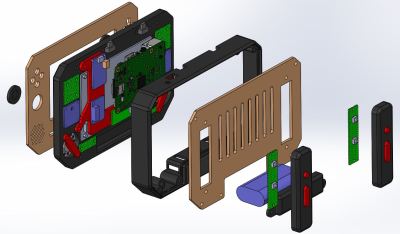
render-blowup-of-retropieFor starters, the laser cut wood case was custom-made. From there, all of the PCBs were fitted including specific ones to handle each set of buttons (complete sets of D-pads, shoulder buttons, and joysticks) and another for the 5″ HDMI screen. It has stereo speakers and its own headphone jack (to the envy of all new iPhone owners), and is powered from a Raspberry Pi 2 running Retropie 4.1. The battery pack shouldn’t leave you stranded, either, especially not if you grew up playing the Sega Game Gear.

The quality of the build here is outstanding, and its creator made a design choice to make it easily replicable, so if you’ve wanted to play N64 or PS1 games while on the go, this might be what you’ve been waiting for. There are lots of other options for getting some fun from a Retropie going though, from building one into a coffee table to re-purposing that infamous Game Gear.

Obligatory clip of this portable playing Doom is found after the break.

Continue reading “Portable RetroPie Builds On The Shoulders Of Giants”

Amstrad On An FPGA

If you are from the United States and of a certain age, it is very likely you owned some form of Commodore computer. Outside the US, that same demographic was likely to own an Amstrad. The Z80-based computers were well known for game playing. [Freemac] implemented a working Amstrad CPC6128 using a Xilinx FPGA on a NEXYS2 demo board.

The wiki posting is a bit long, but it covers how to duplicate the feat, and also gives technical details about the design. It also outlines the development process used ranging from starting with a simple Z80 emulation and moving on to more sophisticated attempts. You can see a video of the device below.

Continue reading “Amstrad On An FPGA”

Anti-Emulation Tricks On GBA-Ported NES Games

Emulation is a difficult thing to do, particularly when you’re trying to emulate a complex platform like a game console, with little to no public documentation available. Often, you’ll have to figure things out by brute force and dumb luck, and from time to time everything will come unstuck when a random piece of software throws up an edge case that brings everything screeching to a halt.

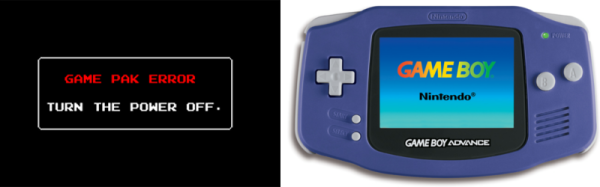
The Classic NES series was a handful of Nintendo Entertainment System games ported to the Game Boy Advance in the early 2000s. What makes them unique is a series of deliberately obtuse programming decisions that make them operate very differently from other titles. These tricks utilize advanced knowledge of the way the Game Boy Advance hardware operates and appear to have been used to make the games difficult to copy or emulate.

The games use a variety of techniques to confuse and bamboozle — from “mirrored memory” techniques that exploit addressing anomalies, to putting executable code in video RAM and writing to the audio buffers in unusual manners.

Even more confusingly, these techniques only appear to have been used in the Classic NES series of games, and not other Game Boy Advance titles. It’s not obvious why Nintendo went to special effort to protect these ports over other titles; perhaps the techniques used were for other reasons than just an attempt at copy protection. Speculate amongst yourselves in the comments.

This isn’t the first time we’ve discussed emulation of Nintendo systems — check out this effort to reverse engineer the Sony Pocketstation.

[Thanks to [[[Codifies]]] for sending this in!]

Reverse Engineering The Sony PocketStation

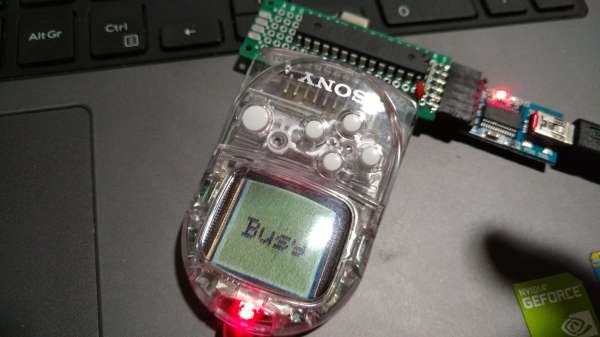
[Robson Couto] never actually owned a PlayStation in his youth, but that doesn’t mean he can’t have a later in life renaissance. In particular a Japan-only accessory called the PocketStation caught his interest.

The item in question resided in the PlayStation’s memory card slot. It’s purpose was to add additional functionality to games and hopefully sell itself. Like the PokeWalker, Kinect, etc. It’s an age old tactic but the PocketStation had some interesting stuff going on (translated).

The biggest was its processor. Despite having a pathetic 32×32 mono screen, it hosted the same processor as the GameBoy Advance. Having acquired a card from an internet auction house [Robson] wanted to load up some of the ROMs for this device and see what it was like.

It took quite a bit of work. Luckily there is a ton of documentation floating around the internet thanks to the emulation scene and it wasn’t long before he convinced a microcontroller to pretend to be the memory card slot. Now anyone with some skill and a small piece of gaming history can play around with the rare ROM dump for the PocketStation.

The Dual-Core, ARM-Powered Commodore 64

There is no CPU that is better understood than the 6502 and its cousins the 6510, 6507, 6509, and whatever we’re calling the CPU in the NES. With this vast amount of documentation, just about anything can be done. Want a discrete and un-discreet 6502? Sure thing. It’s the NMOS version, though. Want an emulated version. Sure. With libraries porting the 6502 to every platform ever, there’s only one place left to go: putting a 6502 in a Commodore 64. Make it dual-core, too, so we can run CP/M.

This build is based on one of [telmomoya]’s earlier builds – a soft-core 6510 running on an ARM Cortex M3. The inspiration for this build came from a 6502 emulator running on an Arduino, which got [telmomoya] wondering what would happen if he attached some external RAM, CIA or a SID. Doing this on an Arduino is hard, but there are a few 5 Volt tolerant ARM chips out there, and with a few banks of SRAM, [tel] quickly had an emulated 6502 running EhBasic.

Running an emulated 6502 on an ARM chip is nothing new. What makes this build spectacular is the adaptation to the C64 motherboard. Since [telmomoya] was already breaking out the data and address lines to go to the SRAMs, it didn’t take much extra work to simply build an adapter for the DIP40 CPU socket on a C64. A few 74-series logic chips made the interface easy, and after a bit of soldering, [telmomoya] had a Commodore 64 powered by an ARM chip.

If you’re emulating one chip, you can emulate two, and with the Commodore 64, this leads to a few interesting possibilities. The C64 had a CP/M cartridge — a cartridge that contained a Z80 CPU, sharing the data and address bus with the 6510. This cartridge allowed the ‘toy computer’ C64 to run the ‘business’ CP/M operating system (and the Z80 made the Commodore 128 much cooler).  Since [telmomoya] was already emulating a CPU, emulating a second CPU wasn’t really that hard.

It’s a phenomenal build, and great if you’ve ever wanted to speed up VisiCalc.

Virtually Free Rapsberry Pis

One of the nice things about the Raspberry Pi is that it runs Linux and you can do a lot of development right on the board. The converse of that is you can do a lot of development on a Linux desktop and then move things over to the Pi once you get the biggest bugs out. However, sometimes you really need to run code on the actual platform.

There is, however, an in-between solution that has the added benefit of upping your skills: emulate a Pi on your desktop. If you use Linux or Windows on your desktop, you can use QEMU to execute Raspberry Pi software virtually. This might be useful if you don’t have a Pi (or, at least, don’t have it with you). Or you just want to leverage your large computer to simplify development. Of course we would be delighted to see you build the Pi equivalent of the Tamagotchi Singularity but that’s a bit beyond the scope of this article.

Since I use Linux, I’m going to focus on that. If you insist on using Windows, you can find a ready-to-go project on Sourceforge. For the most part, you should find the process similar. The method I’ll talk about works on Kubuntu, but should also work on most other Debian-based systems, including Ubuntu.

Continue reading “Virtually Free Rapsberry Pis”

GameGirl: A Better Portable Raspberry Pi

For better or worse, the most popular use for the Raspberry Pi – by far – is media centers and retro game consoles. No, the great unwashed masses aren’t developing Linux drivers for their Pi peripherals, and very few people are tackling bare metal ARM programming. That doesn’t mean creating a handheld console based on the Pi isn’t a worthy pursuit.

For their entry for the 2016 Hackaday Prize, [David] and [Jean-André] are building a portable Pi console that’s much better than an old Bondo-encrusted Game Boy enclosure stuffed with hot glue and wires. They’re doing this project the right way with a hardware accelerated display, custom software, and a high quality case.

[David] is in charge of the hardware, and that means making a very, very small handheld console. The design of this GameGirl is extremely similar to the old-school Game Boy Pocket (or Game Boy Light). There’s a D-pad, four buttons, select, start, and two ‘shoulder’ buttons on the back. The build is based on the Raspberry Pi Zero, and thanks to the Pi’s standard 40-pin header, [David] is able to configure the display to use an RGB565 DPI interface. This means the display is stupidly cheap while still leaving a few GPIO pins left over for the SPI, buttons, backlight, and PWM audio.

[Jean-André] is the other half of the team, and his contributions to open source software make him exceptionally qualified for this project. He’s the main developer for Lakka, a DIY retro emulation console, and the #5 RetroArch contributor. No, this project isn’t using RetroPie – and there’s a reason for that. Emulator hackers are spending a lot of time optimizing emulators for the Raspberry Pi, only because of RetroPi. If these emulator hackers spent their time optimizing for an API like LibRetro, you could eventually play a working version of Pilotwings 64 on the Raspberry Pi and every other platform LibRetro is available for. All the effort that goes into making a game work with a Raspberry Pi is effort that goes into making that game work for the PSP, Wii, iOS, and a PC. Yes, its philosophical pissing in the wind while saying, ‘this is what the community should do’; this is open source software, after all.

With the right ideas going into the hardware and software, [David] and [Jean-André] have an amazing project on their hands. It’s one of the most popular entries and are near the top of the charts in the community voting bootstrap effort where every like on a project gets the team a dollar for their project. GameGirl is shaping up to be a great project, and we can’t wait to see the it in action.

The HackadayPrize2016 is Sponsored by: