While WiFi controlled lights are readily available, replacing your lighting fixtures or switches isn’t always an option. [Thomas] ran into this issue with his office lights. For the developers in the office, these lights always seemed to run a little too bright. The solution? A 3D printed, WiFi controlled finger to poke the dimmer switch.
This little hack consists of a servo, a 3D printed arm and finger assembly, and a Wemos D1 Mini development board. The Wemos is a low cost, Arduino compatible development board based on the ESP8266. We’ve seen it used for a wide variety of hacks here on Hackaday.
For this device, the Wemos is used to listen for UDP packets on the company’s WiFi network. When it receives a packet, it tells the servo to push the dimming button for a specified amount of time. [Thomas] wrote a Slack bot to automatically send these packets. Now, when the lights are too bright, a simple message to the bot allows anyone to dim the lights without ever leaving the comfort of their desk. Sure, it’s not the most secure or reliable method of controlling lights, but if something goes wrong, the user can always get up and flip the switch the old fashioned way.
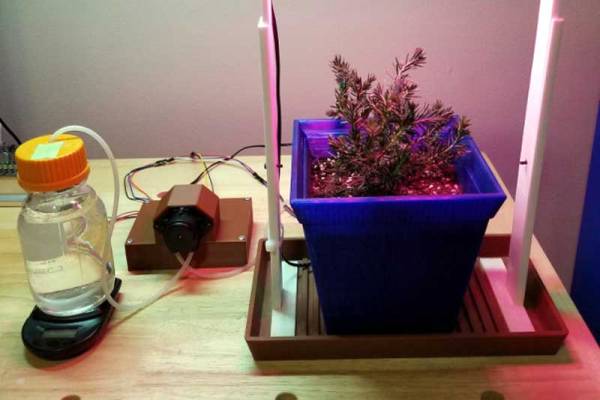
The closest some of us at Hackaday get to a green thumb comes when we are painting, so for us and other folks not gifted in the gardening department Bionic Cactus might help. It’s a neatly designed water and light control system, built around an ESP8266. You can control the system through a web interface, setting a schedule for water and light and seeing how much water is left in the reservoir. There is also a soil moisture sensor and it will even email you when it is running low on water. As creator [SamsonKing] notes, if you combine this with a 3D-printed plant pot and light holder, and you’ve got a complete system from growing herbs and spices in the middle of winter.
[SamsonKing] created the system using PlatformIO, a neat open source Internet of Things development platform that means you could probably switch the system over to run on other low-power platforms if you had them lying around. But with an ESP8266 typically costing no more than a few bucks, it’s a neat and low-cost way to keep your plants fed and watered.
People often get the impression that home built hardware is destined to have a certain amateurish look or feel to it. It’s as though just because you didn’t buy it in a store, it will look cheap or thrown together. While it’s true a hacked together device could look like it was built from the parts bin (and to be fair, sometimes it is), there are plenty of examples of DIY hardware that could give commercial offerings a run for their money.
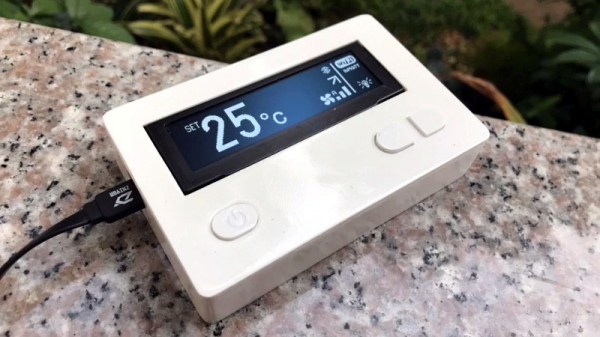
A case in point is this fantastic ESP8266 air conditioner controller created by [Sitinut Waisara] (Google Translate). Between the simple yet elegant 3D printed enclosure to the very slick user interface on its OLED screen, this project could easily pass as a commercial device. In fact, we’ve seen commercial offerings that didn’t look half this good, let alone offer the same features for what this cost in components and printer filament. It’s a perfect example of what the modern hacker or maker is capable of with the wide array of tools and components currently available to us.
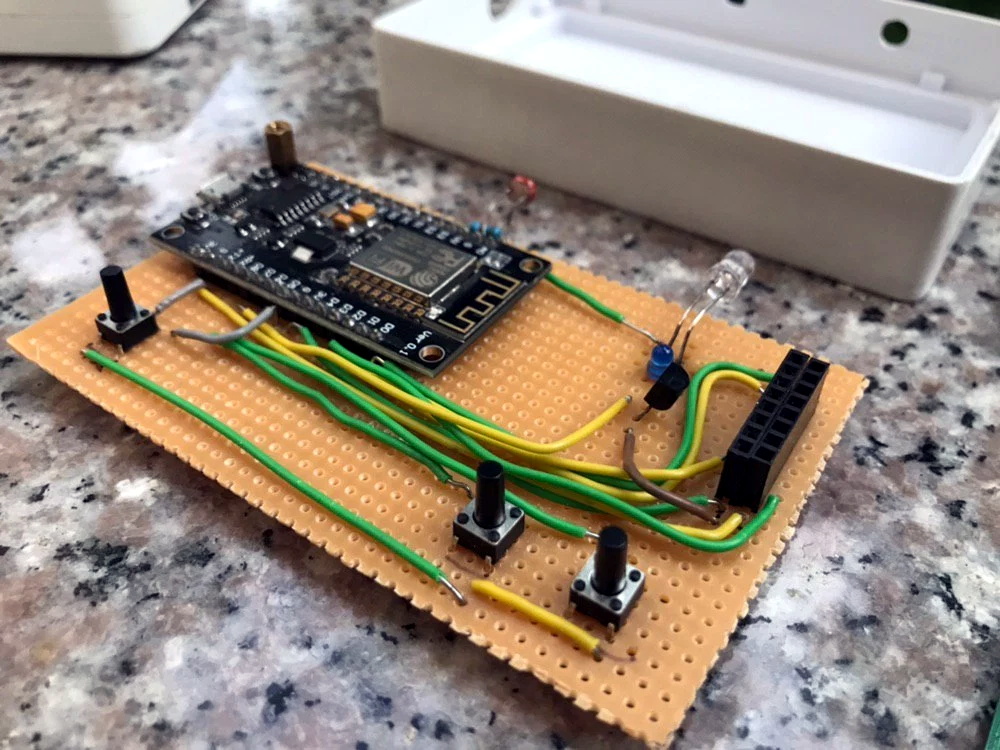
What’s perhaps the most impressive about this project, especially given how good it looks on the outside, is how little there really is on the inside. Beyond the NodeMCU board and SSD1332 OLED display, the only components inside the device are the three tactile buttons, a photoresistor so it can dim the display’s brightness based on ambient light level, an IR LED so it can send commands to the AC unit, and a handful of passives. The hardware side of this design is so simple that [Sitinut] was able to put the whole thing together on a scrap of perfboard. Not that you’d be able to tell when it gets installed into the 3D printed wall-mount enclosure, complete with printed button caps.
While the hardware side of the project might be rather light, the software is anything but. [Sitinut] really went all-in writing his code for the ESP, adding in the little features like the automatic screen dimming and pulling the current time from NTP that often get overlooked in our rush to get a project out the door. He even included a whole collection of icons to display on the OLED screen, which goes a long way towards selling that professional look. But his effort wasn’t limited to cosmetics or clever features, there was also plenty of work put into decoding the IR signals used to control the AC unit and getting all the features and functions plugged into MQTT.
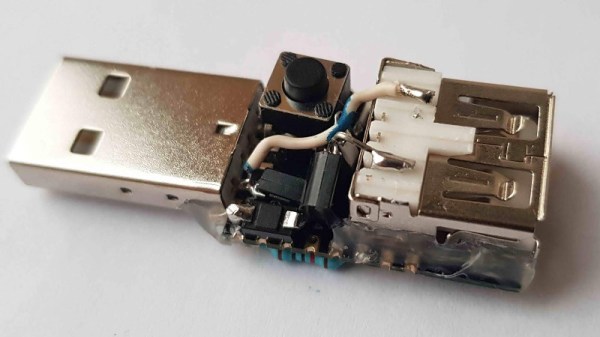
The explosion of cheap LED lighting products has given a never-ending array of opportunities for the resourceful hacker. A few dollars can secure strings of colourful illumination, but without further expenditure they lack the extra utility of electronic control. This is something that [Albert David has addressed] with his simple ESP8266-based WiFi switcher that he’s added to a string of USB-powered LEDs, and he’s neatly mounted the ESP-12 module it used atop a USB plug.
The circuitry is pretty straightforward, with only a couple of I/O lines being used. A transistor takes care of the heavy lifting, and the software comes courtesy of the Tasmota firmware for Sonoff (and similar) devices. We suspect with this economy of connection, the same task could be achieved even with the limited resources provided by the lesser ESP-01 module.
There was a time not so long ago when performing a task such as controlling a light over a wireless network involved significant cost, power, and complexity. In the nearly five years since we reported on the arrival of the ESP8266 we have progressed to the point at which that task is a simple project using commodity components, and that represents something of a miracle.
Sometimes the best hacks come from the most basic of questions. In this case, [CNLohr] was wondering what would happen if he started to reduce the clock speed of the ESP8266’s Baseband PLL (BBPLL) while still trying to communicate with it. You know, as one does. The results ended up being fairly surprising, and while it’s not immediately clear if there’s a practical application for this particular trick, it’s certainly worth some additional research.
Code for stepping through clock speeds
The idea here is that the BBPLL is the reference clock for the entire system, including all of the peripherals. So underclocking it doesn’t just slow down code execution as you might expect, but it also slows down the chip’s interactions with the outside world. [CNLohr] demonstrates this concept in the video below, showing how the baud rate used to view the serial output from the ESP8266 needs to be adjusted to match the chip’s frequency or else you’ll only get garbage on the line.
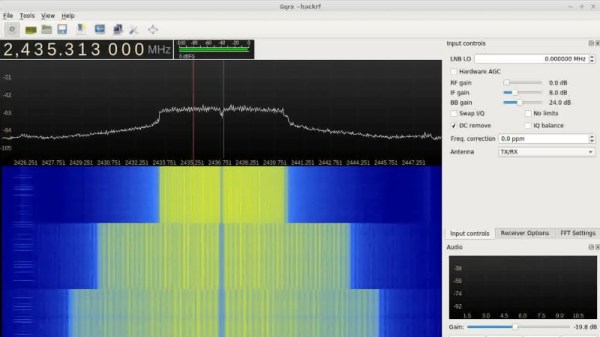
But what happens to the WiFi? As [CNLohr] discovered, while the center frequency itself doesn’t change, the channel width gets narrower as the clock rate is lowered. When viewed on the waterfall display of a software defined radio (SDR), the transmission can be seen “compressing” in a step pattern as the clock rate is reduced. As one might expect, the 802.11 packets become indecipherable to a normal WiFi device running in monitor mode. The signal is still at the correct frequency, but the devices can no longer understand each other.
Now it was time for another of those basic questions. What would happen if you did the same thing to a second ESP8266? Much to his surprise, [CNLohr] discovered that the two devices could still communicate successfully as long as their BBPLL clock speed was the same. From an outsider’s perspective it looked like gibberish, but to the two ESPs which had been slowed by the same amount, everything worked as expected even though the 802.11 standards say it shouldn’t.
So what can you do with this? The most obvious application is a “stealth” WiFi connection between ESP8266s which wouldn’t show up to normal devices, a communications channel invisible to all but the most astute eavesdropper. [CNLohr] has made all the source code to pull this trick off public on GitHub, and it should be interesting to see what kind of applications (if any) hackers find for this standards-breaking behavior.
Many Hackaday readers will be settling back into their lives after a holiday period crammed into some family matriarch’s house along with too many assorted relatives, having given up their speedy internet connection for whatever passes for broadband wherever Granny lives. The bargain-basement router supplied by the telephone company will have spent the period wilting under the pressure of a hoard of teenagers watching other teenagers inanities on YouTube, and the Christmas ritual of Resetting The Router will have been performed multiple times.
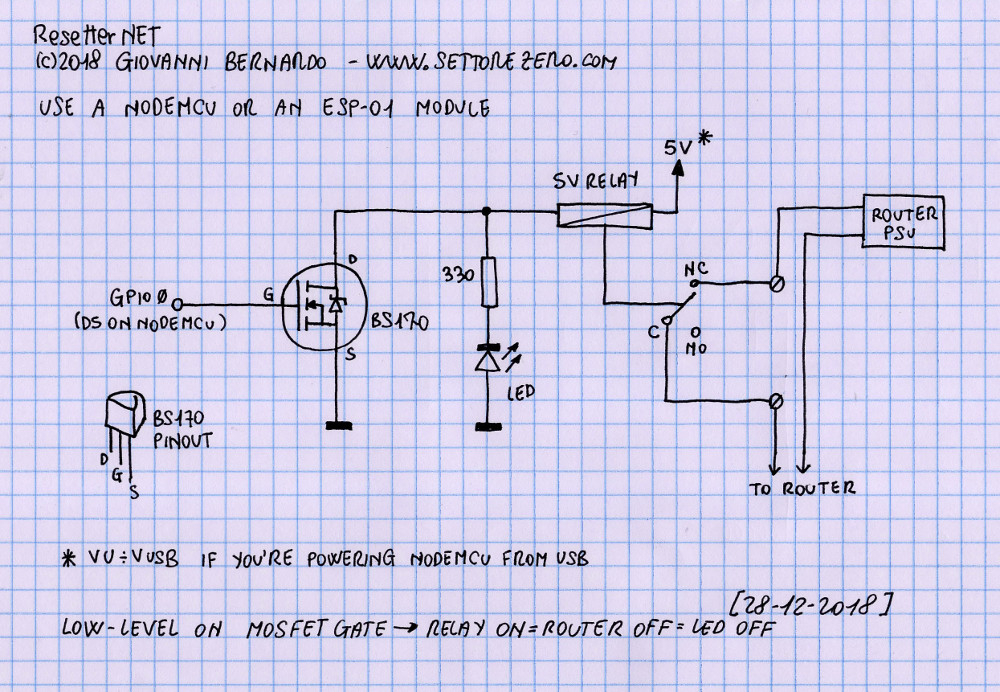
A very simple schematic for the resetter.
Wouldn’t it be nice if your router simply reset itself every time it crashed or the Internet connection went down? [Cyb3rn0id] has a solution (Italian original here), in the form of an ESP8266 that pings an online service every few seconds, and turns the router off and on again via a power relay in the event that the ping attempt is repeatedly unsuccessful. It’s brilliantly simple, requiring only a single GPIO and a MOSFET to fire the relay with an LED indicator for good measure, and it’s built upon a piece of prototyping board. The router power is switched on the low-voltage side for safety.
The software is pretty basic and has the WiFi credentials hard-coded into it, so we’re guessing a version with a web interface could be built. But as a personal device for easing the pain of router crashes it gets our vote despite that shortcoming.
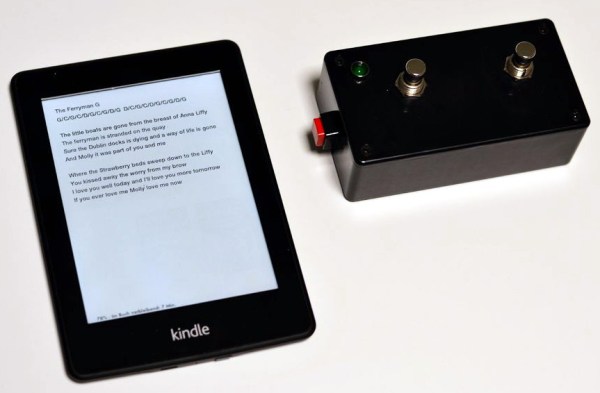
You don’t have to be an avid bookworm to find use for an e-book reader. Take your local wedding band for example: with a big repertoire of songs to cover, you don’t really want to drag huge folders full of chords and lyrics around, tediously browsing through them to find the correct one for every new song. Even the biggest tree corpse enthusiast cannot deny the comfort of an e-book reader here. And since turning the page boils down to simply changing the content on a display, you don’t necessarily need to use your hands for that either. With that in mind, [mosivers] built a WiFi foot switch for his musician brother’s Kindle to flip backwards and forwards through the pages.
After jailbreaking the Kindle and installing busybox, [mosivers] set up a web server to serve two CGI scripts that write the previously recorded input events for forward and backward flipping respectively to /dev/input/event0, essentially simulating a touch screen press that way. The foot switch, as counterpart, houses a battery-powered ESP8266, acting as access point for the Kindle to connect to, and requesting those page flipping CGI scripts whenever one of its two buttons is pressed.
If you don’t like the idea of jailbreaking your device in order to change the pages without using your hands, you could of course consider combining a more mechanical solution with the foot switch concept. And in case you want to see more of [mosivers], have a look at his DIY talk box project we’ve covered earlier.