
Ambient Lighting For Baby With The ESP8266

There are plenty of great reasons to have a child. Perhaps you find the idea of being harshly criticized by a tiny person very appealing, or maybe you enjoy somebody screaming nonsense at you while you’re trying to work on something. But for us, we think the best reason for procreation is getting another excuse to build stuff. It’ll be what, at least two years before a baby can solder or program a microcontroller? Somebody’s going to have to do it for them until then.

To try to help his baby daughter get on a better sleep schedule, [Amir Avni] decided to outfit her room with some “smart” lighting to establish when it’s time for her to wake up. Not only can he and his wife control the time the lights come on to “day” mode, but they can also change the colors. For example, they can switch over to a red glow at night. Despite some learning experience setbacks, the both the parents and the baby are very happy with the final product.
An ESP8266 controls a WS2812 LED strip to provide the adjustable lighting, and a DHT22 sensor was added to the mix to detect the temperature and humidity in the baby’s room. [Amir] used Blynk to quickly throw together a slick mobile application that allows for complete control of the brightness and color of light in the room, as well as provides a readout of the environmental data pulled from the DHT22.

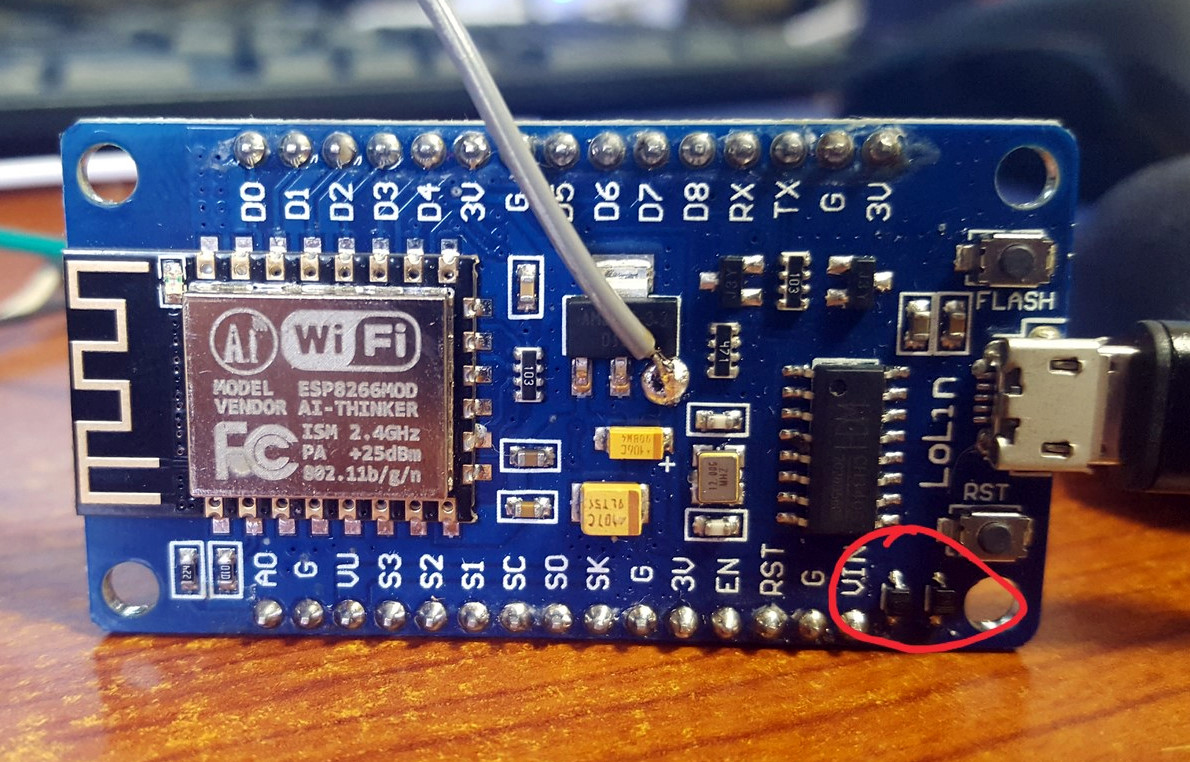
But not everything went according to plan. [Amir] thought he could power the LED strip from the ESP8266 development board by soldering to the 5 V side of its AMS1117 voltage regulator. Which worked fine, until he turned on too many LEDs. Then it pulled too much current through a resistor connected to the regulator, and let all the magic smoke out. An important reminder of what can happen when we ask more of a circuit than what it was designed for.

We’ve covered many awesome projects that were born of a parental need, from feature packed baby monitors to devices seemingly designed to program nostalgia in the little one’s subconscious.
WiFi Pool Controller Only Cost $20

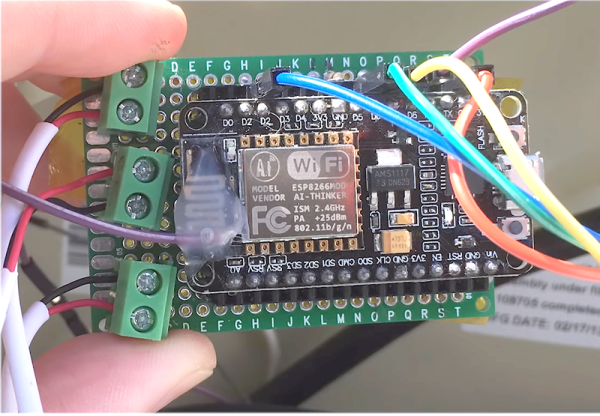
Pools have come a long way. It used to be you had a pump and if you were lucky it had a mechanical timer switch on it. That was it. Now you have digital controllers and spa jets and heaters. You can even get them that connect to your home automation system. If your pool isn’t new enough to do that already, you can get a range of add-on accessories. For a price. [Rob] paid $500 to get a remote for his pool. It wasn’t even WiFi, just a simple RF remote. In 3 years, the transmitter had burned out ($300 to replace) and he decided he had enough. For $20, [Rob] added MQTT control and monitoring to his pool using an ESP8266. You can see the video description of the project below.

Naturally, the instructions are a bit specific to the Pentair system he has. However, it isn’t as specialized as you might think. The project relies on the connection for a wired “spa-side remote” that most modern pool systems support. The electrical connections for these aren’t quite standard, but they are all very similar, so you have a good chance of reproducing this for your setup assuming you have a connection for one of these wired remotes.

Continue reading “WiFi Pool Controller Only Cost $20”

$6 Weather Station Goes Where You Do

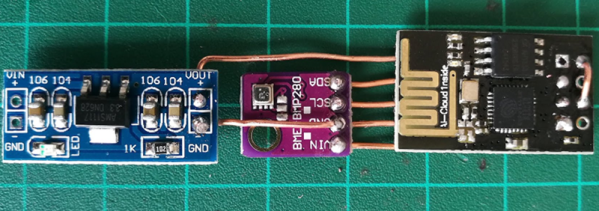
We admit, we see a lot of weather stations. What makes [Mike Diamond’s] take on this old favorite interesting is that it is tiny enough to carry with you, and uses your cell phone as a hotspot to deliver its data. Of course, that assumes you have a phone that can act as a hotspot.

The parts are straightforward, a power supply, an ESP8266, and a weather sensor board. It looks as though you could easily slip the whole affair into a tube or maybe a 3D printed enclosure. We were a little concerned about the bare wire used, but as [Mike] points out you can use insulated wire if you like, and we’d encourage you to do so.

Continue reading “$6 Weather Station Goes Where You Do”

Internet Of Smells: Giving A Machine The Job Of Sniffing Out Spoiled Food

Has the food in your pantry turned? Sometimes it’s the sickening smell of rot that tells you there’s something amiss. But is there a way to catch this before it makes life unpleasant? If only there were machines that could smell spoiled food before it stinks up the whole place.

In early May, I was lucky enough to attend the fourth FabLab Asia Network Conference (Fan4). The theme of their event this year was ‘Co-Create a Better World’. One of the major features of the conference was that there were a number of projects featured, often from rural areas, that were requesting assistance throughout the course of the conference.

Overall there were many bright people tackling difficult problems with limited resources. This is how I met [Yogesh Kulkarni] who runs a FabLab in Pabal, a farming community not far from Pune, India. [Yogesh] has also appeared on TED Talks (video here). He explained to me that in his area, vendors sell milk-based desserts. These are not exactly refrigerated, and sometimes people become ill from eating them. It would be nice if there was a way for the vendors to avoid selling the occasional harmful product.

I’ve had similar concerns with food safety in my area (Vietnam), and while it has been fine nearly all of the time, a few years ago I nearly died from a preventable food-borne illness. I had sufficient motivation to do a little research.

Continue reading “Internet Of Smells: Giving A Machine The Job Of Sniffing Out Spoiled Food”

Talking To Laptop Batteries With The ESP8266

It’s not something you often give a lot of thought to, but the modern consumer laptop battery is a pretty advanced piece of technology. Not only does it pack several dozen watt-hours of energy into a relatively small and lightweight package, but it features integrated diagnostic capability to make sure all those temperamental lithium cells are kept in check. Widely available and extremely cheap thanks to the economies of scale (unless you try to get them from the OEM, anyway), they’re a very compelling option for powering your projects.

Of course, it also helps if, like [teliot] you have a bunch of the things lying around. For reasons we won’t get into, he’s got a whole mess of Acer AL12x32 battery packs which he wanted to use for something other than collecting dust. He had the idea of hooking one up to a solar panel and using it as a power supply for some ESP8266 projects but wanted to be able to talk to the battery for status and diagnostic information. After studying the Smart Battery System (SBS) protocol the batteries use, he was able to come up with some code that lets him pull 37 separate fields of information from the pack’s onboard electronics using his ESP8266.

Battery consumption over time

It took some fiddling with a multimeter to figure out which pin did what on the eight pin interface of the battery. Two of the pins need to be shorted to enable the dual 12 VDC pins to kick in. Technically that’s all you really need to do if you want to utilize the battery in a low-tech sort of way. But to actually get some information from the battery, [teliot] had to identify the two pins which are for the System Management Bus (SMBus) interface where the SBS data lives.

Once he knew which pins to talk to the battery on, the rest was fairly easy. SBS is well documented, and the SMBus interface is very similar to I2C. Like all the cool kids are doing these days, his code publishes the battery info to MQTT where he can plot it and get finely grained info on the performance of his solar power system.

This isn’t the first time we’ve seen a hacker wrangle laptop batteries through SMBus, but it’s always nice to get multiple perspectives on a topic. If you plan on making this kind of thing part of your standard bag of tricks, you might even want to take the time to build a dedicated SMBus scanner.

[via /r/esp8266]

Atltvhead - wearable interactive TV

RCA TV Gets New Life As Interactive Atltvhead

TVs are usually something you sit and passively watch. Not so for [Nate Damen’s] interactive, wearable TV head project, aka Atltvhead. If you’re walking around Atlanta, Georgia and you see him walking around with a TV where his head should be, introduce yourself! Or sign into Twitch chat and take control of what’s being displayed on the LEDs which he’s attached to the screen. Besides being wearable technology, it’s also meant to be an interactive art piece.

For this, his third version, the TV is a 1960’s RCA Victor Portable Television. You can see some of the TVs he found for previous versions on his hackaday.io page. They’re all truly vintage. He gutted this latest one and attached WS2812 LED strips in a serpentine pattern inside the screen. The LEDs are controlled by his code and the FastLED library running on an ESP8266. Power comes from four NiMH AA-format batteries, giving him 5 V, which he regulates down to 3.3 V. His phone serves as a WiFi hotspot.

[Nate] limits the commands so that only positive things can be displayed, a heart for example. Or you can tweak what’s being displayed by changing the brightness or make the LEDs twinkle. Judging by the crowds we see him attracting in the first video below, we’d say his project was a huge success. In the second video, Nate does a code walkthrough and talks about some of his design decisions.

Continue reading “RCA TV Gets New Life As Interactive Atltvhead”

Linear Clock Is A Different Way To Look At Time

There are usually two broad user interfaces for clocks. On the one hand you’ve got the dial clock, the default display for centuries, with its numbered face and spinning hands. The other mode is some form of digital clock, where the current time is displayed directly as alphanumeric characters. They’re both useful representations of time, but they both have their limits.

Here’s a third model — the linear clock. [Jan Derogee] came up with it thanks to the inspiration of somewhat dubious run-ins with other kinds of clocks; we feel like this introductory video was made with tongue firmly planted in cheek. Whatever the inspiration, we find this idea clever and well executed. The running gear of the clock is just a long piece of M6 threaded rod and a stepper motor. A pointer connected to a nut rides on the rod, moving as the stepper rotates it. There are scales flanking the vertical rod, with the morning hours going up the left side and afternoon hours coming down the right. The threaded rod rotates one way for twelve hours before switching to the other direction; when the rotation changes, the pointer automatically swivels to the right scale. For alarms, [Jan] has brass rods running along each scale that make contact with the pointer; when they encounter a sliding plastic insulator to break the contact, it triggers an alarm. An ESP8266 controls everything and plays the audio files for the alarm.

Unusual clocks seem to be a thing with [Jan]. His other builds include this neat phosphorescent clock and YouTube subs counter, which is sure to turn heads along with this clock.

Continue reading “Linear Clock Is A Different Way To Look At Time”