Amazing “Connect Fore!” Robot Challenges Your Putting Practice

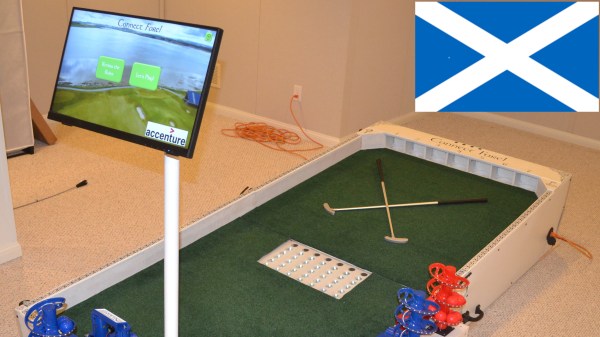
We’ve just come across [Bithead]’s amazing, robotically-automated mashup of miniature golf and Connect Four, which also includes an AI opponent who pulls no punches in its drive to win. Connect Fore! celebrates Scotland — the birthplace of golf, after all — and looks absolutely fantastic.

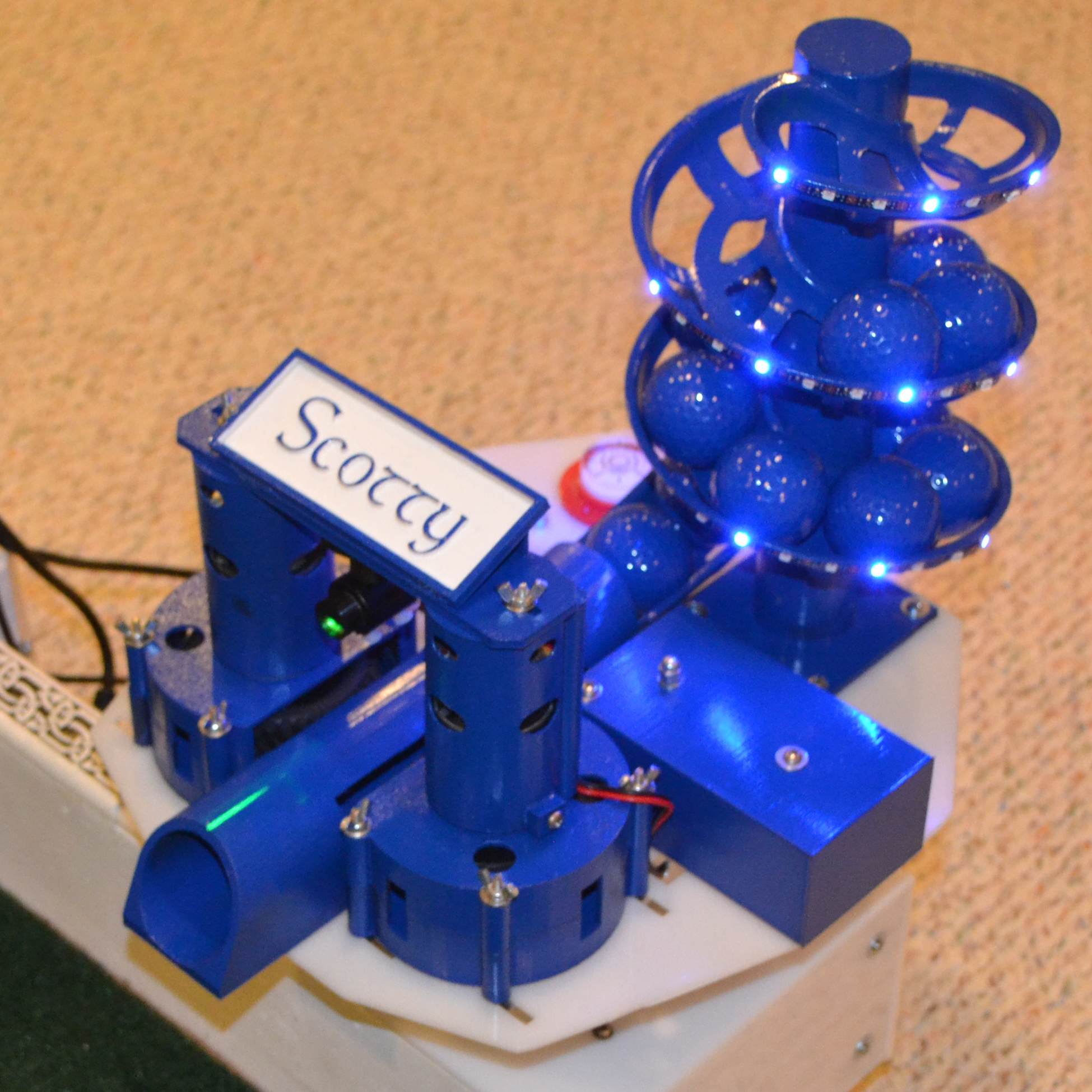
Scotty the AI opponent uses this robotic turret to make their moves in a game of Connect Fore!

The way it works is this: players take turns putting colored balls into one of seven different holes at the far end of the table. Each hole feeds to a clear tube — visible in the middle of the table — which represent each of the columns in a game of Connect Four.

Each player attempts to stack balls in such a way that they create an unbroken line of four in their color, either horizontally, vertically, or diagonally. In a one-player game, a human player faces off against “Scotty”, the computer program that chooses its moves with intelligence and fires balls from a robotic turret.

[Bithead] started this project as a learning experience, and being such a complex project, the write-up is extensive. We really recommend reading through the whole thing if you are at all interested in what goes into making such a project work.

What’s particularly interesting is all of the ways in which things nearly worked, or needed nudging or fine adjustment. One might think that reliably getting a ball to enter a hole and roll down a PVC tube wouldn’t be a particularly finicky task, but it turns out that all kinds of things can go wrong.

Even finding the right play surface was a challenge. [Bithead]’s first purchase from Amazon was a total waste: it looked bad, smelled bad, and balls didn’t roll well on it. There are high-quality artificial turfs out there, but the good stuff gets shockingly expensive, and such a small project pretty much pigeonholes one as a nuisance customer when it comes to vendors. The challenges [Bithead] overcame serve as a reminder to keep the 80/20 rule (or Pareto principle) in mind when estimating what will get a project to the finish line.

Right under the page break below is a brief video tour of the completed table, and after that, you can watch a game in action as [Bithead] faces off against Scotty the AI. Curious about the inner workings? The last video has some build details that fill in a few blanks from the write-up.

We’ve seen an automated Chess table before, but this is an entirely other, utterly fantastic level of work.
Continue reading “Amazing “Connect Fore!” Robot Challenges Your Putting Practice”

Make Your Own Tabletop Game Organizers With Online Tool

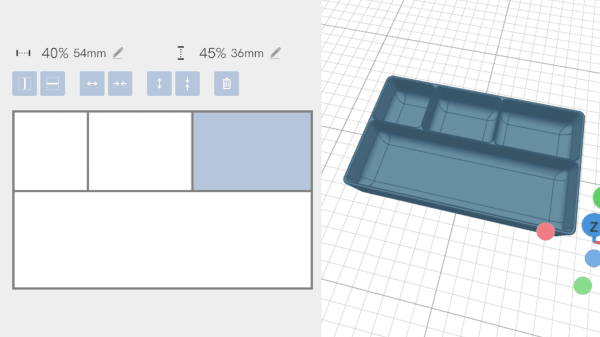
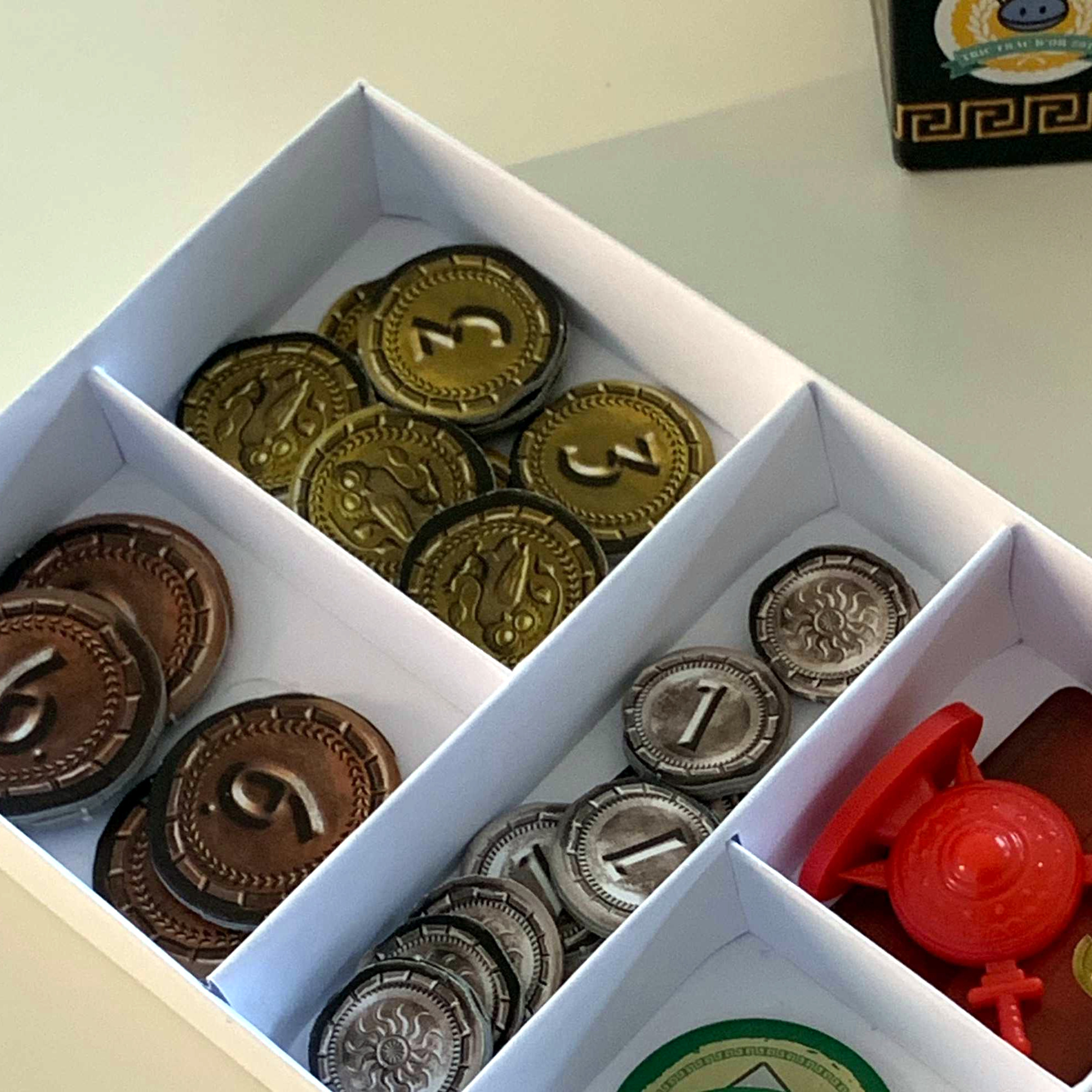
There is a vibrant cottage industry built around selling accessories to improve the storage and organization of tabletop games, but the more DIY-minded will definitely appreciate [Steve Genoud]’s deckinabox tool, which can create either 3D-printable designs, or ones more suited to folded paper or cardstock. Making your own organizer can be as satisfying as it is economical, and [Steve]’s tool aims to make customization simple and easy.

The tool can also generate models for folded paper or cardstock.

The interface for customizing the 3D-printable token tray, for example, begins with a simple filleted receptacle which one can split into additional regions by adding horizontal or vertical separators. The default is to split a given region down the middle, but every dimension can of course be specified.  Things like filleting of edges (for easier token scooping) and other details are all handled automatically. A handy 3D view gives a live render of the design after every change.

[Steve] has a blog post that goes into some added detail about how the tool was made, and it makes heavy use of replicad, [Steve]’s own library for generating browser-based 3D models in code. Intrigued by the idea of generating 3D models programmatically, and want to use it to make your own models? Don’t forget to also check out OpenSCAD; chances are it’s both easier to use and more capable than one might think.

Fixing A Broken Game Installer By Sheer Force Of Will

These days, we seldom purchase games on physical media. Even when buying titles from yesteryear, we usually download them from an online service. Some of these older games haven’t been properly ported to their new delivery platform, as [Slortibort] found out. Thus, it was time to dive into the game files and sort the problem out.

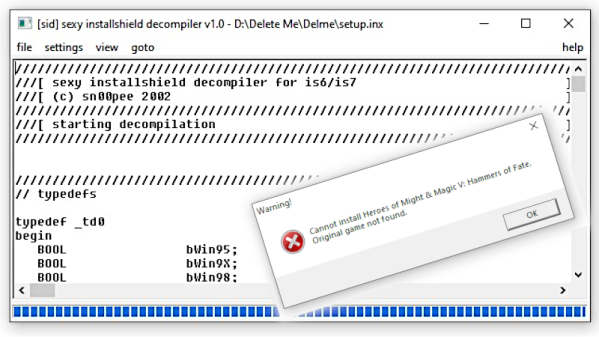
The game in question was the Hammers of Fate expansion pack for the base game Heroes of Might and Magic V. [Slortibort’s] partner bought it from Ubisoft, and ran the installer. However, the installer would report that it couldn’t find the original files from the base game, and fail to start.

Fixing the issue was no mean feat, requiring use of the Sexy Installshield Decompiler to dive into the guts of the installer to see what was going wrong. In the end, it came down to some registry key shenanigans, but the route of how [Slortibort] got there is well worth the read.

It’s a fine example of some of the issues around moving games to digital distribution; proper attention must be paid to do it right. Even then, there’s always the risk you’ll lose your games down the track. There are benefits, of course, but there’s always a tradeoff to be made.

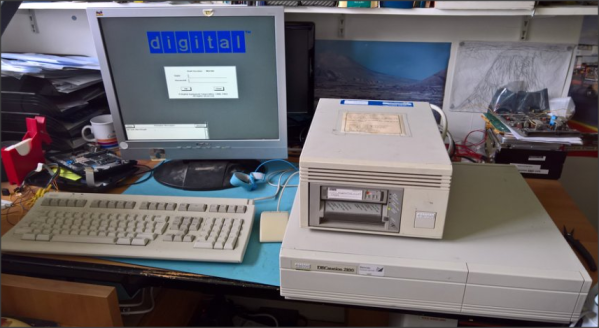
DEC microVAX with tape drive

Bake It To ReMake It: Cooking Old Magnetic Tape To Recover Data

Those of us old enough may remember the heyday of the text adventure game genre from the first time around. London-based Magnetic Scrolls was an early pioneering company producing titles for the first Amiga and Atari ST platforms. Fast-forward to 2017 and [Hugh Steers], the original co-founder and core developer for Magnetic Scrolls has formed an initiative to revive and re-release the original games on modern platforms. Since the 1980s-era DEC MicroVAX used originally for development is not particularly rare in retro computing circles, and media containing source code was found in someone’s loft space, reviving the games was not a tall order.

First, he needed to recover a copy of the original source code from the backup tapes. But there was a problem, it turns out that the decaying tapes used a unstable polyurethane-based binder to stick the oxide material (which is what stores the data) to the backing tape, and this binder can absorb water over the years.

Not much happens until you try to read the tape, then you trip over the so-called sticky-shed syndrome. Secondly you may find that a small amount of the oxide layer sheds from the tape, coating the read head, rollers and guides inside the complicated tape mechanism. This quickly results in it gumming up, and jamming, potentially chewing up the tape and destroying it permanently.

This was further exacerbated by the behaviour of the DEC TK50Z tape drive, which needed to shuttle the whole length of the tape as part of its normal operation.

A temporary solution was to bake the tape in an oven to drive out the moisture and reduce the stickiness enough to run it through the drive safely. Then only the oxide-shedding problem remained. The TK50Z drive was swapped for a TZ30 which shuttles the tape less, but also critically with a simple hack, would allow the heads to be cleaned with IPA between read passes. This was enough to keep the gumming up at bay and allow enough data to be read from the tapes to recover several games worth of code, ready for the re-releasing process.

The video after the break shows [Rob Jarratt] working through the process of the data recovery.

Continue reading “Bake It To ReMake It: Cooking Old Magnetic Tape To Recover Data”

E.T. Video Game Gets Re-Imagined In 10 Lines Of BASIC

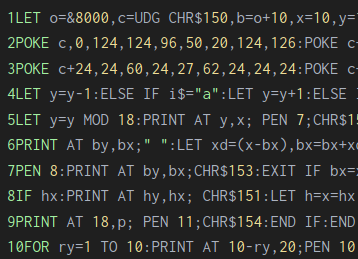
Most people would recognize E.T. The Extra-Terrestrial for the Atari 2600 by its reputation as one of the worst video games of all time. We’ll have more to say about that in a moment, but E.T. was nevertheless chosen as the inspiration behind [Martin Fitzpatrick]’s re-imagining of the game in ten lines of BASIC code for a contest that encourages and celebrates games written in ten lines of BASIC, or less.

Ten lines of BASIC is a big limitation, even when getting clever by stacking multiple statements into a single line, so [Martin]’s game has a much narrower scope than the original Atari 2600 version. Still, the core elements are present: E.T. must find and gather all the parts of the phone in order to contact his ship, after which he must meet the ship in time to escape. All the while, FBI agents attempt to interfere. The game was written in SAM BASIC, used by the SAM Coupé, a British Z80-based home computer from the late 80s with an emulator available for download.

Now, for lovers of “um, actually” topics, do we have a treat for you! Let’s take this opportunity to review a few things about E.T. The Extra-Terrestrial. That it was a commercial flop is no doubt, but the game itself is often badly misunderstood. Way back in 2013 we covered an extraordinary effort to patch improvements into the binary for the 2600 game, and in the process there’s a compelling case made that the game was in many ways far ahead of its time, and actually quite significant in terms of game design. You can jump right in on an analysis of the hate the game receives, and while reading that it’s helpful to keep in mind that In 1982, many of its peers were games like Space Invaders, with self-evident gameplay that simply looped endlessly.

The Famous Basic Computer Games Book Gets A 2021 Update

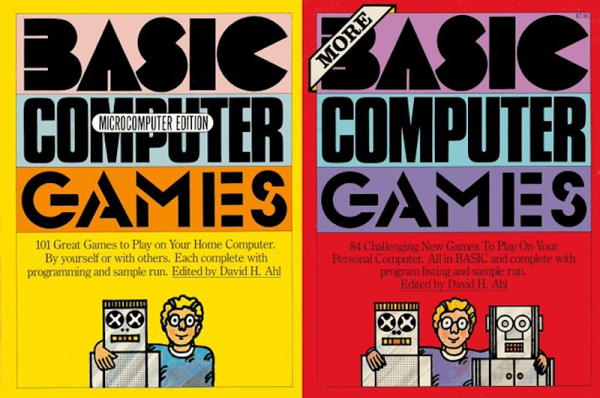
If you are a certain age, your first programming language was almost certainly BASIC. You probably at least saw the famous book by Ahl, titled BASIC Computer Games or 101 BASIC Computer Games. The book, published in 1973 by [David Ahl] was a staple in its day and the first computer book to sell over one million copies. Of course, if you want to run Super Star Trek or Hamurabi, you better fire up an old retrocomputer or a simulator because BASIC in 1973 doesn’t look like what we have today. Or, you can head to GitHub where [coding-horror] is inviting people to help update the programs using modern languages.

One of our favorites, Bagels, is there with directories for C#, Java, Javascript, Python, Ruby, and VB.net. It doesn’t appear that all of the games are in all the languages, though. There’s also a .Net solution file that apparently has a few entries in it. We were also happy to see Super Star Trek represented, along with a link to an article about a C++ language port. The original games were tweaked to run on VintageBasic.

Continue reading “The Famous Basic Computer Games Book Gets A 2021 Update”

Making A Kid-Friendly Computer As A Present: Or How To Be The Cool Aunt At Christmas

This article was meant to be finished up before Christmas, so it’ll be a little late whenever you’re reading it to go and prepare this for the holiday. Regardless, if, like me, should you ever be on the lookout for something to give a toddler nephew or relative, it could be worth it to look into your neglected old parts shelves. In my case, what caught my eye was a 9-year-old AMD laptop catching dust that could be better repurposed in the tiny hands of a kid eager to play video games.

The main issues here are finding a decent selection of appropriate games and streamling the whole experience so that it’s easy to use for a not-yet-hacker, all the while keeping the system secure and child-friendly. And doing it all on a budget.

This is a tall order, and requirements will be as individual as children are, of course, but I hope that my experience and considerations will help guide you if you’re in a similar boat.

Continue reading “Making A Kid-Friendly Computer As A Present: Or How To Be The Cool Aunt At Christmas”