Modern Tape Echo Made Easy

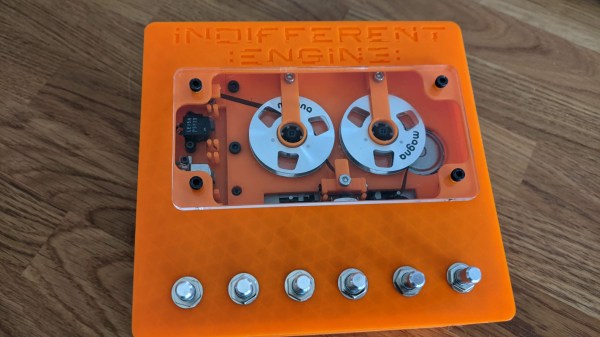
Modern popular music increasingly relies on more and more complicated and intricate equipment and algorithms to generate catchy tunes, but even decades ago this was still the case. The only difference between then and now was that most of the equipment in the past was analog instead of digital. For example, the humble tape echo was originally made by running a loop of magnetic tape over a recording head and then immediately playing it back. Old analog machines from that era are getting harder and harder to find, so [Adam Paul] decided to make his own.

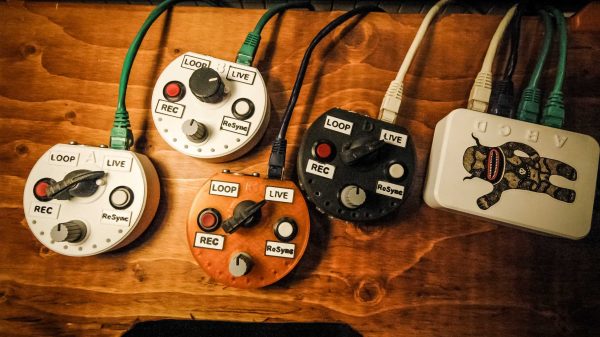
At first, [Adam] planned to use standard cassette tapes in various configurations in order to achieve the desired effect, but this proved to be too cumbersome and he eventually switched his design to using the cassette internals in a custom tape deck. The final design includes a small loop of tape inside of the enclosure with a motor driving a spindle. The tape is passed over a record head, then a read head, and then an erase head in order to achieve the echo sound. All of this is done from inside of the device itself, with 1/4″ jacks provided so that the musician can plug in their instrument of choice just like a standard effects pedal would be configured.

The entire build is designed to be buildable and repairable using readily-available parts as well, which solves the problem of maintaining (or even finding) parts from dedicated tape echo machines from decades ago. We like the sound from the analog device, as well as the fact that it’s still an analog device in a world of otherwise digital substitutes. Much like this magnetic tape-based synthesizer we featured about a year ago.

Continue reading “Modern Tape Echo Made Easy”

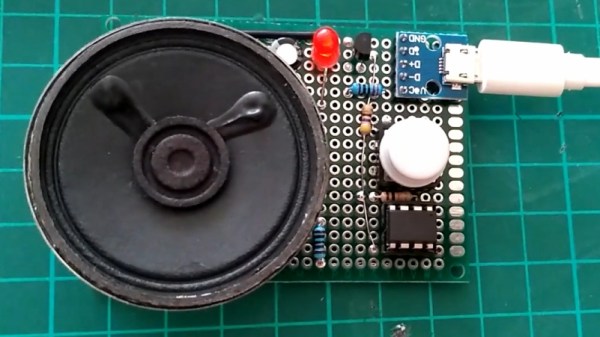
ATtiny85 on circuit board with 2n2222, pushbutton, usb-c power connector, LED, and speaker.

Custom Compression Squeezes Classic Computer Choruses Into A Tiny Controller

Geeks of a certain vintage will have fond memories of games that were simplistic by today’s standards, but drew one in all the same. Their low fidelity graphics were often complimented by equally low fidelity music being forced through the afterthought of a speaker that inhabited most computers. Despite the technical constraints of the era, these games didn’t just offer gameplay. They told stories, and they were immersive in a way that some would think wouldn’t be relatable to a younger generation.

That didn’t stop [Thanassis Tsiodras] from sharing the classic “The Secret of Monkey Island” with his niece and nephew when they were young. Excited to see his family after a year of separation due to COVID-19, [Thanassis] wanted to give them a handmade gift: The music from “The Secret of Monkey Island” on a custom player. What an uncle!

[Thanassis] could have just recorded the music and played it back using any number of chips made for the purpose, but being a long time software engineer, he decided to take the scenic route to his destination. First, DOSBox was hacked to dump the speaker output into a file. Python, C, and 30 years of experience were leveraged to squeeze everything into the 8 KB storage of an ATtiny85. Doing so was no small feat, as it required that he create a custom implementation of Huffman compression to get the data small enough to fit on chip. And when it fit, but didn’t work, even more optimization was needed.

The end result was worth it however, with the music from “The Secret of Monkey Island” playing in its original form from a speaker driven by the ever so humble but useful 2n2222. [Thanassis]’ site is replete with details too intricate to post here, but too neat to miss. Watch the video below the break for a demonstration.

Continue reading “Custom Compression Squeezes Classic Computer Choruses Into A Tiny Controller”

Are Hackers Being Let Down In Education?

In my work for Hackaday over the years I have been privileged to interact with some of the most creative people I have ever met, I have travelled far more than I ever did when I toiled unseen in an office in Oxford, and I have been lucky enough to hang out in our community’s spaces, camps, and dives across Europe.

Among the huge diversity of skills and ideas though, it’s striking how many of us share similar experiences and histories that have caused us to find our people in rooms full of tools and 3D printers. One of these things I found surprising because I thought I was the only one; I never fit in with the other kids at school, I found much of the teaching incomprehensible and had to figure things out for myself. As an exercise recently I did a straw poll among some of my friends, and found that a significant majority had a similar experience. Clearly something must have gone badly wrong in the way we were being taught that so many of us could have been let down by our schooling, and maybe to understand the needs of our community it’s time to understand why.

Continue reading “Are Hackers Being Let Down In Education?”

MIDI Mouse Makes Marvelous Music

It’s an old misconception that digital musicians just use a mouse and keyboard for their art. This is often far from the truth, as many computer music artists have a wide variety of keyboards/synths, MIDI controllers, and “analog” instruments that all get used in their creative process. But what if one of those instruments was just a mouse?

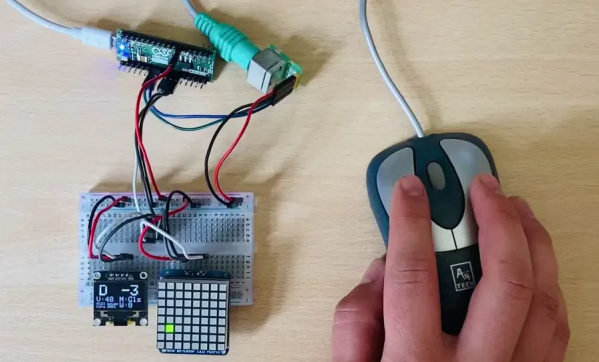
Well, that must have been what was going through [kzra]’s mind when he turned an old ps/2 roller ball mouse into an electronic instrument. Born out of a love for music and a hate for waste, the mouse is a fully functional MIDI controller. Note pitch is mapped to the x-coordinate of the pointer, and volume (known as velocity, in MIDI-speak) is mapped to the y-coordinate. The scroll wheel can be used as a mod wheel, user-configurable but most often used to vary the note’s pitch. The mouse buttons are used to play notes, and can behave slightly differently depending on the mode the instrument is set to.

Not satisfied with simply outputting MIDI notes, [kzra] also designed an intuitive user interface to go along with the mouse. A nice little OLED displays the mode, volume, note, and mouse coordinates, and an 8×8 LED matrix also indicates the note and volume. It’s a fantastic and versatile little instrument, and you’ve gotta check out the video after the break to see it for yourself. We’ve seen some awesome retro-tech MIDI controllers before, and this fits right in.

Continue reading “MIDI Mouse Makes Marvelous Music”

Web Assembly, Music Synthesis, And The Beauty Of Math

The electronics hobby has changed a lot since the advent of the microprocessor. Before that — and with the lack of large-scale integrated circuits — projects in magazines tended to be either super simple or ultra complex. However, one popular type of project dealt with music synthesis. Fairly simple circuits could combine to make a complex synthesizer so it was sort of the best of both worlds. Nowadays, you are more likely to tackle a music synthesizer in software like [Tim] did when he created Abelton in Web Assembly and C++. Along the way, he learned a lot about the relationship between math and music.

[Tim] covers what he learned about the Nyquist theorem and how to keep synthesis data flowing in real time with buffers. However, there are some problems trying to do all this in a cross-browser context. The AudioWorklet class appears to have widespread support, though, and [Tim] managed to get that working.

Continue reading “Web Assembly, Music Synthesis, And The Beauty Of Math”

Ferrofluid Dances In Custom Bluetooth Speaker

Ferrofluids, as the name implies, are liquids that respond to magnetic fields. They were originally developed for use by NASA as rocket fuel but are available to the general public now for anyone who wants to enjoy their unique properties. For [Dakd Jung], that meant building a special chamber into a Bluetooth speaker that causes the ferrofluid inside to dance along with the rhythm of the music.

This project isn’t quite as simple as pushing the ferrofluid container against a speaker, though. A special electromagnetic device similar to a speaker was used specifically to manipulate the fluid, using a MSGEQ7 equalizer to provide the device with only a specific range of frequencies best tailored for the fluid’s movement. The project includes two speakers for playing the actual music that point upward, and everything is housed inside of a 3D-printed case. There were some additional hurdles to overcome as well, like learning that the glass needed a special treatment to keep the ferrofluid from sticking to it.

All in all it’s a unique project that not only brings sound to a room but a pleasing physical visualization as well. Being able to listen to music or podcasts on a portable speaker, rather than the tinny internal speakers of a phone or laptop, is the sort of thing you think you can live without until you get used to having higher quality sound easily and in every place you go. And, if there’s a way to improve on that small but crucial foundation with something like a dancing ferrofluid that moves with the music the speaker is playing, then we’re going to embrace that as well.

Don’t Fret Over The Ukulele

A ukulele is a great instrument to pick to learn to play music. It’s easy to hold, has a smaller number of strings than a guitar, is fretted unlike a violin, isn’t particularly expensive, and everything sounds happier when played on one. It’s not without its limited downsides, though. Like any stringed instrument some amount of muscle memory is needed to play it fluidly which can take time to develop, but for new musicians there’s a handy new 3D printed part that can make even this aspect of learning the ukulele easier too.

Called the Easy Fret, the tool clamps on to the neck of the ukulele and hosts a series of 3D printed “keys” that allow for complex chord shapes to be played with a single finger. In this configuration the chords C, F, G, and A minor can be played (although C probably shouldn’t be considered “complex” on a ukulele). It also makes extensive use of compliant mechanisms. For example, the beams that hit the chords use geometry to imitate a four-bar linkage. This improves the quality of the sound because the strings are pressed head-on rather than at an angle.

While this project is great for a beginner learning to play this instrument and figure out the theory behind it, its creator [Ryan Hammons] also hopes that it can be used by those with motor disabilities to be able to learn to play an instrument as well. And, if you have the 3D printer required to build this but don’t have an actual ukulele, with some strings and tuning pegs you can 3D print a working ukulele as well.