Thermal Printer Brain Transplant

Thermal Printer Brain Transplant Is Two Hacks In One

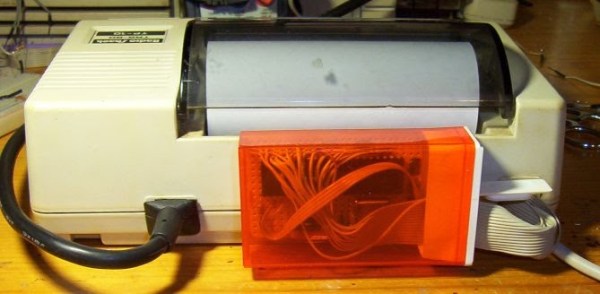
You know how sometimes you just can’t resist collecting old hardware, so you promise yourself that you will get around to working on it some day? [Danny] actually followed through on one of those promises after discovering an old Radio Shack TRS-80 TP-10 thermal printer in one of his boxes of old gear. It looks similar to a receipt printer you might see printing receipts at any brick and mortar store today. The original printer worked well enough, but [Danny] wasn’t satisfied with its 32 character per line limitation. He also wanted to be able to print more complex graphics. To accomplish this goal, he realized he was going to have to give this printer a brain transplant.

First, [Danny] wanted to find new paper for the printer. He only had one half of a roll left and it was 30 years old. He quickly realized that he could buy thermal paper for fax machines, but it would be too wide at 8.5 inches. Luckily, he was able to use a neighbor’s saw to cut the paper down to the right size. After a test run, he knew he was in business. The new fax paper actually looked better than the old stuff.

The next step was to figure out exactly how this printer works. If he was going to replace the CPU, he was going to need to know exactly how it functioned. He started by looking at the PCB to determine the various primary functions of the printer. He needed to know which functions were controlled by which CPU pins. After some Google-Fu, [Danny] was able to find the original manual for the printer. He was lucky in that the manual contained the schematic for the circuit.

Once he knew how everything was hooked up, [Danny] realized that he would need to learn how the CPU controlled all of the various functions. A logic analyzer would make his work much easier, but he didn’t happen to have one lying around. [Danny] he did what any skilled hacker would do. He built his own!

He built the analyzer around an ATMega664. It can sample eight signals every three microseconds. He claims it will fill its 64k of memory in about one fifth of a second. He got his new analyzer hooked up to the printer and then got to work coding his own logic visualization software. This visualization would provide him with a window to the inner workings of the circuit.

Now that he was able to see exactly how the printer functioned, [Danny] knew he would be able to code new software into a bigger and badder CPU. He chose to use another ATMega microcontroller. After a fair bit of trial and error, [Danny] ended up with working firmware. The new firmware can print up to 80 characters per line, which is more than double the original amount. It is also capable of printing simple black and white graphics.

[Danny] has published the source code and schematics for all of his circuits and utilities. You can find them at the bottom of his project page. Also, be sure to catch the demonstration video below. Continue reading “Thermal Printer Brain Transplant Is Two Hacks In One”

Printing Text With A Chart Recorder

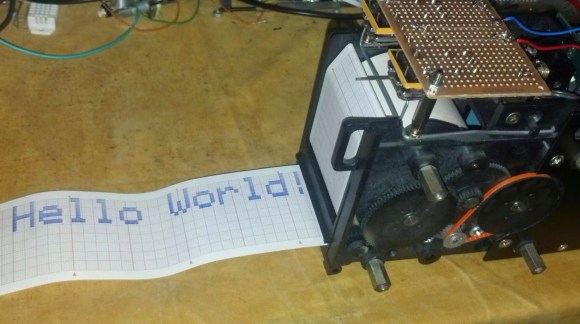
A chart recorder printing 'Hello World'

Chart recorders are vintage devices that were used to plot analog values on paper. They’re similar to old seismometers which plot seismic waves from earthquakes. The device has a heated pen which moves across a piece of thermally sensitive paper. This paper is fed through the machine at a specified rate, which gives two dimensions of plotting.

[Marv] ended up getting a couple of discontinued chart recorders and figured out the interface. Five parallel signals control the feed rate of the paper, and an analog voltage controls the pen location. The next logical step was to hook up an Arduino to control the plotter.

However, once the device could plot analog values, [Marv] quickly looked for a new challenge. He wanted to write characters and bitmaps using the device, but this would require non-continuous lines. By adding a solenoid to lift the pen, he built a chart recorder printer.

After the break, check out a video of the chart recorder doing something it was never intended to do. If you happen to have one of these chart recorders, [Marv] included all of the code in his writeup to help you build your own.

Continue reading “Printing Text With A Chart Recorder”

Red Bull Creation: A Giant Daisy Wheel Printer

While most of the teams in this year’s Red Bull Creation didn’t really pay attention to the theme of ‘reinventing the wheel’, 1.21 Jiggawatts did. Their creation, a giant typewriter that can be suspended along the side of a building, takes its inspiration directly from 1970s typewriters and printers. Yes, it’s a giant daisy wheel typewriter.

The basic idea of a daisy wheel typewriter is a wheel with a few dozen petals, on the end of which is a single letter. To print a letter, the wheel spins around, and a solenoid mechanism strikes the letter against a piece of paper. This was cutting edge tech in the 70s, and was a fast (and cheap) way for computers to print out letter-quality reports.

1.21 Jiggawatts used a ladder as the rail to move down a line of text. The movement from line to line was supposed to be done by dangling the ladder off a chain with a few sprockets attached to motors. Unfortunately, the team couldn’t quite get the machine working for the competition and live event, but the build does show an amazing amount of creativity and respect for classic, forgotten technology.


Learning To Reverse Engineer On A Broken Printer

Lexmark Hack

When a Lexmark inkjet printer stopped working, [Mojobobo] was able to claim it as his own. He quickly realized that the machine was flooded with ink and not worth repairing, but that didn’t mean he couldn’t still find a use for it. When he learned that the printer’s firmware was not only upgradable but also unprotected, he knew he should be able to get the printer to do his own bidding.

[Mojobobo] started his journey with the motherboard. The unit still powered up, but it was asking to insert a “duplex module” before it would boot any further. [Mojobobo] first tried to find a way to trick the duplex module sensor, but was unsuccessful. His next step was to search for some kind of serial communications port. He didn’t have an oscilloscope, so instead he used a speaker with a wire probe. In theory, if the wire was pressed against an active serial port, he would be able to hear varying tones through the speaker. Sure enough, he found some interesting tones after probing around some ports next to a “JTAG” label. He looked up some information about the nearby chip and found that it included an SPI bus.

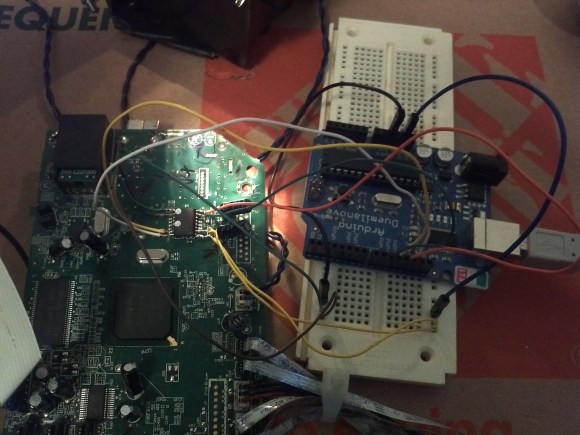
After some internet research, [Mojobobo] learned enough about SPI to have a rough idea of how to use it. Having limited tools available to him, he decided to use his Arduino to try to communicate with the motherboard. After wiring up a simple circuit, (and then re-wiring it) he was able to dump the first 4096 bytes of the motherboard’s boot loader to the Arduino via the SPI interface.

[Mojobobo’s] next steps will be to find a faster way to dump the boot loader. At 9600 baud, he grew tired of waiting after three hours. Once he has the full boot loader he intends to search for a way to bypass the duplex sensor and get the board to finish booting. Then he may just use the printer for its scanning functions, or he might find other interesting uses for it.

Old Inkjet Turned Into An SVG Plotter

plotter

What do you do when you have an old printer, a portable CD player, and a handful of other electronics sitting around? Turn it into a plotter, of course.

The frame of the plotter was taken from a ye olde Epson printer, reusing the two stepper motors to move the paper along its length and width. The pen is attached to the laser head of a junked portable CD player. With this, it’s just three stepper motors that allow the Arduino control system to move the pen across the paper and put a few markings down.

The motors on the printer are, in the spirit of reuse, still connected to the printer’s driver board, with a few leads going directly from the Arduino to the parallel port interface. The motor in the CD player is another ordeal, with a single H-bridge controlling the lifting of the pen.

On the software side of things, a Processing sketch reads an SVG file and generates a list of coordinates along a path. The precision of the coordinates is set as a variable, but from the video of the plotter below, this plotter has at least as much resolution as the tip of the pen.

Continue reading “Old Inkjet Turned Into An SVG Plotter”

Examining Vintage Printer Server Hardware For Apple II

II-easy-print-reverse-engineering

Need to share a printer between several Apple II computers? Of course you don’t, but back in the day this would have been a really awesome piece of hardware to own. It’s a Pacemark iiEasy Print (we’re not sure on the capitalization of the name so talk amongst yourselves). It is an automatic buffer and switch that you can have now-a-days for just a couple of Hamiltons. [David] doesn’t mention where he “acquired” his specimen, but all the details about his adventures reverse engineering the card are shared in detail.

First off, we have to mention his unorthodox bench tools. To the untrained eye it would appear that he has attached the iiEasy Print to a Commodore 64; and that eye would be right. [David] says he uses the C64 something like an Arduino (if that’s even possible). The green card is plugged into the C64 memory bus, connecting to the DIP socket breakout board on the left and the chip select pins for most of the other IC’s on the original board. The gist of this setup is that it’s simple to use the “passthrough” DIP socket to monitor what the 6502-like processor is doing, while mapping the memory with the help of the chip select signals.

What did he learn from all this? Quite a lot but you might as well click that link above and hear it from his own mouth.

Microcontroller Enumerates As USB Printer — Can Be Programmed By Printing

avr-programming-by-printing

This is a fascinating concept. We’re not sure of its usefulness, but it definitely stands on its own just for the concept. [Dean Camera] just added a new HID class to the LUFA project that lets you flash AVR chips by printing to them. This means once you have a file like the one seen open in Notepad above, you can just click on File, then on Print, and the firmware will be uploaded to the chip.

[Dean] is the creator of the LUFA project and still likes to get his hands dirty hacking around with it. This idea came to him while he was exploring the concept of using the MIDI protocol to program a chip. That didn’t pan out because of the way Microsoft has handled MIDI in newer versions of Windows. But he did get the idea of making LUFA identify itself as a simple USB printer. He dug into the specification and figured out how to do that. Once Windows connects to the device it doesn’t really care what data gets sent to it. So [Dean] wrote a parser for the bootloader which could accept the incoming hex code and write it to the chip’s program memory.