TruffleHog Sniffs Github For Secret Keys

Secret keys are quite literally the key to security in software development. If a malicious actor gains access to the keys securing your data, you’re toast. The problem is, to use keys, you’ve got to write them down somewhere – oftentimes in the source code itself. TruffleHog has come along to sniff out those secret keys in your Github repository.

It’s an ingenious trick — a Python script goes through the commit history of a repository, looking at every string of text greater than 20 characters, and analyzing its Shannon entropy. This is a mathematical way of determining if it looks like a relatively random string of numbers and letters. If it has high entropy, it’s probably a key of some sort.

Sharing source code is always a double-edged sword for security. Any flaws are out for all to see, and there are both those who will exploit the flaws and those who will help fix them. It’s a matter of opinion if the benefits outweigh the gains, but it’s hard to argue with the labor benefits of getting more eyes on the code to hunt for bugs. It’s our guess though, that a lot of readers have accidentally committed secret keys in a git repository and had to revert before pushing. This tool can crawl any publicly posted git repo, but might be just as useful in security audits of your own codebase to ensure accidentally viewable keys are invalidated and replaced.

For a real world example of stolen secret keys, read up on this HDMI breakout that sniffs HDCP keys.

Air Conditioner Speaks Serial, Just Like Everything Else

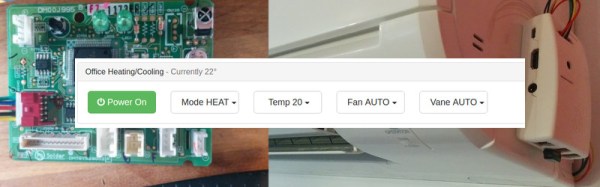
Like so many other home appliances, it’s likely that even your air conditioner has a serial interface buried inside it. If you’re wondering why, it’s because virtually every microcontroller on the planet has a UART built in, and it’s highly useful for debugging during the development process, so it makes sense to use it. Thus, it was only a matter of time before we saw a hacked airconditioner controlled by a Raspberry Pi.

[Hadley] was growing frustrated with the IR remote for his Mitsubishi air conditioner; it can issue commands, but it’s a one way interface – there’s no feedback on current status or whether commands are received, other then the occasional beep or two. Deciding there had to be a better way, [Hadley] grabbed a Saleae Logic Analyser and started probing around, determining that the unit spoke 5 V TTL at 2400 bps with even parity. The next step was to start talking back.

Continue reading “Air Conditioner Speaks Serial, Just Like Everything Else”

Python Solution To A Snake Cube Puzzle

Puzzles provide many hours of applied fun beyond any perfunctory tasks that occupy our days. When your son or daughter receives a snake cube puzzle as a Christmas gift — and it turns out to be deceptively complex — you can sit there for hours to try to figure out a solution, or use the power of Python to sort out the serpentine conundrum and use brute-force to solve it.

Continue reading “Python Solution To A Snake Cube Puzzle”

Counting Laps And Testing Products With OpenCV

It’s been about a year and a half since the Batteroo, formally known as Batteriser, was announced as a crowdfunding project. The premise is a small sleeve that goes around AA and AAA batteries, boosting the voltage to extract more life out of them. [Dave Jones] at EEVblog was one of many people to question the product, which claimed to boost battery life by 800%.

Batteroo did manage to do something many crowdfunding projects can’t: deliver a product. Now that the sleeves are arriving to backers, people are starting to test them in the wild. In fact, there’s an entire thread of tests happening over on EEVblog.

One test being run is a battery powered train, running around a track until the battery dies completely. [Frank Buss] wanted to run this test, but didn’t want to manually count the laps the train made. He whipped up a script in Python and OpenCV to automate the counting.

The script measures laps by setting two zones on the track. When the train enters the first zone, the counter is armed. When it passes through the second zone, the lap is recorded. Each lap time is kept, ensuring good data for comparing the Batteroo against a normal battery.

The script gives a good example for people wanting to play with computer vision. The source is available on Github. As for the Batteroo, we’ll await further test results before passing judgement, but we’re not holding our breath. After all, the train ran half as long when using a Batteroo.

SKiDL: Script Your Circuits In Python

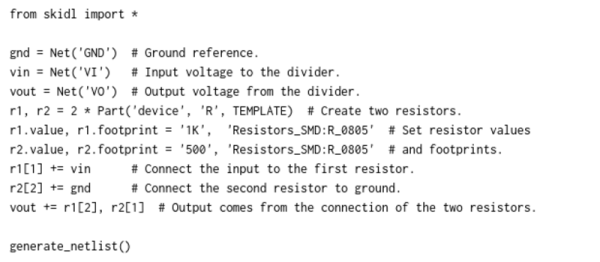
SKiDL is very, very cool. It’s a bit of Python code that outputs a circuit netlist for KiCAD.

Why is this cool? If you design a PCB in KiCAD, you go through three steps: draw the schematic, assign footprints to the symbolic parts, and then place them. The netlist ties all of these phases together: it’s a list of which parts are connected to which, the output of schematic capture and the input for layout. The ability to generate this programmatically should be useful.

For instance, you could write a filter circuit generator that would take the order, cutoff, and type of filter as inputs, and give you a spec’ed netlist as output. Bam! In your next design, when you need a different filter, you just change a couple of variables. Writing your circuits as code would make arranging the little sub-circuits modular and flexible, like functions in code.

At the very least, it’s an interesting alternative to the mouse, click, drag, click paradigm that currently dominates the schematic capture phase. Just as some of you like OpenSCAD for 3D modelling, some of you will like SKiDL for circuit design.

We’ve become so accustomed to the circuit diagram as the means of thinking about circuits that we’re not sure that we can ever give up the visual representation entirely. Maybe designing with SKiDL will be like sketching out block diagrams, where each block is a bit of Python code that generates a circuit module? Who knows? All we know is that it sounds potentially interesting, and that it’ll certainly be mind-expanding to give it a try.

Give it a shot and leave feedback down in the comments!

Reliably Exploiting Apport In Ubuntu

[Donncha O’Cearbhaill] has successfully exploited two flaws in Apport, the crash report mechanism in Ubuntu. Apport is installed by default in all Ubuntu Desktop installations >= 12.10 (Quantal). Inspired by [Chris Evan] work on exploiting 6502 processor opcodes on the NES, [Donncha] describes the whole process of finding and exploiting a 0-day on a modern linux system.

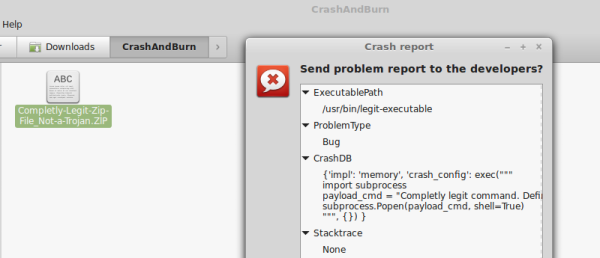
One of the flaws, tracked as CVE-2016-9949, relies on a python code injection in the crash file. Apport blindly uses the python eval() function on an unsanitized field (CrashDB) inside the .crash file. This leads directly to arbitrary python code execution. The other flaw, tracked as CVE-2016-9950, takes advantage of a path traversal attack and the execution of arbitrary Python scripts outside the system hook_dirs. The problem arises when another field (Package) from the crash report file is used without sanitizing when building a path to the package hook files.

CVE-2016-9949 is easily exploitable, if an attacker can trick a user into opening a specially crafted file (apport .crash file), the attacker can execute the python code of his/her choice. Two details make it a very interesting exploit.

The first thing to note is the exploit’s reliability. Given that it is pure python code execution, an attacker doesn’t have to worry about ASLR, Non-Exec Memory, Stack Canaries and other security features that Ubuntu ships by default. As the author notes:

“There are lots of bugs out there which don’t need hardcore memory corruption exploitation skills. Logic bugs can be much more reliable than any ROP chain.”

Another interesting detail is that the exploit file doesn’t need to have the .crash extension, as long as its content starts with the string “ProblemType: ” and the file extension is not associated already with other software, Ubuntu considers it being of mime-type type=”text/x-apport” (for example, .ZlP or .0DF). This significantly improves the chances of an unsuspecting user being fooled into open the file.

Continue reading “Reliably Exploiting Apport In Ubuntu”

Hybrid Raspberry Pi + PIC32 = Oscilloscope And Function Generator

The PicBerry is a student final project by [Advitya], [Jeff], and [Danna] that takes a hybrid approach to creating a portable (and affordable) combination digital oscilloscope and function generator. It’s based on the Raspberry Pi, features an intuitive Python GUI, and can generate and measure simultaneously.

But wait! The Raspberry Pi is a capable little Linux machine, but meeting real-time deadlines isn’t its strong suit. That’s where the hybrid approach comes in. The Pi takes care of the user interface and other goodies, and a PIC32 over SPI is used for 1 MHz sampling and running a DAC at 500 kHz. The idea of combining them into PicBerry is to get the best of both worlds, with the Pi and PIC32 each doing what they are best at. The readings are sent in batches from the PIC32 to the Pi, where the plot is updated every 30 ms so that user does not perceive any visible lag.

The project documentation notes that improvements can be made, the speeds are a far cry from regular bench equipment, and the software lacks some typical features such as triggering, but overall not bad at all for under $50 of parts. In fact, there are hardly any components at all beyond the Raspberry Pi, the PIC32, and a MCP4822 digital-to-analog converter. A short demo video is embedded below.

Continue reading “Hybrid Raspberry Pi + PIC32 = Oscilloscope And Function Generator”