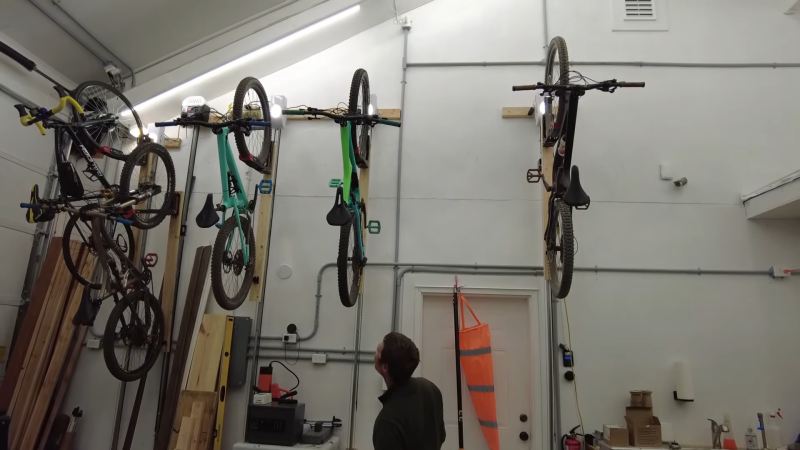
bikes are shown raised from the floor from the garage opener lift

Raise Bikes To The Heavens With Humble Garage Door Opener

Biking can be an incredibly rewarding hobby, but what do you do with all of your expensive pieces of metal and composite when you aren’t hitting the trails? They take up space that you could use for more bikes! [Chaz] figured there had to be a better way and discovered the unlikely solution of the humble garage opener.

Garage doors are made to lift high with moderate weight, exactly what one would expect from a bike lift. If you have high ceilings in your garage or wherever else you store your bikes there can’t be much easier than pushing a button to get your bike out of the way.

To assemble the unusual bike rack, [Chaz] mounted the motor to the wall with a few scraps of wood, and built a wooden platform that rides along the rail. This additional board allows you to use a traditional bike wheel rack to gently raise the bike. While initially [Chaz] had some questionable results, this was quickly resolved with removing the rotational elements of the mount and allowing a slight slant in the bike.

While not everyone may need to raise their bikes to the heavens, this type of simple hacking is always rewarding to see come together. If you want to see how some more bike specific tech works, check out the insides of this expensive bike seat!

Continue reading “Raise Bikes To The Heavens With Humble Garage Door Opener”

Stack N’ Rack Your Hardware With The HomeRacker Project

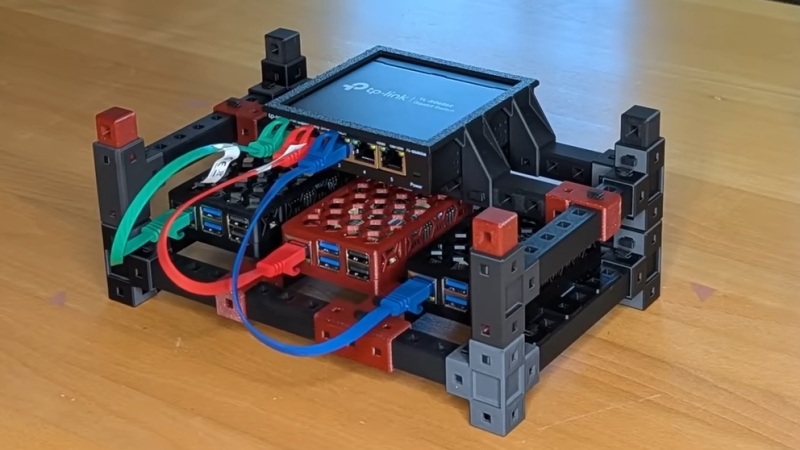
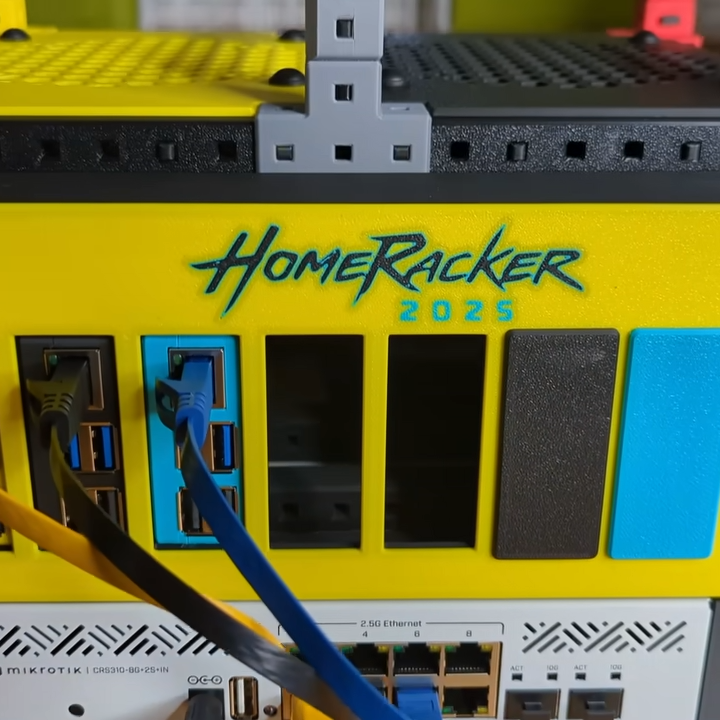
Things are cooler when rack-mounted, and [KellerLab] aims to make that all far more accessible with the HomeRacker, a modular and 3D-printable rack building system designed to let you rack-mount to your heart’s content. While it can handle big things, it seems especially applicable to tasks like mounting one’s home network equipment and Raspberry Pi machines.

A rack is a great place for those Raspberry Pi servers and home networking equipment, but it can also handle bigger jobs.

The basic system (or core) consists of three different parts: supports, connectors, and lock pins. The supports are the main structural bars, the connectors mostly go at the corners, and the lock pins ensure everything stays put. The nominal sizing is a 15 mm x 15 mm profile for the supports, with lengths being a multiple of 15 mm.

All is designed with 3D printing in mind, and requires no tools to assemble or disassemble. There are design elements we really appreciate, like how parts are printed at an angle, which improves strength while eliminating the need for supports. The lock pins (and the slots into which they go) are designed so that they are effective and will neither rattle nor fall out.

But the core system is just the foundation. There’s plenty of modularity and expansions to handle whatever one may need, from Gridfinity shelves and drawers to various faceplates and other modules. There are some example applications available from [KellerLab]’s HomeRacker models page, like CD shelf, under-desk drawer, or filament rack.

[KellerLab] welcomes any collaboration, so check out the GitHub repository for CAD references and design files.

One last point to make about the value of printing objects like this at an angle: not only can the resulting layer lines provide better strength and reduce or eliminate the need for supports, but printing at an angle can help hide layer lines.

Continue reading “Stack N’ Rack Your Hardware With The HomeRacker Project”

A Friendly Reminder That Your Unpowered SSDs Are Probably Losing Data

Save a bunch of files on a good ol’ magnetic hard drive, leave it in a box, and they’ll probably still be there a couple of decades later. The lubricants might have all solidified and the heads jammed in place, but if you can get things moving, you’ll still have your data. As explained over at [XDA Developers], though, SSDs can’t really offer the same longevity.

It all comes down to power. SSDs are considered non-volatile storage—in that they hold on to data even when power is removed. However, they can only do so for a rather limited amount of time. This is because of the way NAND flash storage works. It involves trapping a charge in a floating gate transistor to store a single bit of data. You can power down an SSD, and the trapped charge in all the NAND flash transistors will happily stay put. But over longer periods of time, from months to years, that charge can leak out. When this happens, data is lost.

Depending on your particular SSD, and the variety of NAND flash it uses (TLC, QLC, etc), the safe storage time may be anywhere from a few months to a few years. The process takes place faster at higher temperatures, too, so if you store your drives in a warm area, you could see surprisingly rapid loss.

Ultimately, it’s worth checking your drive specs and planning accordingly. Going on a two-week holiday? Your PC will probably be just fine switched off. Going to prison for three to five years with only a slim chance of parole? Maybe back up to a hard drive first, or have your cousin switch your machine on now and then for safety’s sake.

On a vaguely related note, we’ve even seen SSDs that can self-destruct on purpose. If you’ve got the low down on other neat solid-state stories, don’t hesitate to notify the tipsline.

Shrinking Blinky As Far As Possible

Many of us know the basic Blink Arduino sketch, or have coded similar routines on other microcontrollers. Flashing an LED on and off—it doesn’t get much simpler than that. But how big should a blink sketch be? Or more importantly, how small could you get it? [Artful Bytes] decided to find out.

The specific challenge? “Write a program that runs on a microcontroller and blinks an LED. The ON and OFF times should be as close to 1000 ms as possible.” The challenge was undertaken using a NUCLEO-L432KC Cortex-M4 with 256 K of flash and 64 K of RAM.

We won’t spoil the full challenge, but it starts out with an incredibly inefficient AI & cloud solution. [Artful Bytes] then simplifies by switching to an RTOS approach, before slimming down further with C, assembly, and then machine code. The challenge was to shrink the microcontroller code as much as possible. However, you might notice the title of the video is “I Shrunk Blinky to 0 Bytes.” As it turns out, if you eliminate the digital code-running hardware entirely… you can still blink an LED with analog hardware. So, yes. 0 bytes is possible.

We’ve featured the world’s smallest blinky before, too, but in a physical sense rather than with regards to code size.

Continue reading “Shrinking Blinky As Far As Possible”

ice forming on surface with plus and minus pole

The Coolest Batteries You’ve Never Heard Of

Imagine cooling your building with the same principle that kept Victorian-era icehouses stocked with lake-frozen blocks, but in modern form. That’s the idea behind ice batteries, a clever energy storage hack that’s been quietly slashing cooling costs across commercial buildings. The invention works by freezing water when energy is cheap, and using that stored cold later, they turn major power hogs (air conditioning, we’re looking at you) into more efficient, cost-effective systems.

Pioneers like Nostromo Energy and Ice Energy are refining the tech. Nostromo’s IceBrick modules pack 25 kWh of cooling capacity each, install on rooftops, and cost around $250 per kWh—about half the price of lithium-ion storage. Ice Energy’s Ice Bear 40 integrates with HVAC systems, shifting up to 95% of peak cooling demand to off-peak hours. And for homes, the Ice Bear 20 replaces traditional AC units while doubling as a thermal battery.

Unlike lithium-ion, ice batteries don’t degrade chemically – their water is endlessly reusable. Combining the technology with this hack, it’s even possible in environments where water is scarce. But the trade-off? They only store cooling energy. No frozen kilowatts for your lightbulbs, just an efficient way to handle the biggest energy drain in most buildings.

Could ice batteries help decentralize energy storage? They’re already proving their worth in high-demand areas like California and Texas. Read the full report here and let us know your thoughts in the comments.

Continue reading “The Coolest Batteries You’ve Never Heard Of”

NEMA Releases Standard For Vehicle-to-Grid Applications

Vehicle-to-grid (V2G) has been hailed as one of the greatest advantages of electrifying transportation, but has so far remained mostly in the lab. Hoping to move things forward, the National Electrical Manufacturers Association (NEMA) has released the Electric Vehicle Supply Equipment (EVSE) Power Export Permitting Standard.

The new standards will allow vehicle manufacturers and charger (EVSE) suppliers to have a unified blueprint for sending power back and forth to the grid or the home, which has been a bit of a stumbling block so far toward adoption of a seemingly simple, but not easy, technology. As renewables make up a larger percentage of the grid, using the increasing number of EVs on the road as battery backup is a convenient solution.

While the standard will simplify the technology side of bidirectional charging, getting vehicle owners to opt into backing up the grid will depend on utilities and regulators developing attractive remuneration plans. Unfortunately, the standard itself is paywalled, but NEMA says the standard “could put money back in electric vehicle owners’ pockets by making it easier for cars to store energy at night or when turned off and then sell power back to grids at a profit during peak hours.”

We’ve covered some of the challenges and opportunities of V2G systems in the past and if you want something a little smaller scale, how about using a battery that was once in a vehicle to backup your own home?

Organizing Components, The Easy Way

There’s an old joke: What do you get someone who has everything? A place to put it. For hackers like [Christian], everything is a hoard of priceless electronic components. His solution is using small zipper bags, either regular plastic or anti-static. These attach using hook and loop fastener to plastic binder sheets which then live in a binder. Combined with some custom printed labels and a few other tricks, it makes for a nice system, as you can see in the video below.

Honestly, we’ve done something similar before, using a binder with little pockets, but the bag and custom labels beat our system. He even has QR codes on some of them to locate data sheets easily. Seems like a barcode for inventory management might have been good, too.

Continue reading “Organizing Components, The Easy Way”