A Cortex M4 Based Platform With ETH, USB, BT And Many On-board Peripherals

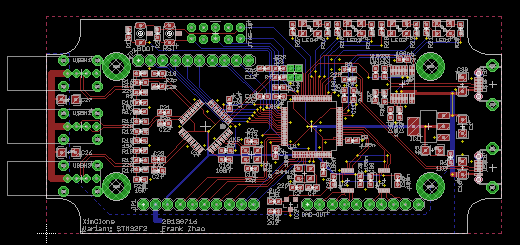
Here is a very time consuming project that I worked on during last summer: an ARM Cortex M4 based platform with plenty of communication interfaces and on-board peripherals. The particular project for which this board has been developed is not really HaD material (one of my father’s funny ideas) so I’ll only describe the platform itself. The microcontroller used in the project is the ATSAM4E16C from Atmel, which has 1Mbyte of flash and 128Kbytes of SRAM. It integrates an Ethernet MAC, a USB 2.0 Full-speed controller, a sophisticated Analog to Digital Converter and a Digital to Analog Converter (among others).

Here is a list of the different components present on the board so you can get a better idea of what the platform can do: a microphone with its amplifier, a capacitive touch sensor, two unipolar stepper motors controllers, two mosfets, a microSD card connector, a Bluetooth to serial bridge, a linear motor controller and finally a battery retainer for backup power. You can have a look at a simple demonstration video I made, embedded after the break. The firmware was made in C and uses the Atmel Software Framework. The project is obviously open hardware (Kicad) and open software.

Continue reading “A Cortex M4 Based Platform With ETH, USB, BT And Many On-board Peripherals”

Backseat USB Charger

backseatCharger

Whether you’re relegated to the backseat of your ride or just strapped for access to power, you may benefit from adding your own backseat USB charger. While this is a fairly straightforward hack, we’re surprised at how clean it turned out and at the convenience it provides.

[wongman2001] started by grabbing a socket wrench and unbolting his seat from the rails in the floor. He then disconnected the electrical plugs for the chair’s heating and power seat adjustment. With the chair disconnected and removed from the car, [wongman2001] further dissected its components, removing its back panel and test fitting a female cigarette adapter. Though this seat had plenty of room near the headrest, you may need to carve out some foam for a snug fit in your vehicle. To source the needed 12V, [wongman2001] tapped into the wiring for the seat’s motor, then soldered and insulated the connections to the cigarette lighter jack.

Check out some other clean-looking car hacks like the hidden MP3/USB Aux hack or the Nexus 7 double-DIN dashboard hack.

Serial USB For Any AVR Microcontroller

If you’re using an AVR microcontroller and you’d like to add USB to a project, there are a lot of options out there for you. Both LUFA and V-USB add some USB functionality to just about every AVR micro, but if you’d like a native serial port, your only options are to look towards the USB-compatible Atmel micros.

[Ray] looked at the options for adding a USB serial port and didn’t like what he saw; seemingly, this was an impossible task without a second, more capable microcontroller. Then he had an idea: if the goal is only to transfer data back and forth between a computer and a microcontroller, why not write an HID-class USB serial port?

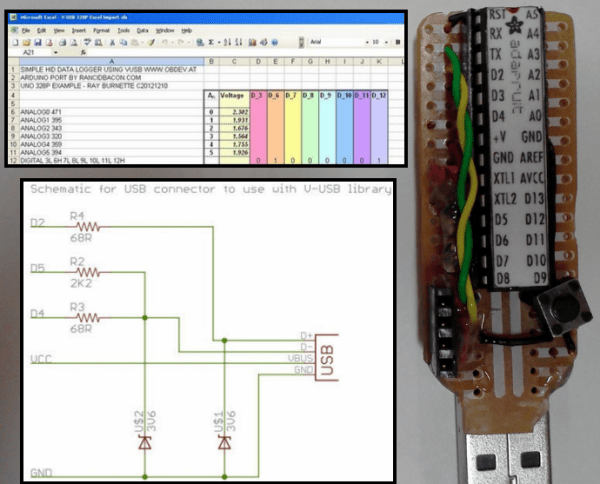
[Ray] based his project on The V-USB library and created a new HID descriptor to transfer data between a micro and a computer. While it won’t work with a proper terminal such as Putty, [Ray] managed to whip up a serial monitor program in Processing that’s compatible with Windows, Linux and OS X.

In the video below, you can see [Ray] using an ATmega328p with a standard V-USB setup. He’s transferring analog values from a photoresistor as a proof of concept, but just about everything that would work with a normal serial port will work with [Ray]’s library.

Continue reading “Serial USB For Any AVR Microcontroller”

USB Implementers Forum Says No To Open Source

For the longest time. one of the major barriers to hobbyists and very small companies selling hardware with a USB port is the USB Implementers Forum. Each USB device sold requires a vendor ID (VID) and a product ID (PID) to be certified as USB compliant. Adafruit, Sparkfun, and the other big guys in the hobbyist market have all paid the USB Implementers Forum for a USB VID, but that doesn’t help the guy in his garage hoping to sell a few hundred homebrew USB devices.

Arachnid Labs had an interesting idea to solve this problem. Since other USB device vendors such as Microchip and FTDI give away USB PIDs for free, a not for profit foundation could buy a VID, give PIDs away to foundation members making open source hardware, and we would all live in a magical world of homebrew devices that are certified as USB compliant.

This idea did not sit well with VTM Group, the people serving as the management, PR, legal, and membership and licensing department of the USB Implementers Forum. In a slightly disproportionate response, the VTM Group told Arachnid Labs to,

Please immediately cease and desist raising funds to purchase a unique USB VID for the purpose of transferring, reselling or sublicensing PIDs and delete all references to the USB-IF, VIDs and PIDs for transfer, resale or sublicense from your website and other marketing materials.

Interestingly, Arachnid Labs’ and scores of other requests for an open source USB VID haven’t hit the desk of anyone at the USB Implementers Forum, the people who are actually in charge of designating USB VIDs and PIDs. There are a number of ideas to get around VTM Group that include squatting on USB VID 0xF055, but we’re at a loss why there couldn’t be a foundation that gives out open source USB PIDs. Microchip, FTDI, and Openmoko do the same, so perhaps it’s time to email some key people at HP, Intel, and Microsoft

ContactKey: A Portable, Battery-powered Phonebook

contactKey

Although it’s still a prototype, [Russell] tipped us off to his battery-powered device for storing your contacts list: ContactKey. (Warning: Loud sound @ beginning). Sure, paper can back up your contact information, but paper isn’t nearly as cool to show off, nor can it receive updates directly from your Android. The ContactKey displays a contact’s information on an OLED screen, which you can pluck through by pressing a few buttons: either ‘Up,’ ‘Down,’ or ‘Reset’. Although the up/down button can advance one contact at a time, holding one down will fly through the list at lightning speed. A few seconds of inactivity causes a timeout and puts the ContactKey to sleep to conserve battery life.

This build uses an ATMega328 microcontroller and an external EEPROM to store the actual list. [Russell] wrote an Android app that will sync your contact list to the ContactKey over USB via an FTDI chip. The microcontroller uses I2C to talk to the EEPROM, while an OLED display interfaces to the ATMega through SPI. We’re looking forward to seeing how compact [Russell] can make the ContactKey once it’s off the breadboard; the battery life for most smartphones isn’t particularly stellar. Phones of the future will eventually live longer, but we bet it won’t be this one.

Continue reading “ContactKey: A Portable, Battery-powered Phonebook”

USB Ableton Foot Controller Reuses Old Keyboard

footLooper2

No, Hackaday hasn’t started advertising shoes, this is [Matlek’s] foot controller for Ableton Live.

Matlek plays guitar and needed an easy way to control Ableton Live, which he uses as a looper. Ableton normally expects keyboard input, so that’s exactly what he gave it.

An old dell keyboard was gutted down to its controller board. This exposes  the leads the keyboard uses to scan the key matrix.  From there it is simply trial and error connecting different pins together and seeing which keys are printed on the PC screen (A text editor works well for this). Only 8 characters are needed to control the looper, so [Matlek] chose digits 1-8.

Since some of the wires are going to be sharing pins, a small piece of stripboard comes in handy between the buttons and the keyboard controller. [Maltek] used basic momentary push buttons for his mini key matrix, though we think that box looks sturdy enough to support some larger stomp box style buttons.

Everything comes together inside a sturdy shoebox, which also serves to insulate the exposed keyboard PCB from shorting out.

The only major downside to the project is that the box is light enough that it slides easily on the floor when recording or triggering loops. Adding some heavy items (or dare we say, some shoes) would solve this problem. Self adhesive rubber feet on the bottom of the box would help too.

Continue reading “USB Ableton Foot Controller Reuses Old Keyboard”

DIY Electricity And Internet For Burning Man

bmPowerInet

Despite this being [Kenneth Finnegan’s] first Burning Man, the guy came prepared and stayed connected by setting up a beefy electricity supply and a faint yet functional internet connection. If you saw [Kenneth’s] Burning Man slideshow, you know that the desert is but a mild deterrent against power, water, and even temporary runways.

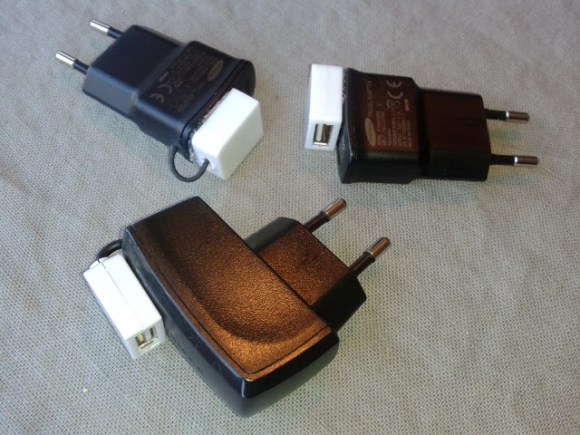
He borrowed a 20V 100W solar panel from Cal Poly and picked up a bargain-price TSMT-20A solar charge controller off eBay. The controller babysits the batteries by preventing both overcharging and over-discharging. The batteries—two Trojan-105 220Ah 6V behemoths—came limping out of a scissor lift on their last legs of life: a high internal resistance ruled out large current draws. Fortunately, the power demands were low, as the majority of devices were 12VDC or USB. [Kenneth] also had conveniently built this USB power strip earlier in the year, which he brought along to step down to 5VDC for USB charging.

Internet in the desert, however, was less reliable. A small team provides a microwave link from civilization every summer, which is shared via open access points in 3 different camps. [Kenneth] pointed his Ubiquiti NanoStation at the nearest one, which provided a host of inconvenient quirks and top speeds of 2-20kBps: enough, at least, to check emails.