A Deep Dive Into Low Power WiFi Microcontrollers

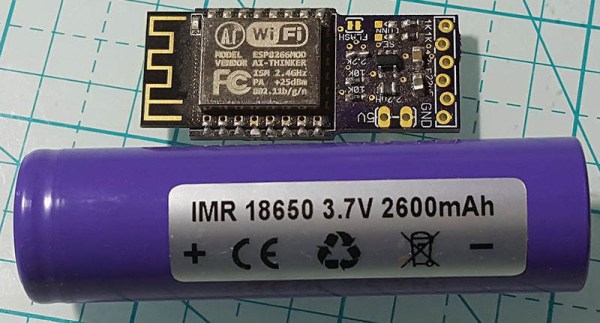
The Internet of Things is eating everything alive, and the world wants to know: how do you make a small, battery-powered, WiFi-enabled microcontroller device? This is a surprisingly difficult problem. WiFi is not optimized for low-power operations. It’s power-hungry, and there’s a lot of overhead. That said, there are microcontrollers out there with WiFi capability, but how do they hold up to running off of a battery for days, or weeks? That’s what [TvE] is exploring in a fantastic multi-part series of posts delving into low-power WiFi microcontrollers.

The idea for these experiments is set up in the first post in the series. Basically, the goal is to measure how long the ESP8266 and ESP32 will run on a battery, using various sleep modes. Both the ESP8266 and ESP32 have deep-sleep modes, a ‘sleep’ mode where the state is preserved, a ‘CPU only’ mode that turns the RF off, and various measures for sending and receiving a packet.

The takeaway from these experiments is that a battery-powered ESP8266 can’t be used for more than a week without a seriously beefy battery or a solar panel. Run times are much longer with an open network as compared to a secured network, and that security eats up a ton of power: connecting to a secure network every now and again means your ESP might only run for a day, instead of a week.

There is another option, though: the ESP32. While the ’32 is vastly more powerful and more capable than the ESP8266, it also has a few improved features that help with power consumption. Importantly, there’s a bug in the ESP8266 where it drops into modem sleep instead of light sleep about half the time. This error was fixed in the ESP32, but all that power does come at a cost. On the whole, if you’re concerned about security, the ESP32 is slightly better, simply because it does the ‘security’ part of connecting to a WiFi network faster. This is really a remarkable amount of testing that’s gone into this write-up, so if you’re developing something battery-powered with any ESP, it’s well worth the read.

Mining Airport WiFi Data: This Sunday Is The Worst Day To Fly

This is Thanksgiving weekend in the United States; the country’s most congested travel weekend of the year. It’s common knowledge, and it’s easy to infer that this holiday weekend is one of the busiest for air travel. But can you prove it empirically? Apparently so. [Bertrand Fan] filed a Freedom of Information Act request for the WiFi traffic at San Francisco International Airport and used the access point data from the past year and a half to show which days were most congested in the airport.

FOIA actually has its own website which boils down the act as follows:

The basic function of the Freedom of Information Act is to ensure informed citizens, vital to the functioning of a democratic society.

We’re not sure if this particular data mining hack falls under that description, but it’s good to know if you want information about what government is doing, you can get it and fast! From the first request to receiving the info was just 10 days.
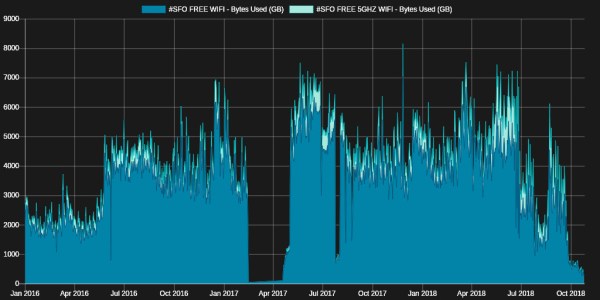
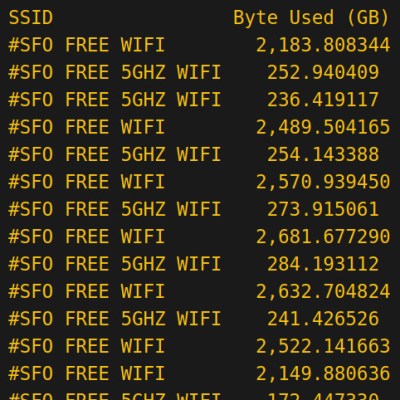
Ghostscript was used to turn the PDF into a CSV which was then plotted on a graph. It shows that the heaviest WiFi usage was on 11/26/17, the Sunday after Thanksgiving. As you can see, the only thing returned was data used per day for each SSID (plus dates which aren’t shown in this screenshot). But in theory the more people stuck at the airport the more data they’ll consume, so the method is reasonable.

This was all just to color a conversation he was having with his parents about the weekend’s travel. It’s a long way to go to prove a point, but we had fun joining along in the ride!

[via Lobsters]

Non-Nefarious Raspberry Pi Only Looks Like A Hack

We’re going to warn you right up front that this is not a hack. Or at least that’s how it turned out after [LiveOverflow] did some digital forensics on a mysterious device found lurking in a college library. The path he took to come to the conclusion that nothing untoward was going on was interesting and informative, though, as is the ultimate purpose of the unknown artifacts.

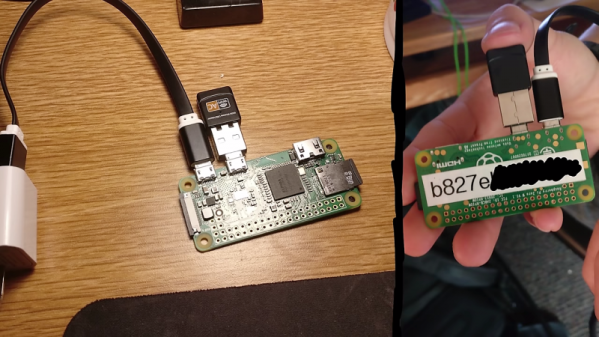
As [LiveOverflow] tells us in the video below, he came upon a Reddit thread – of which we can now find no trace – describing a bunch of odd-looking devices stashed behind garbage cans, vending machines, and desks in a college library. [LiveOverflow] recognized the posted pictures as Raspberry Pi Zeroes with USB WiFi dongles attached; curiosity piqued, he reached out to the OP and offered to help solve the mystery.

The video below tells the tale of the forensic fun that ensued, including some questionable practices like sticking the device’s SD card into the finder’s PC. What looked very “hackerish” to the finder turned out to be quite innocuous after [LiveOverflow] went down a remote-diagnosis rabbit hole to discern the purpose of these devices. We won’t spoil the reveal, but suffice it to say they’re part of a pretty clever system with an entirely non-nefarious purpose.

We thought this was a fun infosec romp, and instructive on a couple of levels, not least of which is keeping in mind how “civilians” might see gear like this in the wild. Hardware and software that we deal with every day might look threatening to the general public. Maybe the university should spring for some labels describing the gear next time.

Continue reading “Non-Nefarious Raspberry Pi Only Looks Like A Hack”

Low-energy ESP8266-based Board Sleeps Like A Log Until Triggered

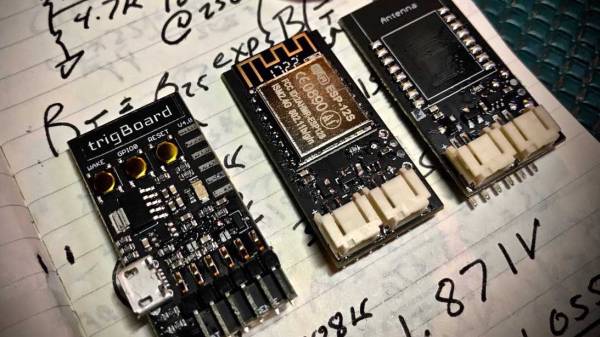
Given the popularity of hacking and repurposing Amazon Dash buttons, there appears to be a real need amongst tinkerers for a simple “do something interesting on the internet when a button is pressed” device. If you have this need but don’t feel like fighting to bend a Dash device to your will, take a look at [Kevin Darrah]’s trigBoard instead.

The trigBoard is a battery-powered, ESP8266-based board that includes some clever circuitry to help it barely sip power (less than one microamp!) while waiting to be triggered by a digital input. This input could be a magnetic reed switch, push button, or similar, and you can configure the board for either normally open or normally closed switches.

The clever hardware bits that allow for such low power consumption are explained in [Kevin]’s YouTube video, which we’ve also embedded after the break. To summarize: the EPS8266 spends most of it’s time completely unpowered. A Texas Instruments TPL5111 power timer chip burns 35 nanoamps and wakes the ESP8266 up every hour to check on the battery. This chip also has a manual wake pin, and it’s this pin – along with more power-saving circuitry – that’s used to trigger actions based on the external input.

Apparently the microcontroller can somehow distinguish between being woken up for a battery check versus a button press, so you needn’t worry about accidentally sending yourself an alert every hour. The default firmware is set up to use Pushbullet to send notifications, but of course you could do anything an EPS8266 is capable of. The code is available on the project’s wiki page.

The board also includes a standard micro-JST connector for a LiPo battery, and can charge said battery through a micro-USB port. The trigBoard’s full schematic is on the wiki, and pre-built devices are available on Tindie.

[Kevin]’s hardware walkthrough video is embedded after the break.

Continue reading “Low-energy ESP8266-based Board Sleeps Like A Log Until Triggered”

Add Nest Functionality To Your Thermostat For $5

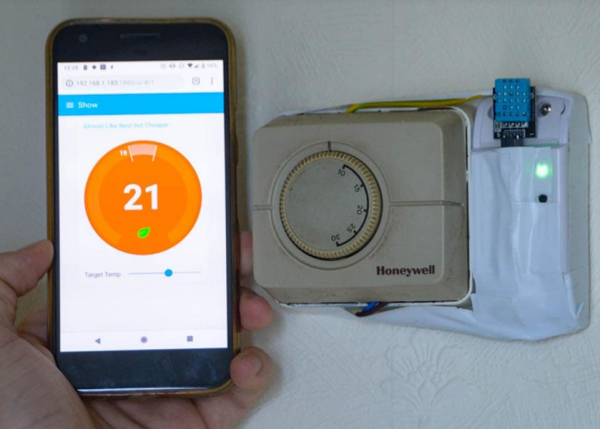
The Nest Thermostat revolutionized the way that people control the climate in their homes. It has features more features than even the best programmable thermostats. But, all of the premium features also come at a premium price. On the other hand, for only $5, a little coding, and the realization that thermostats are glorified switches, you can easily have your own thermostat that can do everything a Nest can do.

[Mat’s] solution uses a Sonoff WiFi switch that he ties directly into the thermostat’s control wiring. That’s really the easy part, since most thermostats have a ground or common wire, a signal wire, and a power wire. The real interesting work for this build is in setting up the WiFi interface and doing the backend programming. [Mat’s] thermostat is controlled by software written in Node-RED. It can even interface with Alexa. Thanks to the open source software, it’s easy to add any features you might want.

[Mat] goes through a lot of detail on the project site on how his implementation works, as far as interfacing all of the devices and the timing and some of the coding problems he solved. If you’ve been thinking about a Nest but are turned off by the price, this is a great way to get something similar — provided you’re willing to put in a little extra work. This might also be the perfect point to fall down the home automation rabbit hole, so be careful!

Continue reading “Add Nest Functionality To Your Thermostat For $5”

Speak Your WiFi

When you create a Thing for the Internet of Things, you’ve made a little computer that does a simple job and which probably has a minimal interface. But minimal interfaces leave little room for configuration, such as entering WiFi details. Perhaps if you made the Thing yourself you’ve hard-coded your WiFi credentials in your code, but that hardly translates to multiple instances. So, how to put end-user WiFi credentials easily on more than one Thing? Perhaps [Rob Dobson] has the answer with his technique of sending them as a sequence of audible tones.

There is a piece of Javascript code in a browser into which you enter your WiFi credentials, which are then expressed through the speaker as a set of FSK tones to be picked up by a microphone on the Thing. They can then be decoded into the credentials, and the Thing can connect. All the code is available, on GitHub, should you fancy it yourself.

Of course, this is nothing new, as any owner of an 8-bit machine that had a cassette interface will tell you. And on the face of it it’s much easier than those awkward impromptu hotspots with a web interface to which you connect and pass on your credentials. But while we quite like the convenience, we can’t help wondering whether expressing the credentials in audible free space might be a bit too insecure for many readers. The technique however remains valid, and we’re sure that other less sensitive applications might be found for it. Meanwhile we hope he hasn’t inadvertently shared his WiFi password in the video below the break.

Continue reading “Speak Your WiFi”

New AVR-IOT Board Connects To Google

Readers of Hackaday are no strangers to using a microcontroller to push data to WiFi. Even before the ESP8266 there were a variety of ways to do that. Now Microchip is joining the fray with a $29 board called the AVR-IOT WG that contains an 8-bit ATmega4808, a WiFi controller, and hardware-based crypto chip for authenticating with Google Cloud.

The board has a section with a USB port for charging a battery and debugging that looks like it is made to cut away. There are a number of LEDs and buttons along with a light sensor and a temperature sensor. It feels like the goal here was to pack as many Microchip parts onto a single dev board as possible. You’ll find the ATmega4808 as the main controller, an ATWINC1510 WiFi controller (a castellated module reminiscent of the ESP8266), the ATECC608A cryptographic co-processor, MCP73871 LiPo charger, MIC33050 voltage regulator, and an MCP9808 temperature sensor. We can’t find much info about the “nEDBG Programmer/Debugger” chip. If you’ve used it on one of a handful of other dev board, let us know in the comments about off-board programming and other possible hacks.

Naturally, the board works with AVR Studio or MPLAB X IDE (Microchip bought Atmel, remember?). Of course, Atmel START or MPLAB Code Configurator can configure the devices, too. There’s also an AVR-IoT-branded website that lets you use Google cloud to connect your device for development. The headers along the top and bottom edges are compatible with MicroElektronika Click boards which will make anyone with a parts bin full of those happy.

Looks like you can pick up the Microchip boards now from the usual places. From reading what Microchip is saying, they would like to position this as the “IoT Arduino” — something someone without a lot of experience could pick up and use to pipe data into Google cloud. While that’s probably good, it isn’t that hard to use an ESP-device to do the same thing using the Arduino IDE and then you have a 32-bit processor and you can use whatever cloud vendor you want. Sure, it would be a little more work, so maybe that’s where this offering will appeal.

On the plus side, we really liked that there was a battery option with a charger already on board — it seems like that’s something we always have to add anyway. It may be buried in the documentation, but the user’s guide and the technical guide didn’t appear to have an average and maximum current draw specified, so battery life is an open question, although the video says “low power.”

Although it isn’t quite the same thing, we’ve seen ESP8266’s talk to Google servers for interfacing with Google Home. And while it is on the Amazon cloud, we’ve even seen a 6502 up there.

Continue reading “New AVR-IOT Board Connects To Google”