Retro-radio: Building On Another WiFi Radio Hack

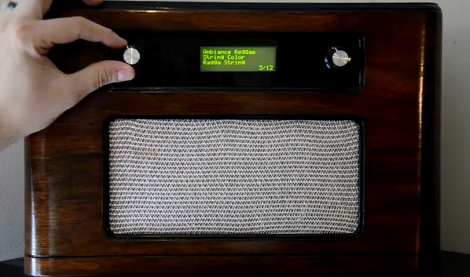
[Jay Collett] likes listening to Internet radio stations and decided to build his own standalone hardware that lets him listen without being at his computer. But he wasn’t starting from square one on this project. [Jay] built on the epic instruction set that [Mighty Ohm] published when he first built his own WiFi radio.

Both of these radios used the same method of getting onto the internet; a hacked router. We kind of like this because it means you should be able to use the radio as a bridge for wired Ethernet devices. But we digress. [Jay] departs from the instructions by using an Arduino and its IDE to interface an LCD screen with a different line/column orientation than the original, and to implement a different control scheme. This makes the project a bit more approachable if you prefer not to roll your own electronics.

Take a look at the video after the break. The router takes quite a while to boot, but once it does it seems that the controls are both intuitive and responsive.

Continue reading “Retro-radio: Building On Another WiFi Radio Hack”

Google Android ADK Bluetooth Wireless Communications

arduino_to_android_ADK_bluetooth_communications

Once the Google ADK was announced, the team over at [ElectFreaks] jumped right in and started experimenting to see what they could do with the new Arduino/Android interface. While the ADK was great for allowing the two devices to interact over a USB connection, they felt that the system would be far better if it allowed for wireless communications instead.

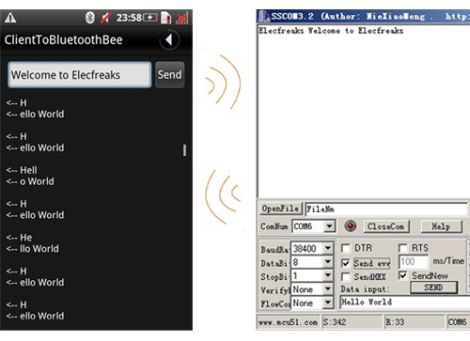
They added a Bluetooth Bee to their Arduino setup and got busy writing an Android application that uses the handset’s built in Bluetooth module to communicate using the ADK. The application configures your phone to act as either a client or server when pairing. This does not affect data flow, as communications are bi-directional, it merely decides which device is placed in discoverable mode.

As you can see in the second part of their post, once the phone and Arduino are connected, it is quite easy to send serial data back and forth between the two devices.

As of right now, their Bluetooth API is in Beta, so things might still be a bit rough around the edges. They do encourage anyone to download and modify the code, which is freely available on their site.

MSP430-based Palm Size Quad Copter

palm_sized_quadcopter_msp430

[Thanh] has spent some time flying quad-copters measuring 12” motor to motor, but wanted to build something smaller so that he could fly indoors. Instead of building just one, he actually constructed five different quad-copters, with motor to motor arm spans ranging from 10” to just 3”.

In his forum post, he highlights the construction process of his 10” copter, covering each step in great detail. While he breaks down his component lists into two categories based on motor to motor span, the one common item is the TI MSP430-based controller board. In particular, he used the eZ430-RF2500 development kit, which has the added benefit of a built-in 2.4 GHz wireless radio. His quad-copter uses a Wii Motion Plus gyro board to help keep it aloft, as well a handful of other components which should be pretty familiar to most of our readers.

It’s great to see the construction broken down in such detail, we imagine it will be a great resource for anyone else looking to build their own quad-copter.

Stick around to see a quick video demonstration of his mini quad-copter in action.

[Thanks, Panikos]

Continue reading “MSP430-based Palm Size Quad Copter”

Reverse Engineering Wireless Weather Stations

lacrosse_wireless_temp_sensor

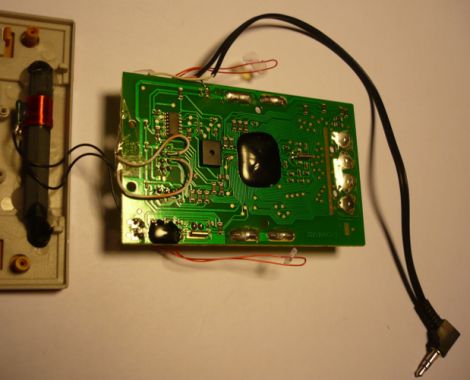
[Fred] got a La Crosse wireless weather station as a gift and thought the LCD display was great, but he was dismayed that there was no means of extracting the temperature data for use on a computer. He thought that the modular design of the system would make it great for use in his home automation project if he could only get his hands on the data.

He tore into the base station and started looking around for easy places to get at the data he was looking for. He thought about tapping into the bus that controls the LCD in hopes of finding an easy to decode signal, but the weather station used a proprietary chip with an integrated LCD controller, making it all but impossible. Instead, he started sniffing the data coming across the wireless link, and while he didn’t quite yet know what he was seeing, it was a start.

He sniffed the signals using Audacity, and eventually found that the base station received 40-bit data bursts from each sensor. He dug further, and with the help of some data he found online, he was able to decode the data packets. The last hurdle he ran into was figuring out how the system’s CRC encoding worked. It took a bit of work but he eventually got it, and can now record data packets knowing that the data has come over the air intact.

So far, it looks like his temperature monitoring system is working quite well, though he has several improvements planned for the near future. If you have a similar unit and are interested in extending its capabilities, [Fred] has posted plenty of code on his site.

Wifon Is Back And Better Than Ever

wifon_v2

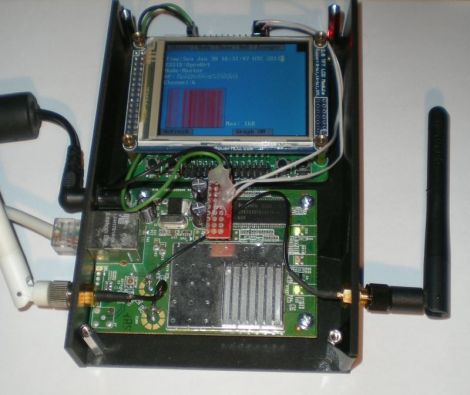
Hackaday forum member [Emeryth] recently posted his newest creation, the Wifon 2.0, which is an update to a project we featured last year. The second iteration of the device looks to make several improvements on the already solid concept.

Ditching the simple 16×4 LCD, version 2 sports a full color 320×240 touch panel LCD. A faster STM32 micro controller replaces the Atmega88 he used the first time around, allowing him to create a much more advanced user interface. The micro runs the ChibiOS/RT real time operating system, which enables multitasking, making the entire project a lot easier. Like the first version, an original Fonera performs all of the pen testing, though this time around he has ditched the vanilla DD-WRT distro for Jasager, which is purpose-built for running the Karma attack.

The project is coming along nicely, and [Emeryth] says he has a few simple apps running on the device already. He has found that running several applications on the device simultaneously is testing the practical limits of the Foneras capabilities, though he may add more memory to the router in order to squeeze a little more life out of it.

[via Hackaday forums]

Wireless Mouse Li-Poly Retrofit With USB Charging

wireless_mouse_lipoly_retrofit

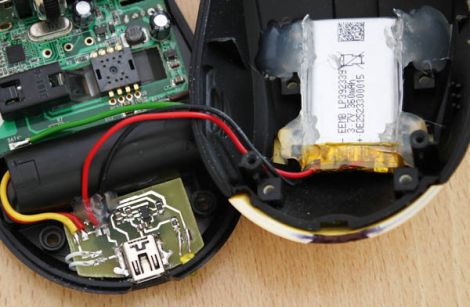
It’s no secret that wireless mice can eat through batteries pretty quickly. Rather than keep a fresh supply of AAs on hand at all times, [Phil] decided he would convert his mouse to use a rechargeable lithium polymer battery instead.

This isn’t the first time we’ve seen a cell phone battery crammed into a mouse to increase capacity, but we think this one has been done quite nicely. [Phil] managed to fit a 2.7 – 4.2v Li-Poly battery in the mouse’s palm rest, where there was a little extra empty space. The battery can be charged from any USB port via a custom-built charging module, which he constructed using a MAX1555 charge controller. Another custom-built circuit resides in the space previously occupied by the AA batteries, which uses an MC340063 DC to DC converter to drop the battery’s voltage down to the 1.25v required by the mouse.

The only part of the build that [Phil] is not pleased with is the power switch on the bottom, but since you rarely see that, we could care less. We think it is quite well done, and with a second version already in the works, we anticipate that it will get even better.

Be sure to check out [Phil’s] video tour of the hack, which you can see below.

Continue reading “Wireless Mouse Li-Poly Retrofit With USB Charging”

Google? In My Lightbulbs? It’s More Likely Than You Think

led_lighting_by_google

With the recent announcement and release of their ADK, it was only a matter of time before Google started invading your home in a big way. From the looks of it, Google will be jumping into the home lighting market very shortly, which could prove to be quite interesting.

Partnering with Florida-based Lighting Sciences, Google is planning on developing consumer-grade 60W equivalent smart LED light bulbs. The bulbs will be able to wirelessly communicate using Google’s new open-source home networking protocol. The lights will be controllable using any Android device allowing users to dim, brighten and toggle the lights on and off without ever touching a wall switch.

We think it’s an interesting idea, and we’re all for getting quality LED lighting in the home. That said, some of Google’s other utility-centric endeavors such as PowerMeter have met only mediocre success, so it remains to be seen if this concept takes off. If it does however, we can’t wait to see the flood of ADK-based hacks the community puts together. Since their new wireless protocol will likely be extended to all sorts of other household systems, the possibilities are endless.