Adding Bluetooth And A Lightning Connector To Beats Pro Headphones

Beats

Not wanting to wait for Apple to step up their game and complete their purchase of Beats headphones, [Carnivore] decided he wanted his own pair of Apple-compatible Beats cans with Bluetooth. He created something that will probably be for sale in the Apple store come Christmas: a pair of Beats Pro headphones with Bluetooth and a Lightning connector for charging.

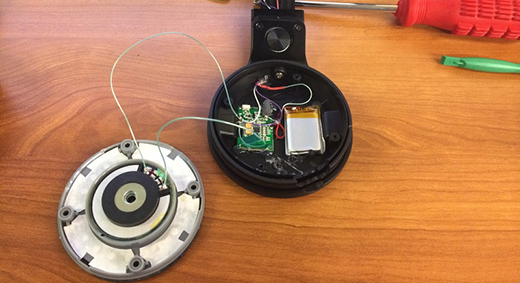
[Carnivore] liked the sound of his Beats Pro headphones but hated the wires. After disassembling the headphones, he carefully rewired the speakers with smaller gauge wire, added a small Bluetooth module and battery, and sealed everything back up.

There are a few interesting bits to this build – by getting rid of all external wires, [Carnivore] was left with a few holes in the headphones. These were a perfect place to add a 3D printed mount for the power button and the Lightning adapter taken from an Apple Lightning extension connector.

Thanks [Tony] for the tip!
A 3D Printed Brushless Motor

brushlessBuilding electronics with 3D printers is something we see hitting the tip line from time to time, but usually these are printed circuits, not electromechanical parts like motors, solenoids, and relays. [pitrack] thought he could do better than printing out a few blinking LED circuits and designed and built a brushless motor, the same kind you would find on electric model planes and quadcopters.
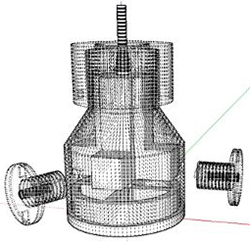
In every brushless DC motor, there are a few common parts: the rotor has a few powerful magnets embedded in it, a stators with coils of wire, and the an enclosure to keep everything together. [pitrack] printed all these parts off on his Makerbot, winding each of the three coils with about 400 turns of 26 AWG magnet wire. Also embedded in the stator are a trio of hall effect sensors to make the control via an Arduino and an L6234 motor driver easy.

For his next trick, [pitrack] is going to test the efficiency of the motor and attempt to optimize it. In the long term, it should be possible to parameterize the design of one of these printed motors, effectively allowing anyone to type in the torque and Kv rating of a desired motor, plug that into an equation, and have a motor design come out the other end.
Continue reading “A 3D Printed Brushless Motor”

Changing Unipolar Steppers To Bipolar

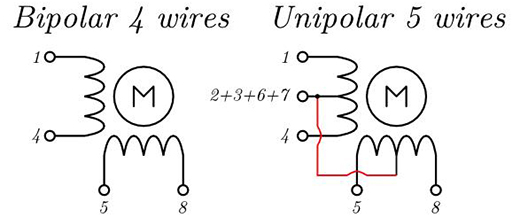
If you’ve been a good little hacker and have been tearing apart old printers like you’re supposed to, you’ve probably run across more than a few stepper motors. These motors come in a variety of flavors, from the four-wire deals you find in 3D printer builds, to motors with five or six wires. Unipolar motors – the ones with more than four wires – are easier to control, but are severely limited in generating torque. Luckily, you can use any unipolar motor as a more efficient bipolar motor with a simple xacto knife modification.

The extra wires in a unipolar motor are taps for each of the coils. Simply ignoring these wires and using the two coils independently makes the motor more efficient at generating torque.

[Jangeox] did a little experiment in taking a unipolar motor, cutting the trace to the coil taps, and measuring the before and after torque. The results are impressive: as a unipolar motor, the motor has about 380 gcm of torque. In bipolar mode, the same motor has 800 gcm of torque. You can check that video out below.

Continue reading “Changing Unipolar Steppers To Bipolar”

Hijacking Chromecast With The Rickmote Controller

rick-astelyWith a simple $35 dongle that plugs right into your TV, it’s possible to enjoy your favorite TV shows, YouTube channels, and everything else Chromecast has to offer. Being a WiFi enabled device, it’s also possible to hijack a Chromecast, forcing your neighbors to watch [Rick Astley] say he’s never going to give you up.
The rickmote, as this horrible device is called, runs on a Raspberry Pi and does a lot of WiFi shennaigans to highjack a Chromecast. First, all the wireless networks within range of the rickmote are deauthenticated. When this happens, Chromecast devices generally freak out and try to automatically reconfigure themselves and accept commands from anyone within proximity. The rickmote is more than happy to provide these commands to any Chromecast device, in the form of the hit song from 1987 and 2008.

Video demo of the rickmote below, along with a talk from ToorCon describing how the hijacking actually works.

Continue reading “Hijacking Chromecast With The Rickmote Controller”

Building A True Unix Keyboard

keyboard

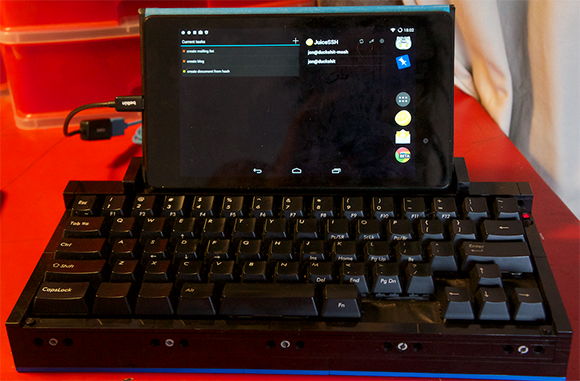
compact keyboards that do away with a third of the keys you would usually find on a normal-sized keyboard are all the rage now, but for [jonhiggs], they weren’t good enough. There is a long tradition of Unix shortcuts these compact keyboards don’t pay attention to – CTRL-A being the Home key, and CTRL-D being the Page Down key. To fix this horrible oversight of Unix history, [jon] tore apart one of these compact keyboards, rewired the switch matrix, and made his own perfect keyboard.

The keyboard [jon] is using is a Filco Minila, a very nice and high quality keyboard in its own right.  After mapping out the switch matrix, [jon] wired all the switches up to a Teensy 2.0 loaded up with the TMK firmware. This is a pretty standard way of building a custom keyboard, and [jon] could have just cut a switch plate and installed panel-mount switches and wired up the matrix and diodes point to point. The case for the keyboard is constructed out of Lego.

Because this is a true, modern Unix keyboard, [jon] needed to connect this keyboard to a box running his *nix of choice. He’s doing this in the most future-retro way possible, with an Amazon EC2 instance. This project isn’t done yet, and [jon] is hoping to add an ARM dev board, an iPad Retina display, battery, and SSD, turning this into a completely homebrew laptop designed around [jon]’s needs.

Cloning Tektronix Application Modules

Tektronix’s MSO2000 line of oscilloscopes are great tools, and with the addition of a few ‘application modules’, can do some pretty interesting tasks: decoding serial protocols, embedded protocols like I2C and SPI, and automotive protocols like CAN and LIN. While testing out his MSO2012B, [jm] really liked the (limited time) demo of the I2C decoder, but figured it wasn’t worth the $500 price the application module sells for. No matter, because it’s just some data on a cheap 24c08 EEPROM, and with a little bit of PCB design <<removed because of DMCA takedown>>

The application module Tektronix are selling is simply just a small EEPROM loaded up with an <<removed because of DMCA takedown>>. By writing this value to a $0.25 EEPROM, [jm] can enable two applications. The only problem was getting his scope to read the EEPROM: a problem easily solved with a custom board.

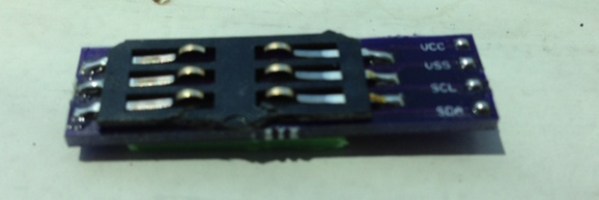
The board [jm] designed <<removed because of DMCA takedown>>, with the only additional components needed being an EEPROM, a set of contacts for reading a SIM card, and a little bit of plastic glued onto the back of the board for proper spacing.

UPDATE: Learn about the DMCA Takedown Notice that prompted this post to be altered: http://hackaday.com/2014/08/05/hardware-security-and-a-dmca-takedown-notice/

A Better Google Glass For $60 (This One Folds)

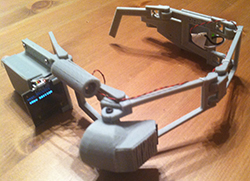
glassFor [Tony]’s entry for The Hackaday Prize, he’s doing something we’ve all seen before – a head mounted display, connected to a Bluetooth module, displaying information from a smartphone. What we haven’t seen before is a cheap version of this tech, and a version of Google Glass that folds – you know, like every other pair of glasses on the planet – edges this project over from ‘interesting’ to ‘nearly practical’.

For the display, [Tony] is using a 0.96″ OLED connected to an Arduino Nano. This screen is directed into the wearer’s eye with a series of optics that, along with every other part of the frame, was 3D printed on a Solidoodle 2. The frame itself not only folds along the temples, but also along the bridge, making this HMD surprisingly compact when folded up.

Everything displayed on this head mounted display is controlled by  either an Android phone or a Bluetooth connection to a desktop. Using relatively simple display means [Tony] is limited to text and extremely simple graphics, but this is more than enough for some very interesting applications; reading SMS messages and checking email is easy, and doesn’t overpower the ‘duino.


SpaceWrencherThe project featured in this post is an entry in The Hackaday Prize. Build something awesome and win a trip to space or hundreds of other prizes.