An Overly-Complicated Logic Chip Clock

Clock

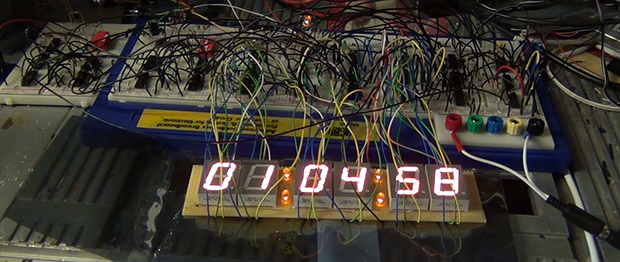
When a normal alarm clock just won’t do, the only option is to build your own, entirely out of discrete logic chips. [jvok] built this alarm clock for last year’s 7400 Logic Competition. In a desire to go against the grain a little bit, [jvok] decided to use 4000-series logic chips. It was allowed under the rules, and the result is a wonderful example of what can be done without a microcontroller.

Most clock projects we’ve seen use a single button to increase each digit. [jvok] wanted to do something unique, so he is able to set his clock with a ‘mode’ button that allows him to independently set the hours, minutes, and seconds. He’s only ever seen this method of setting a clock’s time used with microcontroller-based projects, and translating even that simple code into pure circuitry is quite impressive.

This clock also includes an alarm function, set by a bunch of DIP switches in binary coded decimal. It’s a great piece of work, and deserving of much more attention than it received during the Open Logic Competition.

Portable PS2, Courtesy Of Cross Plane

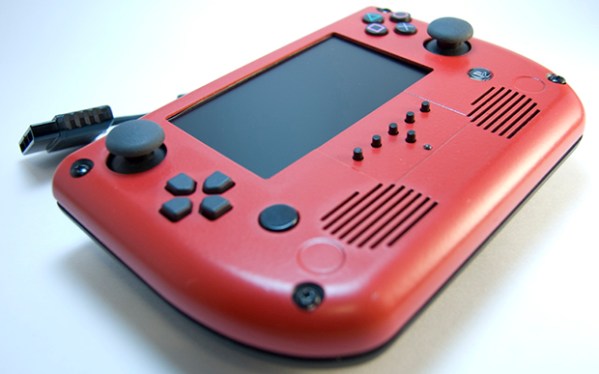
It’s not exactly a portable, but [Downing]’s PS2 advance puts all the power of a Playstation 2 in the palm of your hands, all while being more popular that the Vita.

For the audio and video, the project uses a Cross Plane, a project from a slightly unsuccessful Kickstarter [Downing] pulled the plug on last month. When the handheld is plugged in to the Cross Plane, all the audio, video, and controller wires are transferred through a pair of cables, with the possible addition of wireless transmission should [Downing] ever want to revisit this project.

In deciding on what to use for a case, [Downing] had bought a few AG cases from Polycase but found the ergonomics severely lacking. Putting two of the case backs together, he found the resulting structure was actually very comfortable, and with a few simple modifications to add some holes for acorn nuts,

It’s a great looking project that really highlights [Downing]’s talents as a console modder. He’s also thrown his hat into the Hackaday Trinket contest by engraving the Jolly Wrencher into the back of his project, which unfortunately isn’t seen in the video below.

Continue reading “Portable PS2, Courtesy Of Cross Plane”

Electrochemical Etching With A Microcontroller

IMAG1459_zps68634c16

While most of the time the name of the game is to remove a lot of metal, etching is an entirely other process. If you just want to put a logo on a piece of steel, or etch some labels in a piece of aluminum, You need to think small. Mills and CNC routers will do, but they’re expensive and certainly not as easy to work with as a small, homebrew electrochemical etcher.

This etchinator is the brainchild of [Gelandangan], and gives the techniques of expensive commercial etchers to anyone who can put together a simple circuit. This etcher can etch with both AC and DC thanks to a H bridge circuit, and can be fabbed up by anyone who can make their own circuit board.

To actually etch a design in a piece of metal, simply place the piece on a metal plate, put the stencil down, and hold a felt-covered electrode moistened with electrolyte down over the stencil. Press a button, and in about 30 seconds, you have a wonderfully etched piece of metal.

[Gelandagan] has some templates that will allow you to make your own electro etcher, provided you can etch your own boards and can program the PIC16F1828 microcontroller. All this info is over on the Australian blade forum post he put up, along with a demo video below.

Continue reading “Electrochemical Etching With A Microcontroller”

Aluminum Unibody Nintendo 64

NES1

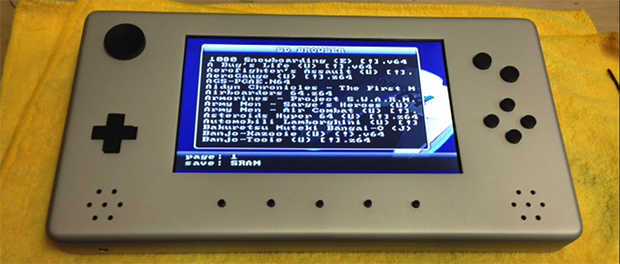
[Travis] wanted us to take a look at his N64 portable to see if it could be featured on Hackaday. By the looks of it, we’re going to say hell yeah. Everything on this portable N64, down to the buttons, is milled from aluminum. It’s an amazing build that raises the bar of what a portabalized game system can be.

Inside this anodized enclosure is the circuit board from an original N64. To cut down on the size, [Travis] milled a new heat sink for the CPU and GPU. All the games – quite possibly all the games ever released for the N64 – are stored on an SD card and accessed through an EverDrive 64. Two 5000 mAh Lipo batteries provide three hours of play time on a beautiful high-res screen.

What’s even more amazing is that [Travis] machined all the parts on an exceedingly small, manual mini-mill. Truly a portabalized console for the ages.

You can check out a gallery of pics [Travis] sent in and his demo video below.

Continue reading “Aluminum Unibody Nintendo 64”

Laptop Trackpads And MIDI Controllers

pads

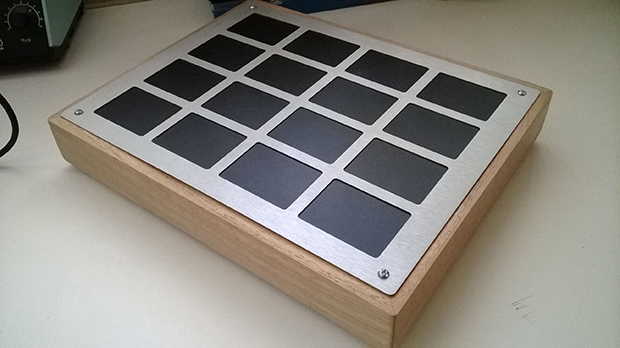
A bunch of pads connected to a MIDI out port is as old an idea as the Akai MPC. creating a homebrew version is great, but [Scott] took his version one step further. He used old laptop trackpads to control note on and note off commands when the each pad is tapped, and also added MIDI CC values for the touch pressure and the x and y-axis position.

The trackpads were identical models, each having their own PS/2 output. A few ribbon cable to 8-pin header adapters were manufactured, and the entire ensemble encased in a wonderful maple and aluminum enclosure.

The electronics are based on an Arduino Mega with 16 clock and data points for each touchpad eating up 32 of the 54 available pins on the ‘duino. The PS/2 protocol is well documented, but running 16 separate PS/2 id most certainly not. [Scott] ended up writing his own asynchronous PS/2 communications library to get the latency of his midi device down to about 50ms.

It’s an amazing bit of kit and comparatively inexpensive, given that [Scott] now has a 16-channel Kaoss pad. Video of the device hooked up to a MicroKorg below.

Continue reading “Laptop Trackpads And MIDI Controllers”

An Impressively Large LED Matrix

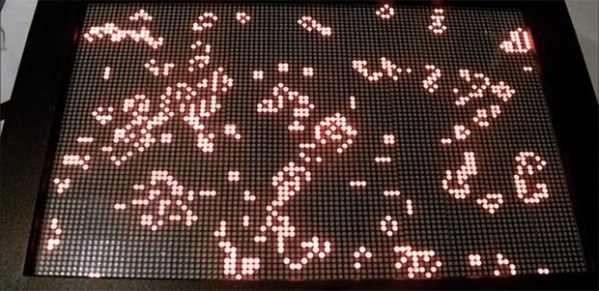
One of the more impressive projects a home-bound tinkerer can pull off is some sort of display. Not only does the final project result in a lot of blinky, glowey things, but driving hundreds of LEDs is an achievement in itself. [Fabien] decided he wanted to build his own LED display and ended up with something great (French, Google translation).

Instead of going off the deep end and making his own boards for this giant LED display, [Fabien] found a very cheap 16×32 LED display board on DealExtreme. Once these kits were pieced together, [Fabian] mounted them in a wooden frame and started connecting the displays together.

The original plan was to drive these with an Arduino, but with so many pixels he quickly ran out of RAM. Replacing the Arduino with a larger ATMega1284p, [Fabian] found the RAM he needed and started work on some interesting visualizations.

Of course, Conway’s Game of Life made a showing in the final build, but [Fabian] also managed to whip up a spectrograph using FFT. It’s a very nicely put together display that makes us want to buy a few of these displays ourselves.

Making 128MB SIMMs From Junk

simm

Working for a tech repair/recycling center, [Jax] has access to a ton of cool hardware. Most of it is junk, but that’s just the way he likes it. Among his better finds in the depths of a tech treasure trove is a huge antistatic bag of 64 MB 72 pin SIMMs. These were the standard RAM form factor for just about everything in the 90s, and while 64 MB is a huge amount of RAM for the time, they’re still a bit away from the 72 pin max of 128 MB.

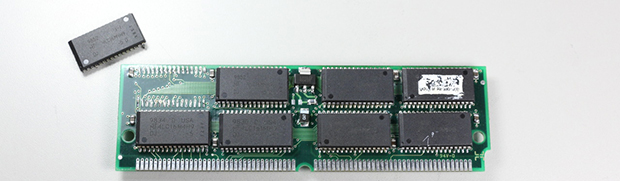
After inspecting these sticks, [Jax] noticed something odd. Each side had pads for memory chips, but only one side was populated. Given the rarity of 128 MB sticks of RAM, [Jax] decided he would have a go at adding 64 Megs of RAM to these chips by desoldering one stick and sticking it on the back of another.

These new 128 MB SIMMs made their way into a Macintosh Quadra 605 for testing. While the 64 MB chips worked fine, the new 128 MB chips threw a chime of death. Something was terribly wrong.

While investigating, [Jax] couldn’t find any bridged solder joints, and everything looked okay. Heat is a wonderful test of what went wrong, and with the SIMM connected to a power source, he found all of the newly transplanted chips were hot. Because the chips on back side of the SIMMs were meant to be installed upside down, [Jax] had inadvertently connected the ground to power and power to ground.

Fixing his mistake on a new SIMM, [Jax] popped it in his old Mac and tried booting with these SIMMs again. There wasn’t a chime of death, but booting with these chips took a very long time. This was actually just the Mac checking all the RAM, which was successfully addressed once [Jax] finally booted his OS.