Vintage Hardware Find Includes Time Capsule Of Data

Before social media brought the Internet to the masses, and before even Napster, ICQ, and AIM gave those with a phone line a reason to connect online at all, those who went online often went to a BBS messageboard. By modern standards these text-only environments would have been extremely limited, with only weather updates, stock information, limited news, some email and messaging, and perhaps some classifieds or other miscellaneous information. This was an important time for the early Internet though, and [Nicola] recently discovered a time capsule of sorts from this era.

He first got a tip about a piece of vintage hardware, a DEC VAXstation II which was missing from his collection. But after painstakingly preserving the data on the hard drive he found it had been hosting one of these BBS servers and had plenty of gems from the era to show off. Not only does this build restore the DEC hardware but [Nicola] was able to virtualize the server using the data he recovered on a SIMH emulator, granting insights into how the Internet of this era was used.

[Nicola] also brought the BBS messaging system back online, although he notes that running it on the original hardware wouldn’t be feasible so for now it runs in the cloud. It’s a fascinating look into the Internet of the past, far beyond when many of us first went online as well. For a deep dive on how these systems worked, as well as an introduction to some of the Internet culture of the day, we saw this guide to the BBS a little while ago.

Arduino Saves Heat Pump

For home HVAC systems, heat pumps seem to be the way of the future. When compared to electric heating they can be three to four times more efficient, and they don’t directly burn fossil fuels. They also have a leg up over standard air conditioning systems since they can provide both cooling and heating, and they can even be used on water heating systems. Their versatility seems unmatched, but it does come at a slight cost of complexity as [Janne] learned while trying to bring one back to life.

The heat pump here is a Samsung with some physical damage, as well as missing the indoor half of the system. Once the damage to the unit was repaired and refilled with refrigerant, [Janne] used an Optidrive E3 inverter controlled by an Arduino Mega to get the system functional since the original setup wouldn’t run the compressor without the indoor unit attached. The Arduino manages everything else on the system as well including all of the temperature sensors and fan motor control.

With everything up and running [Janne] connected the system to a swimming pool, which was able to heat the pool in about three hours using 60 kWh of energy. The system is surprisingly efficient especially compared to more traditional means of heating water, and repairing an old or damaged unit rather than buying a new one likely saves a significant amount of money as well. Heat pump projects are getting more common around here as well, and if you have one in your home take a look at this project which adds better climate control capabilities. to a wall mount unit.

Will HP Create A Carfax System For PCs?

When buying used cars there are plenty of ways to check on their history. In many countries there are systems, like Carfax for parts of North America and Europe, that can provide crash history in some situations and alert a potential buyer of hidden damage. Not so for computers, where anyone can run an intensive mining, gaming, rendering, or AI application for years on hardware which might not otherwise show any outward signs of heavy use. And that’s just for hard use; there’s all kinds of other ways of damaging hardware. HP is hoping to solve this problem with a PC history report of sorts.

Aimed at the enterprise or business arena, where companies tend to follow replacement schedules for laptops and other hardware which might get discarded before reaching a true end-of-life, HP is suggesting adding a data recorder at the firmware level of some computers. This software would monitor the computer’s temperatures, SSD wear, and other telematics on the computer and store a record that could be viewed by a potential buyer when the IT department is ready to take them out of service. And, since it’s 2025, HP is also claiming that this system needs and uses an AI of some sort.

Although HP is billing this as a way to improve sustainability and limit e-waste, we’d theorize that even with a report like this available, the economic gain of a program like this would be marginal at best. While the idea of giving each decommissioned laptop a clean bill of health is noble, it’s hard to imagine overworked IT staff carefully curating device histories when most used enterprise machines are already sold by the pallet.

HP is also proposing something that sounds a lot like Intel’s Management Engine, which we’re not too thrilled about around here. And also keep in mind that this is a company that has failed to innovate in any industry-leading way for as long as we can remember so we won’t expect this system to be widely adopted anytime soon.

AI Is Only Coming For Fun Jobs

In the past few years, what marketers and venture capital firms term “artificial intelligence” but is more often an advanced predictive text model of some sort has started taking people’s jobs and threatening others. But not tedious jobs that society might like to have automated away in the first place. These AI tools have generally been taking rewarding or enjoyable jobs like artist, author, filmmaker, programmer, and composer. This project from a research team might soon be able to add astronaut to that list.

The team was working within the confines of the Kerbal Space Program Differential Game Challenge, an open-source plugin from MIT that allows developers to test various algorithms and artificial intelligences in simulated spacecraft situations. Generally, purpose-built models are used here with many rounds of refinement and testing, but since this process can be time consuming and costly the researchers on this team decided to hand over control to ChatGPT with only limited instructions. A translation layer built by the researchers allows generated text to be converted to spacecraft controls.

We’ll note that, at least as of right now, large language models haven’t taken the jobs of any actual astronauts yet. The game challenge is generally meant for non-manned spacecraft like orbital satellites which often need to make their own decisions to maintain orbits and avoid obstacles. This specific model was able to place second in a recent competition as well, although we’ll keep rooting for humans in certain situations like these.

I Gotta Print More Cowbell

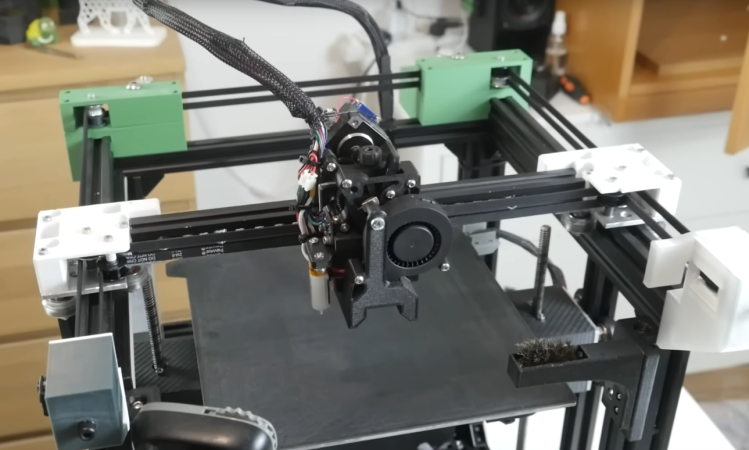
Since the earliest days of affordable, home 3D printers, the technology behind them has been continuously improving. From lowering costs, improving print quality, increasing size and detail, and diversifying the types of materials, it’s possible to get just about anything from a 3D printer today with a minimum of cost. Some of the things that printers can do now might even be surprising, like this upgrade that makes [Startup Chuck]’s 3D printer capable of printing realistic-sounding cowbells out of plastic.

The key to these metal-like prints is a filament called PPS-CF which is a carbon fiber-reinforced polyphenylene sulfide, or PPS. PPS-CF has a number of advantages over other plastics including high temperature tolerance and high dimensional stability, meaning its less likely to warp or deform even in harsh environments. But like anything with amazing upsides, there are some caveats to using this material. Not only does the carbon fiber require more durable extruder nozzles but PPS-CF also needs an extremely hot print head to extrude properly in addition to needing a heated bed. In [Startup Chuck]’s specific case he modified his print head to handle temperatures of 500°C and his print bed to around 100°C. This took a good bit of work just to supply it with enough energy to get to these temperatures and caused some other problems as well, like the magnet on the printer bed demagnetizing above around 75°C.

To get to a working cowbell took more than just printer upgrades, though. He had to go through a number of calibrations and test prints to dial in not only the ideal temperature settings of the printer but the best thicknesses for the cowbell itself so it would have that distinct metallic ring. But cowbells aren’t the only reason someone might want to print with carbon-reinforced materials. They have plenty of uses for automotive, chemical processing, high voltage, and aerospace applications and are attainable for home 3D printers. Just make sure to take some basic safety precautions first.

Continue reading “I Gotta Print More Cowbell”

Whack-A-Disk

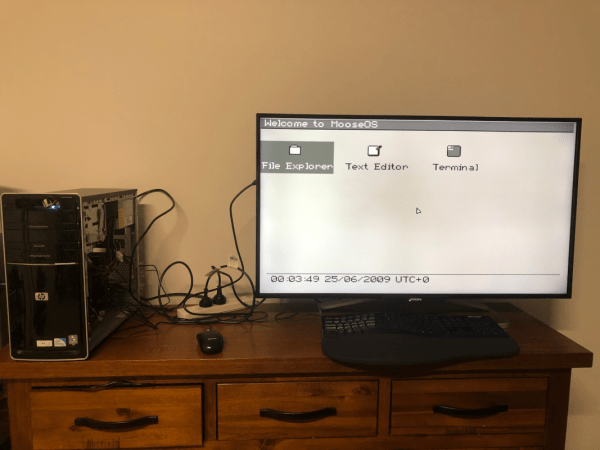
By now most floppy disks have been relegated to the dustbin of history, with a few exceptions for obscure industrial applications using legacy hardware and, of course, much of the world’s nuclear weapons arsenals. In fact, they’re so rare to see in the world anymore that many below a certain age don’t recognize the “save” symbol commonly used in application user interfaces. Without a use case, and with plenty of old floppies still laying around, [Rob] took a pile of them and built this Whack-a-Mole-style game.

The game has a number of floppy-disk-specific features compared to the arcade classic, though. First, there’s no mallet, so the player must push the floppy disks into the drive manually. Second, [Rob] went to somewhat exceptional lengths to customize the drives to that sometimes the disks jump out of the drive, forcing the player to grab them and put them back in to score points in the game. He did this without needing to install high-powered solenoids in the drives too. As for the game software itself, it all runs on an Amiga 600 and even includes a custom-made soundtrack for the 30-second game.

Getting the drives just right did take a number of prototypes, but after a few versions [Rob] has a working game that looks fun to play and is a clever use of aging hardware, not to mention the fact that it runs on a retro computer as well. Of course, for the true retro feel, you’ll want to make sure you find a CRT for the display somewhere, even though they’re getting harder to find now than old floppy disk drives.

Continue reading “Whack-A-Disk”

A Crypto Miner Takes The Straight And Narrow

As it stands, cryptocurrency largely seems to be a fad of the previous decade, at least as far as technology goes. During that time, many PC users couldn’t get reasonably priced graphics cards since most of them were going into these miners. In contrast, nowadays any shortages are because they’re being used to turn the Internet into an AI-fueled wasteland. But nonetheless, there is a lot of leftover mining hardware from the previous decade and unlike the modern AI tools getting crammed into everything we own, this dated hardware is actually still useful. [Zendrael] demonstrates this by turning an old mining rig into a media server.

The mining rig is essentially nothing more than a motherboard with a large number of PCI slots, each designed for a GPU. PCI slots can do many other things, though, so [Zendrael] puts a terabyte solid state drive in each but one of the PCI cards using NVMe to PCI adapters. The final slot still hosts a GPU since the computer is being converted to a media server, and this allows it to do various encodings server-side. Even with only 4 GB of memory, the machine in its new configuration is more than capable of running Debian and spinning up all of the necessary software needed for a modern media server like Jellyfin, Nextcloud, and Transmission.

With many people abandoning miners as the value of them declines over time, it’s possible to find a lot of hardware like this that’s ready to be put to work on something new and useful. Hopefully all of the GPUs and other hardware being put to use today in AI will find a similar useful future, but until then we’ll note that you don’t need super powerful hardware to run some of those models on your own.

Continue reading “A Crypto Miner Takes The Straight And Narrow”