The Many-Sprites Interpretation Of Amiga Mechanics

The invention of sprites triggered a major shift in video game design, enabling games with independent moving objects and richer graphics despite the limitations of early video gaming hardware. As a result, hardware design was specifically built to manipulate sprites, and generally as new generations of hardware were produced the number of sprites a system could produce went up. But [Coding Secrets], who published games for the Commodore Amiga, used an interesting method to get this system to produce far more sprites at a single time than the hardware claimed to support.

This hack is demonstrated with [Coding Secrets]’s first published game on the Amiga, Leander. Normally the Amiga can only display up to eight sprites at once, but there is a coprocessor in the computer that allows for re-drawing sprites in different areas of the screen. It can wait for certain vertical and horizontal line positions and then execute certain instructions. This doesn’t allow unlimited sprites to be displayed, but as long as only eight are displayed on any given line the effect is similar. [Coding Secrets] used this trick to display the information bar with sprites, as well as many backgrounds, all simultaneously with the characters and enemies we’d normally recognize as sprites.

Of course, using built-in hardware to do something the computer was designed to do isn’t necessarily a hack, but it does demonstrate how intimate knowledge of the system could result in a much more in-depth and immersive experience even on hardware that was otherwise limited. It also wasn’t free to use this coprocessor; it stole processing time away from other tasks the game might otherwise have to perform, so it did take finesse as well. We’ve seen similar programming feats in other gaming projects like this one which gets Tetris running with only 1000 lines of code.

Continue reading “The Many-Sprites Interpretation Of Amiga Mechanics”

Measuring Caffeine Content At Home

By far, the most widely used psychoactive substance in the world is caffeine. It’s farmed around the world in virtually every place that it has cropped up, most commonly on coffee plants, tea plants, and cocoa plants. But is also found in other less common plants like the yaupon holly in the southeastern United States and yerba maté holly in South America. For how common it is and how long humans have been consuming it, it’s always been a bit difficult to quantify exactly how much is in any given beverage, but [Johnowhitaker] has a solution to that.

This build uses a practice called thin layer chromatography, which separates the components of a mixture by allowing them to travel at different rates across a thin adsorbent layer using a solvent. Different components will move to different places allowing them to be individually measured. In this case, the solvent is ethyl acetate and when the samples of various beverages are exposed to it on a thin strip, the caffeine will move to a predictable location and will show up as a dark smudge under UV light. The smudge’s dimensions can then be accurately measured to indicate the caffeine quantity, and compared against known reference samples.

Although this build does require a few specialized compounds and equipment, it’s by far a simpler and less expensive way of figuring out how much caffeine is in a product than other methods like high-performance liquid chromatography or gas chromatography, both of which can require extremely expensive setups. Plus [Johnowhitaker]’s results all match the pure samples as well as the amounts reported in various beverages so he’s pretty confident in his experimental results on beverages which haven’t provided that information directly.

If you need a sample for your own lab, we covered a method on how to make pure caffeine at home a while back.

Continue reading “Measuring Caffeine Content At Home”

Modernizing A Classic Datsun Engine

Although Nissan has been in the doldrums ever since getting purchased by Renault in the early 2000s, it once had a reputation as a car company that was always on the cutting edge of technology. Nissan was generally well ahead of its peers when bringing technologies like variable valve timing, turbocharging, fuel injection, and adjustable suspension to affordable, reliable vehicles meant for everyday use. Of course, a lot of this was done before computers were as powerful as they are today so [Ronald] set out to modernize some of these features on his 1978 Datsun 280Z.

Of course there are outright engine swaps that could bring a car like this up to semi-modern standards of power and efficiency, but he wanted to keep everything fully reversible in case he wants to revert to stock in the future, and didn’t want to do anything to the engine’s interior. The first thing was to remove the complicated mechanical system to control the throttle and replace it with an electronic throttle body with fly-by-wire system and a more powerful computer. The next step was removing the distributor-based ignition system in favor of individual coil packs and electronic ignition control, also managed by the new computer. This was perhaps the most complicated part of the build as it involved using a custom-made hall effect sensor on the original distributor shaft to tell the computer where the engine was in its rotation.

The final part of this engine modernization effort was upgrading the fuel delivery system. The original fuel injection system fired all of the injectors all the time, needlessly wasting fuel, but the new system only fires a specific cylinder when it needs fuel. This ended up improving gas mileage dramatically, and dyno tests also showed these modifications improved power significantly as well. Nissan hasn’t been completely whiffing since the Renault takeover, either. Their electric Leaf was the first mass-produced EV and is hugely popular in all kinds of projects like this build which uses a Leaf powertrain in a Nissan Frontier.

Continue reading “Modernizing A Classic Datsun Engine”

Different Algorithms Sort Christmas Lights

Sorting algorithms are a common exercise for new programmers, and for good reason: they introduce many programming fundamentals at once, including loops and conditionals, arrays and lists, comparisons, algorithmic complexity, and the tradeoff between correctness and performance. As a fun Christmas project, [Scripsi] set out to implement twelve different sorting algorithms over twelve days, using Christmas lights as the sorting medium.

The lights in use here are strings of WS2812 addressable LED strips, with the program set up to assign random hue values to each of the lights in the string. From there, an RP2040-based platform will step through the array of lights and implement the day’s sorting algorithm of choice. When operating on an element in the array the saturation is turned all the way up, helping to show exactly what it’s doing at any specific time. When the sorting algorithm has finished, the microcontroller randomizes the lights and starts the process all over again.

For each of the twelve days of Christmas [Scripsi] has chosen one of twelve of their favorite sorting algorithms. While there are a few oddballs like Bogosort which is a guess-and-check algorithm that might never sort the lights correctly before the next Christmas (although if you want to try to speed this up you can always try an FPGA), there are also a few favorites and some more esoteric ones as well. It’s a great way to get some visualization of how sorting algorithms work, learn a bit about programming fundamentals, and get in the holiday spirit as well.

Streaming Music To Cassette

In almost every measurable way, a lossless digital audio file is superior to any analog media. This doesn’t mean that analog audio isn’t valuable though; plenty of people appreciate the compression, ambiance, and other side-effects of listening to a vinyl record or a cassette tape despite the technical limitations. To combine the audio technology of the modern world with these pleasant effects of old analog media, [Julius] built a cassette-based media streamer.

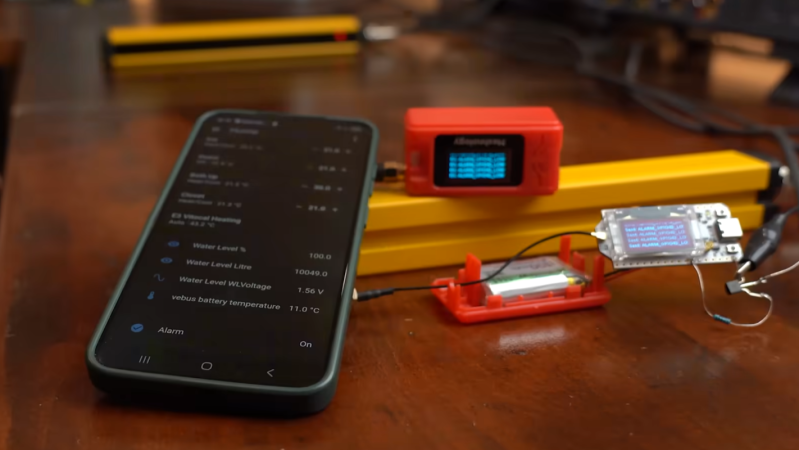
The music playback device takes input from a Bluetooth stream of some sort, converts the digital stream to analog, combines the stereo signal into a mono signal, and then records it to a cassette tape. The tape is then looped through to a playback device which outputs the sound to a single speaker. This has the effect of functioning as a tape delay device, and [Julius] did add input and output jacks to use it as such, but in its default state it has the effect of taking modern streaming through a real analog device and adding the compression and saturation that cassette tapes are known for.

The design of the device is impressive as well, showing off the tape loop and cassette front-and-center with a fluorescent vu meter on the side and a metal case. Getting all of this to work well together wasn’t entirely smooth, either, as [Julius] had to sort out a number of issues with the electronics to keep various electric noises out of the audio signal. Retro analog music players are having a bit of a resurgence right now, whether that’s as a revolt against licensed streaming services or as a way to experience music in unique ways, and our own [Kristina Panos] recently went down an interesting rabbit hole with one specific type of retro audio player.

Continue reading “Streaming Music To Cassette”

Photographing Cosmic Rays With A Consumer Camera

The reason photographic darkrooms are needed is because almost any amount of light can ruin the film or the photographic paper before they are fixed. Until then these things are generally kept in sealed, light-proof containers until they are ready to be developed. But there are a few things that can ruin film even then, most notably because some types of film are sensitive to ionizing radiation as well as light. This was famously how [Henri Becquerel] discovered that uranium is radioactive, but the same effect can be used to take pictures of cosmic rays.

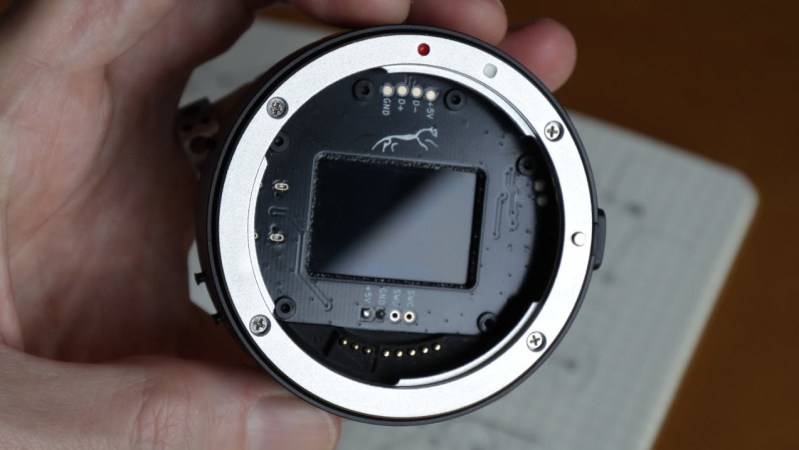
In [Becquerel]’s case, a plate of photographic material was essentially contaminated from uranium by accident, even though the plate was in a completely dark area otherwise. Cosmic rays are similar to this type of radiation in that they are also ionizing and will penetrate various materials even in places we might otherwise think of as dark. For this artistic and scientific experiment, [Gabriel] set up a medium-format digital camera in a completely dark room and set it to take a 41-minute exposure. The results are fairly impressive and are similar to [Becquerel]’s experiment except that [Gabriel] expected to see something whereas the elder scientist was more surprised.

Like cosmic rays or radiation from uranium, there is a lot flying around that is invisible to the human eye but that can be seen with the right equipment and some effort. Although [Gabriel] is using a camera with a fairly large sensor that we might not all have access to, in theory this could work with more off-the-shelf digital photography equipment or even film cameras. A while ago we even saw a build that used UV to see other invisible phenomena like electrical arcing.

Raspberry Pi Gets Desktop Form Factor

Before the Raspberry Pi came out, one cheap and easy way to get GPIO on a computer with a real operating system was to manipulate the pins on an old parallel port, then most commonly used for printers. Luckily, as that port became obsolete we got the Raspberry Pi, which has the GPIO and a number of other advantages over huge desktop computers from the 90s and 00s as well. But if you really miss that form factor or as yearn for the days of the old parallel port, this build which puts a Raspberry Pi into a mini ITX desktop case is just the thing for you.

There are a few features that make this build more than just a curiosity. The most obvious is that the Pi actually has support for PCIe and includes a single PCIe x1 slot which could be used for anything from a powerful networking card to an NVMe to a GPU for parallel computing in largely the same way that any desktop computer might them. The Pi Compute Module 5 that this motherboard is designed for doesn’t provide power to the PCIe slots automatically though, but the power supply that can be installed in the case should provide power not only to the CM5 but to any peripherals or expansion cards, PCIe or otherwise, that you could think of to put in this machine.

Of course all the GPIO is also made easily accessible, and there are also pins for installing various hats on the motherboard easily as well. And with everything installed in a desktop form factor it also helps to improve the cable management and alleviate the rats-nest-of-wires problems that often come with Pi-based projects. There’s also some more information on the project’s Hackaday.io page. And, if you’re surprised that Raspberry Pis can use normal graphics cards now, make sure to take a look at this build from a few years ago that uses completely standard gaming GPUs on the Pi 5.