Heat Pump Control That Works

Heat pumps are taking the world by storm, and for good reason. Not only are they many times more efficient than electric heaters, but they can also be used to provide cooling in the summer. Efficiency aside, though, they’re not perfectly designed devices, largely with respect to their climate control abilities especially for split-unit setups. Many of them don’t have remotely located thermostats to monitor temperature in an area, and rely on crude infrared remote controls as the only user interface. Looking to make some improvements to this setup, [Danilo] built a setup more reminiscent of a central HVAC system to control his.

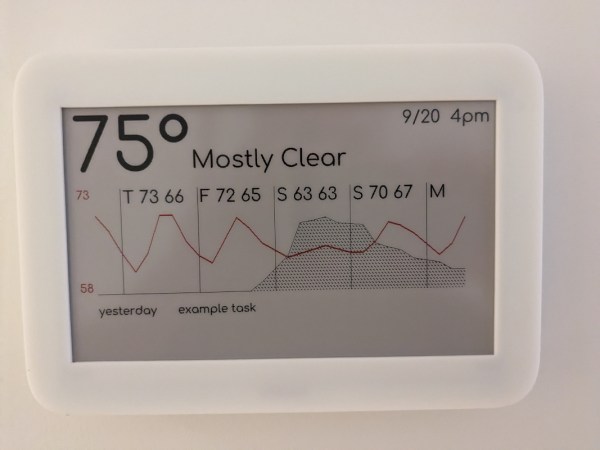
Based on an ESP32 from Adafruit with an integrated TFT display, the device is placed away from the heat pump to more accurately measure room temperature. A humidity sensor is also included, as well as an ambient light sensor to automatically reduce the brightness of the display at night. A large wheel makes it quick and easy to adjust the temperature settings up or down. Armed with an infrared emitter, the device is capable of sending commands to the heat pump to more accurately control the climate of the room than the built-in controls are able to do. It’s also capable of logging data and integrating with various home automation systems.

While the device is optimized for the Mitsubishi heat pumps that [Danilo] has, only a few lines of code need to be changed to get this to work with other brands. This is a welcome improvement for those frustrated with the inaccurate climate controls of their heat pumps, and since it integrates seamlessly into home automation systems could also function in tandem with other backup heat sources, used in cold climates when it’s too cold outside to efficiently run the heat pump. And, if you don’t have a heat pump yet, you can always try and build your own.

Motorized Camera Slider Rides On Carbon

While not every camera mount needs to have six degrees of freedom, one or two can be extremely helpful in the photographic world. In order to make time-lapse shots with some motion or shots that incorporate some parallax, a moving camera mount or dolly is needed, and this small one builds upon a pre-existing, although non-motorized, camera slider.

The slider is an inexpensive model from everyone’s favorite online warehouse, with rails that are at least coated in carbon, if not made out of it entirely, to ensure smooth camera motion. To add the motorization to automatically move the camera, a stepper motor with a belt drive is used which is controlled by an Arduino. A few limit switches are added, letting the dolly perform different movement patterns automatically, and a pair of potentiometers for fine and coarse speed control are included as well, letting the camera take both time-lapse and video while using this mount at various controllable speeds.

With everything tucked into a relatively small box at one end of the dolly, the build is both accessible and functional. The code for the microcontroller is also available on the project’s GitHub page for anyone looking to replicate or build upon the project. And, for those looking to add more degrees of freedom to their camera setups, take a look at this DIY pan and tilt mount.

Continue reading “Motorized Camera Slider Rides On Carbon”

3D Printed Engine Gets Carburetor

3D printed materials have come a long way in the last decade or so as printers have become more and more mainstream. Printers can use all kinds of different plastics with varying physical characteristics, and there are even printers now for other materials like concrete and metal. But even staying within the realm of the plastic printer can do a lot of jobs you might not expect. [Camden Bowen] recently 3D printed a single-piston engine which nearly worked, and is back with some improvements to it thanks to a small carburetor.

The carburetor itself isn’t 3D printed (although not from lack of trying) — it’s on loan from a weed eater, and is helping to solve a problem with the fuel-air mixture of his original design. Switching from butane to a liquid fuel also solved some problems as well, and using starter fluid also helped to kick off the ignition. Although it ran for a short period of time over several starts, the valve train suffered some damage with the exhaust valves melting in place to the head. This is actually a problem common to any internal combustion engine like this, especially if the fuel-air mixture is too lean, there’s incomplete combustion, the valves aren’t adjusted properly, or any number of other problems. In this case it seems to have been caused by improper engine timing.

It’s actually noteworthy though that the intake valves weren’t burned, meaning that if the engine can be tuned to allow for complete combustion before the exhaust gasses leave the combustion chamber, the plastic 3D printed head and valve train will likely survive much longer operational periods. We’ll certainly look forward to the next iteration of this engine build to see if that’s the case. If 3D printed piston engines aren’t your speed, though, take a look at this jet engine which uses a 3D printed compressor.

Continue reading “3D Printed Engine Gets Carburetor”

Converting Wind To Electricity Or: The Doubly-Fed Induction Generator

Humanity has been harvesting energy from the wind for centuries. The practice goes back at least to 8th century Persia where the first known historical records of windmills came, but likely extends even further back than that. Compared to the vast history of using wind energy directly to do things like mill grain, pump water, saw wood, or produce fabrics, the production of electricity is still relatively new. Despite that, there are some intriguing ways of using wind to produce electricity. Due to the unpredictable nature of wind from moment to moment, using it to turn a large grid-tied generator is not as straightforward as it might seem. Let’s take a look at four types of wind turbine configurations and how each deal with sudden changes in wind speeds. Continue reading “Converting Wind To Electricity Or: The Doubly-Fed Induction Generator”

Going To Extremes To Block YouTube Ads

Many users of YouTube feel that the quality of the service has been decreasing in recent years — the platform offers up bizarre recommendations, fails to provide relevant search results, and continues to shove an increasing amount of ads into the videos themselves. For shareholders of Google’s parent company, though, this is a feature and not a bug; and since shareholder opinion is valued much more highly than user opinion, the user experience will likely continue to decline. But if you’re willing to put a bit of effort in you can stop a large chunk of YouTube ads from making it to your own computers and smartphones.

[Eric] is setting up this adblocking system on his entire network, so running something like Pi-hole on a single-board computer wouldn’t have the performance needed. Instead, he’s installing the pfSense router software on a mini PC. To start, [Eric] sets up a pretty effective generic adblocker in pfSense to replace his Pi-hole, which does an excellent job, but YouTube is a different beast when it comes to serving ads especially on Android and iOS apps. One initial attempt to at least reduce ads was to subtly send YouTube traffic through a VPN to a country with fewer ads, in this case Italy, but this solution didn’t pan out long-term.

A few other false starts later, all of which are documented in detail by [Eric] for those following along, and eventually he settled on a solution which is effectively a man-in-the-middle attack between any device on his network and the Google ad servers. His router is still not powerful enough to decode this information on the fly but his trick to get around that is to effectively corrupt the incoming advertising data with a few bad bytes so they aren’t able to be displayed on any devices on the network. It’s an effective and unique solution, and one that Google hopefully won’t be able to patch anytime soon. There are some other ways to improve the miserable stock YouTube experience that we have seen as well, like bringing back the dislike button.

Thanks to [Jack] for the tip!

Wireless Data Connections Through Light

When wired networking or data connections can’t be made, for reasons of distance or practicality, various wireless protocols are available to us. Wi-Fi is among the most common, at least as far as networking personal computers is concerned, but other methods such as LoRa or Zigbee are available when data rates are low and distances great. All of these methods share one thing in common, though: their use of radio waves to send data. Using other parts of the electromagnetic spectrum is not out of the question, though, and [mircemk] demonstrates using light as the medium instead of radio.

Although this isn’t a new technology (“Li-Fi” was first introduced in 2011) it’s not one that we see often. It does have a few benefits though, including high rates of data transmission. In this system, [mircemk] is using an LED to send the information and a solar cell as the receiver. The LED is connected to a simple analog modulator circuit, which takes an audio signal as its input and sends the data to the light. The solar cell sends its data, with the help of a capacitor, straight to the aux input on a radio which is used to convert the signal back to audio.

Some of the other perks of a system like this are seen here as well. The audio is clear even as the light source and solar cell are separated at a fairly significant distance, perhaps ten meters or so. This might not seem like a lot compared to Wi-Fi, but another perk shown is that this method can be used within existing lighting systems since the modulation is not detectable by the human eye. Outside of a home or office setting, systems like these can also be used to send data much greater distances as well, as long as the LED is replaced with a laser.

Continue reading “Wireless Data Connections Through Light”

Patching Together Logic Gates

The digital world offers many advantages over its analog relatives, the use of boolean logic among them. Some of the functions, like NOT, OR, and AND are fairly straightforward and line up nicely with their linguistic counterparts. Others are more elusive, like XOR and NAND. For those just getting their start in digital logic, this teaching tool allows different logic gates to be wired together with patch cables.

While [David] first thought to use 74-series logic circuits directly, a much more versatile solution was to use configurable custom logic — a feature found in AVR DA-series microcontrollers that allows for the creation of custom logic circuits without the need for external hardware or complex programming. He went with an ATmega4809 which is capable of supporting twelve gates which are depicted graphically on the board, where the patch cables can be connected between inputs and outputs from a set of switches on the left to another set of LEDs on the right. The microcontroller continually polls for connections, applies the correct logic via a lookup table, and lights the appropriate LED.

Even with only twelve gates, the amount of real-world analogs that can be created with this teaching tool are numerous and varied, from simple things like displaying traffic light patterns in the correct order to implementing a binary adder. It’s an excellent way to get started in digital logic or understanding gates, and much simpler than dealing with 74-series chips on a breadboard like many of us might have done, but those logic chips can be powerful tools to have on hand even in the modern world of microcontrollers.