Pump Up The (Windows) Volume With Physical Sliders

For as long as we can remember, Windows has provided a mixer that breaks out the volume level of every applicable application into its own slider-controlled lane. But navigating to these controls is non-trivial, especially if you’re in a hurry to silence someone on team speak. You have to stop what you’re doing, click the speaker, go into the mixer, and then go find the appropriate slider. Windows won’t respect resizes between mixer visits, so you’ll almost always have some horizontal scrolling to do.

So why on Earth would you put yourself through all of this when you could be pushing physical sliders on the fly like a DJ? A slider is just a potentiometer in a straight line, after all.

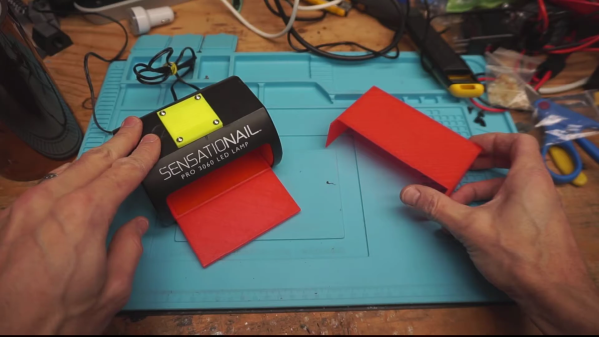
These are wired up to an Arduino Nano, which sends the serial data to a Python script on the PC that changes the volume values accordingly for whatever five programs are in the config file. Thanks to a little bit of Visual Basic, the Python script can run in the background.

[Aithorn]’s got everything you need to replicate this, so slide on over and grab the STL files and code. If you get to point where these sliders are too small, just build some bigger ones.

CherryPi Mechanical Keyboard Warrants A Long Look

[Gosse Adema] has been poking a Microsoft Natural Elite for the last 20 years, and the curvy old girl is about to give out. Looks like he got bit pretty hard by the DIY mechanical keyboard bug in his quest to replace her. Luckily for us, he documented his build.

Where do we start? A first keeb is decently-sized undertaking, but [Gosse] turned it up a notch and made it as low-profile as he could — it’s 2cm thick with the keycaps on. This ultimately meant designing the board such that the anti-ghosting diodes sit inside a cutout underneath their respective switches, which are low-profile Cherry MX Reds. There is no Eagle template for those yet, so [Gosse] whipped one up and milled a prototype PCB before deciding to go the fab route.

The Raspberry Pi Zero W that controls this keeb lives in a separate controller box in the name of slimness. If you are as-yet unimpressed by this build for some reason, [Gosse] even rolled his own firmware, which he explains as part of this epic journey. Seems the only thing he didn’t do was mold his own keycaps, but not everyone wants to type on blanks. We wonder if [Gosse] is aware of the terrifically low-slung Kailh choc switches, although prefab keycap options for those are even more limited.

Speaking of, here’s a tasty choc-filled game pad.

Dog-Harnessing The Power Of Walkie Talkies

[javier.borquez] likes to take his dog to the hang out at the dog park around dusk. But once the sun goes down and [Rusio]’s off the leash, running amok with the other dogs, it’s almost impossible to keep track of him.

Sure, there are probably glow-in-the-dark or lighted collars out there, but if you go commercial, chances are good that someone else’s dog will be wearing the same thing. Besides, what’s the fun in buying something that you can do a better job making yourself? With this dog distance indicator harness, you don’t even have to program anything. Instead, it uses a cheap pair of modified walkie talkies to show green LEDs on the harness while the dog is in range, and red when it isn’t.

Although [javier]’s pupper is the best pupper yes he is, [Rusio] can’t be expected to hold down the button and bark his location. His walkie talkie uses a 555-based frequency generator and a glued-down button to speak at 1 kHz.

Over in [javier]’s walkie, there’s a resistor in place of the speaker to keep the talkie parts working. There’s also a half-wave bridge rectifier that charges a capacitor when [Rusio] is within range, and a resistor that drains it when he’s outside the 6-8 meter range. The rectifier’s output goes to a second 555 set up as a Schmitt trigger, which tells a transistor to turn the red LEDs on instead.

If you got stuck on the idea of hearing your dog talk to you over distances, here’s a Bluetooth Babelfish collar.

Stop ‘n Go DUPLO

[beshur]’s 2-year-old is obsessed with transportation, so he lifted a few DUPLO blocks from the bin and made this toy traffic light as a birthday present. Hey, might as well get him used to the realities of traffic, right? It also makes for a good early hacker lesson: why buy something when you can make it yourself?

The traffic pattern is determined by an Arduino Nano V3 situated inside the carved-out rear block. There’s a push button on the side in case there’s a spill and the lights need to go blinking red until the issue is dealt with. Instead of trying to solder everything in situ and risk melting the plastic, [beshur] dead-bugged the LEDs and resistors to the Nano with a helping hands and then worked everything into the case. The 5mm LEDs fit perfectly into the drilled-out posts of a second block and produce a nice, soft glow. Proceed with caution and check it out after the break.

Of course, plastic building blocks can do real work, too. This LEGO chocolate pantograph is pretty sweet.

Continue reading “Stop ‘n Go DUPLO”

Inputs Of Interest: My First Aggressively Ergonomic Keyboard

Ever since my RSI surgery, I’ve had to resort to using what I call my compromise keyboard — a wireless rubber dome affair with a gentle curvature to the keys. It’s far from perfect, but it has allowed me to continue to type when I thought I wouldn’t be able to anymore.

This keyboard has served me well, but it’s been nearly three years since the surgery, and I wanted to go back to a nice, clicky keyboard. So a few weeks ago, I dusted off my 1991 IBM Model M. Heck, I did more than that — I ordered a semi-weird hex socket (7/32″) so I could open it up and clean it properly.

And then I used it for half a day or so. It was glorious to hear the buckling springs singing again, but I couldn’t ignore the strain I felt in my pinkies and ring fingers after just a few hours. I knew I had to stop and retire it for good if I wanted to keep being able to type.

Continue reading “Inputs Of Interest: My First Aggressively Ergonomic Keyboard”

Esper Makes Virtual Reality From Live Reality

There’s a scene in Bladerunner where Deckard puts a photograph in a magical machine that lets him zoom and enhance without limit, and even see around obstacles. In today’s climate, this is starting to seem more plausible, what with all the cameras everywhere. [Jasper van Loenen] explores this concept in Esper, a technological art installation he created in Seoul, Korea during an artist residency.

Esper is a two-part piece that turns virtual reality on its head by showing actual reality in VR. It covers two adjoining rooms, one to record reality, and the other for real-time virtual viewing on headsets. The first is outfitted with 60 ESP32 cameras on custom mounts, all pointing in different directions from various perches and ceiling drops. [Jasper] used an Android app based on openFrameworks to map the cameras’ locations in 3D space. The room next door is so empty, it’s even devoid of FOMO. You don’t want to miss this one, so check it out after the break.

Recreating sci-fi props is all fun and games until the dystopia arrives. Then again, the fact that we can all easily access 70,000 or so insecure surveillance cameras is a pretty good start.

Continue reading “Esper Makes Virtual Reality From Live Reality”

Scott Shawcroft Is Programming Game Boys With CircuitPython

Some people like to do things the hard way. Maybe they drive a manual transmission, or they bust out the wire wrap tool instead of a soldering iron, or they code in assembly to stay close to the machine. Doing things the hard way certainly has its merits, and we are not here to argue about that. Scott Shawcroft — project lead for CircuitPython — on the other hand, makes a great case for doing things the easy way in his talk at the 2019 Hackaday Superconference.

In fact, he proved how easy it is right off the bat. There he stood at the podium, presenting in front of a room full of people, poised at an unfamiliar laptop with only the stock text editor. Yet with a single keystroke and a file save operation, Scott was able make the LEDs on his Adafruit Edge Badge — one of the other pieces of hackable hardware in the Supercon swag bag — go from off to battery-draining bright.

Code + Community

As Scott explains, CircuitPython prides itself on being equal parts code and community. In other words, it’s friendly and inviting all the way around. Developing in CircuitPython is easy because the entire environment — the code, toolchain, and the devices — are all extremely portable. Interacting with sensors and other doodads is easy because of the import and library mechanics Python is known for, both of which are growing within the CircuitPython ecosystem all the time.

CircuitPython is so friendly that it can even talk to old hardware relatively easily without devolving into a generational battle. To demonstrate this point, Scott whipped out an original Nintendo Game Boy and a custom cartridge, which he can use to play fun sounds via the Game Boy’s CPU.

Now You’re Playing With Python

It’s interesting to see the platforms on which Scott has used the power of CircuitPython. The Game Boy brings the hardware for sound and pixel generation along with some logic, but he says it’s the code on the cartridge that does the interesting stuff.

The CPU communicates with carts at a rate of 1MHz. As long as you can keep this rate up and the CPU understands your instructions, you can get it to do anything you want.

Scott’s custom cart has a 120MHz SAMD51. He spends a second explaining how he gets from Python libraries down to the wire that goes to the Game Boy’s brain — basically, the C code underneath CircuitPython accesses direct structs defined within the SAMD to do Direct Memory Access (DMA), which allows for jitter-free communication at 1MHz.

He’s using the chip’s lookup tables to generate a 1MHz signal out of clock, read, and A15 in order to send music-playing instructions to the sound register of the Game Boy’s CPU. It sounds like a lot of work, but CircuitPython helps to smooth over the dirty details, leaving behind a simpler interface.

If you want easy access to hardware no matter how new or nostalgic, the message is clear: snake your way in there with CircuitPython.

Continue reading “Scott Shawcroft Is Programming Game Boys With CircuitPython”