Navigate Around Garmin’s Custom Map Limits

If your only experience with Garmins is from that one rental car a few years back, it may surprise you that some of them, mostly the handheld outdoor units, allow custom maps. This sounds cool until you find out the limitations. Unless you upgrade to premium, it doesn’t allow map files larger than 3MB. What’s worse, it will choke the resolution of maps larger than one megapixel. Well, bust out your virtual hiking boots, because [facklere]’s gonna take you down the trail of DIY digital cartography.

You can use any map you want as long as its not completely fictional (although wandering the maps of middle-earth would be a fun hack on top of this one). Your map can be paper, PDF, or parchment; it just has to be converted to JPEG. The map [facklere] wanted to use was a huge PDF, so as a bonus, he shows how to get from PDF to JPEG in GIMP. Then comes the fiddly part — rooting the map in reality by overlaying it on real roads using Google Earth.

You’ve still got a huge map. Now what? The secret sauce is tiling. [facklere] used KMZfactory, a free map editor for Garmin maps that goes the extra mile to split the tiles for you, keeping them under the 1MP limit. Once that’s done, just upload it to your unit and hit the road.

Got an old Garmin that won’t do custom maps? See if you can get DOOM up and running on it.

PrintEye Gives You Stats In A Blink

Once upon a time, most things were single-purpose, like the pocket watch. Then somebody made a watch with a date function, and next thing you know, we had TV/VCR combos and Swiss army knives. Now, people pull computers out of their pockets just to check the time or the bed temperature of their RepRap.

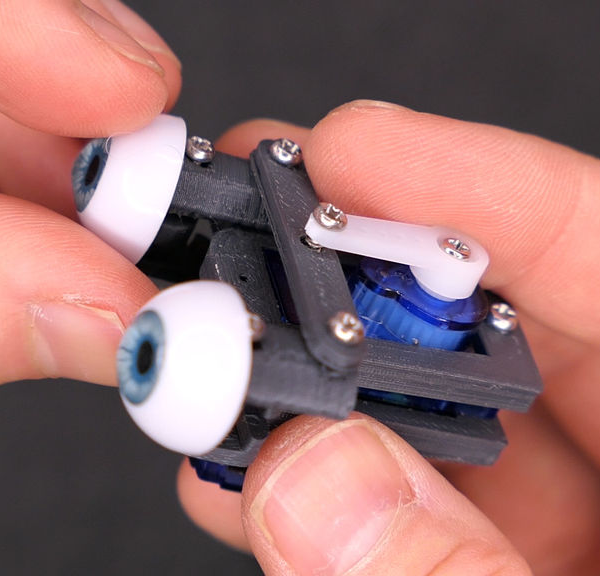
[Owen]’s antidote for this multi-function madness is PrintEye, a simple interface that queries his printer and displays its vital signs on a pair of OLED peepers. It’s a parts bin special, and you know how much we love those. PrintEye connects to the Duet controller over UART, and does its firmware whispering with an ATMega328P. The ‘Mega sends a single M-command and gets back all the status and temperature data in JSON format. Then it parses the info and displays it on twin OLED screens.

Want to make one? [Owen]’s got all the files you need over on IO, but offers no hand-holding services. If you’ve never spun a board before, this could be your introduction. Have to have an internet connection? Check out the Octoprint monitor that inspired PrintEye.

A Useless Tomb Of Eternal Doom

It’s officially October, and that means we can start unleashing the Halloween hacks. Take for example this restless skeleton that master automaton maker [Greg Zumwalt] has doomed to spend eternity inside of a useless box. If that wasn’t enough to wake the dead, every time some joker pushes the button, these blinky lights come on. Hey, at least there’s no opera music.

The ironic thing about useless machines is that there are a ton of ways to make them. This spooktacular Halloween-themed do-nothing box doesn’t use a microcontroller, or even a 555 — it’s purely electromechanical. When the button is pressed, two AAAs power a small gear motor that simultaneously lifts the lid, raises the dead, and twists him a quarter turn so he can close the lid and put himself back to eternal rest.

The intricately-printed skeleton doesn’t really push the button — he’s far too dead and frail for that. The gear motor also turns a dual-lobe cam that activates a pair of roller switches that handle the candles and lower Mr. Bones back into his crypt. Clear as blood? Skitter past the break for a closer look at the mechanism.

Halloween or not, we love a good useless machine around these parts. Here’s one that incorporates a real candle and who could forget this octo-switched beast?

Continue reading “A Useless Tomb Of Eternal Doom”

Arduino Wire Bender Probably Won’t Kill All Humans

Do you want to make your own springs? Yeah, that’s what we thought. Well, blow the dust off of that spare Arduino and keep reading. A few months ago, we let you know that renowned circuit sculptor [Jiří Praus] was working on a precision wire-bending machine to help him hone his craft. Now it’s real, it’s spectacular, and it’s completely open source.

Along with that ‘duino you’ll need a CNC shield and a couple of NEMA 17 steppers — one to feed the wire and one to help bend it. Before being bent or coiled into springs, the wire must be super straight, so the wire coming off the spool holder runs through two sets of rollers before being fed into the bender.

[Jiří]’s main goal for this build was precision, which we can totally get behind. If you’re going to build a machine to do something for you, ideally, it should also do a better job than you alone. It’s his secondary goal that makes this build so extraordinary. [Jiří] wanted it to be easy to build with commonly-available hardware and a 3D printer. Every part is designed to be printed without supports. Bounce past the break to watch the build video.

You can also make your own springs on a lathe, or print them with hacked g-code.

Continue reading “Arduino Wire Bender Probably Won’t Kill All Humans”

Awesome Animation Channel Is An Educational Rabbit Hole

Once [Shabab] clued us in to the brilliant animations of [Jared Owen], we pretty much lost an afternoon exploring this incredible YouTube channel. Self-taught Blender wizard [Jared] combines fantastic animations with clear and concise explanations for the inner workings of everything from Nerf guns and Fisher-Price corn poppers to the International Space Station.

Space nerds and casuals alike should check out [Jared]’s crowning achievement: a three-video Apollo spacecraft series, which covers many details in a short amount of time. Want more Apollo? Here’s a deeper dive into the lunar module. [Jared] uses music to great effect in these videos, especially in the Apollo series.

Several videos are devoted to mechanisms, like the humble gumball machine, the grand piano, and the combination lock. In addition to all the great how-it-works videos, [Jared] explores various noteworthy buildings. You know there’s a bowling alley in the White House, right? [Jared]’s tour shows you exactly where it is.

We love the diversity of the videos, all of which [Jared] researches in great detail. He enjoys working from user suggestions, so let him know what you’re dying to see dissected in detail.

Thanks for the tip, [Shabab].

Barcode Guitar Plays More Than Beep-Bop

One of our favorite things about the rise of hobbyist development ecosystems such as the Arduino is that it’s now possible to make a MIDI controller out of almost anything, as long as you have the the shields and the dedication. We’re glad that [James Bruton] takes the occasional break from making robots to detour into instrument making, because his latest creation turns it up to 11.

This awesome guitar uses a barcode scanner to play notes, and various arcade controls to manipulate those notes. The barcodes themselves scan as ASCII values, and their equivalent integers are sent to an external MIDI device. This futuristic axe is built on an Arduino Mega, with a USB shield for the barcode scanner, and a MIDI shield on top that [James] connects to various synths in the video after the break.

In between shooting barcodes, the right hand also controls octave shifting and changing MIDI channels with the joystick, and doing pitch-bends with the rotary encoder. The array of arcade buttons on the bottom neck let him switch between single player for monophonic synths, and multiplayer for polys. The other three buttons are press-and-scan programmable single-note sounders that assist in chord-making and noodling.

We particularly dig the construction, which is a combination of 20/20 and 3D printed boxes. [James] found some angled PVC to serve as fretboards for the four necks, and a nice backgrounds for bar codes.The only thing we would change is the native beep of the barcode scanner — either silence it forever or make it mutable, because it doesn’t jive with every note. It might be nice to get the gun to scan continuously so [James] doesn’t get trigger finger. Or better yet, build the scanner into a glove.

Want to do something more useful with that barcode scanner in your parts bin? Use it to manage your household inventory. But first, reacquaint yourself with the history of the humble barcode as presented by [Adam Fabio].

Continue reading “Barcode Guitar Plays More Than Beep-Bop”

Silicone Injector Gives Parts Production A Shot In The Arm

Many of us are happy to spend hours cooking up a solution that saves us seconds, if success means never having to do a hated task again. [frankensteinhadason] molds enough silicone parts that he grew tired of all the manual labor involved, so he built a silicone injector to do it for him. Now, all he has to do is push the handle in notch by notch, until silicone starts oozing from the vent holes in the mold.

The mold pictured above is designed to make little shrouds for helicopter communications connections like this one. His friends in the industry like them so much that he decided to sell them, and needed to scale up production as a result. Now he can make six at once.

He designed brackets to hold a pair of syringes side by side against a backplane. There’s a lever that pushes both plungers simultaneously, and adapters that keep the tubing secured to the syringe nozzles. Ejected two-part silicone travels down to a double-barrel mixing nozzle, which extrudes silicone into the top of the mold.

Naturally, we were going to suggest automating the lever operation, but [frankensteinhadason] is already scheming to do that with steppers and an Arduino. Right now he’s working on increasing the hose diameter for faster flow, which will mean changes to the adapter. Once that is sorted, he plans to post the STLs and a video of it pumping silicone.

Ever thought about doing the reverse, and using silicone to mold hot plastic? Yeah, that’s a thing.

Via r/functionalprint