Review: LinkSprite Mini CNC

It’s a great time to be a hobbyist. No matter how you feel about the Arduino/Raspberry Pi effect, the influx of general enthusiasm and demand it has created translates to better availability of components, a broader community, and loads of freely available knowledge. When people have access to knowledge and ideas, great things can happen. Tools that were once restricted to industrial use become open source, and the price of entry-level versions goes into a nosedive.

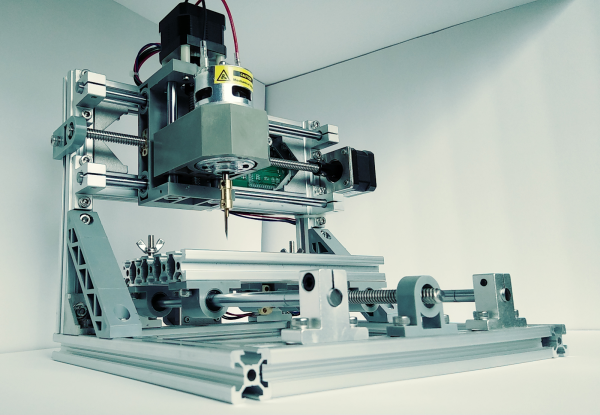
As we’ve seen over the last several years, the price of cheap 3D printers keeps falling while the bar of quality keeps rising. It’s happening with laser cutters and carving tools, too. Strolling through Microcenter a few weeks ago, I spotted a new toy on the back wall next to the 3D printers. It was LinkSprite’s desktop mini CNC. They didn’t have one out on display, but there were two of them in boxes on the shelf. And boy, those boxes were small. Laughably small. I wondered, could this adorable machine really be any good? To some, the $200 price tag suggests otherwise. To me, the price tag made it justifiable, especially considering that the next price point for a hobby CNC mill is at least twice as much. I took my phone out and stood there frantically looking for reviews, documentation, anything that was available. It seemed that the general, if sparse consensus is that this thing isn’t a total waste of money. Oh, and there’s a wiki.

According to LinkSprite’s wiki, this little machine will engrave wood, plastic, acrylic, PVC, and PCBs. It will specifically not engrave metal (PCB copper notwithstanding). I’m a bit leery of the chemicals used in the PCB etching process, so the idea of engraving them instead was especially tempting. I pulled the trigger.

Continue reading “Review: LinkSprite Mini CNC” →

LED Tree Brings Gravity To Christmas

Here’s a fun entry into our coin cell challenge. The power source is the actuating force in [Frank]’s blinky LED Christmas tree, which takes advantage of the physical structure of coin cells and our old pal gravity to roll out some holiday cheer. Talk about forward voltage!

We love the concept, and the circuit couldn’t be more simple. A coin cell is released at the top of the tree and rolls down a series of angled foam board railings covered with 1/4″ copper tape. As the coin cell travels, the negative terminal shimmies along the face of the tree, which has corresponding ground rail tapes. There’s no microcontroller here—all that’s needed for blinks are breaks in the negative rail tape.

The challenging part of a project like this is the execution. Getting a coin cell to ride the rails without falling off required angle experimentation prior to and during the build. Now that it’s done, keeping the tree tilted back against the wall is key. [Frank] explored several options for returning the coin cell to the top using a camera motor and the gear assembly from an old inkjet, but for now, his six-year-old does the job without complaint. Check out his work ethic after the break.

Continue reading “LED Tree Brings Gravity To Christmas” →

Bring Up A PCB With Fewer Headaches

What’s the first thing you do when a new set of boards from the fab house hits the doorstep? Apply solder paste, populate the components, and stick it in the reflow oven? That’s one way to do it. But a lot of non-obvious things can go wrong at the fab house, like shorts and undrilled vias. One tiny mistake can mean hours of frustration and sanity questioning as you troubleshoot some problem that’s now buried under solder paste and 0603s.

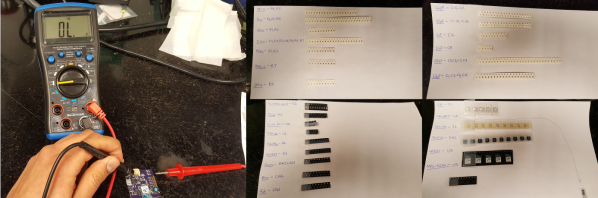
Over on IO, [Bhavesh] tries to nip these problems in the bud with a comprehensive and explanatory guide to properly bringing up a PCB. Though it’s based on fab house boards, this soup-to-nuts plan is good for any project from kit building to custom stripboard circuits. When new boards arrive, [Bhavesh] does several continuity checks and visually inspects them with a microscope. In the case of a stripboard layout, it’s a good idea to verify there’s no continuity across cut traces. He goes on to cover solder paste, touching on proper handling and storage, application, and problem correction.

Our favorite part of this guide is the component sheets. Making these is a great preventive measure, like lining up all your ingredients on the counter before you bake a cake. If you know what you need, why not have it all ready?  [Bhavesh] uses a sheet for each component type, lists all the relevant values in ascending order, and lays out component reels next to them.

The guide covers solder paste, too—his stencils were late to arrive, so the guide deals with applying paste by hand. He suggests a plan for populating the board by starting in one corner and working in circle, placing small components first. Then it’s on to reflow and those all-important post-reflow checks for bridges and bad joints before letting the magic smoke out.

A great time to catch mistakes is before you send the order to the fab house. Hackaday’s own [Joshua Vasquez] has you more than covered there.

Ocelot Arcade System Illustrates The Scope Of Vector Graphics

Who knows how far the Vectrex system, or vector graphics gaming in general could have gone if not for the crash of ’83? The console wars might have been completely different if not for this market saturation-based reset button.

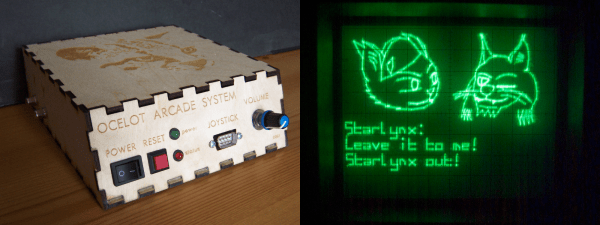
[Matt Carr] doesn’t own a Vectrex, but he does have a Tektronix 465 oscilloscope. After an intense labor of love and documentation, he also has a shiny new vector graphics arcade system that he built himself. It’s based on a dsPIC33 and uses a dual-channel DAC to produce wire frame 3-D graphics and send X-Y coordinates to the ‘scope via phono outputs. The PIC’s internal DAC is meant for audio and didn’t do so well with graphics, so [Matt] used a TLV5618A piggybacked on the PIC’s DAC pins.

The Ocelot doesn’t take cartridges, though it might someday. For now, changing games means getting out the PICkit. There are currently two to choose from: Star Lynx, an awesome flying shooter where you get to save a feline population, and Mattsteroids, which is exactly what it sounds like. There’s only one Ocelot in existence, and although it isn’t for sale, [Matt] has terrific technical documentation should you care to replicate it. One thing you might not be able to replicate is the awesome vintage advert he made for the Ocelot, which is cued up after the break.

Don’t have a ‘scope? You can do vector graphics on a CRT with an FPGA.

Continue reading “Ocelot Arcade System Illustrates The Scope Of Vector Graphics” →

BrewBuddy Is A Home Brewer’s Best Friend

Whether coffee, tea, or beer is your jam, brewing is a delicate pas de deux of time and temperature. Proper brewing of any of these beverages can elevate the experience from average to amazing. With this in mind, [Marcelo] created a time and temperature tool to dial in his beer-brewing process.

BrewBuddy is a complex application-specific timer with an integrated thermometer. It lets him program time and temperature profiles for both the mashing process and the boiling process and store up to 10 steps for each. BrewBuddy doesn’t control the brewing temperature, but it does unify temperature-taking and time-marking into one convenient device that can last about 20 hours on a single CR2032.

The system is based on an STM32 and an LMT86 analog temperature sensor which has been modified to sit inside a stainless steel tube. There are four directional buttons to navigate through intuitive menus to set the desired times and temperatures. As each step completes, the status LED lights up and BrewBuddy waits for confirmation via button push before moving on to the next step. If there’s a problem, the timer can be paused and resumed using the up/down buttons. [Marcelo] is working to perfect the case design, but he already has the board files and firmware up on GitHub. Open up a cold one and check out the demo videos after the break.

After boiling and cooling comes fermentation, and that requires careful monitoring of the sugar content. Here’s a tool for that.

Continue reading “BrewBuddy Is A Home Brewer’s Best Friend” →

Afroman Teaches Intro To Servos, Builds Laser Turret

After a longish hiatus, we were pleased to see a new video from [Afroman], one of the most accessible and well-spoken teachers the internet has to offer. If you’re new to electronics, see the previous sentence and resolve to check out his excellent videos. The new one is all about servos, and it culminates in a simple build that provides a foundation for exploring robotics.

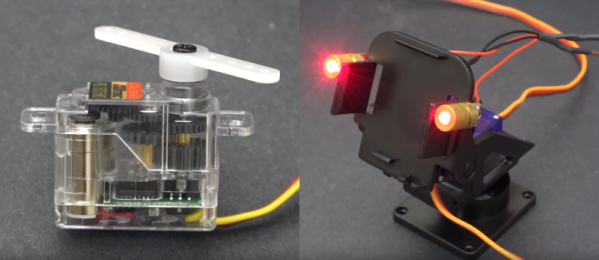
[Afroman] leaves no gear unturned in his tour de servo, which is embedded after the break. He explains the differences between open vs. closed loop motor systems, discusses the different sizes and types of servos available, and walks through the horns and pigtails of using them in projects. Finally, he puts this knowledge to use by building a laser turret based on a pan-tilt platform.

The Arduino-driven turret uses two micro servos controlled with pots to move by degrees in X/Y space. Interestingly, [Afroman] doesn’t program the board in the Arduino IDE using wiring. Instead, he uses an open-source microcontroller language/IDE called XOD that lets you code by building a smart sort of schematic from drag-and-drop components and logic nodes. Draw the connections, assign your I/O pin numbers, and XOD will compile the code and upload it directly to the board.

Continue reading “Afroman Teaches Intro To Servos, Builds Laser Turret” →

A Mini Stacker Arcade Cabinet

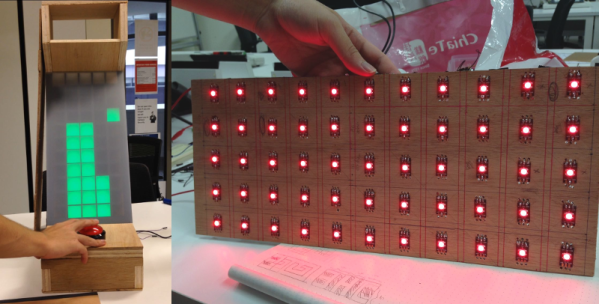
For [LumoW], what started as a school project turned into a passion project. He and his team made a hardware implementation of an arcade game called Stacker. Never heard of it? It’s pretty fun, kind of like an inverse Tetris. You can play the flash version here and see their mini arcade version after the break.

The game is based around the Mojo FPGA which the class required, and it’s programmed entirely in bitwise operators. It uses WS2812 RGB LEDs to represent the individual tower building blocks, and these are mounted on plywood in a matrix and separated into cells by a grid of foam board. After some trial and error, the team found the perfect shade of acrylic to diffuse the bright dots into glowing squares.

Since the game only needs one input, we don’t think [LumoW] should apologize at all for using the biggest, baddest button they could find. Besides, the game has that edge-of-your-seat action that can turn panic into heavy-handedness and cool DIY arcade games into shards of sadness.

Looking for something more advanced to do with an FPGA? Try your hand at vector games.

Continue reading “A Mini Stacker Arcade Cabinet” →