Have you heard of the iPhone game Puzzle & Dragons? We understand it’s big in Japan. The puzzle part is all about rearranging colored orbs and grouping them together so they disappear and give you points. It’s also part RPG—each color is linked to a little guy, and every combo makes the matching-colored guy a little stronger. Then you fight monsters and take loot.
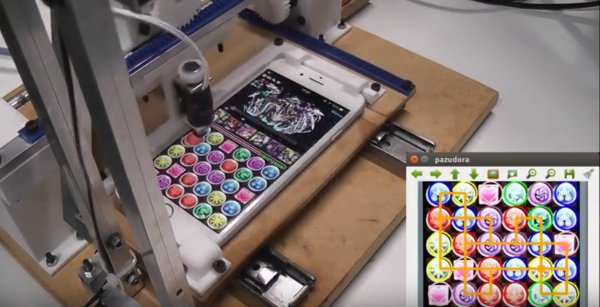
A YouTube user named [Junya Sakamoto] built a robot to play the game for him. It analyzes the board to come up with the best possible series of moves and then executes them using a Raspberry Pi. You can see what the robot is planning on the screen of a connected laptop. A couple of motors controlled with a Gertbot move a stylus up and down the screen and the phone itself back and forth.
There are two videos after the break. The first one is a combination build and demo video that proves this robot can do a lot more than just while away the hours playing Puzzle & Dragons. The second video demonstrates just how awesome it is at playing Puzzle & Dragons.
We like game-playing robots quite a bit around here. Here’s a Legoduino robot that plays Jurassic Park Builder. This other robot was built to test apps, but it plays Angry Birds in its spare time.