Mangle Videos With RecurBOY And A Raspberry Pi Zero

You used to need a lot of equipment to be a video DJ. Now you can do it all with a Raspberry Pi Zero and [cyberboy666]’s recurBOY. And if you missed out on the 1970’s video-editing psychedelia, now’s your chance to catch up – recurBOY is a modern video synth with all of the bells and whistles, and it’ll fit in your pocket. Check out [cyberboy666]’s demo video if you don’t yet know what you’re getting into. (Embedded below.)

RecurBOY has four modes: video, shader, effects, and external input, and each of these is significantly cooler than the previous. Video mode plays videos straight off of the SD card through the recurBOY’s composite video out. Shader mode lets you program your own shaders using the GLES shader dialect for resource-constrained devices. And this is where the various knobs and buttons come in. You can program the various shader routines to read any of the pots as input, allowing you to tweak the graphics demos on the fly.

Effects mode overlays your shaders on the video that’s playing, and external mode allows you to plug in a USB video capture card or a webcam so you can do all that same mangling with a live camera feed. And these two modes are where it gets awesome. The shader effects in the demo video cover all of the analog classics – including bloom and RGB separation – but also some distinctly digital effects. And again, you can tweak them all live with the knobs. Or plug in a MIDI controller and control it all externally. What hasn’t he thought of?

Old school analog video effects are really fun, and recurBOY brings them to you with the flexibility of modern shader coding. What’s not to love? If you want to see the pinnacle of the pre-digital era, that would be the Scanimate. For a video synth that integrates with your audio synth, check out Hypno. And if glitching the video is more your style, you can hijack the RAM of a VGA/composite converter.

Trippy, man!

Continue reading “Mangle Videos With RecurBOY And A Raspberry Pi Zero”

Minecraft In Minecraft On The CHUNGUS II

Minecraft is a simple video game. Well, it’s a simple video game that also has within it the ability to create all of the logic components that you’d need to build a computer. And building CPUs in Minecraft is by now a long-standing tradition.

Enter CHUNGUS II. The Computational Humongous Unconventional Number and Graphics Unit by [Sammyuri] is the biggest and baddest Minecraft computer that we’ve ever seen. So big, in fact, that it was finally reasonable to think about porting a stripped-down version of Minecraft to the computer itself. Yes, that’s right, Minecraft running in Minecraft. (Video embedded below.) Writing the compiler and programming the game brought two more hackers to the party, [Uwerta] and [StackDoubleFlow], and quite honestly, we’re amazed that a team as small as three people pulled this off.

Anyway, once you’ve picked your jaw up off the floor, also check out [Sammyuri]’s video on just the CHUNGUS II computer itself. (Also embedded below.) Seeing the architecture is interesting, even if you don’t speak Redstone as fluently as our heroes here. We love that the assembler creates a block of ROM – out of Minecraft blocks – that you can then cut/paste into the game’s reality.

For a “simple” game about breaking blocks and punching trees, Minecraft has inspired hackers to make the game better both inside and outside of the real world. For instance, for the latest in performant open-source Minecraft servers, check out Folia. Maybe, one day, they’ll build CHUNGUS II in the real world. It could happen.

Thanks [dbcdr] for the tip!

Continue reading “Minecraft In Minecraft On The CHUNGUS II”

Hack Simple

Here at Hackaday, we definitely love to celebrate the hard hacks: the insane feats of reverse engineering, the physics-defying flights of fancy, or the abuse of cutting edge technology. But today I’d like to raise a rhetorical glass in tribute of the simple hacks. Because, to be perfectly honest, the vast majority of my hacks are simple hacks, and it’s probably the same for you too. And these often go unsung because, well, they’re simple. But that doesn’t mean that something simple can’t be helpful.

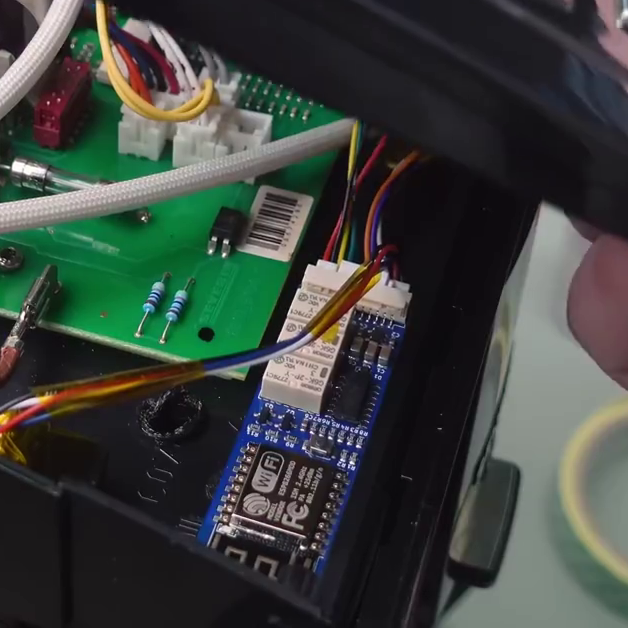
Case in point: an ESP8266 press-buttons device that we featured this week. It doesn’t do much. It’s main feature is that it connects to a home automation network over WiFi and enables you to flip three relays. Wires coming off the board are to be soldered to the not-yet-smart device in question, simply connected to each side of the button you’d like to press. In the example, a coffee machine was turned on and the “go” button pressed, automating one of the most essential kitchen rituals. While recording the podcast, I realized that I’ve built essentially this device and have it controlling our house’s heating furnace.

For the experienced hacker, there’s not much here. It’s a simple board design, the software heavily leverages ESPHome, so there’s not much work on that front either. But imagine that you lacked any of the wide-ranging skills that it takes to make such a device: PCB layout, ESP8266 software wrangling, or the nuances of designing with relays. You could just as easily build this device wrong as right. The startup costs are non-trivial.

Making a simple design like this available to the public isn’t a technical flex, and it’s not contributing to the cutting edge. But it just might be giving someone their first taste of DIY home automation, and a sweet taste of success. There’s not much easier than finding a switch and soldering on two wires, but if that’s the spark that pushes them on their path to greater hacks, that’s awesome. And even if it doesn’t, at least it’s another appliance under user control, connected to a private WiFi network rather than spying you out and phoning home to Big Toaster.

So here’s to the simple hacks!

How Far Can An EULA Go?

We read this news with mixed glee and horror: a company called Telly is giving TVs away, for the low price of having to live with an always-on advertisement bar and some pretty stringent terms and conditions. Break the terms, and they’ll repossess your TV. If you don’t give them the TV, they have your credit card on record and they think the set is worth $1,000.

The hacker in me sees free hardware, so I checked out the terms and conditions, and it doesn’t look good. They’ve explicitly ruled out opening up or physically modifying the device, and it has to continually have WiFi – for which you pay, naturally. It sounds like it could easily tell if you try to tamper with it. My next thought was, perhaps too cynically, to get one, put it in the closet, and wait for the company to go bankrupt. Because you know that business model isn’t going to last.

But it’s clear that they’ve seen through me. The most bizarre clause is that you have to “Use the Product as the primary television in Your household”. Now, we’re not lawyers, but it seems like an amazing stretch that they can tell you how intensively you are to use the product. Can you imagine a license with a keyboard that demanded that you only use it to write sci-fi novels, or that you have to use it more than any other keyboard?

Nope. Too many hoops to jump through for a silly free TV. You can keep your dystopian future.

Two Factor Authentication Apps: Mistakes To Malware

Everyone in security will tell you need two-factor authentication (2FA), and we agree. End of article? Nope. The devil, as always with security, is in the details. Case in point: in the last few weeks, none less than Google messed up with their Google Authenticator app. The security community screamed out loud, and while it’s not over yet, it looks like Google is on the way to fixing the issue.

Since 2FA has become a part of all of our lives – or at least it should – let’s take a quick dip into how it works, the many challenges of implementing 2FA correctly, what happened with Google Authenticator, and what options you’ve got to keep yourself safe online.

Continue reading “Two Factor Authentication Apps: Mistakes To Malware”

Tools Of The Trade: Dirt Cheap Or Too Dirty?

We’ve recently seen a couple reviews of a particularly cheap oscilloscope that, among other things, doesn’t meet its advertised specs. Actually, it’s not even close. It claims to be a 100 MHz scope, and it’s got around 30 MHz of bandwidth instead. If you bought it for higher frequency work, you’d have every right to be angry. But it’s also cheap enough that, if you were on a very tight budget, and you knew its limitations beforehand, you might be tempted to buy it anyway. Or so goes one rationale.

In principle, I’m of the “buy cheap, buy twice” mindset. Some tools, especially ones that you’re liable to use a lot, make it worth your while to save up for the good stuff. (And for myself, I would absolutely put an oscilloscope in that category.) The chances that you’ll outgrow or outlive the cheaper tool and end up buying the better one eventually makes the money spent on the cheaper tool simply wasted.

But that’s not always the case either, and that’s where you have to know yourself. If you’re only going to use it a couple times, and it’s not super critical, maybe it’s fine to get the cheap stuff. Or if you know you’re going to break it in the process of learning anyway, maybe it’s a shame to put the gold-plated version into your noob hands. Or maybe you simply don’t know if an oscilloscope is for you. It’s possible!

And you can mix and match. I just recently bought tools for changing our car’s tires. It included a dirt-cheap pneumatic jack and an expensive torque wrench. My logic? The jack is relatively easy to make functional, and the specs are so wildly in excess of what I need that even if it’s all lies, it’ll probably suffice. The torque wrench, on the other hand, is a bit of a precision instrument, and it’s pretty important that the bolts are socked up tight enough. I don’t want the wheels rolling off as I drive down the road.

Point is, I can see both sides of the argument. And in the specific case of the ’scope, the cheapo one can also be battery powered, which gives it a bit of a niche functionality when probing live-ground circuits. Still, if you’re marginally ’scope-curious, I’d say save up your pennies for something at least mid-market. (Rigol? Used Agilent or Tek?)

But isn’t it cool that we have so many choices? Where do you buy cheap? Where won’t you?

Supercon 2023 Is On, We Want You!

We’re absolutely excited to be able to announce that the Hackaday Supercon is on for 2023, and will be taking place Nov 3 – Nov 5 in sunny Pasadena CA. And with that, we’d like to open the floodgates: we’d like to hear your proposals for talks and workshops! The Call for Speakers and Call for Workshops forms are online now, and you’ve got until July 18th to get yourself signed up.

Continue reading “Supercon 2023 Is On, We Want You!”