There’s More Than Meets The Eye To This Robot Car

This is a robot that any Transformers enthusiast will love. Sure, the car looks just a bit boxy, but you’ll forget all about that when you see it unfold into a bipedal robot (translated). [Zak Sawa] is responsible for the creation. He pull off the build using 22 servo motors which let the car transform, and provide the somewhat awkward ability to walk. Fold it back up again and the car can drive away. In other words, here’s the Transformers toy that you always wanted; radio controled and it actually works!

This is the result of about four years of work. Apparently it’s the eighth iteration, and a note on the video after the break teases a ninth version on the way. It’s not just the robot that looks great, check out the carrying case that houses it for storage.

Continue reading “There’s More Than Meets The Eye To This Robot Car”
RC Car Controller And Receiver Replacement

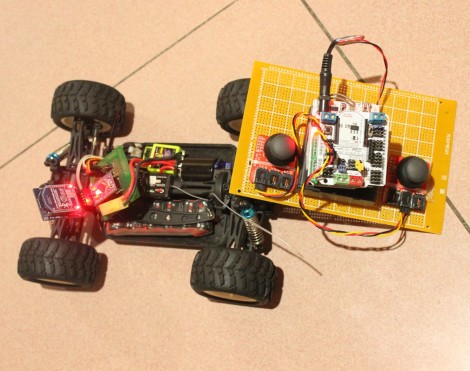
This radio controlled car controller replacement is a great project to try some new things with that fancy hardware you’ve got sitting around. The hack comes in two parts, the receiver and the transmitter. They’re communicating via Bluetooth so if you only want to build one side of the hardware you should be able to make most Bluetooth devices work as the other. For instance, build the receiver for the car and control it with a Wii remote. Or use the controller to play emulator games on an Android phone.

Both pieces are Arduino based. The controller makes use of a Freeduino with a Bluetooth shield as well as a pair of analog stick breakout boards. The car side of things uses a Bluetooth Bee (a Bluetooth module that is pin compatible with an Xbee socket) and an Arduino pro. Once the hardware bits are assembled, it takes very little code to get the system up and running. Join us after the break for a quick clip of the car in action.

Continue reading “RC Car Controller And Receiver Replacement”

Wristwatch Measures Your Perception Of Time; Also Tells Time

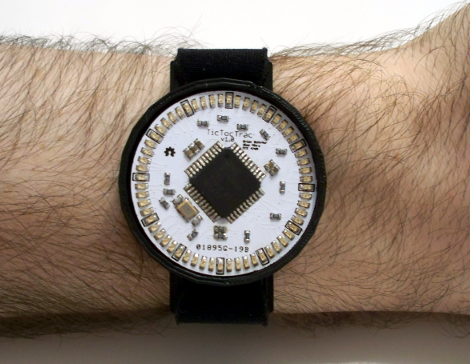
This wristwatch is hiding a lot of features in its hardware and its software. It’s called the TicTocTrac and it’s a Senior project for a pair of students at Cornell University. Judging from the sheer volume and quality of the project documentation we wonder if someone has a science writing career ahead of them? Be we digress… It’s a clock and we love it!

First off, this does more than just tell the time. In fact, that’s almost an ancillary function in this case. The wristwatch is more of a metering device to record your own time-based behaviors. Find yourself checking your watch frequently as the lunch break approaches? This watch records that activity and you can later graph the data. This allows you to analyze how you percieve the passage of time. The more often you check the time, the slower you feel time progressing. The documentation does a much better job of describing this than we have time for, so check it out.

On the hardware side of things we’re quite impressed. The housing is 3D printed. It hides two half-circle PCBs below the full-circle PCB face plate. The half-boards leave space for a tiny rechargeable battery, and host a vibrating motor and RTC chip. Instead of using buttons, there’s a piezo sensor which detects when you tap on the top of the watch.

You Might Be A Geeky Dad If: Your Kids Practice Spelling In Morse Code

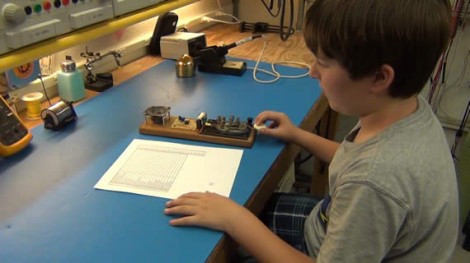
Kids learn better if they’re engaged in the topic at hand. [Todd] found something that has his son just begging to practice his spelling words each night. He converts them all to Morse code and taps each out on the Morse code practice station they built together. To start off Todd connected the keyer to his Fluke 87 meter, using the continuity tester to sound a beep each time the key is depressed. But this is just a temporary setup until [Todd] could help guide his young one through some circuit design and assembly.

The replacement is based on a 555 timer. They grabbed an electronics project book and found the schematic along with a Morse code primer. With parts in hand [Todd] films as his son hones his soldering skills with each connection. The finished project uses the timer chip to produce the audio frequency heard from the on-board speaker. If you’ve never had the joy of teaching a kid how to solder, you’re going to love seeing the video.

Continue reading “You Might Be A Geeky Dad If: Your Kids Practice Spelling In Morse Code”

Firefly Cap Has No Battery And Is Meant For Indoor Light Harvesting

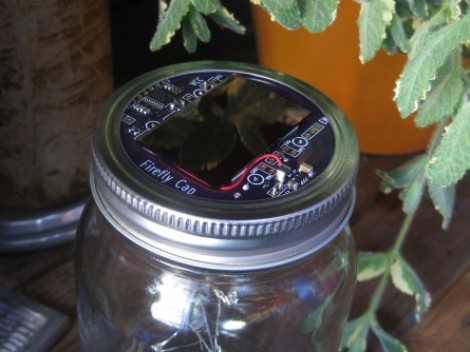
[Michael Ossman] wrote in to show off his newest project. He calls it the Firefly cap, which we think is something of a play on words. You can see that it serves as the cap of a Mason jar, but it also uses a supercap instead of a rechargeable battery.

Posts about firelfly jars go way back. And [Michael] mentions that a similar firefly project was his first embedded project. The concept uses LEDs suspended in a jar. When a light detector senses the target level of darkness, the lights inside begin to twinkle like their insect namesakes.

We like this design for two reasons. It’s aimed at collecting light in an indoor environment so you don’t have to worry about placing it in the sun. And it uses a super capacitor instead of a battery so this should truly keep going and going without wearing out the energy storage components. We also like the fact that although this is a Kickstarter project, everything you need to build your own is already available at the Github repository.

Program Your Arduino Via IR Using The Arduino IDE

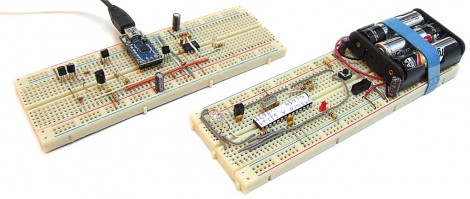
Here’s a way to program an Arduino wirelessly while still using the stock IDE. It uses an alternative bootloader called SuperDuplex along with an IR receiver like the ones used for TV remotes.

As you can see, this does take two parts. There is the target device which has the IR receiver, as well as the transmitting unit which connects to the computer via USB. You can see a demonstration of the programming process after the break. It might be a bit slow, but nothing outrageous.

With hobby electronics we always thing that “what does it do?/what is it for?” is the wrong question. But in this case we there’s a very apparent use for it. If you’ve built a gadget for use in a harsh environment and want to keep the number of openings in the enclosure to a minimum (like for an underwater ROV) this is perfect. Just make sure there’s a window for the IR receiver and you’ll be able to program as much as you want. Of course it still looks like you need a method to manually reset the target chip, but you’ll think of something.

Continue reading “Program Your Arduino Via IR Using The Arduino IDE”

Six-digit VFD Alarm Clock

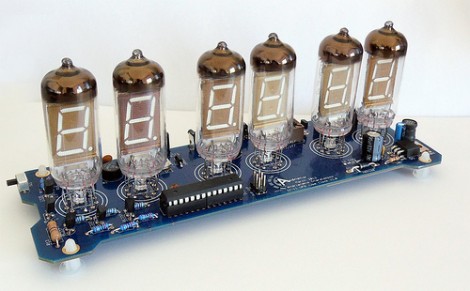
[Haris Andrianakis] just finished building this very clean-looking vacuum fluorescent display clock. It shows six digits using IV-11 tubes, and also has a half-dozen RGB LEDs to spice things up (check out the video after the break for an example). An ATmega168 drives the device, controlling the display and serving as a battery-backed real-time clock.

As with any tube-based clock there’s a fair amount of work that goes into driving the display. Each tube has a filament which requires 1.2V, and the segments themselves need 60 volts to light up. The microcontroller is not hard to protect; this is done with a series of transistor-based circuits used for switching. But the need for three voltages (to power microcontroller, filament, and segments) means a more complex PSU design. [Haris] chose to use a MAX6921 to simplify the process.

If you’re considering building something like this, we’d recommend looking for some 12-segment tubes. As we’ve seen before, they can display letters as well as numbers in case you wish to repurpose the device in the future.

Continue reading “Six-digit VFD Alarm Clock”