A Beginner’s Guide To LED Matrices

led_tutorial

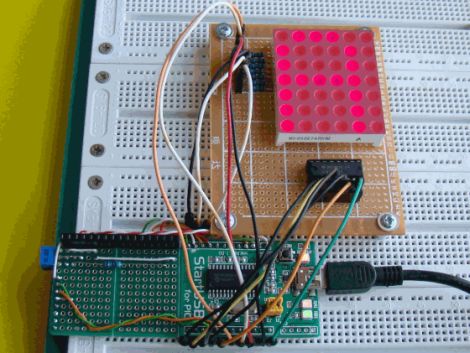
[Rajendra Bhatt] wrote in to share a tutorial he put together demonstrating the basics of using LED dot matrix displays. While this subject might be old hat to many out there, his helpful walkthroughs are geared more towards beginners who are exploring various electronics concepts for the first time.

He explains the theory behind LED displays using a PIC-driven 5×7 matrix as an example. He discusses persistence of vision and how tricking the human eye can save you quite a bit of time and a whole lot of pins. Multiplexing is broken down into its most basic steps, which [Rajendra] illustrates by showing how a letter would be drawn on the LED display one column at a time. The use of a ULN2803A Darlington Array is also discussed, and he details why it is used when pulling the five columns of LEDs to ground.

The only portion of the tutorial we thought could be expanded upon was the programming section. While he does show how each letter of the alphabet can be displayed via a series of five hex values, he does not cover the “why” part of the process. Obviously while anyone familiar with binary and hex can figure it out in pretty short order, we think that it would be a great place to pause and expand the readers’ knowledge even more.

Overall it’s a useful tutorial, and most beginners would likely find it quite helpful.
A Visual History Of The Computer Mouse

mouse

As we all go about our day to day activities, it’s easy to get lost in technology and take for granted things that have slowly evolved over long periods of time. Take for instance the mouse on your desk. Whether it’s a standard 2-button mouse with a scroll wheel or a magic mouse with no buttons at all, we’re all a bit spoiled when you think about it.

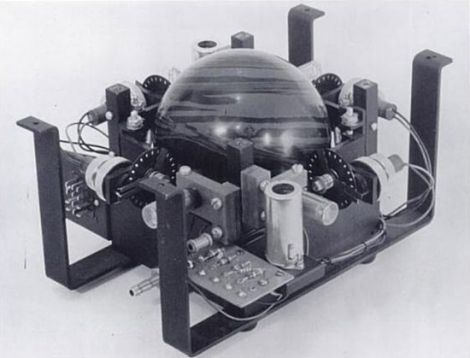
Dvice recently published a visual history of the computer mouse, which is quite interesting. The first pointing device that relied on hand motions to move a cursor was created by the Royal Canadian Navy in 1952. This trackball device, which is predates all other mechanical pointing devices, was crafted using a 5-pin bowling ball and an array of mechanical encoders that tracked the ball’s movement.

As time went on, other mouse-type devices came and went, but it was 30 years ago yesterday that Xerox unveiled the world’s first optical mouse at its PARC facility. The mouse used LEDs and optical sensors along with specialized mouse pads to track the user’s movements. The tech is primitive compared to today’s offerings, but it’s a nice reminder of the humble beginnings something you use every single day.

Be sure to swing by the Dvice site and take a look at how the mouse has evolved over the years – it’s a great way to kill a few minutes.

Wooden Bike Hopes To Set World Record, Not Catch Fire

splinterbike

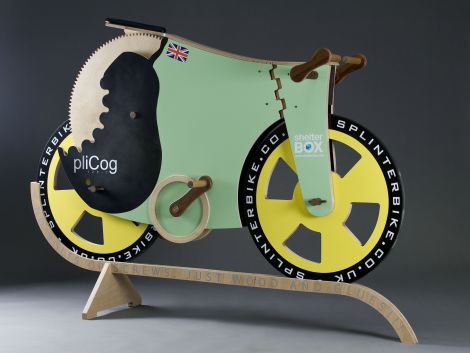
[Michael Thompson] has been hard at work for well over six months building a bicycle made entirely of wood. The project started as a bet between two friends, and has become much more over the last few months. The SplinterBike, as it is being called, has been constructed solely from wooden parts, as well as glue and paint – but not much else.

The bike uses many different woods in its construction, each chosen to fulfill a particular purpose. The axles are made from hardwood ekki, while all of the gears, wheels, and frame parts were constructed from birch plywood. Oiled ironwood was chosen to serve as a replacement for metal bearings wherever moving parts came together due to its durability. Other parts were constructed with random scraps that [Michael] had sitting around in the shop, such as the handlebars which were cut from an old broomstick.

Now that the bike is complete, [Michael] and his friend [James] are gearing up to set a wooden bike land speed world record. It should be doable, as they have calculated that the bike should hit about 31 miles per hour provided [James] can pedal fast enough. A date for the record attempt has yet to be set, but keep an eye out – it’s likely to be an entertaining show.

[via Gizmodo]

BlinkM Smart Garage Door Opener

garage_indicator

Calling Canada home, Hackaday reader [TheRafMan] has seen his share of bitterly cold winters. He also knows all too well how hard it is to get his cars started in the morning if somebody happens to leave the garage open. After the door was left open overnight for the second time this last winter, he decided that it was time to add an indicator inside the house that would alert him when the garage had not been closed .

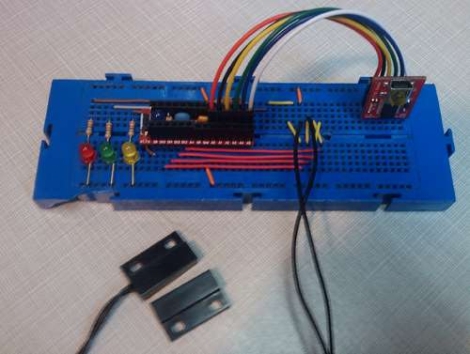
Inspired by our BlinkM Arduino coverage a short while back, his circuit incorporates a BlinkM as well as several other components he already had on hand. He disassembled the garage door switch situated in the house and fit the BlinkM into the switch box once he had finished programming it. A set of wires was run to the BlinkM, connecting it to both a power supply located in the garage as well as the magnetic switch he mounted on the door.

The end result is a simple and elegant indicator that leaves plenty of room for expansion. In the near future, he plans on adding an additional indicator strobe to let him know when the mail has arrived, not unlike this system we covered a few months ago.

Stick around to see a quick video demonstration of his garage door indicator in action.

Continue reading “BlinkM Smart Garage Door Opener”

IDE Bus Sniffing And Hard Drive Password Recovery

hdd_password_recovery

shackspace member [@dop3j0e] found himself in a real bind when trying to recover some data after his ThinkPad’s fingerprint scanner died. You see, he stored his hard drive password in the scanner, and over time completely forgot what it was. Once the scanner stopped working, he had no way to get at his data.

He brainstormed, trying to figure out the best way to recover his data. He considered reverse engineering the BIOS, which was an interesting exercise, but it did not yield any password data. He also thought about swapping the hard drive’s logic board with that of a similar drive, but it turns out that the password is stored on the platters, not the PCB.

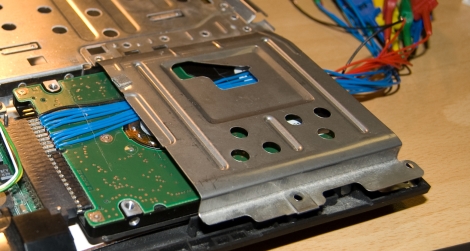
With his options quickly running out, he turned to a piece of open-source hardware we’ve covered here in the past, the OpenBench Logic Sniffer. The IDE bus contains 16 data pins, and lucky for [@dop3j0e] the OpenBench has 16 5v pins as well – a perfect match. He wired the sniffer up to the laptop and booted the computer, watching SUMP for the unlock command to be issued. Sure enough he captured the password with ease, after which he unlocked and permanently removed it using hdparm.

Be sure to check out [@dop3j0e’s] presentation on the subject if you are interested in learning more about how the recovery was done.

Playstation Network Breached, No End To Downtime In Sight

psn_logo

If you are not a gamer, or simply a casual player, you may not have heard about the recent breach of Sony’s Playstation Network. In short, the network was infiltrated on April 17th, and the service was completely shut down on the 19th as a precautionary measure. Now, more than a week later services have yet to be restored, but Sony is finally starting to talk a bit more about what happened.

At this point, nobody knows the total extent of the data stolen, but stories are emerging that indicate just about everything that could be accessed was accessed. Sony admits that information such as names, addresses, passwords, and security questions have all been accessed by an unauthorized third party. They have also not completely ruled out the possibility that credit card data has been stolen as well.

It seems the situation has turned from a mere inconvenience to PSN users into a full-blown security and PR nightmare. After a breach like this with so many questions left unanswered, and the gaming network rendered completely useless, we have to ask:

When everything is “fixed” and back to normal, what could Sony possibly do to regain your trust?

Data Scraping And Visualization With Python

arduino_dial

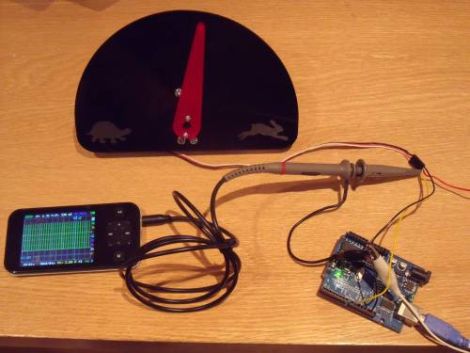
[Greg] built himself a small indicator dial with his laser cutter, and wanted to use it for visualizing server performance and load information. Before he started using it for server monitoring however, he thought he should test out his data parsing skills on a simpler data set.

Pachube has a wealth of information that can be freely used for whatever project you might have in mind, so [Greg] started looking around for something interesting to track. Eventually he located the data feed for a tanker ship and wired his dial to display the ship’s speed. He uses a Python script to interface with the Pachube API, which is fed to his Netduino board. A servo motor then changes the position of the dial based on the feed’s data. Since large tankers don’t change speed often, the experiment was a bit of a letdown. He searched for a bit and tuned into another feed that tracked wind speed in New Zealand, getting much better results.

His future plans include hooking it directly to his network and eventually using it to monitor his servers…at least once the novelty of tracking random data feeds wears off.

All of his code is available on GitHub, and he is happy to make a gauge for anyone who is interested, though he doesn’t currently list a price.