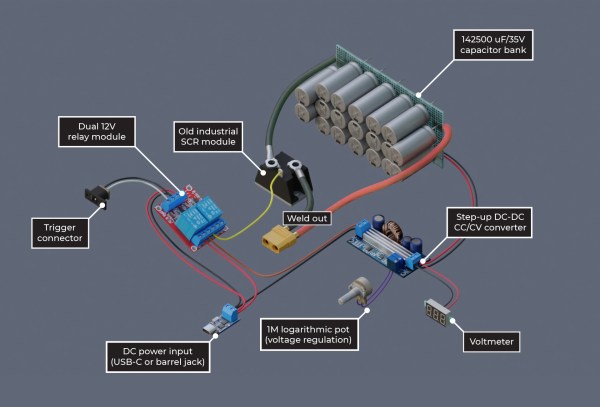
An exploded diagram of the spot welder. Shown are the capacitor bank, trigger, 12 V relay, DC power input, power out, step up converter, voltmeter, industrial SCR module, and capacitor bank.

Hackaday Prize 2022: A Not-So-Smart Spot Welder

DIY spot welders often use high-powered components that can be a bit frightening, given the potential for dangerous malfunctions. [Wojciech “Adalbert” J.] designed his capacitive discharge spot welder to be safe, easy to build, and forego the microcontroller.

Many projects work great with just a single Li-ion cell, but when you need more power, you’ve got to start connecting more cells together into a battery. [Wojciech]’s spot welder is designed to be just powerful enough to weld nickel tabs onto a cell without any overkill. The capacitor bank uses nineteen Nichicon UBY 7500uF/35V capacitors, all wired in parallel using solder wick saturated with solder. They sit atop on a perfboard with metallicized holes to carry the high current.

[Wojciech] has detailed every step of building the welder, including changes to the off-the-shelf relay board and adding a potentiometer to the step-up converter board. The level of detail makes this seem like a good starting place if you’re hoping to hop into the world of DIY spot welders. Safe is always a relative term when dealing with high powered devices, so be careful if you do attempt this build!

DIY spot welders have graced these digital pages many times, including this one built with safety in mind, and this other one that was decidedly not.

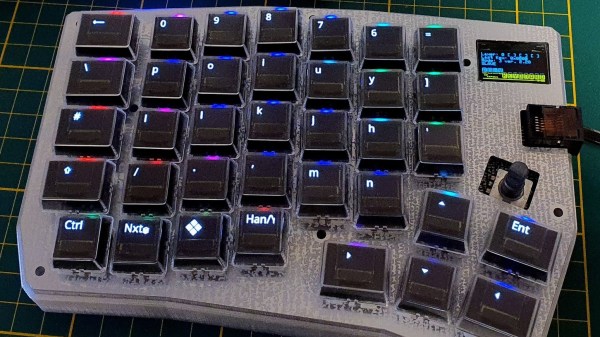
A left-hand side unit of a split keyboard. The keys are black with RGB lighting and the key legends are displayed on small OLED screens in each key.

Poly Keyboard Has Screens In Every Key

Aspiring polyglots can be stymied by differing keyboard layouts and character sets when switching between languages. [Thomas Pollak]’s Poly Keyboard circumvents this problem by putting a screen in every key of the keyboard.

In his extensive build logs, [Pollak] details the different challenges he’s faced while bringing this amazing keyboard to life. For example, the OLED screens need glyph rendering to handle the legends on the keys. Since the goal is true universal language support, he used the Adafruit-GFX Library as a beginning and was able to extend support to Japanese, Korean, and Arabic so far in his custom fork of QMK.

The attention to detail on this build is really impressive. Beside the dedication to full glyph support, [Pollak] has measured the amount of extra force the flex cables from the OLEDs add to the actuation of the keyswitches. For the Gateron yellow switch he tested, the difference was about 62.2 g versus the initial 49.7 g.

In case you’re thinking you’ve seen other screen keyboard projects, [Pollak] includes a roundup of similar projects in his logs as well. This isn’t the first keyboard we’ve seen here at Hackaday with an OLED on top of a keyswitch, although [Voidstar Lab]’s MiRage only has three screen keys that were removed in a later iteration. If you’d like a more conventional fixed display in your keyboard, check out [Peng Zhihui]’s modular board with an e-ink display and haptic feedback knob.

Continue reading “Poly Keyboard Has Screens In Every Key”

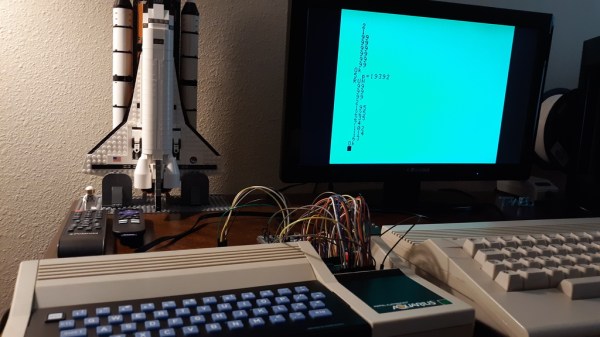
A small keyboard form factor retrocomputer with blue keys on a black background sits in front of a display and a LEGO model of the Space Shuttle. There are a number of jumper wires and a breadboard coming from an open panel on the right side of the machine.

Aqua PCB Is A Big Upgrade For The Mattel Aquarius

In case you weren’t around in the 80s, or you happened to blink, you may have missed the Mattel Aquarius computer. [Nick Bild] has a soft spot in his heart for the machine though and built the Aqua cartridge to make the Aquarius into a more usable machine.

Originally equipped with a mere 4 KB of RAM and a small, rubbery keyboard, it’s not too surprising that the Aquarius only lasted five months on the market. [Nick] decided on the cartridge slot to beef up the specs of this little machine given the small number of expansion ports on the device. Adding 32 KB of RAM certainly gives it a boost, and he also designed an SD card interface called Aqua Write that connects to the Aqua cartridge for easily transferring files from a more modern machine.

The Aqua Write uses an Arduino Mega 2560 to handle moving data between the SD card and the system’s memory. This is complicated somewhat because a “PLA sits between the Z80 and data bus that XORs data with a software lock code (initialized to a random value on startup).” [Nick] gets around this by running a small program to overwrite the lock code to zero after startup.

Getting data on and off retrocomputers can certainly be a challenge. If you’re trying to get files on or off another old machine, check out this Simple Universal Modem or consider Using a Raspberry Pi as a Virtual Floppy Drive.

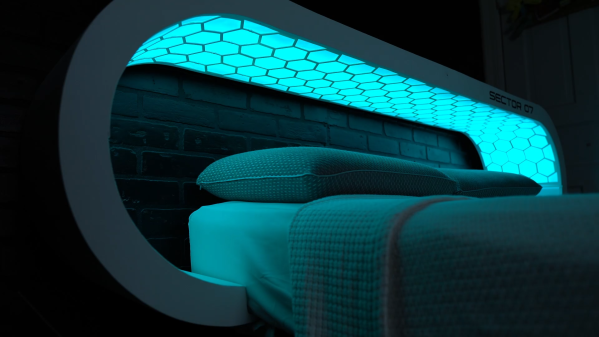
A futuristic bed headboard has a continuous light with a hexagonal grid overlaid on top of it that wraps around the bed, much like an ovoid MRI machine.

This Headboard Contains An Artificial Sun

Despite the proliferation of artificial lighting, humans are still highly dependent on sunlight for regulation of our circadian rhythms. Accordingly, [Sector 07] has built a futuristic headboard that can help with the waking up side of things whether you’re headed to space or just in the dead of winter.

The interior of the headboard includes custom 3D printed panels to mount the electronics and a light diffusion screen made of nylon fabric. The printed parts were all joined by “welding” the pieces with a soldering iron and extra filament. Besides the futuristic hexagon motif in the diffusion screen, the most eye-catching part of this build is the curved ends making it look like a set piece from Star Trek: TNG. [Sector 07] was able to get the unique shape by kerf bending the plywood ends before joining them to the flat sections with dowels and wood glue.

Since this build also includes an integrated coffee maker and voice assistant, there’s a bit more going on with the electronics than you might have in a normal circadian lamp. Powering the project are two Arduino Mega boards and a SpeakUp Click that handles the voice commands. Wake-up times are controlled via a keypad, and the voice assistant, Prisma, will ask if you are awake once the 30 minute sun simulation has completed before your alarm goes off. If you don’t confirm wakefulness, Prisma will escalate alarms until the system is sure you’re awake and then will ask if you want coffee. If you want a deep dive into the system’s functionality, be sure to checkout the video after the break.

We’ve covered artificial suns before, so if you’re interested in trying to build you’re own you should check out this Hugely Bright Artificial Sun, a Sunrise Alarm Clock Mounted Above the Bed, and this Artificial Sun Via Old Satellite Dishes.

Continue reading “This Headboard Contains An Artificial Sun”

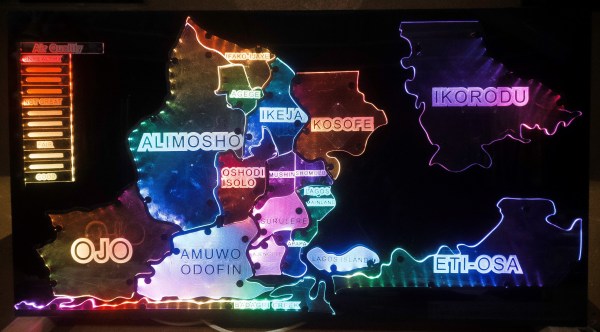
An acrylic map of the state of Lagos. Each region is lit a different color by LEDs shining on the acrylic panels. The colors coorespond to the air quality index key which is lit in cooresponding colors to the value.

Hackaday Prize 2022: This Interactive Air Quality Map Makes The Invisible Visible

Air quality can have a big impact on your health, but it isn’t always something you can see. [Ahmed Oyenuga] wanted to make air quality something more tangible and developed an Interactive Air Quality Map.

Using addressable LEDs and acrylic panels, [Oyenuga]’s map lights up different regions of his state (Lagos) with colors that correspond to qualitative values of the air quality readings. The color key on the edge of the map becomes a readout when you touch a specific region of the map.

Most of the map’s functionality is handled by an Arduino WiFi 1010, but the capacitive touch is running on a custom board [Oyenuga] designed with an ATSAMD21J17. [Oyenuga] is getting air quality data via a DesignSpark Environmental Sensor Development Kit (ESDK) and then uses reverse geocoding to take the GPS data and turn it into a location the map will understand.

If you’re interested in different options for monitoring air quality that could feed into a map like this, why don’t you check out this LoRa Air Quality Monitor or even a Mobile Air Quality Monitor.

Continue reading “Hackaday Prize 2022: This Interactive Air Quality Map Makes The Invisible Visible”

A streamlined black boiler with a headlight at the tip dwarfs the 5th wheel trailer and secondary trailer it is attached to.

Bringing A Steam Train Back From Extinction

There’s no denying that while railroads have switched to diesel and electric as their primary power sources, there’s a certain allure to the age of steam. With that in mind, a group of Pennsylvania train fans are bringing the alleged fastest steam train back from extinction.

It takes real dedication to build a 428-ton device from scratch, but these rail aficionados seem to have it in spades. Armed only with the original blueprints and a lot of passion, this team has already finished construction of the boiler and nose of the Class T1 replica which is no small feat. This puts the train at approximately 40% complete.

Some changes are planned for the locomotive including a change to fuel oil from coal and replacing the poppet valves prone to failure with camshaft-driven rotary valves. While not original hardware, these changes should make the train more reliable, and bring the world record for the fastest steam locomotive within reach. If the T1 replica can reach the 140 MPH storied of the originals, it will smash the current record of 126 MPH held by a British train, the A4 Mallard, which would be exciting indeed.

Speaking of Pennsylvania and steam, a trip to Scranton is a must for anyone interested in the age of rail.

An e-ink screen mounted on a small white box is flanked by four mechanical keyboard switches. A power cable is routed from the device to a power bank that is mostly out of frame.

DIY E-Reader Has Hot Swap Mechanical Keys

In the early days of e-readers, most devices had physical buttons to turn pages and otherwise navigate the device. [bwkrayb] longed for these halcyon days before touchscreen e-readers and improved on the concept by adding mechanical keyswitches.

By using an Adafruit NeoKey 1×4 as the keyboard interface, the e-reader has four hot-swappable keyboard sockets with built-in LEDs. [bwkrayb] is hoping to use these LEDs to implement a front lighting system in a future revision of the hardware.

The 3.7″ screen displays pages after running an EPUB through ebooklib and Beautiful Soup to generate files that can be used by the Waveshare drivers. Refresh time is reportedly slow, although [bwkrayb] suspects this  might be due more to the limited power of the Raspberry Pi Zero 2 more than the display itself.

If you want to see some other open e-reader projects we’ve covered, check out the EPub-Inkplate or the Open Book Project.