Home Automation Terminal With Cyberpunk Style

The OLKB-Terminal designed by [Jeff Eberl] doesn’t have a battery, can’t fold up (even if it seems like it could), and is only portable in the sense that you can literally pick it up and move it somewhere else. So arguably it’s not really a cyberdeck per se, but it certainly does look the part. If you need to be furiously typing out lines of code in a dimly lit near-future hacker’s den, this should do you nicely.

[Jeff] has provided everything you’d need to recreate this slick little machine on your own, though he does warn that some of the hardware decisions were based simply on what he had on-hand at the time, and that better or cheaper options may exist. So for example if you don’t want to use the Raspberry Pi 4, you can easily swap it out for some other single-board computer. Though if you want to change something better integrated, like the LCD panel, it will probably require modifications to the 3D printed components.

The rear electronics tray offers plenty of room for expansion.

The slim mechanical keyboard that [Jeff] used for the OLKB-Terminal, which in some ways set the tone for the whole design, is actually a completely separate open source project from [Victor Lucachi]. The VOID30 is a 3D printed, 30% handwired ortholinear keyboard that runs the popular QMK firmware on an Arduino Pro Micro. He’s implemented a couple tweaks, namely using a USB-C equipped Arduino clone, but otherwise it’s the same as upstream. So if you’re not in the market for a little bedside cyberpunk terminal but love its sleek keyboard, you’re in luck.

Software wise, [Jeff] has the OLKB-Terminal hooked into his larger Home Assistant system. This gives him an attractive status display of the whole network, and with just a tap on the terminal’s seven inch touch screen, he’s able to directly control devices around the home. That said, at the end of the day it’s just a Raspberry Pi, so it could really run whatever you want.

While cyberdeck builds might be all the rage right now, we do appreciate projects that bring those same design tenets to the desktop. From the gorgeous faux-retro designs of [Oriol Ferrer Mesià] to modernized pieces of vintage hardware, truly personal computers that can be easily upgraded and repaired don’t have to be limited to something you can lug around with a guitar strap.

Astro Pi Mk II, The New Raspberry Pi Hardware Headed To The Space Station

Back in 2015, European Space Agency (ESA) astronaut Tim Peake brought a pair of specially equipped Raspberry Pi computers, nicknamed Izzy and Ed, onto the International Space Station and invited students back on Earth to develop software for them as part of the Astro Pi Challenge. To date, more than 50,000 young people have had their code run on one of the single-board computers; making them arguably the most popular, and surely the most traveled, Raspberry Pis in the solar system.

While Izzy and Ed are still going strong, the ESA has decided it’s about time these veteran Raspberries finally get the retirement they’re due. Set to make the journey to the ISS in December aboard a SpaceX Cargo Dragon, the new Astro Pi MK II hardware looks quite similar to the original 2015 version at first glance. But a peek inside its 6063-grade aluminium flight case reveals plenty of new and improved gear, including a Raspberry Pi 4 Model B with 8 GB RAM.

The beefier hardware will no doubt be appreciated by students looking to push the envelope. While the majority of Python programs submitted to the Astro Pi program did little more than poll the current reading from the unit’s temperature or humidity sensors and scroll messages for the astronauts on the Astro Pi’s LED matrix, some of the more advanced projects were aimed at performing legitimate space research. From using the onboard camera to image the Earth and make weather predictions to attempting to map the planet’s magnetic field, code submitted from teams of older students will certainly benefit from the improved computational performance and expanded RAM of the newest Pi.

As with the original Astro Pi, the ESA and the Raspberry Pi Foundation have shared plenty of technical details about these space-rated Linux boxes. After all, students are expected to develop and test their code on essentially the same hardware down here on Earth before it gets beamed up to the orbiting computers. So let’s take a quick look at the new hardware inside Astro Pi MK II, and what sort of research it should enable for students in 2022 and beyond.

Continue reading “Astro Pi Mk II, The New Raspberry Pi Hardware Headed To The Space Station”

Retro TV Shows Off Family Memories With Raspberry Pi

Fascinated by the look and feel of vintage electronics, [Democracity] decided to turn an old Sony Micro TV into a digital picture frame that would cycle through old family photos in style. You’d think the modern IPS widescreen display would stick out like a sore thumb, but thanks to the clever application of a 1/16″ black acrylic bezel and the original glass still installed in the front panel, the new hardware blends in exceptionally well.

Driving the new display is a Raspberry Pi 4, which might sound overkill, but considering the front-end is being provided by DAKboard through Chromium, we can understand the desire for some extra horsepower and RAM. If it were us we’d probably have gone with a less powerful board and a few Python scripts, and of course there are a few turn-key open source solutions out there, though we’ll admit that this is probably faster and easier to setup.

[Democracity] provides some general information on how he took apart the TV and grafted in the new gear, but of course the exact steps will vary a bit depending on which old TV you end up sending to the big parts bin in the sky. We did like that he made sure to keep all the mechanisms for the buttons and knobs intact, so even if they don’t do anything, you can still fiddle around with them.

Otherwise, his steps for setting up a headless Chromium instance are probably more widely applicable. As are the tips about setting up this particular LCD module and getting the display rotated into the proper orientation. If you just follow along for that part of the guide, you can spin up your own stand-alone Raspberry Pi DAKboard endpoint to take the service for a test drive.

It probably won’t come as much of a surprise to hear that this isn’t the first time [Democracity] has upgraded a piece of vintage hardware. Back in 2017, we covered this gorgeous art deco speaker that he outfitted with RGB LEDs and an Amazon Echo Dot. As with the previous post, it’s likely some commenters will be upset that a vintage piece of gear has been gutted for this project. But we’d counter that by saying his family is going to get a lot more enjoyment out of this beautiful piece of hardware now than they would have if it was still collecting dust in a closet.

Bringing The Quake Flicker To Life With A Hacked Light

If you ever feel a pang of shame because you’ve been reusing the same snippets of code in your projects for years, don’t. Even the big names do it, as evidenced by the fact that code written to govern flickering lights back in 1996 for Quake is still being used in AAA titles like 2020’s Half-Life: Alyx. In honor of this iconic example of digital buck-passing, [Rodrigo Feliciano] thought he’d port the code in question over to the Arduino and recreate the effect in real-life.

Since the Quake engine has been released under the GPLv2, it’s easy to pull up the relevant section of the code to see how the lighting was configured. Interestingly, lighting patterns were implemented as strings, where the letters from a to z referenced how bright the light should appear. So for example, a strobe light that goes between minimum and maximum brightness would be written as “aaaaaaaazzzzzzzz”, while a flickering light could be represented with the string nmonqnmomnmomomno“.

An emergency light provided the LEDs and enclosure.

This ended up being very easy to implement on the Arduino in just a few lines, as [Rodrigo] simply had to assign each letter in the string a numerical value between 0 and 255 using map, and then use the resulting number to set the LED brightness with analogWrite.

With the code written, [Rodrigo] then had to put the hardware together. He stripped down a basic emergency light to get an array of white LEDs and a handy enclosure. He also wired up a simple transistor circuit on a scrap of perfboard so the Arduino Pro Mini could control all the LEDs from a single GPIO pin. Combined with a long USB cable to power it, and he’s got a perfect desk accessory for late-night gaming sessions.

In the video below you can see the final result, which [Rodrigo] has even synced up to footage from the classic 1996 shooter. The light makes for an interesting conversation piece, but we think the logical next step is to work this technique into an ambilight-like system to really make it feel like you’re wandering down those dimly lit corridors.

Continue reading “Bringing The Quake Flicker To Life With A Hacked Light”

Up Close And Personal With An Unusual 3D Printer Kit

While there are still plenty of folks out there tinkering with custom 3D printers, it’s safe to say that most people these days are using a commercially-available machine. The prices are just so low now, even on the resin printers, that unless you have some application that requires exacting specifications, it just doesn’t make a whole lot of sense to fiddle around with a homebrew machine.

As it so happens, [Nicolas Tranchant] actually does have such an application. He needs ultra-high resolution 3D prints for his jewelry company, but even expensive printers designed for doing dental work weren’t giving him the results he was looking for. Rather than spend five-figures on a machine that may or may not get the job done, he decided to check out what was available in kit form. That’s when he found the work of [Frédéric Lautré].

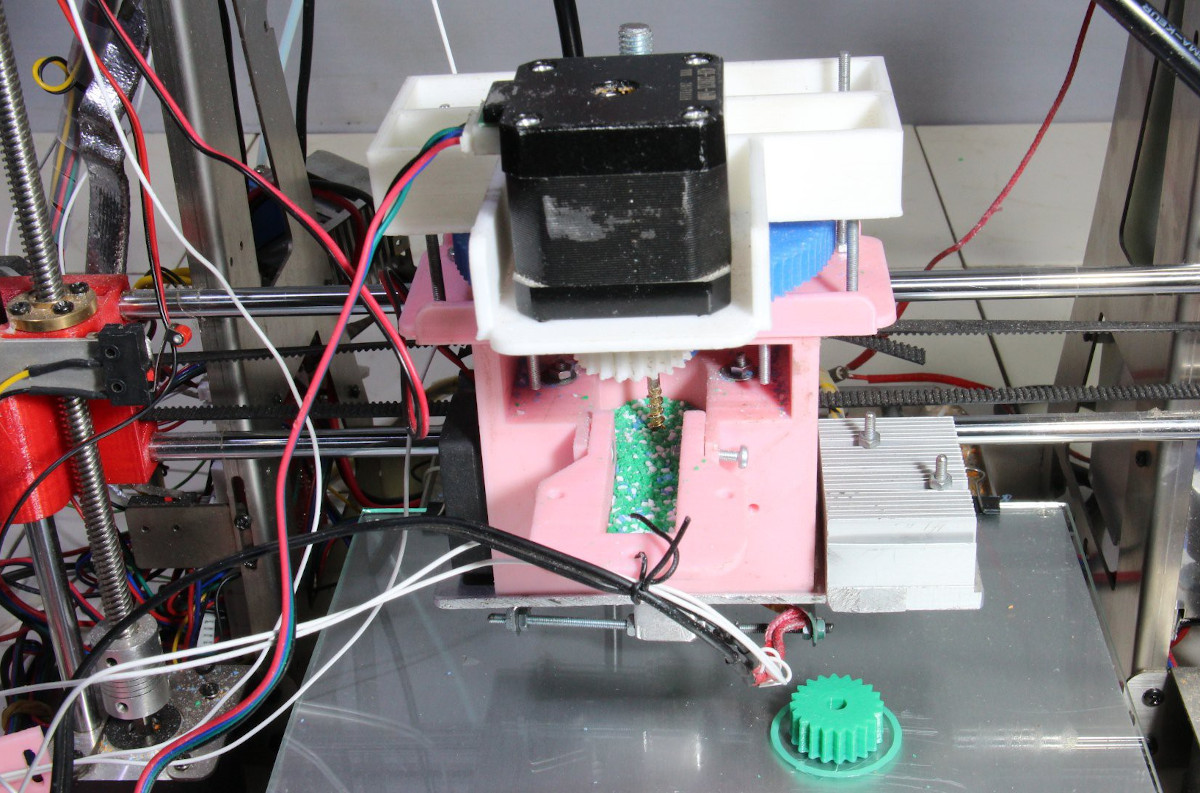
A look at the heavy-duty Z axis.

He purchased the unique “Top-Down” SLA kit from him back in 2017, and now after four years of working with the machine, [Nicolas] decided he would share his experiences with the rest of the class. The basic idea with this printer is that the light source is above the resin vat, rather than below. So instead of the print bed being pulled farther away from the resin on each new layer, it actually sinks deeper into it.

Compared to the “Bottom-Up” style of resin printers that are more common for hobbyists, this approach does away with the need for a non-stick layer of film at the bottom of the tank. Printing is therefore made faster and more reliable, as the part doesn’t need to be peeled off the film for each new layer.

[Nicolas] goes into quite a bit of detail about building and using the $700 USD kit, including the occasional modifications he made. It sounds like the kit later went through a few revisions, but the core concepts are largely the same. It’s worth noting that the kit did not come with the actual projector though, so in his case the total cost was closer to $1,400. We were also surprised to see that [Frédéric] apparently developed the software for this printer himself, so the tips on how to wrangle its unfamiliar interface for slicing and support generation may be particularly helpful.

Unfortunately, it sounds like [Frédéric] has dropped off the radar. The website for the kit is gone, and [Nicolas] has been unable to get in touch with him. Which is a shame, as this looks to be a fascinating project. Perhaps the Hackaday community can help track down this mysterious SLA maestro?

Mastering Stop Motion Through Machine Learning

Stop motion animation is notoriously difficult to pull off well, in large part because it’s a mind-numbingly slow process. Each frame in the final video is a separate photograph, and for each one of those, the characters and props need to be moved the appropriate amount so that the final result looks smooth. You don’t even want to know how long Ben Wyatt spent working on Requiem for a Tuesday, though to be fair, it might still get done before the next Avatar.

But [Nick Bild] thinks his latest project might be able to improve on the classic technique with a dash of artificial intelligence provided by a Jetson Xavier NX. Basically, the Jetson watches the live feed from the camera, and using a hand pose detection model, waits until there’s no human hand in the frame. Once the coast is clear, it takes a shot and then goes back to waiting for the next hands-free opportunity. With the photographs being taken automatically, you’re free to focus on getting your characters moving around in a convincing way.

If it’s still not clicking for you, check out the video below. [Nick] first shows the raw unedited video, which primarily consists of him moving three LEGO figures around, and then the final product produced by his system. All the images of him fiddling with the scene have been automatically trimmed, leaving behind a short animated clip of the characters moving on their own.

Now don’t be fooled, it’s still going to take awhile. By our count, it took two solid minutes of moving around Minifigs to produce just a few seconds of animation. So while we can say its a quicker pace than with traditional stop motion production, it certainly isn’t fast.

Machine learning isn’t the only modern technology that can simplify stop motion production. We’ve seen a few examples of using 3D printed objects instead of manually-adjusted figures. It still takes a long time to print, and of course it eats up a ton of filament, but the mechanical precision of the printed scenes makes for a very clean final result.

Continue reading “Mastering Stop Motion Through Machine Learning”

PCB Metro Maps Are A Gorgeous Labor Of Love

Is your love of public transportation matched only by your passion for designing custom PCBs? If so, then you’re going to love these phenomenal transit maps created by [Chai Jia Xun]. Using the painstakingly refined principles outlined in his detailed write-up, he’s created versions for Tokyo, Singapore, and the comparatively spartan San Francisco Bay Area. All you need to make one up for your home town is an incredible amount of patience and dedication. No problem, right?

As [Xun] explains, the first part of creating one of these maps isn’t unlike generating a normal PCB. Just make a footprint for the stations, consult with Google Maps as to where they should be placed on the board, and then connect them all up with traces to stand in for the rail lines. A little silkscreen work, and you’re done.

Well…unless you want them to light up, anyway. To pull that off, [Xun] created a second PCB that places an LED behind each station hole drilled in the previous board. With a microcontroller and shift register, he’s able to selectively illuminate individual lines and run through different patterns. To combat light bleeding through the PCB, a CNC-cut piece of 3 mm MDF sits between the two boards to make sure each LED is only visible through the respective hole in the top surface.

You could call the map finished here as well, assuming you don’t mind all the stations lighting up white. If you want them to be different colors, you’ll need to insert some colored diffusers. [Xun] went through several different approaches here, but in the end, the idea that seemed to work best was to simply print out all the colored dots on a piece of transparency paper and use a second sheet of tracing paper to soften the light. Alignment here is critical, but once everything is dialed in, the results are quite impressive.

It’s quite a bit of work, and we haven’t even mentioned the fact that [Xun] had to modify the circuit when it came time to do the Tokyo map, as some MOSFETs had to be added into the mix for the microcontroller to reliably control 350+ LEDs. So there’s certainly no shame in simply buying one of them when they go on sale instead of trying to recreate it from scratch. Assuming you live in one of the cities he’s offering, anyway. Otherwise, you might want to take a look at our HackadayU class on KiCad and get yourself a comfortable chair.