Retro Terminals Bring Some Style To Your Desktop

It wasn’t so long ago that a desktop computer was just a beige box with another, heavier, beige box sitting next to it or maybe perched on top. They’re a bit more visually exciting these days, with even mass produced PCs now shipping with RGB lighting and clear side panels. But even so, few could really look at a modern desktop computer and call it objectively beautiful.

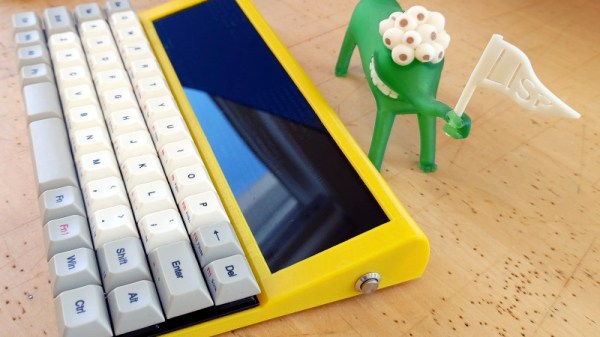
But [Oriol Ferrer Mesià] wonders if we couldn’t improve on things a bit. Over the last few months, he’s been experimenting with small 3D printed enclosures that reimagine the traditional desktop computer aesthetic. With their distinctively retro-futuristic style, they look like the kind of gadgets science magazines in the 1960s thought would be dotting kitchens, living rooms, and space stations by the year 2000. But unlike those fanciful creations, each one of these beauties is a fully functional computer.

A few of the designs are relatively conservative, and not entirely unlike some of the old “dumb terminals” of the 1970s. With a Raspberry Pi 4 and a tablet-sized screen, these diminutive terminals would be perfectly usable for light desktop work or some retro gaming.

But we particularly like the ultra-widescreen design that [Oriol] has come up with. With a fairly unusual 4:1 aspect ratio LCD, the printed enclosure for this one was so large that it had to be done in two pieces on his Ender 3. To keep the 8″ 1920 x 480 panel well fed, this design uses a Jetson Nano 2GB which has considerably more graphical punch than other Linux SBCs of similar size and price.

As part of the recent cyberdeck craze, we’ve seen plenty of people recreating the look and feel of vintage portable computers with 3D printed cases and modern components. Desktop creations have been far less common, but with gorgeous designs like these to serve as inspiration, that may change.

Cyberpunk Mazda MX-5 Packs Onboard Cyberdeck

Back in April of 2019, inspired by iconic films such as Blade Runner and Akira, [Chris Watson] embarked on a journey to create his very own cyberpunk roadster from a 1991 Mazda MX-5. After pouring an incredible amount of blood, sweat, and fiberglass into the project, he now has a vehicle that wouldn’t look out of place cruising the streets of Neo Tokyo. Even if you’re not usually into car mods, his impeccably photographed build log is an absolutely fascinating journey.

But as impressive as the car itself might be, what really caught our attention was the computer sitting on the dash. From early on, [Chris] wanted the vehicle to have a companion cyberdeck that would be used to control various onboard systems. At this point it’s just for show, but he says ultimately it will be integrated with the electric motor he plans to install in place of the MX-5’s original power plant. We can’t wait to see it.

Of course, the lack of a practical application has hardly stopped us from admiring any of the other cyberdecks we’ve covered thus far. This one started out life as a laptop with a broken screen, which [Chris] beheaded and connected it to 15″ external display mounted in the top of a heavy-duty case. With a new SSD and a fresh copy of Linux Mint to verify all the hardware was still functional, he put together an MDF bezel for the display that includes some faux antennae and covered aircraft style switches.

When this futuristic roadster is making an appearance at a car show or contest, [Chris] makes sure to load up some suitably high-tech looking imagery on the display. It even shows some flashing technobabble error messages pulled from The Fast & The Furious.

Traditionally we haven’t covered many custom car projects, though to be fair, we traditionally haven’t seen many that looked like this either. But between ever more technologically advanced vehicles and the insightful car modding column helmed by our very own [Lewin Day], we expect tricked out rides may become an increasingly common sight on these pages.

Careful Drilling Keeps Stadia From Listening In

Google’s fledgling Stadia service leverages the Chrome ecosystem to deliver streamed PC games on mobile devices, web browsers, and TVs. While not strictly required, the company even offers a dedicated Stadia controller that connects directly to the streaming servers over its own WiFi connection to reduce overall system latency. Of course, being a Google product, the controller has a tiny microphone that’s always listening in for interacting with the voice assistant.

[Heikki Juva] didn’t like the privacy implications of this, but unfortunately, there appears to be no way to turn off this “feature” in software. He decided the most expedient solution would be to simply remove the microphone from the controller, but it turns out there was a problem. By researching previous teardowns, he found out that it’s nearly impossible to take the controller apart without damaging it.

Getting close to the target.

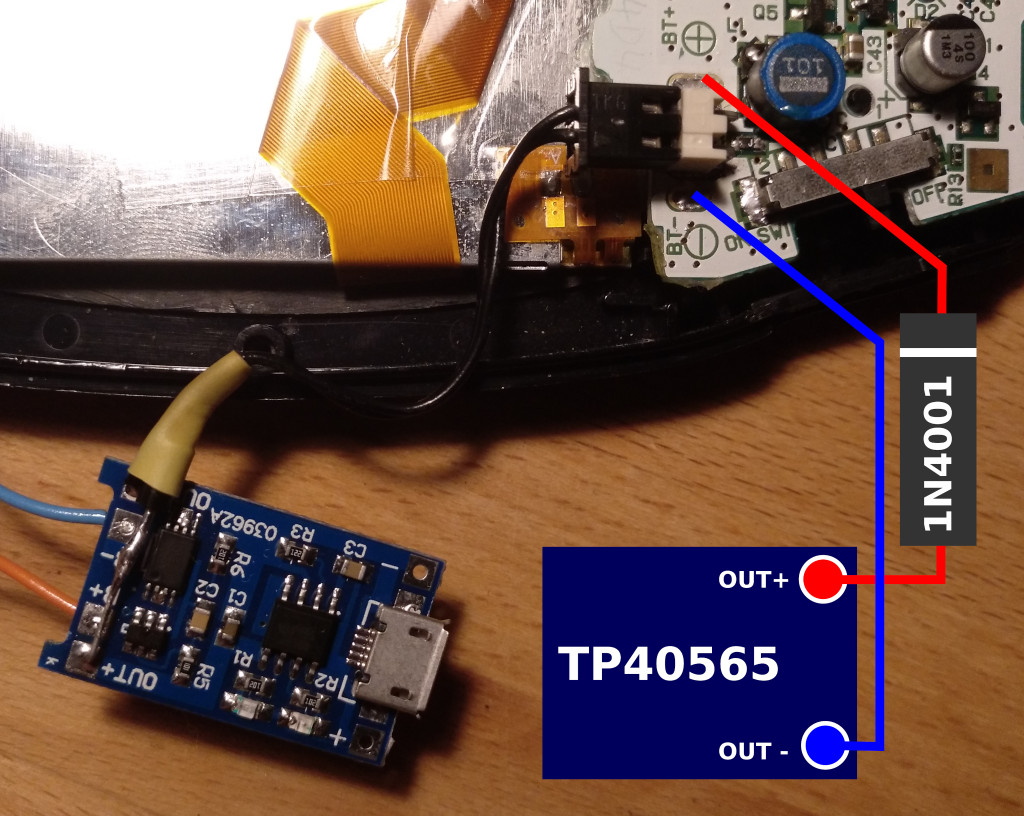
So [Heikki] came up with a bold idea. Knowing roughly the position of the microphone, he would simply drill through the controller’s case to expose and ultimately remove the device. The operation was complicated by the fact that, from the teardown video he saw, he knew he’d also have to drill through the PCB to get to the microphone mounted to the opposite side. The only bright spot was that the microphone was on its own separate PCB, so physically destroying it probably wouldn’t take the whole controller out with it.

Now we don’t have to explain why drilling into a gadget powered by an internal lithium-ion battery is dangerous, and we’re not necessarily vouching for the technique [Heikki] used here. But when presented with a sealed unit like this, we admit there weren’t a lot of good options. The fact that the user should have to go to such ridiculous lengths to disable the microphone in a game controller is a perfect example of why we should try to avoid these adversarially designed devices, but that’s a discussion for another time.

In the end, with a steady and and increasingly larger bits, [Heikki] was able to put a 7 mm hole in the back of the Stadia controller that allowed him to extract the microphone in one piece. Removing the microphone seems to have had no adverse effect on the device as, surprisingly enough, it turns out that a game controller doesn’t actually need to listen to the player. Who knew?

As our devices get smarter, hidden microphones and cameras are unfortunately becoming more common. Thankfully a few manufacturers out there are taking the hint and including hardware kill switches for these intrusive features, but until that becomes the norm, hackers will have to come up with their own solutions.

Update 1/10/21: This article originally indicated that the microphone is always listening. While there is no hardware switch to disable the mic, there is a button which must be pressed to trigger the voice assistant functions. We have used strike through above to indicate the change to what was originally published.

Continue reading “Careful Drilling Keeps Stadia From Listening In”

Industrial Stack Light Keeps An Eye On Prusa Mini

When most people want to keep tabs on what their 3D printer is up to while they’re out and about, they’ll install OctoPrint on a Pi and be done with it. But what if you’re just on the other side of the room? Inspired by the stack lights used on factory floors, [Jeff Glass] decided to add a similar system to his Prusa Mini so he could see what it’s up to at a glance.

It turns out you can get these lights pretty cheaply online from the usual retailers, and as [Jeff] explains in the video after the break, driving them is about as easy as it gets. Rather than being some kind of addressable device, they generally have a single common 12 or 24 volt DC wire and ground lines for each color. With a USB controlled relay board, kicking on the appropriate light is simple from your operating system of choice.

What ended up being a bit harder was finding out what the Prusa Mini was up to. The printer offers up a simple status web page, but it has a few oddball quirks that make it difficult to scrape; such as presenting a little pop-up message that you have to manually close each time you load the page. But after spending some time with the powerful Selenium library for Python, he was able to create a script that worked its way through the UI and pulled the relevant status messages. Obviously the resulting code is Prusa specific, but the general concept would work on other printers assuming you can find a reliable way to pull the device’s current status.

After coming up with a wall mounted enclosure for the electronics that doubles as a mount for the light itself, [Jeff] can now see if his printer needs attention from clear across the room. An especially nice feature when the printer is all buttoned up inside of its enclosure.

Continue reading “Industrial Stack Light Keeps An Eye On Prusa Mini”

Old Kindle Shows HDMI Video, Eventually

Even with the recent price reductions on stand-alone panels, picking up a used Kindle is still arguably the most cost effective way to get your hands on a large electronic paper display. Especially when you consider the Kindle includes a battery, case, and electronics to drive the display. Bending the Kindle software to your whims introduces its own unique challenges of course, but with a little tweaking, an old e-reader can live again as whatever you wish it to be.

Case in point, the OkMonitor project by [Brendan Sleight]. Using a somewhat dizzying combination of software and hardware, he’s figured out a way to turn an older Kindle Paperwhite into a plug-and-play HDMI monitor. Is it a great monitor? Far from it. As the name implies, the best you can hope to get from this solution is an OK monitor. But at least it’s something.

There’s quite a bit going on behind the scenes in OkMonitor, which [Brendan] describes through a slideshow on the project page. But the high-level idea is that a Raspberry Pi 4 with a simple USB HDMI capture device takes the video input and converts it on the fly to a scaled down Kindle-friendly format. The converted video is streamed over WiFi to the jailbroken Kindle with netcat, where it’s displayed by a native video player. In the video after the break you can see that the end result looks pretty impressive, even if there is a considerable delay involved.

Despite the demonstration [Brendan] has put together for OkMonitor, we can’t say we’d watch many films over this setup. But the fact that you can plug any HDMI device into the “base station” and have the video sent out to one or more Kindles is undeniably impressive. It’s definitely worth a close look, even if you just take some of the concepts of this project to get your own Kindle repurposing idea off the ground.

We’ve recently seen some promising progress made towards repurposing large e-paper price tags labels, but it’s hard to imagine such niche devices will ever become cheaper than second hand Kindles. With continued software development, these old e-readers are likely to remain quite popular among hackers.

Continue reading “Old Kindle Shows HDMI Video, Eventually”

FISHBOT Reels Them In So You Don’t Have To

Fishing is generally thought of as a relaxing and laid-back activity, but it still requires a certain amount of physical strength and dexterity. This can be a problem for older anglers or those with physical disabilities. To bring back the simple joy of fishing to those who may no longer be able to hold a rod on their own, [Ozz] has been working on the FISHBOT.

The FISHBOT looks like a miniature crane, complete with an electric motor and winch to pull in the line. But there’s a bit more going on here than meets the eye. Anyone who’s tried to land a large fish knows you have to be cautious of snapping the line, so [Ozz] has added a load cell to the system that can tell when its being pulled too tightly. In the future he hopes to make this feature a bit smarter by taking into account additional variables, but for now it should at least keep the more energetic of your quarry from getting away.

[Ozz] is controlling the beefy 400 watt motor with an IBT-2 H-bridge module connected to an Arduino Mega. The electronics can communicate with the user’s smartphone over a HM-10 Bluetooth module, which allows for more advanced features such as gesture controls that utilize the accelerometer in the phone. Long term, it sounds like he hopes to use the microcontroller in conjunction with the load cell to pull off more advanced tricks like weighing the fish and sending the data off to the user’s fishing buddies to show off.

In the past we’ve seen a drone used to get a lure out where the fish are, but catching one and reeling it back in is a very different challenge. It looks like [Ozz] still has some work to do on this project, but so far it seems things are going well. Being able to return a simple pleasure like this to those who thought their fishing days were behind them will surely prove worthy of the effort.

Continue reading “FISHBOT Reels Them In So You Don’t Have To”

Building A Pocket Sized Python Playground

Like many of us, [Ramin Assadollahi] has a certain fondness for the computers of yesteryear. Finding his itch for nearly instant boot times and bare metal programming weren’t being adequately scratched by any of his modern devices, he decided to build the PortablePy: a pocket-sized device that can drop him directly into a Python prompt wherever and whenever the urge hits him.

The device is powered by the Adafruit PyPortal Titano, which combines a ATSAMD51J20, ESP32, an array of sensors, and a 3.5″ diagonal 320 x 480 color TFT into one turn-key unit. The PyPortal is designed to run CircuitPython, but the scripts are usually dropped on the device over USB. That’s fine for most applications, but [Ramin] wanted his portable to be usable without the need for a host computer.

For a truly mobile experience, he had to figure out a way to bang out some Python code on the device itself. The answer ended up being the M5Stack CardKB, a tiny QWERTY board that communicates over I2C. Once he verified the concept was sound, he wrote a simple file management application and minimal Python editor that could run right on the PyPortal.

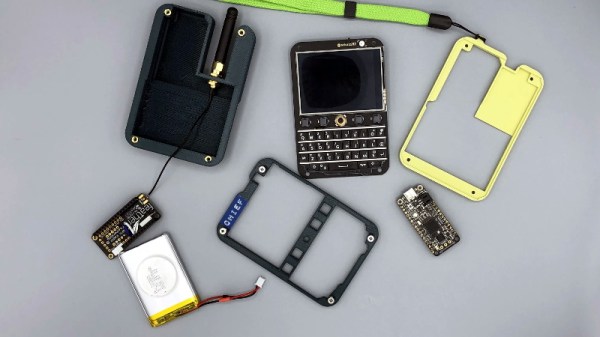
The final step was packaging the whole thing up into something he could actually take off the bench. He designed a 3D printed clamshell case inspired by the classic Game Boy Advance SP, making sure to leave enough room in the bottom half to pack in a charging board and LiPo pouch battery. He did have to remove some of the connectors from the back of the PyPortal to get everything to fit inside the case, but the compact final result seems worth the effort.

While an overall success, [Ramin] notes there are a few lingering issues. For one thing, the keyboard is literally a pain to type on. He’s considering building a custom keyboard with softer buttons, but it’s a long-term goal. More immediately he’s focusing on improving the software side of things so its easier to write code and manage multiple files.

It sounds like [Ramin] isn’t looking to compromise on his goal of making the PortablePy completely standalone, but if your convictions aren’t as strong, you could always connect a device like this up to your mobile to make things a bit easier.

Continue reading “Building A Pocket Sized Python Playground”