Synthesizer Gets An External Touch Screen

Like other owners of the high-end Yamaha MODX, [sn00zerman] wasn’t happy with the synthesizer’s integrated touch screen. It’s a bit small, and not at a very good angle for viewing. So he made it his mission to find some way of adding a larger external touch screen without making any permanent modifications to the expensive instrument.

This might seem like a tall order, but he wasn’t starting from zero. It was already known that you could plug an external display into it if you used a USB to DVI/HDMI adapter; but without the touch overlay it wasn’t a particularly useful trick. He pondered adding an external connector for the device’s built-in touch screen overlay, but that broke his no modifications rule. Considering how much one of these things cost, we can’t blame him for not wanting to put a hole in the side.

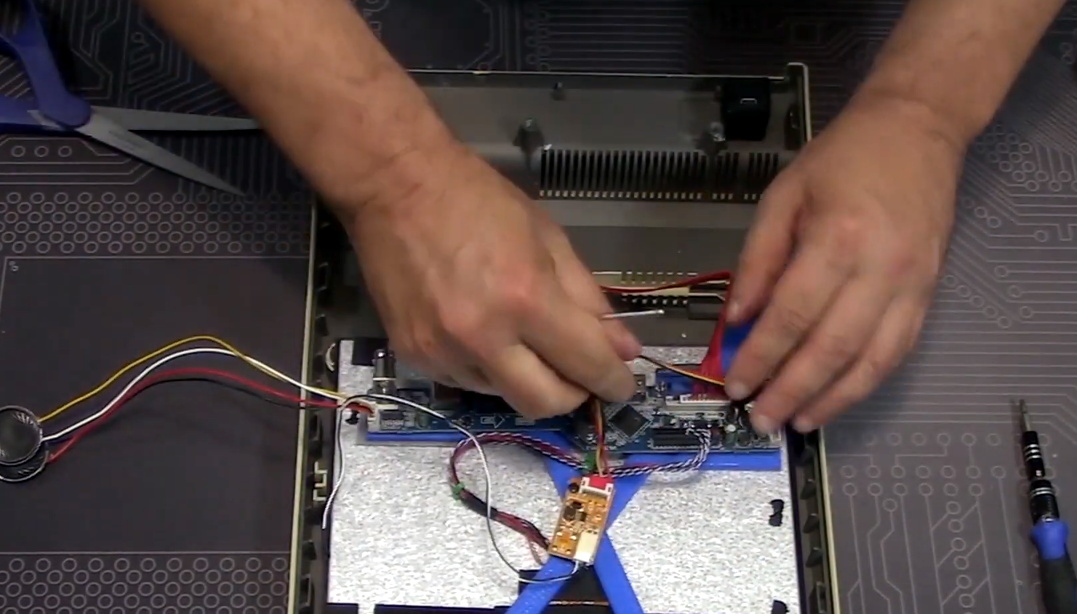
Sometimes you just have to dig out the right parts.

So he started to look for a software solution to get him the rest of the way. Luckily the MODX runs Linux, and Yamaha has made good on their GPL responsibilities and released the source code for anyone who’s interested. While poking around, he figured out that the device uses tslib to talk to the touch screen, which [sn00zerman] had worked with on previous projects. He realized that the solution might be as simple as finding a USB touch screen controller that’s compatible with the version of tslib running on the MODX.

In the end, a trip through his parts bin uncovered a stand-alone touch screen controller that he knew from experience would work with the library. Sure enough, when plugged into the MODX, the OS accepted it as an input device. With the addition of a USB hub, he was able to combine this with an existing display and finally have a more comfortable user-interface for his synthesizer.

Now all he’s got to do is plug in a USB floppy drive, and he’ll have the ultimate Yamaha Beat Laboratory.

Continue reading “Synthesizer Gets An External Touch Screen”

Heater Joins The Internet Of Things With ESP32 Board

The wood-burning heater [g3gg0] has at home works perfectly, except for one flaw: the pellet reservoir needs to be manually refilled every few days. Humans being notoriously unreliable creatures, this critical task is sometimes overlooked, which naturally leads to literally chilling results.

With automatic fill systems expensive and difficult to install, [g3gg0] wanted to find some kind of way for the heater to notify its caretakers about any potential fault conditions. Not just the fact that it was out of fuel (though that would naturally be the most common alert), but any other issue which would potentially keep the heater from doing it’s job. In short, the heater was going to get a one-way ticket to the Internet of Things.

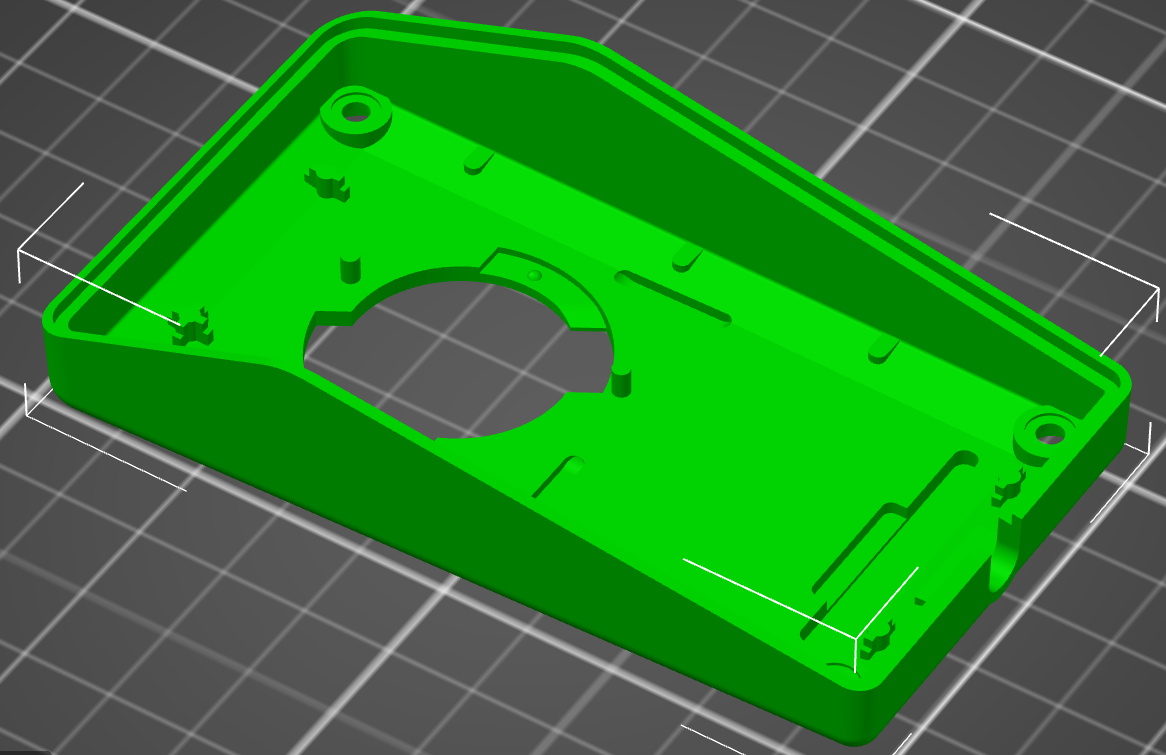
As it turns out, this task was not quite as difficult as you might expect. The Windhager heater already had upgrade bays where the user could insert additional modules and sensors, as well as a rudimentary data bus over RS-485. All [g3gg0] had to do was tap into this bus, decode what the packets contained, and use the information to generate alerts over the network. The ESP32 was more than up to the task, it just needed a custom PCB and 3D printed enclosure that would allow it to slot into the heater like an official expansion module.

When an interesting message flashes across the bus, the ESP32 captures it and relays the appropriate message to an MQTT broker. From there, the automation possibilities are nearly endless. In this case, the heater’s status information is being visualized with tools like Grafana, and important alerts are sent out to mobile devices with PushingBox. With a setup like this, the Windhager will never go hungry again.

Continue reading “Heater Joins The Internet Of Things With ESP32 Board”

Animatronic Nikola Tesla Sets The Record Straight

While the Hackaday reader likely knows all about Nikola Tesla and his incredible body of work, the same can’t necessarily be said for the average passerby. Even a child can be counted on to know the names of Thomas Edison and Alexander Graham Bell, but as [Daniel Springwald] laments, the name Tesla is more often associated with the line of sleek electric cars than the brilliant Serbian inventor they were named for.

Hoping to level the playing field a bit, [Daniel] has come up with a way for the great man to plead his case. This custom designed robotic facsimile of the alternating current aficionado is able to speak about Tesla’s life and accomplishments in an interactive, if rather creepy, format.

There isn’t a lot of technical detail on this one yet, but what we can glean from the image gallery and video below is that there are an incredible number of OpenSCAD-designed 3D printed parts knocking around inside Mr. Tesla’s head. Add into the mix a healthy dose of springs, linkages, and servos, and you’re just a mustache short of a museum exhibit.

Most of the animatronic projects we’ve covered in the past have been based on animals, so it’s certainly interesting to see what goes into approximating human mannerisms mechanically. We’re not sure if this talking Tesla head will help educate the masses, but it’s certainly an impressive technical achievement.

Continue reading “Animatronic Nikola Tesla Sets The Record Straight”

Salvaged Drill Gets A Magnetic Upgrade

For most people, a broken tool is at the end of its useful life. But rather than toss a heavy-duty drill that had its handle broken off, [Workshop From Scratch] thought it was a perfect opportunity to create something new. In his latest video, he shows how he converted this old hand tool into a magnetic drill press with predictably impressive results.

Despite being assembled largely from pieces of scrap metal cut into shape with an angle grinder, we wouldn’t blame you for believing the end result was a commercial product. From the handles salvaged from chewed up old screwdrivers to the scratch-built rack and pinion assembly, the attention to detail here is really fantastic.

Removing what was left of the broken handle.

It’s difficult to pick a favorite detail, but the reinvented enclosure for the drill certainly ranks up there. [Workshop From Scratch] could have simply bolted on the tool as-is, but instead he surgically removed the vestigial handle to make it look as though the drill was always meant for this application. After cutting, it was finished off with some body filler, a bit of sanding, and a coat of his signature orange spray paint.

When he built his magnetic vise, [Workshop From Scratch] used magnets pulled from automotive air conditioning systems. They got the job done, but were somewhat annoying to work with given their round shape. This time around, he’s used off-the-shelf magnetic locks intended for steel doors. When energized with a 19 V laptop power supply, he says the three rectangular electromagnets have a combined pull of 540 kilograms.

If you don’t have a broken drill to use as a donor for this type of project, don’t worry. You could always use a salvaged hoverboard motor instead.

Continue reading “Salvaged Drill Gets A Magnetic Upgrade”

Designing 3D Printed Enclosures For KiCad PCBs

If you’ve used KiCad before, you’re certainly familiar with the handy 3D view that shows you a rendered view of what your assembled board would look like. But as [Vadim Panov] explains, you can take this capability a step further. With a few extra tools and a little bit of know-how, you can leverage KiCad’s PCB renderings to make custom 3D printable enclosures.

The first step is to design the PCB as you normally would in KiCad. This could be an original PCB of your own invention, or a digital representation of an off-the-shelf model you want to build an enclosure for. If the latter, then the PCB doesn’t need to be 100% accurate; the goal is really just to get the big components into roughly the right areas so you can get the clearances right. Though obviously you’ll want to make sure the board’s outer dimensions and mounting hole locations are recreated as accurately as possible.

From there, [Vadim] recommends a tool called StepUp. This will take your PCB KiCad PCB files and create either a STEP or STL file of the assembled board which can be imported into your CAD package of choice. For the purposes of this demonstration he’s sticking with FreeCAD, as he likes the idea of it being a completely FOSS toolchain from start to finish.

Now that you have a model of the PCB in your CAD software, the rest is up to you. Naturally, there are existing enclosure models you can use such as the ones produced by the “Ultimate Box Maker” that we covered previously, but you could just as easily start building a new enclosure around the digital PCB.

Looking for a bit more guidance? As it so happens, our very own [Anool Mahidharia] will be presenting a class on how you can develop a KiCad + FreeCAD workflow as part of our recently launched HackadayU initiative.

Elegant Shoji Lamps From Your 3D Printer

The gorgeous Shoji-style lamps you’re seeing here aren’t made of wood or paper. Beyond the LEDs illuminating them from within, the lamps are completely 3D printed. There aren’t any fasteners or glue holding them together either, as creator [Dheera Venkatraman] used authentic Japanese wood joinery techniques to make their components fit together like a puzzle.

While we’re usually more taken with the electronic components of the projects that get sent our way, we have to admit that in this case, the enclosure is really the star of the show. [Dheera] has included a versatile mounting point where you could put anything from a cheap LED candle to a few WS2812B modules, but otherwise leaves the integration of electronic components as an exercise for the reader.

All of the components were designed in OpenSCAD, which means it should be relatively easy to add your own designs to the list of included panel types. Despite the colorful details, you won’t need a multi-material printer to run them off either. Everything you see here was printed on a Prusa i3 MK3S in PETG. Filament swaps and careful design were used to achieve the multiple colors visible on some of the more intricate panels.

If the timeless style of these Japanese lanterns has caught your eye, you’ll love this beautiful sunrise clock we covered last year.

Syringes Put The Squeeze On This Mini Drill Press

If you’re making your own PCBs for through-hole projects at home, getting the board etched is only half the battle; you’ve still got to drill all those little holes. It’s a tedious process, and if you’ve got a lot of them, doing them freehand with a drill just isn’t going to cut it. Which is why [Ruchir Chauhan] built this tiny 3D printed drill press.

This design is actually interesting for a number of reasons. The fact that it’s primarily 3D printed is a big one, though of course it’s not the first time we’ve seen that. We also like the minimal part count and low-cost, which is sure to appeal to those looking to produce PCBs on a budget. But the most impressive feature has to the hydraulic system [Ruchir] has come up with to actually do the drilling.

Rather than pulling an arm to lower the bit towards the work piece, a system utilizing four syringes, some water, and a bit of tubing is used to pull the tool down. This might seem extravagant, but if you’ve got a lot of holes to drill, this design is really going to save your arms. This method should also give you more consistent and accurate results, as you won’t be putting any torque on the structure as you would with a manually operated press.

[Ruchir] doesn’t offer much in the way of instructions on the project’s Hackaday.io page, but once you print out all of the provided STLs and get your syringes ready to go, the rest should be fairly self explanatory. Personally we might have added a smooth steel rod in there to make sure the movement is nice and straight, but we can see the appeal of doing it with a printed part to keep things cheap.

Looking for more ideas? If you’re after something a bit larger we might suggest this one made from PVC pipes, and this 3D printed desktop press would look good on anyone’s bench. Just don’t blame us if your arms get tired.

Continue reading “Syringes Put The Squeeze On This Mini Drill Press”