Flicker Detector Lets You Hear What You Can’t See

Have you ever looked at modern LED lighting and noticed, perhaps on the very edge of your perception, that they seemed to be flickering? Well, that’s because they probably are. As are the LEDs in your computer monitor, or your phone’s screen. Pulse width modulation (PWM) is used extensively with LEDs to provide brightness control, and if it’s not done well, it can lead to headaches and eyestrain.

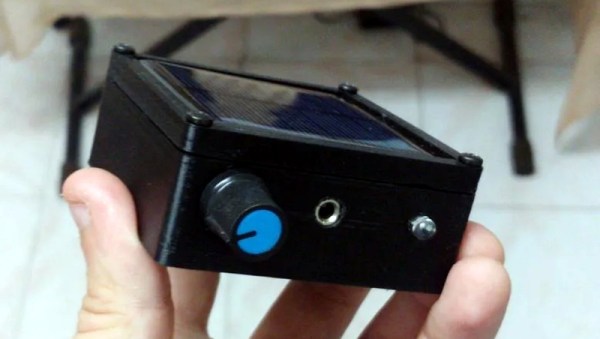
Looking to quantify just how much flashing light we’re being exposed to, [Faransky] has created a simple little gadget that essentially converts flashing light into an audio tone the human ear can pick up. Those LEDs might be blinking on and off fast enough to fool our eyes, but your ears can hear frequencies much higher than those used in common PWM solutions. In the video after the break, you can see what various LED light sources sound like when using the device.

The electronics here are exceptionally simple. Just connect a small solar panel to an audio amplifier, in this case the PAM8403, and listen to the output. To make it a bit more convenient to use, there’s an internal battery, charger circuit and USB-C port; but you could just as easily run the thing off of a 9 V alkaline if you wanted to build one from what’s already in the parts bin.

Who knows? If you carry this thing around long enough, you might even hear the far less common binary code modulation in action (but probably not).

Continue reading “Flicker Detector Lets You Hear What You Can’t See”
Clock Uses Custom LED Displays To Keep Myst Time

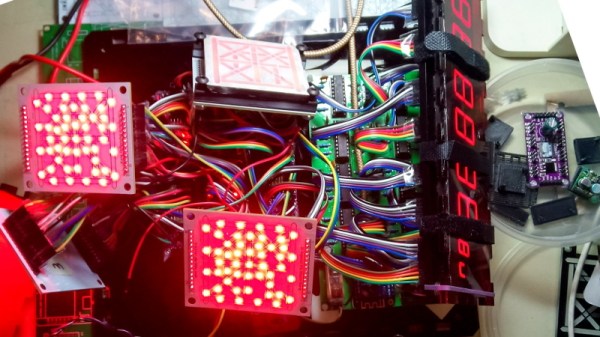
The Myst fans in the audience will love this project because it displays the 25-hour timekeeping system of the D’ni. The hardware hackers will lean a little closer to their screen because it does so with custom made 25-segment LEDs, and the precision obsessed will start breathing heavily when they hear it maintains an accuracy of 0.001 seconds. As for which of those camps creator [Mike Ando] most identifies with, we can’t say. But we definitely respect his style.

We’ll spare you the in-depth description of the base-25 number system apparently used in the Myst franchise. If you’re interested enough you can click on through to the project’s Hackaday.io page and learn how to actually read the clock. Presumably you’ll then come back here and leave your comment in Klingon.

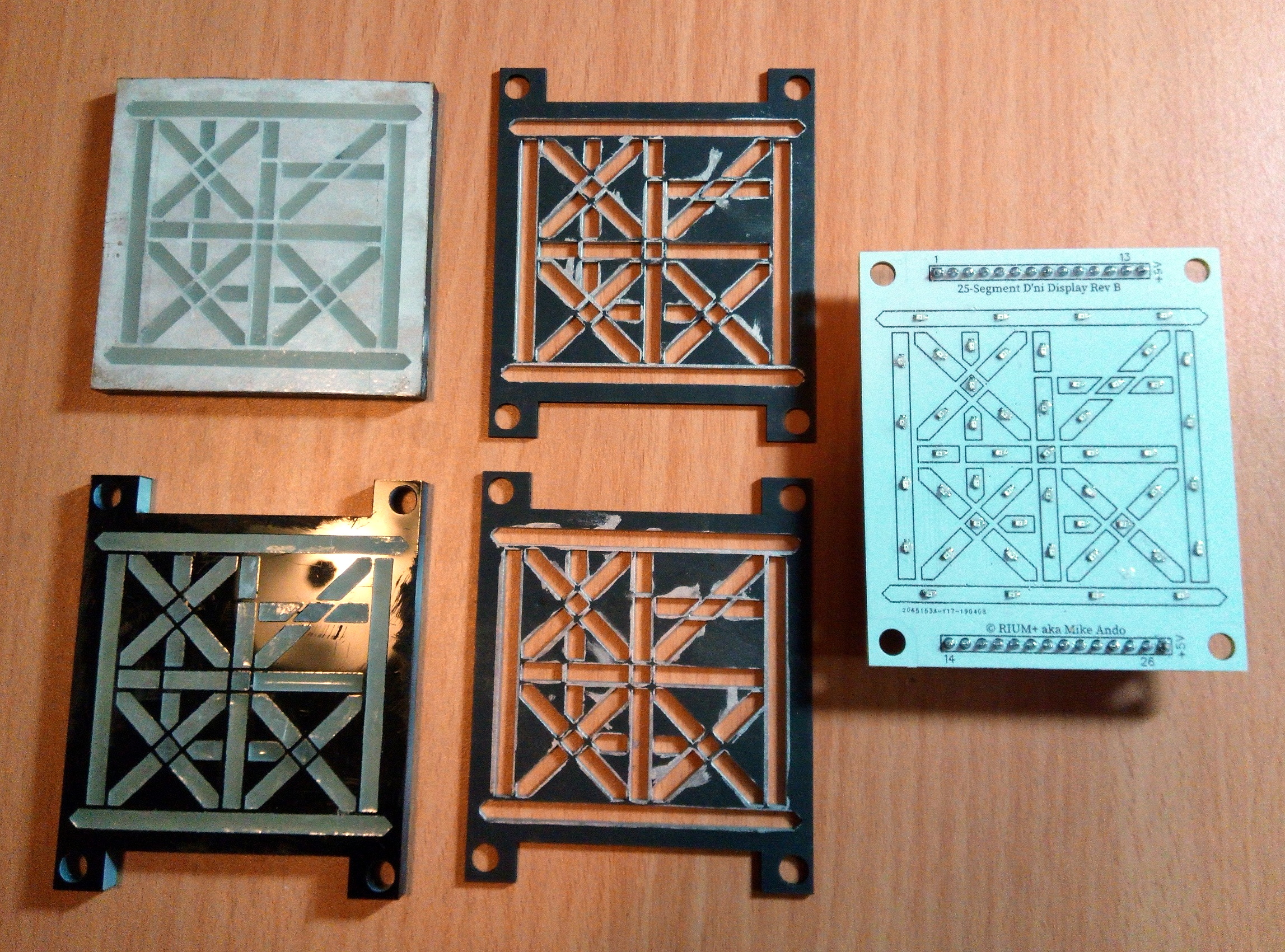
Let’s instead jump right to the part that really gets us excited, those custom displays. To create them, [Mike] cut the face out of black acrylic with a laser, and filled each void with a mixture of clear resin and very fine gypsum plaster. Getting the mix right can be a little finicky as the plaster can clump up, but the end result diffuses the light nicely. The acrylic front panel and a couple of cardboard “gaskets” to keep the light from leaking onto adjacent segments is then stacked on top of a PCB with corresponding 0603 SMD LEDs.

Beyond the soul-crushing number of wires required to hook everything up internally, the rest of the project is relatively straightforward. It uses a WeMos D1 Mini to connect to the WiFi network and pull the current time down from the geographically closest NTP server every couple of hours. Rather than putting a temperature controlled oscillator on the board, [Mike] has decided to pin his accuracy on a constantly on Internet connection and aggressive synchronizations.

From impressive curved bar graph modules to displays segmented with household items, we’ve seen our fair share of custom indicators. But we have to admit that building 25-segment LED displays for the alphabet of a fictional interstellar species sets the bar pretty high.

Continue reading “Clock Uses Custom LED Displays To Keep Myst Time”

A Miniature Laptop You Can Build Yourself

Over the last couple of years, we’ve seen more and more hackers building their own custom computers. We’re not just talking casemods here; enabled by advancements in desktop 3D printing and increasingly powerful boards such as the Raspberry Pi 4, these are machines designed and built from the ground up to meet the creator’s particular set of needs and desires.

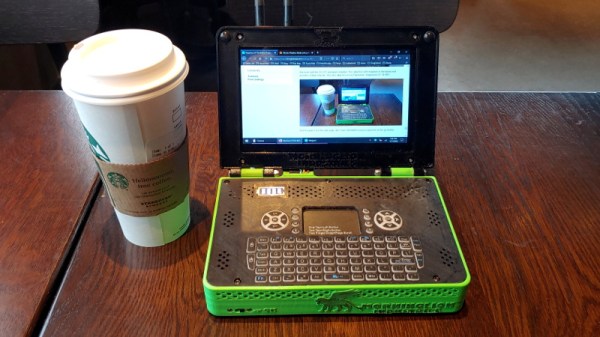
A perfect example of this trend is the Rasptop 2.0, a remarkably practical design for a 3D printed miniature laptop. Despite the name, you don’t even need to use the Raspberry Pi if you don’t want to. Creator [Morgan Lowe] has designed the Rasptop to take other single board computers (SBCs) such as the Asus Tinker Board or even the Intel Atom powered Up Board. So whether you want an energy efficient ARM machine running Linux for development, or a mobile Windows box for on the go gaming, you can use the same printed parts.

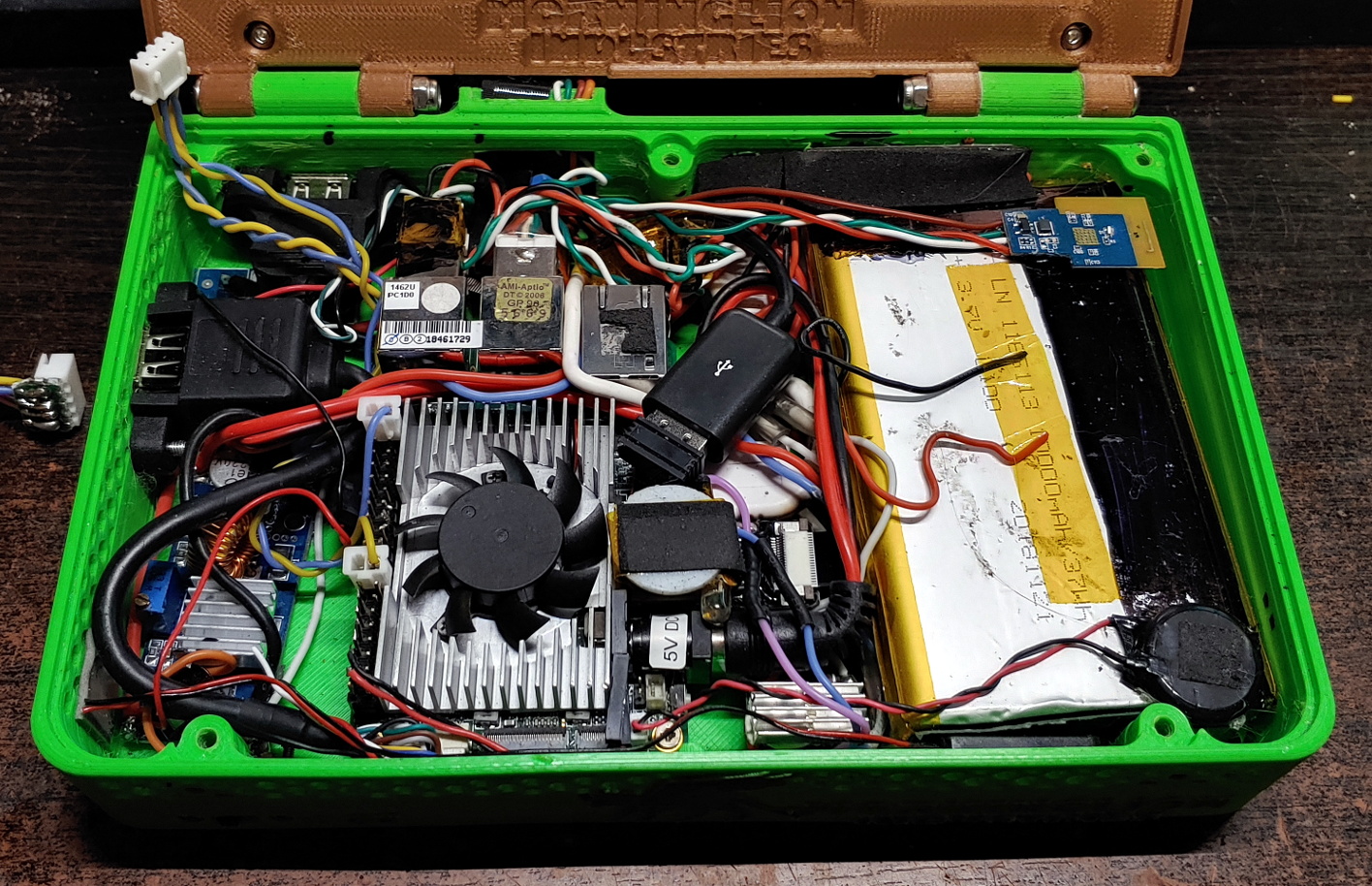
At the most basic level, the Rasptop 2.0 is just a hollow box with a hinged compartment for a screen mounted on top. You’re free to equip it with whatever hardware you chose. If you’re after maximum runtime you could fill all the free space with batteries, or maybe install multiple hard drives if you’re a data horder in need of a mobile terminal. Even the various SBCs that [Morgan] has tested are really just suggestions. The choice is yours.

Perhaps also our favorite feature of the Rasptop is how he worked a keyboard into the design. Rather than just leaving a big rectangle in the STL for you to shove a mobile keyboard into, the top surface is designed to mount the PCB and membrane keypad of one of those mini wireless keyboards you see on all the import sites. Aside from the fact it’s a good deal chunkier than what we expect from modern mobile devices, it has a very finished and professional overall look.

Of course if you’d rather use all these powerful tools to build a computer that’s somewhat farther off the beaten track, your design could abandon the traditional computer form factors altogether.

ESP32 Serial Interface Modernizes Old Equipment

There’s still plenty of useful hardware out there that uses an RS-232 interface, like the Behringer Ultradrive loudspeaker systems that [Lasse Lukkari] works with from time to time. Rather than ditch perfectly good gear because modern computers (to say nothing of phones or tablets) don’t have physical serial ports, he decided to come up with a WiFi adapter for these old devices that he calls SerialChiller.

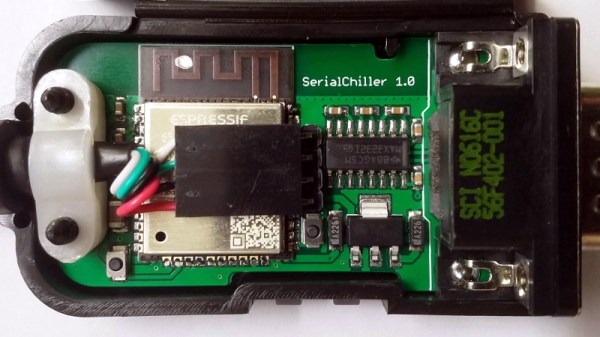
Inside the SerialChiller is an ESP32, a MAX3232 line driver, a LM1117 linear regulator, and a few passives. The professionally manufactured PCB is housed inside of an enclosure that [Lasse] has repurposed from a cheap DB15 breakout adapter. The USB cable is used to power the board and for programming, though it can also be used to turn the SerialChiller into a USB-to-serial cable as well.

The hardware for this project is pretty straightforward, but what we really like is the direction he’s taken with the software. Rather than using the SerialChiller as a simple serial to WiFi bridge, [Lasse] is actually implementing a complete web-based interface directly on the microcontroller. In the video after the break he demonstrates his firmware for controlling the aforementioned Behringer Ultradrive, but that’s just one possible application for the project. Firmware could be spun up for all sorts of classic devices, breathing new life into hardware that might otherwise be in danger of heading to the landfill.

Of course, using the ESP family of chips as serial adapters is hardly anything new. In fact, that’s what they were designed for. But developing modern user interfaces for old hardware thanks to the power of the ESP32 has some fascinating potential.

Continue reading “ESP32 Serial Interface Modernizes Old Equipment”

Keeping A 3D Printed NAS Updated With The Times

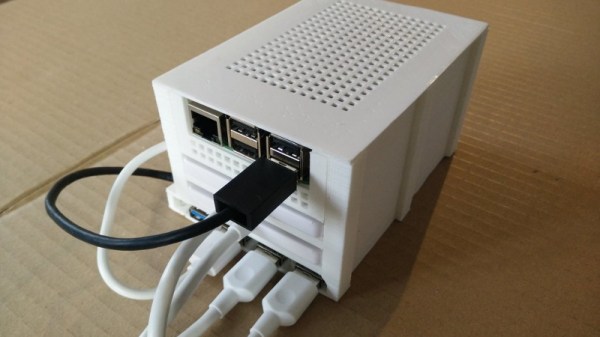
Back in 2018, [Paul-Louis Ageneau] created a 3D printed network-attached storage (NAS) enclosure for his Raspberry Pi. The design worked well, the Internet liked it when he posted the details on his blog, and all was right with the world. But of course, such glories are fleeting. Two years later that design needs updating, and thanks to the parametric nature of OpenSCAD, he’s been able to refresh his design for another tour of duty.

In our book, this is as much a cautionary tale as it is a success story. On one hand, it’s a testament to the power of CAD and desktop 3D printing. That a design can be tweaked and reproduced down the line with only minimal hassle is great for folks like us. But it’s also a shame that he didn’t get more than two years before some of the parts he used in the original NAS became unobtainium.

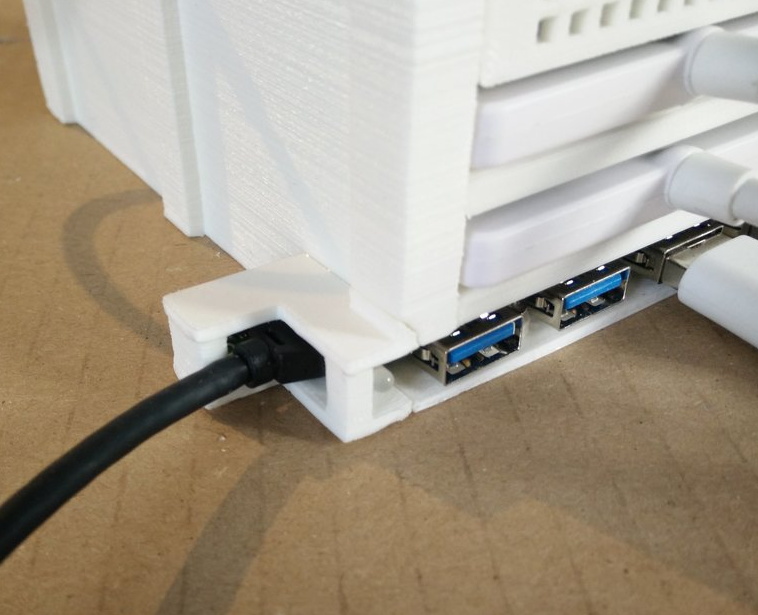
The main issue was that the integrated USB hub he used for the first version is no longer available, so the design had to be modified to accept a similar board. Unfortunately, the new hub is quite a bit wider than the old one. Resizing the entire case isn’t really an option since the Pi has to slide into it, so the hub now bumps out a bit on one side. He’s added a printable cover that cleans it up a bit, but the asymmetrical look might be a problem for some. While fiddling with the design, he also changed around the cooling setup so a larger fan could be mounted; now that the Raspberry Pi 4 is out, it can use all the cooling help it can get.

We covered the original version of the printed NAS back when it was first released, and it’s always good to see a creator coming back and keeping a project updated; even if it’s because hardware availability forced their hand.

A Custom Raspberry Pi 4 Arcade Cabinet

Over the years we’ve covered quite a few Raspberry Pi based arcade cabinets, and admittedly many of them have been fairly similar. After all, there’s only so much variation you can make before it stops looking like a traditional arcade machine. But even still, we never tire of seeing a well executed build like the one [Dawid Zittrich] recently shared with us.

These days you can order a kit that has pre-cut panels to build your cabinet with, but looking for a completely custom build, [Dawid] decided to first model his design in SketchUp and then cut out the panels himself with a jigsaw. This obviously is quite a bit more work, and assumes you’ve got sufficient woodworking tools, but we think the final result looks great. Not to mention the fact that it’s going to be a lot stronger than something made out of MDF.

He also created the side artwork himself, taking the logos and names from his favorite arcade and Amiga games and putting them on a retro-looking gradient pattern.  The marquee on the top has an acrylic front and is illuminated from behind with strips of LEDs. It’s mounted on a hinge so that it can be lifted up and a new piece of art slid in without taking apart the whole cabinet. While it might be a little more labor intensive to switch out than some of the electronic marquees we’ve seen, we do like that you still have the ability to change the artwork on a whim.

With the cabinet itself completed, [Dawid] turned his attention to the electronics. Inside you’ve got the aforementioned Raspberry Pi 4 (with a Noctua fan to keep it cool), an external hard drive, a HDMI to VGA converter with scanline generator to drive the 4:3 ratio Eizo Flex Scan S2100 monitor, and a rather beefy amplifier hanging off the Pi’s 3.5 mm analog audio output. All of which is easily accessible via a maintenance hatch built into the cabinet so [Dawid] doesn’t need to tear everything down when he wants to tweak something.

If you’d like to have that arcade cabinet feel but don’t have the space and equipment to put something like this together, you could always stick a Raspberry Pi into an iCade and call it a day.

Broken 3D Printer Turned Scanning Microscope

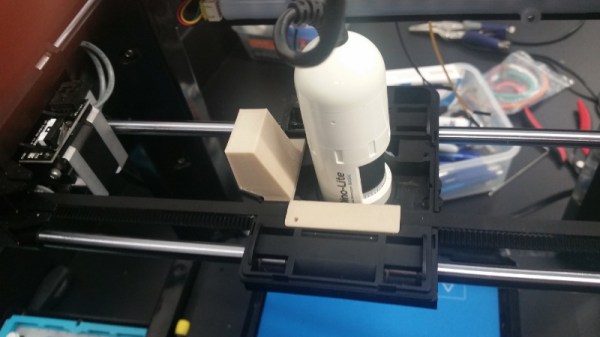
A few years ago, [Wayne] managed to blow out the main board of his Flashforge Finder attempting to change the fan. But the death of one tool ended up being the birth of another, as he ended up using its mechanical components and a Raspberry Pi to create an impressive scanning microscope.

Scan of Ulysses S. Grant from a US $50 bill

As you might have guessed from the name, the idea here is to scan across the object with a digital microscope to create an enlarged image of the entire thing. This requires some very precise control over the microscope, which just so happens to be exactly what 3D printers are good at. All [Wayne] had to do was remove the hotend, and print some adapter pieces which let him mount a USB microscope in its place.

The rest is in the software. The Raspberry Pi directs the stepper motors to move the camera across the object to be scanned in the X and Y dimensions, collecting thousands of individual images along the way. Since the focus of the microscope is fixed and there might be height variations in the object, the Z stage is then lifted up a few microns and the scan is done again. Once the software has collected tens of thousands of images in this manner, it sorts through them to find the ones that are in focus and stitch them all together.

The process is slow, and [Wayne] admits its not the most efficient approach to the problem. But judging by the sample images on the Hackaday.io page, we’d say it gets the job done. In fact, looking at these high resolution scans of 3D objects has us wondering if we might need a similar gadget here at the Hackaday Command Bunker.

The project is actually an evolution of an earlier attempt that used gutted optical drives to move the microscope around.