When Engineering, Fine Art, And ASMR Collide

The success that [Julian Baumgartner] has found on YouTube is a perfect example of all that’s weird and wonderful about the platform. His videos, which show in utterly engrossing detail the painstaking work that goes into restoring and conserving pieces of fine art, have been boosted in popularity by YouTube’s Autonomous Sensory Meridian Response (ASMR) subculture thanks to his soft spoken narration. But his latest video came as something of a surprise to lovers of oil paintings and “tingles” alike, as it revealed that he’s also more than capable of scratch building his own equipment.

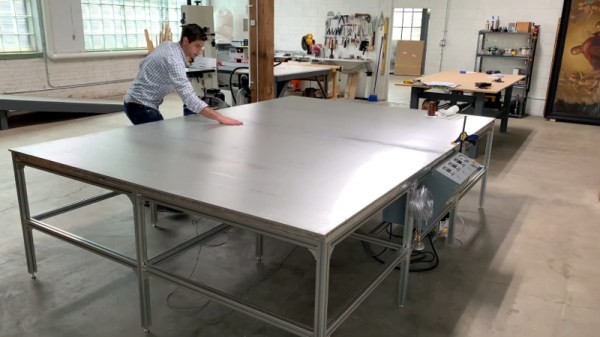
Anyone who’s been following his incredible restorations will be familiar with his heated suction table, which is used to treat various maladies a canvas may be suffering from. For example, by holding it at a sufficiently high temperature for days on end, moisture can be driven out as the piece is simultaneously smoothed and flattened by the force of the vacuum. But as [Julian] explains in the video after the break, the heated suction table he’s been using up to this point had been built years ago by his late father and was starting to show its age. After a recent failure had left him temporarily without this important tool, he decided to design and build his own fault-tolerant replacement.

The table itself is built with a material well known to the readers of Hackaday: aluminum extrusion. As [Julian] constructs the twelve legged behemoth, he extols the many virtues of working with 4040 extrusion compared to something like wood. He then moves on to plotting out and creating the control panel for the table with the sort of zeal and attention to detail that you’d expect from a literal artist. With the skeleton of the panel complete, he then begins wiring everything up.

Underneath the table’s 10 foot long surface of 6061 aluminum are 6 silicone heat pads, each rated for 1,500 watts. These are arranged into three separate “zones” for redundancy, each powered by a Crydom CKRD2420 solid state relay connected to a Autonics TC4M-14R temperature controller. Each zone also gets its own thermocouple, which [Julian] carefully bonds to the aluminum bed with thermally conductive epoxy. Finally, a Gast 0523-V4-G588NDX vacuum pump is modified so it can be activated with the flick of a switch on the control panel.

What we like most about this project is that it’s more than just a piece of equipment that [Julian] will use in his videos. He’s also released the wiring diagram and Bill of Materials for the table on his website, which combined with the comprehensive build video, means this table can be replicated by other conservators. Whether it’s restoring the fine details on Matchbox cars or recreating woodworking tools from the 18th century, we’re always excited to see people put their heart into something they’re truly passionate about.

Continue reading “When Engineering, Fine Art, And ASMR Collide”

The Righteous Quest To Crack A Canon I9900

[Starhawk] is a man with a problem. More accurately, he’s a man whose mother has a problem, but ultimately that ends up being the same thing. Her wide-format Canon printer recently stopped working after better than a decade of reliable service, and he wants to know why. Rather than spend the money on buying a new printer, he’s determined to find out if she’s been the victim of planned obsolescence by reverse engineering the Canon i9900 to see what makes it tick (or stop ticking, as the case may be).

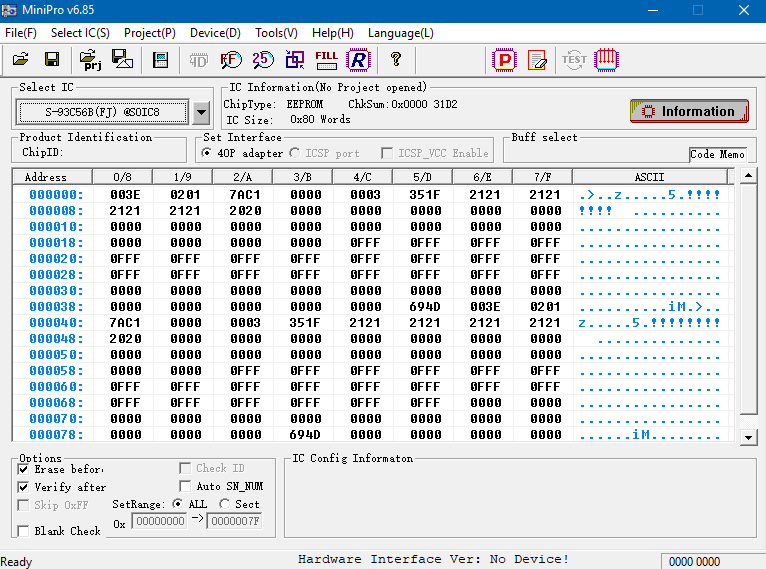
In the absence of any obvious hardware faults, [Starhawk] has suspicions that the machine’s QY6-0055 printhead has run over some internal “odometer” and simply turned itself off. We’ve all seen similar trickery at play when trying to use third party ink cartridges in our printers, so it’s certainly not outside the realm of possibility that the Canon i9900 is designed to reject heads once they’ve seen enough usage. Perhaps the biggest clue is that the QY6-0055 has a Seiko S93C56BR EEPROM on the board that’s keeping track of…something.

Right now, [Starhawk] is devoting his energies on trying to make sense of the data he pulled from the EEPROM using his TL866A programmer. But that’s no easy feat with a sample size of just one, which is why he’s looking for help. He’s hoping that other hackers with similar printers (and ideally ones that use the same QY6-0055 head) could submit their own EEPROM dumps and the community could get to work trying to decipher what’s stored on the chips. He’s really hoping that somebody at Canon might be willing to sneak him a couple tips on what he should be looking for, but at this point we think he’ll take whatever assistance he can get.

Now to be fair, there’s really no way to know definitively if there’s some flag stored on the EEPROM that’s keeping the printer from working. It could just be good old fashioned hardware failure, which would hardly be a surprise for a piece of consumer electronics from 2005. But even if the effort to understand the Canon’s EEPROM doesn’t get him any closer to a working printer, we still think it’s a fascinating example of real-world reverse engineering that’s worth it for the experience alone.

There’s a long history of hackers doing battle with their printers, from emulating an ink cartridge with a microcontroller to reinking the ribbon of a vintage 1980s behemoth. We’re interested in seeing where this project takes [Starhawk], but no matter what happens there are likely to be some interesting discoveries made along the way.

Meet MutantC: Raspberry Pi Sidekick Complete With Sliding Screen, QWERTY

Over the years we’ve seen the Raspberry Pi crammed into almost any piece of hardware you can think of. Frankly, seeing what kind of unusual consumer gadget you can shoehorn a Pi into has become something of a meme in our circles. But the thing we see considerably less of are custom designed practical enclosures which actually play to the Pi’s strengths. Which is a shame, because as the MutantC created by [rahmanshaber] shows, there’s some incredible untapped potential there.

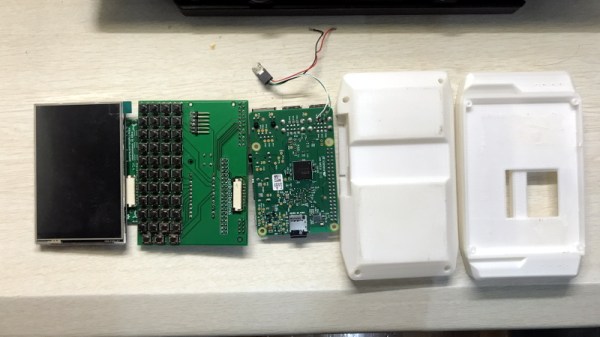
The MutantC features a QWERTY keyboard and sliding display, and seems more than a little inspired by early smartphone designs. You know, how they were before Apple came in and managed to convince every other manufacturer that there was no future for mobile devices with hardware keyboards. Unfortunately, hacking sessions will need to remain tethered as there’s currently no battery in the device. Though this is something [rahmanshaber] says he’s actively working on.

The custom PCB in the MutantC will work with either the Pi Zero or the full size variant, but [rahmanshaber] warns that the latest and greatest Pi 4 isn’t supported due to concerns about overheating. Beyond the Pi the parts list is pretty short, and mainly boils down to the 3D printed enclosure and the components required for the QWERTY board: 43 tactile switches and a SparkFun Pro Micro. Everything is open source, so you can have your own boards run off, print your case, and you’ll be well on the way to reliving those two-way pager glory days.

We’re excited to see where such a well documented open source project like MutantC goes from here. While the lack of an internal battery might be a show stopper for some applications, we think the overall form factor here is fantastic. Combined with the knowledge [Brian Benchoff] collected in his quest to perfect the small-scale keyboard, you’d have something very close to the mythical mobile Linux device that hackers have been dreaming of.

Continue reading “Meet MutantC: Raspberry Pi Sidekick Complete With Sliding Screen, QWERTY”

Off-World Cement Tested For The First Time

If the current Administration of the United States has their way, humans will return to the surface of the Moon far sooner than many had expected. But even if NASA can’t meet the aggressive timeline they’ve been given by the White House, it seems inevitable that there will be fresh boot prints on the lunar surface within the coming decades. Between commercial operators and international competition, we’re seeing the dawn of a New Space Race, with the ultimate goal being the long-term habitation of our nearest celestial neighbor.

Schmitt's dusty suit while retrieving samples from the Moon
An Apollo astronaut covered in lunar dust

But even with modern technology, it won’t be easy, and it certainly won’t be cheap. While commercial companies such as SpaceX have significantly reduced the cost of delivering payloads to the Moon, we’ll still need every advantage to ensure the economical viability of a lunar outpost. One approach is in situ resource utilization, where instead of transporting everything from Earth, locally sourced materials are used wherever possible. This technique would not only be useful on the Moon, but many believe it will be absolutely necessary if we’re to have any chance of sending a human mission to Mars.

One of the most interesting applications of this concept is the creation of a building material from the lunar regolith. Roughly analogous to soil here on Earth, regolith is a powdery substance made up of grains of rock and micrometeoroid fragments, and contains silicon, calcium, and iron. Mixed with water, or in some proposals sulfur, it’s believed the resulting concrete-like material could be used in much the same way it is here on Earth. Building dwellings in-place with this “lunarcrete” would be faster, cheaper, and easier than building a comparable structure on Earth and transporting it to the lunar surface.

Now, thanks to recent research performed aboard the International Space Station, we have a much better idea of what to expect when those first batches of locally-sourced concrete are mixed up on the Moon or Mars. Of course, like most things related to spaceflight, the reality has proved to be a bit more complex than expected.

Continue reading “Off-World Cement Tested For The First Time”

USB Armory MkII: A USB-C Thumb Drive Based Linux Computer For Pentesters

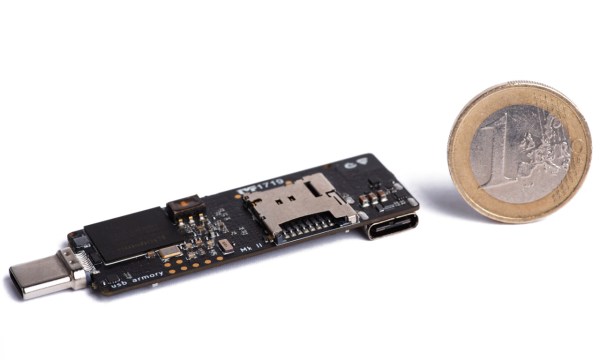
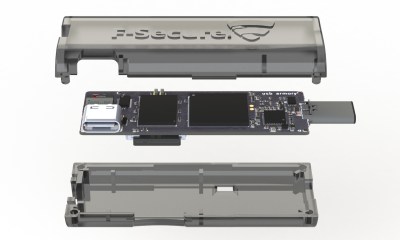
While it might look like a disrobed flash drive or RTL-SDR dongle, the USB Armory Mk II is actually a full-fledged open hardware computer built into the ubiquitous USB “stick” format. But more than just that, it’s optimized for security research and boasts a list of features that are sure to get the attention of any pentesters in the audience. Fine tuned thanks to the feedback developer [Inverse Path] received about the original version of the hardware, the Mk II promises to be the last word in secure mobile computing.

Compared to the original hardware, the most obvious change is the switch to USB-C. The previous USB Armory used traces on the PCB to plug directly into a USB Type-A port, but this time around [Inverse Path] has put a proper male connector on the front of the board. Nominally, the USB Armory is plugged into a host computer to provide it with power and a network connection, though it also has the ability to disguise itself as a storage or input device for more stealthy applications. There’s also a female USB-C port on the Mk II, which can be used to connect additional devices, a feature the previous version lacked.

The USB Armory Mk II is powered by an upgraded 900 MHz ARM Cortex-A7 processor, though it retains the same 512 MB of RAM from the previous version. Like the original, there’s a micro SD slot to hold the Linux operating system, but this time it’s supplemented with an onboard 16 GB eMMC chip. There’s even a physical switch that allows the user to choose which storage device they want to boot from. Other additions for the Mk II include Bluetooth connectivity, and a hardware true random number generator (TRNG).



We first brought you word of the original USB Armory back in 2014, and it’s always good to see an open hardware project thriving and iterating years later. While the $149 price tag arguably puts the MKII out of the tinkering budget for many of us, there’s clearly a market for niche devices like this and we can’t wait to see what [Inverse Path] comes up with next.

This Word Clock Has Dirty Alphanumeric Mouth

Clocks which use words to tell the time in place of numbers are an increasingly popular hacker project, but we have to admit that before seeing this gorgeous clock from [Mitch Feig], we didn’t realize how badly we wanted to see one that could curse like a sailor.

But don’t worry, the WordClock-1 knows more than just the bad words. Rather than using an array of illuminated letters as we’ve seen in previous clocks, this one uses six alphanumeric LED displays. So not only can it display the time expressed with words and numbers, but it can show pretty much any other text you might have in mind.

[Mitch] is partial to having his clock toss a swear word on the display every few seconds, but perhaps you’d rather have it show some Klingon vocabulary to help you brush up. The lack of extended characters does limit its language capabilities somewhat, but it still manages to include Spanish, Italian, French, and Croatian libraries.

The ESP32 powered clock comes as a kit, and [Mitch] has provided some very thorough documentation that should make assembling it fairly straightforward as long as you don’t mind tackling a few SMD components. Additional word databases are stored on an SD card, and you can easily add your own or edit the existing ones with nothing more exotic than a text editor. The clock itself is configured via a web interface, and includes features like RGB LED effects and support for pulling the time down from an external GPS receiver.

Of course, if you’re content with what we can apparently now refer to as “old style” word clocks, we’ve seen plenty of projects which should serve as inspiration for anyone looking to roll their own textual timepiece.

Continue reading “This Word Clock Has Dirty Alphanumeric Mouth”

A Raspberry Pi 4 Video Streaming Backpack

Were you aware that there’s a market for backpack-housed live streaming video systems, and that they can cost as much as $1600? Apparently these things are popular with social media moguls who want to stream themselves living their fabulous lives to people sitting at home watching on YouTube or Twitch. But believing that even slack jawed yokels like us should have access to the same technology, [Speedify Labs] has been working on less expensive DIY alternative based on the Raspberry Pi 4.

Now you’ll note we didn’t use the term “cheap” to describe this build. As detailed here, it’s still going to cost you around $600. You could always swap out the Sony AS-300 camera and Elgato Cam Link capture device with cheaper versions, but the goal of this project was to deliver high quality HD video that’s comparable to what the professional rigs are capable of, so those kinds of concessions were avoided.

Whatever video source your audience and budget are comfortable with, it eventually gets fed into the Raspberry Pi 4 which uses an ffmpeg one-liner to encode the video and ultimately push it out as 720p at 24 FPS, which [Speedify Labs] says seems to be about as good as the Pi can do. The operator is able to start and stop the stream at will using a Circuit Playground Express and a Python script.

Of course, the trick to all of this is getting the video stream uploaded over potentially flaky mobile networks. But as you might have guessed, that’s where [Speedify Labs] gets to flex their eponymous product: a VPN with software channel bonding that allows you to combine multiple Internet connections for higher bandwidth and reliability. With their software, the Pi is able to stream the video through two mobile phones connected to it over USB. As demonstrated in the video below, the setup was able to maintain the stream even as they walked in and out of buildings.

Our very own [Lewin Day] wrote about his experiments with streaming video over 4G on the Raspberry Pi which might be of interest to anyone looking to take their show on the road. Though if you want to get serious it would be worth taking a look at the impressive mobile streaming rig that [Jenny List] saw at the BornHack 2019 hacker camp in Denmark.

Continue reading “A Raspberry Pi 4 Video Streaming Backpack”