The Easiest Thermal Camera Build You’ll Ever See

Thermal cameras are one of those tools that we all want, but just can’t justify actually buying. You don’t really know what you would do with one, and when even the cheap ones are a couple hundred dollars, it’s a bit out of the impulse buy territory. So you just keeping waiting and hoping that eventually they’ll drop to the price that you can actually own one yourself.

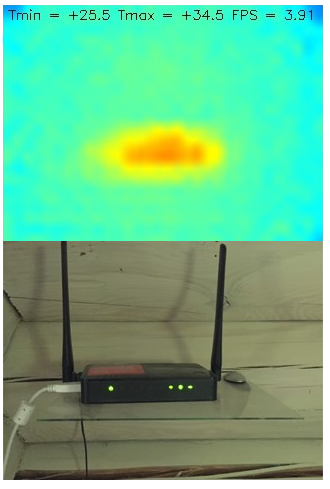
Well, today might be the day you were waiting for. While it might not be the prettiest build, we think you’ll agree it can’t get much easier than what [vvkuryshev] has put together. His build only has two components: a Raspberry Pi and a thermal camera module he picked up online for about $80 USD. There isn’t even any wiring involved, the camera fits right on the Pi’s GPIO header.

Of course, you probably wouldn’t be seeing this on Hackaday if all he had to do was just buy a module and solder it to the Pi’s header. As with most cheap imported gadgets, the GY-MCU90640 module that [vvkuryshev] bought came with some crusty Windows software which wasn’t going to do him much good on the Raspberry Pi. But after going back and forth a bit with the seller, he was able to get some documentation for the device that put him on the right track to writing a Python script which got it working under Linux.

The surprisingly simple Python script reads a frame from the camera four times a second over serial and run it through OpenCV. It even adds some useful data like the minimum and maximum temperatures in the frame to the top of the image. Normally the script would output to the Pi’s primary display, but if you want to use it remotely, [vvkuryshev] says he’s had pretty good luck running it over VNC. In fact, he says that with a VNC application on your phone you could even use this setup on the go, though the setup is a bit awkward for that in its current incarnation.

This isn’t the first DIY thermal camera build we’ve seen, and it isn’t even the first one we’ve seen that leveraged a commercially available imaging module. But short of buying a turn-key camera, we don’t see how it could get any easier to add heat vision to your bag of tricks.

Teardown Of A Luxury Bluetooth Nightlight

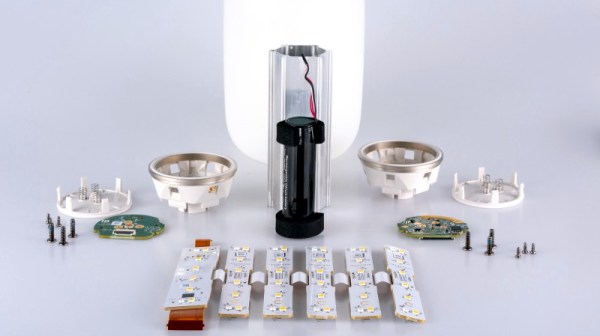
If you had asked us yesterday what peak nightlight technology looked like, we might have said one of those LED panels that you stick in the outlet. At least it beats one of those little wimpy light bulbs behind the seashell, anyway. But after looking at a detailed teardown of the “Glow Light” from Casper, we’ve learned a lot about the modern nightlight. Such as the fact that there are adults who not only sleep with nightlights, but are willing to pay $89 USD for one.

But more importantly, as [Tyler Mincey] demonstrates in his excellent look inside one of these high-end nightlights, they are gorgeous pieces of engineering. Even if a nightlight next to the bed has long since gone the way of pajamas with feet on them for you personally, we think you’ll be impressed just how much technology has gone into these softly glowing gadgets.

On the outside they might look like marshmallows, but the insides look far more like what you’d expect from an expensive piece of consumer gear. It’s based on the Nordic nRF52832 Bluetooth SoC which is becoming an increasingly common sight in consumer gadgets, and uses an inertial measurement unit (IMU) to detect when it’s moved or twisted and adjusts the light output accordingly. If you’ve got the disposable income for two of these things, they’ll even synchronize so that twisting one will dim its counterpart.

The teardown that [Tyler] did on the Glow Light is quite frankly one of the best we’ve ever seen, and while it might be a bit light on the gritty technical details, it more than makes up for that with the fantastic pictures that are about as close to actual hardware porn as you can get. The only question we have now is, how long until a hacker replicates this design with a 3D printed enclosure and an ESP?

[Thanks to Adrian for the tip.]

Teardown: AppLights Personalized Projection

Listen, it hurts to hear, but somebody needs to say it. It’s over, OK? You’ve got to admit it and move on. Sure, you could get away with it for a week or two in January, but now it’s just getting weird. No matter how hard you fight it, the facts are the facts: the holidays are over. It’s time to pack up all those lights and decorations before the neighbors really start talking.

Fun Fact: It can’t actually do this

But don’t worry, because there’s an upside. Retailers are now gearing up for their next big selling season, which means right now clearance racks the world over are likely to be playing home to holiday lights and decor. That wouldn’t have been very interesting to the average hacker or maker a few years ago, after all, there’s only so much you can do with a string of twinkle lights. But today, holiday decorations are dripping with the sort of high-tech features you’d expect from gadgets that are actively aiming to be obsolete within the next ten months or so.

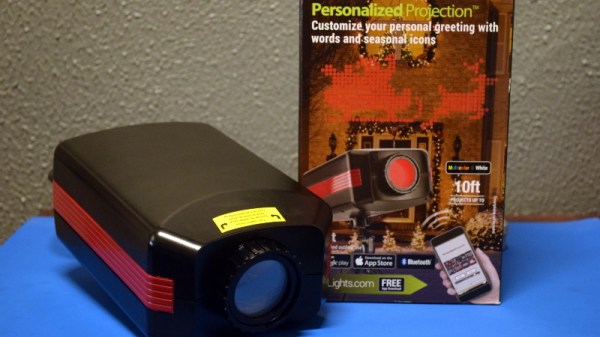
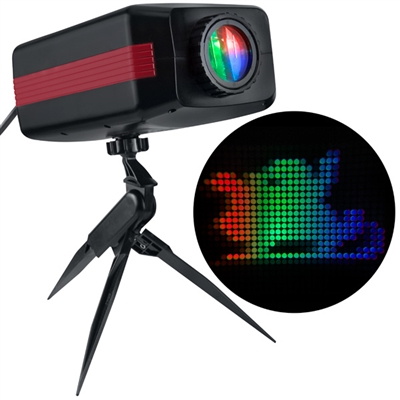
Case in point, the “AppLights Personalized Projection” which I found sulking around the clearance section of the Home Depot a couple weeks back. This device advertises the ability to project multi-color custom messages and animations on your wall, and is configured over Bluetooth with a companion application on your Android or iOS device. At a minimum we can assume the device must contain a fairly powerful RGB LED, an LCD to shine the light through, and some sort of Bluetooth-compatible microcontroller. For $20 USD, I thought it was worth taking a shot on.

Around this time last year, the regular Hackaday reader may recall I did a teardown for a Christmas laser projector. Inside we found red, green, and blue lasers of considerable power, as well as all the optics and support hardware to get them running. It was a veritable laser playground for $14. Let’s see if the AppLights projector turns out to be a similar electronic cornucopia, and whether or not we’ve got a new Hackaday Holiday tradition on our hands.

Continue reading “Teardown: AppLights Personalized Projection”

Ten 3D Printed Gadgets That Just Can’t Stay Still

There was a time, not so very long ago, when simply getting a 3D printer to squirt out an object that was roughly the intended shape and size of what the user saw on their computer screen was an accomplishment. But like every other technology, the state of the art has moved forward. Today the printers are better, and the software to drive them is more capable and intuitive. It was this evolution of desktop 3D printing that inspired the recently concluded 3D Printed Gears, Pulleys, and Cams contest. We wanted to see what hackers and makers can pull off with today’s 3D printing tools, and the community rose to the challenge.

Let’s take a look at the top ten spinning, walking, flapping, and cranking 3D printed designs that shook us up:

Continue reading “Ten 3D Printed Gadgets That Just Can’t Stay Still”

Blink An LED On The Internet Of Things

Blinking an LED is generally considered the hardware equivalent of the classic “Hello World” project. It’s a quick and simple test to show that you’ve got the basics worked out, and a launching point for bigger and better things. So why should it be any different in this glorious new Internet of Things era?

The “WiFi HDD LED” created by [Limbo] is essentially just that, a status LED that can be triggered remotely thanks to the WiFi capability of the ever-popular ESP8266. Don’t think there’s much use for a wireless LED that blinks when your computer’s hard drive is thrashing around? Maybe not, but it’s definitely worth checking out if you’re looking for a good way to get your feet wet in the world of ESP hacking.

On the hardware side, this is exactly what you’d expect: an LED hanging off the digital pin of an ESP8266 module. If you go with the bare ESP-01 like [Limbo], things are somewhat more complex due to the need for a voltage regulator, but if you’re using one of the more common ESP development boards then there’s nothing else you need to add. Really, as a proof of concept you could even use the built-in LED on those boards.

As you might imagine, this project is more about the software than the hardware. The code on both sides of the equation has been released as open source for your hacking pleasure, and is more capable than you’d probably expect. The LED is actually an extension of a system activity monitor that [Limbo] had previously developed and includes a binding function to make sure you’re talking to the right blinking ESP. It’s probably overkill for many purposes, but it’s a good example of how to do more robust UDP connections than we’re used to seeing.

This project is one of many that prove there’s more than one way to accomplish a particular goal, and that there’s something to be learned from even the most eccentric of hacks.

Continue reading “Blink An LED On The Internet Of Things”

A Raspberry Pi Grimoire For The Command Line Wizard

Who says there’s no such thing as magic? Not anyone who knows what a Unix pipe is, that’s for sure. If you do some of your best incantations at a blinking cursor, this scratch-built Raspberry Pi Zero “Spellbook” laptop created by [Calvin] might be just what the apothecary ordered. Lucky for us, he was kind enough to document the design and construction of this penguin-powered tome for anyone else who wishes to dabble in the GNU Dark Arts.

In the series of videos after the break, viewers have the opportunity to watch a project go from idea to final product. The first video was uploaded nearly a month before the project was completed, and goes over some of the design elements of the project as well as different ideas [Calvin] had in terms of things like component placement. Throughout the video, he illustrates his ideas in TinkerCAD, which might not have been our first choice for a project this complex, but it does go to show what’s possible in the free web-based CAD package.

By the second video, [Calvin] has printed some parts and now has the hardware coming together. The general idea is that the outside panels of the “book” are made out of steel cut from the side panel of an old computer, with the 3D printed components taking the form of spacers between the electronic components. These plastic “pages” are not only easier and faster to print than a complete case, but help sell the appearance of the book when viewed from the sides.

[Calvin] has shared his TinkerCAD design so that others can print out the necessary components for the book, though you’ll have to source your own steel plates. He also breaks down all the principle components he used and gives links to where you can buy them, from the display and keyboard down to the screws and standoffs. He went with the Pi Zero and sticks to mainly console work, but if you want something with enough power to throw around a graphical environment, he says there’s room in the case for a Pi 3.

Hackers seem to enjoy hiding hardware inside of books, PLA or otherwise. We’ve recently seen an iPad nestled snugly into a notebook, and of course no house would be complete without a book doubling as a hidden switch.

Continue reading “A Raspberry Pi Grimoire For The Command Line Wizard”

Would You Like To Play A Game? WOPR Summit Is This Weekend

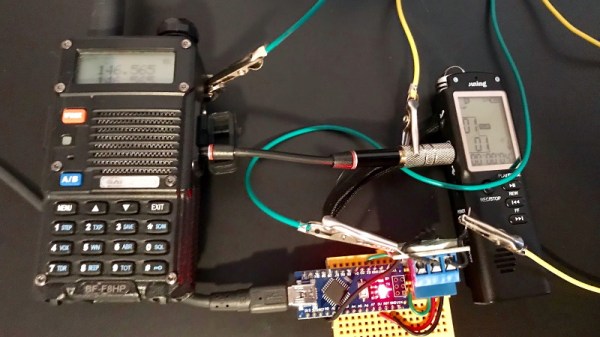
During the summer months it might be known as “America’s Playground”, but around this time of year, Atlantic City is generally the destination of choice for bus loads of seniors looking to burn up some of that fixed income. Of course, that was before the WOPR Summit came to town. From March 1st to the 3rd, it promises to transform Bally’s Hotel and Casino on the famous Atlantic City Boardwalk into a high-tech oasis in a sea of oxygen tanks and walkers. There might not be any fun in the sun to be had at this time of year, but a full schedule of talks and workshops covering everything from penetration testing to ham radio is more our speed anyway.

There’s still a couple days to register for WOPR online at a discount, but naturally they’ll be happy to take your money at the door if you miss the cutoff. As of this writing, there’s even still rooms left at Bally’s for the special WOPR rate, which you’ll probably want to take advantage of as the schedule has events running until well past our normal bedtime.

WOPR looks like it will be a nice mix between hardware and software, with a generous sprinkling of InfoSec. Presentations such as “Strategies for your projects: Concept to Prototype” and “Being Q. — Designing Hacking Gadgets” sound like classic Hackaday fare. But even if you aren’t normally into the security scene, talks such as “Ham Hacks: Breaking into Software Defined Radio” and “An Introduction to IoT Penetration Testing” seem like they’ll be an excellent way to cross the divide. In between the talks, they promise to have a hackerspace up and running for you to check out, complete with soldering classes and contests.

It’s not often that you get to witness the birth of a new hacking conference, especially one on the East Coast, so Hackaday will be shaking off the last bits of our long winters nap as I catch the next bus out of the Senior Center that’s headed towards the Boardwalk. Track me down and you might even be able to take some of our Jolly Wrencher stickers home along with your slot machine winnings. But even if you can’t make it to America’s rather chilled and blustery playground this weekend, I’ll be sure to report on all the highlights so you can live vicariously through the comforting flicker of your favorite screen.