Wooden Piano Keys Hold Your Less-Wooden, Not-Piano Keys

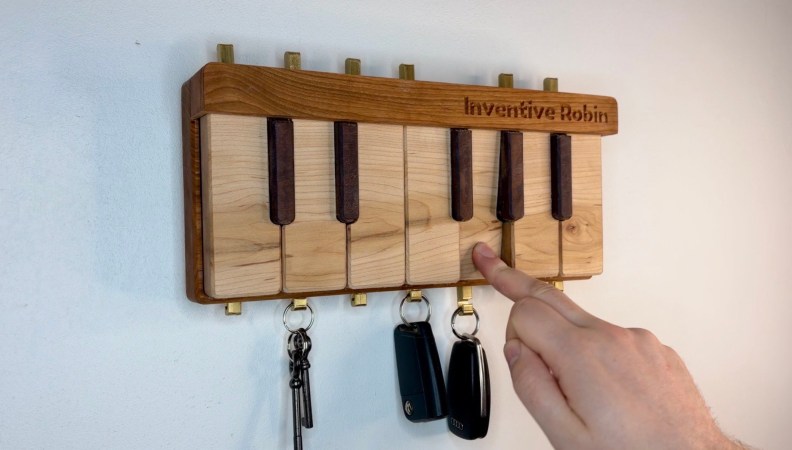
There are many ways to deal with keys: a bowl next to the entryway, a junk drawer, or you can just leave them in your pockets and hope you remember to check on Laundry Day. [Inventive Robin] has come up with his own, unique take on the key holder concept: he’s got piano keys to hold his car keys, CNC’d out of some nice hardwoods.

Of course, it’s not just a fake one-octave piano with hooks glued to it; that wouldn’t be quite enough to catch our fancy. There’s a mechanism hidden under the “white” keys– made of maple– that lowers the brass hooks when you press the, er, wooden actuator, so you can retrieve your, uh, lock-openers. Keys, that is. They’re both keys, of different sorts, because English is a wonderful language. In any case, pressing the maple key a second time lifts the brass hook, trapping the likely metal key hanging on it.

The mechanism was carved from acetyl sheet on the same Shapoko CNC machine that handled the wood, and was assembled with purchased metal rods, springs, and some plastic standoffs. It’s very satisfying to watch it work unenclosed, so check out the build video embedded below to see that in action– jump to 4:46 if you don’t want to get the whole design brief.

It’s not the most complex of hacks, but it’s beautifully done inside and out, and [Robin] is clearly happy with the result. It’s nice enough that visitors might want to photograph the key holder, but perhaps have them do it sans keys– those photos could potentially be a security risk.

Continue reading “Wooden Piano Keys Hold Your Less-Wooden, Not-Piano Keys” →

A wooden doll with a long nose that has nothing to do with Disney

Bavarian Court Tells Gemini It Can’t Be A Real Boy Until It Tells The Truth

Does anyone like Google’s AI summaries? If so, they weren’t on the Judge’s bench in a specific Bavarian courtroom recently, where it was ruled that yes, Google is liable for the hallucinations of its search engine AI.

This was a civil case brought by a pair of Munich companies, both of whom were wrongfully slandered by LLM hallucinations. Google took the position that this information must have existed somewhere, and like presenting links to libelous websites — something they have no obligation to avoid — they should not be held accountable for what the summary at the top of the search results says.

Continue reading “Bavarian Court Tells Gemini It Can’t Be A Real Boy Until It Tells The Truth” →

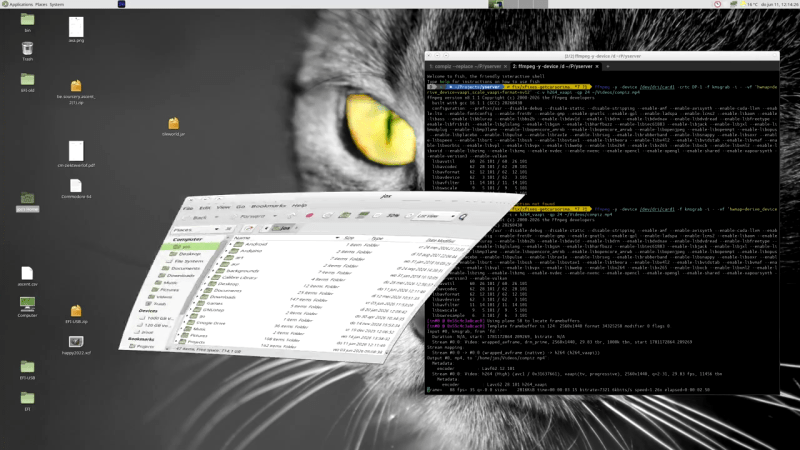
yserver screenshot demonstrating compiz comptibility

Why Not Yserver? It’s Xserver, But Rust-y.

If you’re not into Wayland as a display manager, it seems like your options are slowly dwindling. Xorg isn’t exactly a hotbed of activity, and the one fork everyone knows about is best known as a political lightning rod. Luckily, Rust developers can apparently never see a tool without pulling it into their heavily oxidized bucket of crabs, so we now have another option: the creatively named yserver, released under the MIT license by [joske].

The name, yserver, for the record, is just a placeholder name, but we rather like the simple logic of “Y comes after X” — sure, you could call it X12, but that could imply continuity, and this is a clean break. It’s also not a full reimplementation of the huge, sprawling mess that Xorg has become over the decades. It can’t launch multiple screens and thus lacks full multi-monitor support. So, for now, it may be too bare-bones for some people’s use cases.

As it uses Vulkan, it is limited to relatively modern hardware, but has been tested on Intel, AMD, Nvidia, and Apple chips. The target kernel is good old Linux, but the docs do cover compiling for FreeBSD; just be aware that that’s very much a secondary target. FreeBSD users are probably used to that, though.

On Linux, a standalone DRM/KMS yserver can successfully run not just window managers but full desktops — specifically MATE, Cinnamon, and XFCE, as they’re not on the Wayland bandwagon. It even supports Compiz, in case you missed the cube and wiggly window animations. You can also use yserver via Xwayland or even Xorg. Speaking of Xorg, [joske] has run the X.Org X Test Suite (xts5) against this proposed successor, and it currently scores 66.2%, which seems pretty good considering the project explicitly does not plan to copy all of Xorg’s functionality.

Aside from multiple screens, one thing that would have been neat to see is support for the Asterinas rust-based Linux-compatible kernel — though if that project achieves full Linux compatibility, that may be a non-issue. Even if you aren’t an oxidization enthusiast, you might find reasons to be happy to see more competition in the display-manager market — after all, Wayland Will Never Be Ready For Every X11 User. If Xorg really is destined to the slow death critics predict, perhaps yserver could cover the holdouts.

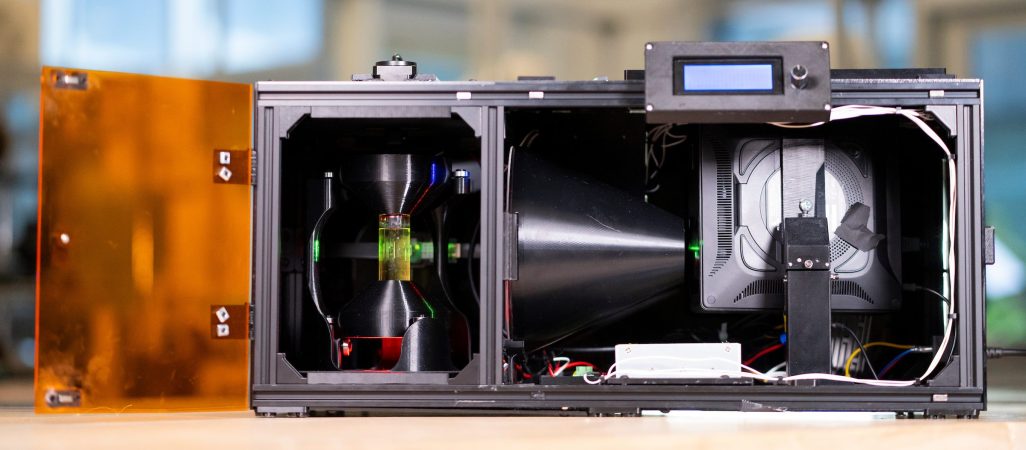
The OpenCAL printer, projector on the right, print volume on the left.

OpenCAL: Computed Axial Lithographic 3D Printing For Everyone

Computed Axial Lithographic printing gets even closer to the Star Trek replicator fantasy than any other 3D printer we’ve seen: there’s a machine, it glows with a mysterious bluish light, and an object appears. OK, the object is appearing inside a spinning vat of photochemical ooze, not in thin air, but that’s a detail. It’s still very cool tech, and now it’s open source enough to replicate with full documentation and a GitHub repository.

This project is descended from the same Berkeley research that we featured last year, but at that point, they were inviting everyone to join their Discord server, and that was about it. At the time, we put on our old man outfit to yell at clouds and say, “A Discord shouldn’t count as open source!” For once, it looks like those geriatric grumblings were heeded. There is still a corporate-hosted chat server named for a malignant goddess, and you’re still invited, but now there’s also actual, searchable documentation!

Continue reading “OpenCAL: Computed Axial Lithographic 3D Printing For Everyone” →

Is A CS Degree DOA Thanks To LLMs? IEEE Says TBD.

The ongoing AI apocalypse is hitting prices for high-end components from RAM to GPUs to storage hard, which is bad enough when you have a job to try and budget for those now-pricier items — but what if you don’t? Once upon a time, it might have been good advice to tell a jobless friend to “learn to code,” but is that still true in the era of AI? [Brian Jenney], writing for IEEE Spectrum, says the death of the CS degree has been vastly exaggerated, but your take might differ. Let’s look at the numbers.

Unemployment is higher amongst new Computer Science grads than ever: in the US, it’s at 6.1%, while 7.5% of Computer Engineering graduates are on the dole. That’s a record high, and while various EU countries have their own numbers, they all have one thing in common: they’ve all shot up like a rocket in the past few years. In the USA, Philosophy grads report only 3% unemployment. Let that sink in: the folks you used to bully as being the most useless on campus are twice as likely to get a job as you would be if you were in school today.

Continue reading “Is A CS Degree DOA Thanks To LLMs? IEEE Says TBD.” →

It's rare to see an A1200 case fuller than this.

Amiga 1232 Storm CD Packs Every Upgrade Into One Wedge

You know what they used to say– once you go Commodore, you’ll never leave by any door. Well, they might not have said that, but given the prevalence of projects still using Commodore-branded systems decades after the company’s demise, perhaps someone should have. A case in point is [Jit06] with this writeup on his Ultimate Amiga 1200 — or “Amiga 1232 Storm CD”– which crams just about every upgrade you might think of into the 1990s wedge computer.

Of course it has the PiStorm 32, with a CM4 providing supercomputer performance, at least by A1200 standards. That’s rather old hat, though, and it’s everything else crammed into the old Commodore that takes the score. For one thing, there’s a slot-loading, slim-form DVD drive from an old laptop that’s been incorporated so smoothly it almost looks factory. Ditto for the compact flash card slot, which is also on the IDE bus. The two share a custom IDE cable– yes, kids, we did used to roll our on 44-pin cables back in the day, but you’d better believe no one did it unless they really had to. With the space constraints inside the A1200 case, [Jit06] falls into that category.

The optical and CF cards trigger the drive LED on the Amiga case by default, but [Jit] wanted to see access on the PiStorm’s SD card as well, so he wired a couple of red LEDs to the default lightguide to get a colour-contrasting flash. That SD card is also broken out with an extender for easy access without opening the case– and once again, it looks almost as good as stock. So does the modded-on VGA port, which is stealing space that once belonged to the Amiga’s RF modulator and fed by a ScanPlus AGA board.

The only thing that really stands out as modded is the volume knob on the floppy-drive side of the case; that controls a mixer that sits between the CD audio and Paula, the Amiga’s custom sound chip. This lets him use the A1200 as a CD-32 system, and is very handy to have as CD-32 games used CD audio tracks that apparently were not well mixed with the digital audio in the games.

With all the cutting and soldering, this is not a reversible mod, something people are becoming much more concerned with as these machines slowly increase in rarity. Still, as a quality-of-life improvement, this sort of upgrade might be worth it if can keep the old A1200 relevant for another three decades. For anyone else who never got over the Amiga bug, he’s also published a linux-native SD-card creator called emu68 bootstrap on github to help with making images for the PiStorm.

Thanks to [Jit] for the tip! With the easy OS-swapping he’s enabled with the SD-breakout, there’s no reason not to try the rediscovered Amiga Unix. If you want the same without cutting into a vintage case, the PiStorm can be a sidecar.

Continue reading “Amiga 1232 Storm CD Packs Every Upgrade Into One Wedge” →

Process 4 Billion Pixels Per Second From 16 DIY Cameras For The Best V-Tubing Rig Ever

[Dennis] is on YouTube with his channel “Made By Dennis,” but for the record he is a maker, not a V-tuber. On the other hand, his latest project– creating a profesisonal-level tracking rig with DIY IR cameras and a whole lot of moxie–does mean he’s now equipped to make the move to the prestigious, high-status world of pretending to be an anime girl.

That is of course not why he did it. Like most projects around here, the motivation was more a case of “I wonder if I can…”– in this case [Dennis] wondered what it would take for him to pull off the same sort of optical motion capture, or MoCap, that is used in Hollywood studios. Optical mocap has the advantage of being very precise, able to track things at high speeds, and not being in any way limited to the human form like the slew of AI-assisted methods hitting the market right now. The disatvantage is that you need to place markers on any part of your subject you want tracked, film them from all angles, and process a whole lot of pixels. In [Dennis]’s case, it ended up being about four billion. Keeping in mind that actually locating those points in 3D space is dependent on knowing exactly where your cameras are: if you want sub-millimeter precision, your cameras need to be fixed with sub-millimeter tolerance. It’s a big project, hence a long video, which is embedded below.

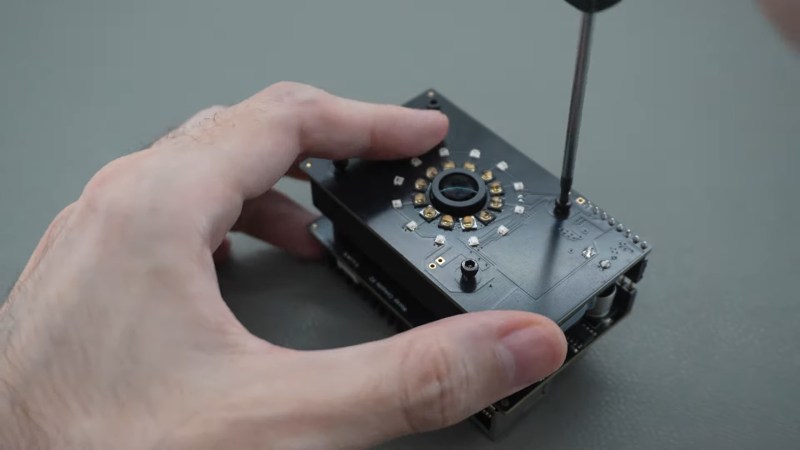
The DIY cameras use a AR0234 MIPI camera on a custom PCB with M12 lenses and IR filters. To improve the signal-to-noise ratio on optical MoCap, it’s standard to use near-IR light. The camera boards, as you might expect given the MIPI interface, hook into Raspberry Pi compute modules– the cheapest CM4 should work, though he’s using CM5s. The compute modules sit on custom boards that provide PoE, and some other niceties– like a small microcontroller driven by the pulse-per-second pin to help trigger the cameras in sync.

Each camera gets a ring light of near-IR LEDs that pulse at 160 W, which would be way more than PoE is specced to provide, but since the LEDs are only on when the camera is taking a frame, the average power is well within allowable limits. With 16 cameras each having their own ring light, that’s a lot of near-IR photons. Don’t forget your safety squints!

Rather than process the images with OpenCV, he has his own custom solution optimized for this use-case that [Dennis] reports is 300x faster. Luckily, he’s put his implementation on GitHub, along with the rest of the project. Even if you don’t have any v-tubing ambitions, this project is very impressive and worth checking out in its entirety.

Optical MoCap isn’t the only game in town, of course. If you want to do this cheap and easy, you can strap a bunch of IMU sensors to yourself– just don’t expect the same precision.

Thanks to [Dennis] for the tip!

Continue reading “Process 4 Billion Pixels Per Second From 16 DIY Cameras For The Best V-Tubing Rig Ever” →