$79 Smart Mirror Uses Raspberry Pi

[Nathan] wanted a smart mirror that cost less than the last one he built, which was about $500. He decided that you don’t see more smart mirrors because of the high cost. His latest build came in at only $79 (you’ll have to visit the blog’s home page to find the entire series).

The most expensive piece of the build is a 7-inch monitor ($45). Any Raspberry Pi will work, although [Nathan] uses a Pi B+. Although he managed to score a free one-way mirror from a local glass shop, you can buy one for about $13.

This is the kind of project that isn’t a big technical challenge. After all, it is a one-way mirror with an LCD screen behind it. However, getting the screen blacked out and set to provide the best possible effect is the trick and [Nathan’s] techniques will give you a head start.

You can see the mirror in the video below. We’ve seen smart mirrors that sense your presence as well as wireless mirrors before.

Continue reading “$79 Smart Mirror Uses Raspberry Pi” →

A Lucky Antenna

Antennas come in all shapes and sizes, and which one is best depends wholly on what you are doing with it. A very popular choice for sending video from drones is the cloverleaf antenna. It is circularly polarized which is an advantage when you have a moving vehicle. It also reduces multipath interference.

A cloverleaf contains three closed loops spaced at different angles. The antenna works well for transmitting but isn’t ideal for receiving. It is also difficult to tune after building it. However, for the right job, it is a good performer. [Vitalii Tereshchuk] shows how he made a cloverleaf antenna that fits a WiFi router.

Continue reading “A Lucky Antenna” →

Adding Spice To Your Workbench

Most of us didn’t fight in World War II, drive a race car, or fly the Space Shuttle. But with simulation, you can experience at least some of what it would be like to do those things. Granted, playing Call of Duty isn’t really the same as going to war. No matter what you are simulating, it only goes so far. However, you can get a lot of value from a simulation. I’d bet the average kid who has played Call of Duty knows more about WWII locales and weapons than my high school history teacher.

When it comes to electronics, simulation is an excellent way to get insight into a circuit’s operation. After all, most circuits operate in the abstract–you can’t look at an audio amplifier and see how it works without a tool like a scope. So simulation, when done well, can be very satisfying. You just have to be careful to remember that it isn’t always as good as the real thing.

That’s Spicy

One of the best-known electronics simulators is Spice, which Berkeley created in 1973. In its original form, you had to punch cards that described your circuit and the analysis you wanted to perform. Modern PC versions sometimes replace the deck of cards with a text file. The best modern versions, though, give you a GUI that allows you to draw a schematic and then probe it to see the results.

There are several paid and free versions of Spice (and other simulators) that include a GUI. One of the best for a casual user is the free offering from Linear Technology called LTSpice.

Linear makes LTSpice available and populates it with models for their devices in the hopes you’ll buy components from them. However, the software is entirely usable for anything, and it has a powerful set of features. Linear produces the software for Windows, but I can attest that it runs just fine under Wine on Linux. The Web site will invite you to register, but you don’t have to if you don’t want to.

Continue reading “Adding Spice To Your Workbench” →

Variable Stiffness Joints For Robots And More

The human body has many miraculous capabilities that we often take for granted. One of the more subtle ones is the variable stiffness of your joints. In technical terms, stiffness refers to the ability to resist a load. Delicately manipulating an artist’s paint brush, for example, doesn’t require much load resistance, but does require fine control. However, that same artist might pick up a bowling ball with a stiffer joint (and, usually, less fine control).

[Christopher Churchill] and some colleagues have a novel mechanical device that can rapidly change stiffness. The device could have applications in robotics and other devices. It can also transmit or attenuate vibration since non-stiff joints don’t pass vibrations as easily as stiff ones.

Continue reading “Variable Stiffness Joints For Robots And More” →

The Internet Of Linux Things

The Linux Foundation is a non-profit organization that sponsors the work of Linus Torvalds. Supporting companies include HP, IBM, Intel, and a host of other large corporations. The foundation hosts several Linux-related projects. This month they announced Zephyr, an RTOS aimed at the Internet of Things.

The project stresses modularity, security, and the smallest possible footprint. Initial support includes:

  • Arduino 101
  • Arduino Due
  • Intel Galileo Gen 2
  • NXP FRDM-K64F Freedom

The project (hosted on its own Website) has downloads for the kernel and documentation. Unlike a “normal” Linux kernel, Zephyr builds the kernel with your code to create a monolithic image that runs in a single shared address space. The build system allows you to select what features you want and exclude those you don’t. You can also customize resource utilization of what you do include, and you define resources at compile time.

By default, there is minimal run-time error checking to keep the executable lean. However, there is an optional error-checking infrastructure you can include for debugging.

The API contains the things you expect from an RTOS like fibers (lightweight non-preemptive threads), tasks (preemptively scheduled), semaphores, mutexes, and plenty of messaging primitives. Also, there are common I/O calls for PWM, UARTs, general I/O, and more. The API is consistent across all platforms.

You can find out more about Zephyr in the video below. We’ve seen RTOS systems before, of course. There’s even some for robots. However, having a Linux-heritage RTOS that can target small boards like an Arduino Due and a Freedom board could be a real game changer for sophisticated projects that need an RTOS.

Continue reading “The Internet Of Linux Things” →

Lego Nuclear Reactor Uses Arduino

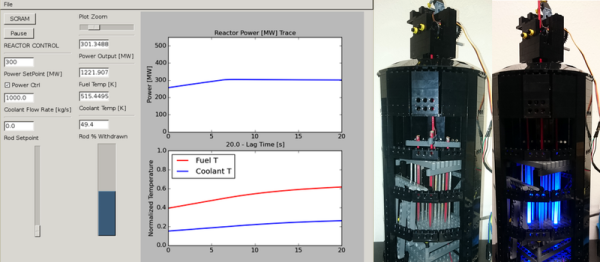
Before the NSA deletes this post, we’ll be clear: We’re talking about a model of a nuclear reactor, not the real thing. Using Legos, [wgurecky] built a point kinetic reactor model that interfaces with the reactor simulator, pyReactor.

Even without the Lego, the Python code demonstrates reactor control in several modes. In power control mode, the user sets a power output, and the reactor attempts to maintain it. In control rod mode, the user can adjust the position of the control rods and see the results.

If things get out of hand, there’s a SCRAM button to shut the reactor down in a hurry. The Lego model uses an Arduino to move the rods up and down (using a servo) and controls the simulated Cherenkov radiation (courtesy of blue LEDs).

We’ve been excited to see more high schools with significant engineering programs. This would be a good project for kids interested in nuclear engineering. It certainly is a lot safer than one of our previous reactor projects.

Ski Buddy Jacket Uses Arduino To Teach Youngsters To Ski

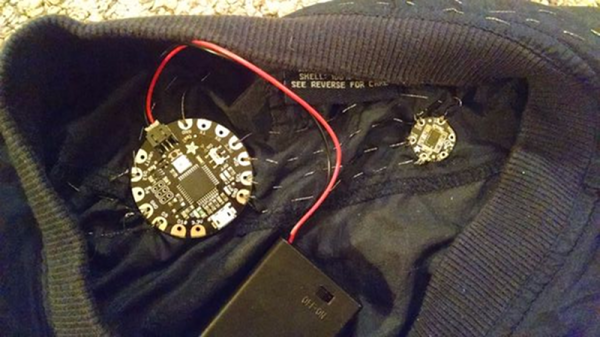
Snow skiing looks easy, right? You just stay standing, and gravity does the work. The reality is that skiing is difficult for beginners to learn. [19mkarpawich] loves to ski, but he was frustrated seeing crying kids on skis along with screaming parents trying to coach them. Inspired by wearable electronics, he took an Arduino, an old jacket, some LEDs, and created Ski Buddy.

Continue reading “Ski Buddy Jacket Uses Arduino To Teach Youngsters To Ski” →