Commodore C16 Resurrection With A Raspberry Pi

[lactobacillusprime] had a non-working Commodore C16 and too many Raspberry Pi computers, so he decided to bring the C16 back to life by emulating it on the Pi. At the heart of the project is the Pi, along with a small board that converts the old style Commodore keyboards (and joysticks) to a USB port.

Once you have the keyboard as a USB port, the rest of the project is more or less mechanics and software. [lactobacillusprime] did a nice job of getting everything in the new case, along with all the I/O wires routed through the existing ports. For software, Emulation Station does the job of launching the Commodore emulation on the Pi.

Of course, there’s no reason to limit yourself to just the Commodore emulator. Emulation Station along with the right back end emulators will allow this machine to play games that no real Commodore C16 could.

Of course, we were happiest to see him boot up Commodore 64 BASIC. Perhaps we should complete all those half finished C64 BASIC projects we started back in the 1980’s. In general, we hate to see old computers gutted instead of repaired, but at least this one will continue running its software. If you are upset about seeing a machine gutted,  you can always switch over to our previous coverage of putting Commodore guts in a new box.

Continue reading “Commodore C16 Resurrection With A Raspberry Pi”

Hacking An SD Slot For WiFi

Back in the 1990’s moving files via a floppy disk was known as “sneaker net.” While floppies are a thing of the past, SD Cards are the modern equivalent and they still lend themselves to sneaker net operations.

But why? WiFi is everywhere now. Wouldn’t it be great if you could hack those devices with SD slots to use WiFi? Apparently 3D printer [extrud3d] thought the same thing and found a way to reconfigure a Toshiba FlashAir card to put his 3D printer on the network.

The card is aimed at consumers, so by default it creates a hotspot and waits for a connection, a rudimentary web app allows you to move files back and forth over the network to the SD card which is then read by the host device. However, [extrud3d] shows how to modify a file on the SD card’s file system to allow the device to hook up to an existing wireless network and also provides a Python script to make the file transfer easier.

Although this hack is for a 3D printer, it ought to work with most devices that have a full sized SD slot (or can be adapted to take a full sized card). Since the hack is nothing more than changing a text file, it is a lot easier than some other SD hacks we’ve covered. Over on hackaday.io, [Chris Jones] has recently done some hacking on the FlashAir and has a list of its shell commands if you want to go beyond the text file hacks.

Continue reading “Hacking An SD Slot For WiFi”

Hacking A NRF24L01 Radio For Longer Range

[RonM9] wasn’t happy with his 50 foot range on his NRF24L01 project. The RF had to cut through four walls, but with the stock modules, the signal was petering out after two or three walls.  A reasonably simple external dipole antenna managed to increase the range enough to do the job.

[RonM9’s] instructions show where to cut away the existing PCB antenna and empirically tune the 24 gauge wire for best performance. He even includes an Arduino-based test rig so you can perform your own testing if you want.

Continue reading “Hacking A NRF24L01 Radio For Longer Range”

Panel-Mounted Breadboard Accessories

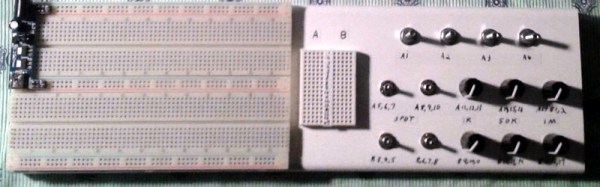
[Chuck Stephens] grew up with Radio Shack 100-in-1 electronic kits. The ones with lots of components and spring terminals that could be wired to be a radio, a burglar alarm, or whatever.[Chuck] graduated to solderless breadboard, but did miss having panel mounted components like pots and switches easily available. So he has been building his own accessory boxes.

Of course, it is easy enough to just connect breadboard wires to component, but [Chuck] went further than that. Using boxes of different types (including a cigar box), he mounted the components properly and also wired them to a breadboard for easy connection.


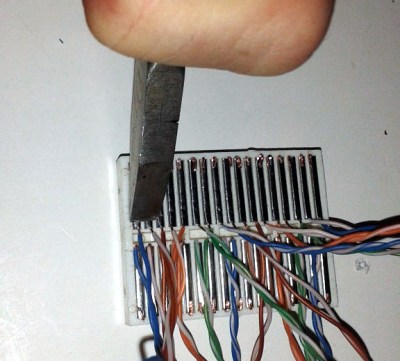
If you’ve ever tried to solder to breadboard springs (we have), you’ve found it is hard to get adhesion to the shiny metal. [Chuck] solved the problem by crimping little wire hooks to the springs. The result is a good looking and functional prototyping aid.

They do make tiny breadboard style contacts (called tie point blocks; good luck finding them) for this kind of application, but the crimp technique works on common breadboards. These are cheap and much easier to find.

Of course, these days, we are as likely to want to mount SMDs than panel mounted controls. Now if we could only figure out where to put the components. If you want something less involved, take a look at the video below.

Continue reading “Panel-Mounted Breadboard Accessories”

Becoming A State Machine Design Mastermind

Imagine a robot with an all-around bump sensor. The response to the bump sensor activating depends on the previous state of the robot. If it had been going forward, a bump will send it backwards and vice versa. This robot exhibits behavior that is easy to model as a state machine. That is, the outputs of the machine (motor drive) depend not only on the inputs (the bump sensor) but also on the current state of the machine (going forward or backward).

As state machines go, that’s not an especially complicated one. Many state machines have lots of states with complex conditions. For example, consider a phone switchboard. The reaction to a phone going off hook depends on the state of the line. If the state is ringing, picking up the phone makes a connection. If the state is idle, the phone gets a dial tone. The switchboard also has to have states for timeouts, connection failures, three way calling, and more.

If you master state machines your design and debug cycles will both move along faster. Part of this is understanding and part is knowing about the tools you can choose to use. I’ll cover both below.

Continue reading “Becoming A State Machine Design Mastermind”

Arduino Powered Rubber Band Sentry Turret Is Not A Lie

You know that guy in the next cube is sneaking in when you are away and swiping packs of astronaut ice cream out of your desk. Thanks to [Kevin Thomas], if you have an Arduino and a 3D printer, you can build a rubber band sentry gun to protect your geeky comestibles. You’ll also need some metric hardware, an Arduino Uno, and a handful of servo motors.

The video shows [Kevin] manually aiming the gun, but the software can operate the gun autonomously, if you add some sensors to the hardware.  The build details are a bit sparse, but there is a bill of material and that, combined with the 3D printing files and the videos, should allow you to figure it out.

We couldn’t help but wish for a first person view (FPV) camera and control via a cell phone, so you could snipe at those ice cream thieves while hiding in the broom closet. On the other hand, if you got the gun working, adding the remote wouldn’t be hard at all. You probably have a WiFi FPV camera on your quadcopter that finally came out of that tree and there’s lots of ways to do the controls via Bluetooth or WiFi.

Not that you don’t have options. But here at Hackaday HQ, we have lots of rubber bands and not so many green pigs. If you’d rather shoot paintballs, be careful you don’t accidentally repaint the insides of your cube.

Continue reading “Arduino Powered Rubber Band Sentry Turret Is Not A Lie”

$50 Multimeter Comparison And Teardown

We remember when buying even a modest digital multimeter was a big investment. These days, you can find tool stores giving away cheap meters and if you are willing to spend even a little money, you can buy a meter with tons of features like capacitance, temperature, and other measurements.

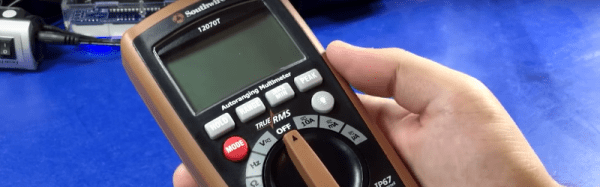
Like most things, though, you can pay a little money for a bargain, or you can overpay for a dud. To help you pick, [TechnologyCatalyst] decided to do an extensive video review of 15 different meters in the under $50 price category.

If you are looking for a quick video to watch, you might want to move along. The review is in nine videos ranging from an introduction, to a comparison of build quality, discussion about the displays on each meter, and, of course, the measurement capability of each meter. There’s even a video that shows tear downs so you can see inside the instruments.

Continue reading “$50 Multimeter Comparison And Teardown”