Sticking Up For The Stick Shift

It seems that stick shift has become a sticking point, at least for American car buyers. Throughout 2019, less than 2% of all the cars sold in the US had a manual transmission. This sad picture includes everything from cute two-seater commuters to — surprisingly enough —  multi-million dollar super cars built for ultimate performance.

But aside from enthusiasts like myself, it seems no one cares too much about this shift away from manual transmissions. According to this video report by CNBC (embedded below), the fact that demand is in free-fall suggests that Americans on the whole just don’t enjoy driving stick anymore. And it stands to reason that as more and more people live their lives without learning to drive them, there would be a decline in the number of teachers and proponents. It’s a supply and demand problem starring the chicken and the egg.

But giving up the stick is one more example of giving up control over the vehicle. It’s not something everyone cares about, but those that do care a lot. Let’s grind through the ebb and flow of the manual transmission — more lovingly called the stick shift.

Continue reading “Sticking Up For The Stick Shift”

Nintendo Switch Laptop Isn’t As BASIC As It Looks

Remember the days when computers booted up straight into a BASIC screen, where theoretically you could program yourself a full game without any further software needed? Well, in reality most of us were amused enough making it print “butts” over and over again, but there are those who are adept in the dark arts of making impressive things with such a limited language. [Bugtaro] is one of those people, and to help with his game development in SmileBASIC 4 on the Nintendo Switch, he built himself a dock that turns it into a laptop with an integrated keyboard.

Details on the build are scarce as it’s only outlined in his Twitter account, but there’s enough to give us an idea about what it’s composed of. The Switch slides into the top just like the official dock it comes with, and the laptop shell takes advantage of those functions. Inside it is a 5000 mAh battery to extend the portable life of the whole ensemble, plus a USB hub which gives it its built-in keyboard and allows for a mouse to be plugged in as well. The laptop also gives the Switch its docked TV output mode and can hold the Joy-cons slotted on its sides.

This project would pass for any other case mod here at Hackaday if it weren’t for the fact that [Bugtaro] is in fact a programmer that has been releasing BASIC software on Japanese magazines since the 1980s and worked on several cult classic Mega Drive games with Wolf Team and NexTech during the 1990s. His latest game is GIVERS P3D, a game programmed in SmileBASIC using a 3D engine of his own design and one of the flagship games for the platform. It would be interesting to see if more SmileBASIC programmers end up coming up with their own solutions to aid their development experience following this project.

If you’re interested in the possibilities of custom-made Switch docks like these but don’t fancy giving it a keyboard, how about this one that wraps a Gamecube controller around the screen? And if you don’t have a Switch yet and are looking for a bigger challenge, well, you can make your own from scratch.

[Via GoNintendo]

An Open Hardware Sega Genesis Cartridge Dumper

You might be wondering why anyone would build device to dump Sega Genesis and Mega Drive cartridges. Perhaps they want to play their well-worn copy of The Lost Vikings on their phone, or they want to keep their QVC Limited Edition Maximum Carnage box set in near mint condition. Maybe. But we’re betting that [tonyp7] was just looking for a challenge, and as an added bonus, the world gets another cool open hardware gadget in the process. Sounds like a good deal to us.

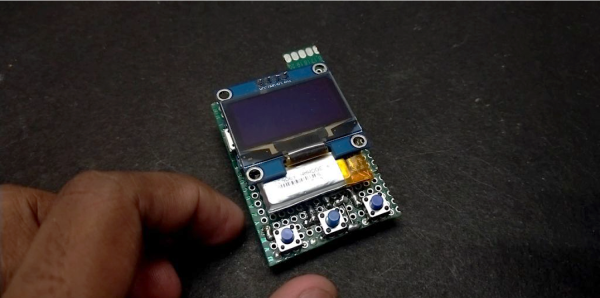
Based on the ATmega324PB, the GenDumper can take those dusty old Sega cartridges and back them up to an image file on your computer. Right now the hardware depends on a Windows program, but according to the documentation, [tonyp7] is working on a platform-agnostic Python script so everyone can play along. What you do with the image file after you’ve dumped it is your business, but presumably loading it up in an emulator would be the next step.

Considering how easy it is to find ROMs for these old games online, do you actually need a GenDumper of your own? Probably not. But it’s still an interesting piece of hardware, and if you look close enough, you just might learn a thing or two from the design. For example, [tonyp7] shows how a relatively easy to work with 12 pin USB-C connector can be used on your USB 2.0 projects to embrace the new physical connector without diving into a full USB 3.0 implementation. The keen-eyed reader might also note there’s a lesson to be learned about finalizing the name of your project before sending off your PCBs for manufacturing.

A perusal of the archive uncovered a similar project from 2012 that, believe it or not, was also tested on a copy of Madden 96. Whether that means the game is so beloved that hackers want to make sure its preserved for future generations, or so despised that they are secretly hoping the magic smoke leaks out during testing, we can’t say.

Break Time Is Calling On The Rainbow Connection

Like some of us, [Mister M] is prone to staying glued to his seat too long in this new era of working from home. And you know what they say about a body at desk — it tends to stay at desk until it absolutely must rise up to find food or use the restroom.

Thanks to this nifty new break time reminder, [Mister M] has a third call to answer that demands he get up. Every hour, the NeoPixel ring in this old dial-deficient phone fills up completely and switches over to an attention-getting rainbow animation. If [Mister M] stays seated, playtime is over. All the lights start flashing red, and the phone starts beeping incessantly until he walks across the room and either pushes the momentary button or lifts the handset to reset the timer.

We love that [Mister M] incorporated all of the phone’s original inputs and outputs into this project, because it’s such a cool old dog and bone. No need to drop a dime, just whistle at the break button to check out the build video.

This grille-faced phone was probably part of an intercom system. Incidentally, you can make an intercom system with two standard-style phones of this vintage.

Continue reading “Break Time Is Calling On The Rainbow Connection”

Arm Gives Gift To Startups: Zero Cost

Who hasn’t dreamed of pulling together some gadget in their garage and turning it into a big business? Of course, most gadgets today have a CPU in them, and Arm CPUs power just about any kind of embedded device you can think of. If you just want to use a chip, that’s easy. You buy them from a licensee and you use their tools for development. But if you want to integrate ARM’s devices into your own chips, that’s a different story. You have to pay fees, buy tools, and pay licenses on each chip you produce. Until now. Arm’s flexible access for startups program will let you apply to get all of that free.

To qualify, you have to be an “early stage silicon startup with limited funding.” Normally, flexible access costs about $75,000 to $200,000 a year and that doesn’t cover your license fees and royalties. The plan offered to qualifying startups is the $75,000 package, but that still includes access to nearly all Arm products, technical support, a few introductory training credits, and development tools. After your first tape-out, though, it looks as though you’ll have to pony up.

Continue reading “Arm Gives Gift To Startups: Zero Cost”

Measure The Speed Of A Speeding Bullet

In the study of ballistics, you can do very little without knowing the velocity of a projectile. Whether you need to hit a target at over a mile, check if a paintball gun is safe for opposing players, or photograph high-velocity objects, you need a way to measure that velocity. [td0g] enjoys the challenge of photographing bullets impacts, and has created an open-source ballistic chronograph to help achieve this.

A rifle bullet punching through a wine glass, captured with the help of the chronograph

[td0g]’s design makes use of two light gates spaced some distance apart, and the time that an object takes to travel between the two is measured and used to calculate velocity. Most commercial ballistic chronographs also work in this way. [td0g] created the light gates using pairs of infrared photodiodes and LEDs. When there is a sudden dip in the amount of light received by the photodiode, the Arduino control circuit knows that an object has passed between the photodiode and LEDs and triggers the timer. An LCD shield on the Arduino is used to control the software and display velocity. As you probably guessed, clock accuracy is very important for such time measurements, and [td0g] demonstrates a simple technique using a smartphone metronome app to manually calibrate the clock to acceptable accuracy for his purposes. Continue reading “Measure The Speed Of A Speeding Bullet”

Get Quarantine Fit With This Smart Pull-up Bar

Most gyms are closed right now due to social distancing rules, which is what we’re using as our latest excuse to justify our sloth-like lifestyle. But apparently some people miss working out enough that they’re putting together impromptu home gyms. [Michael Pick] has even outfitted his DIY pull-up station with an Arduino to keep track of his exercise while on lockdown. You may not like it, but this is what peak performance looks like.

Can you beat the HaD high score?

In the video after the break, [Michael] explains the design and construction of the bar itself which technically could be thought of as its own project. Obviously the Arduino counter isn’t strictly necessary, so if you just wanted to know how to put some scraps of wood and suitably beefy rod together in such a way that it won’t rip off the wall when you put your weight on it, this video is for you.

Towards the end of the video, he gets into an explanation of the electronic side of the project. Inside the 3D printed enclosure is an Arduino Pro Mini, a HC-SR04 ultrasonic sensor, and a 1602 serial LCD. Once the gadget has been mounted in the proper position and activated, it will count how many pull-ups [Michael] has done on the screen.

While we historically haven’t seen a whole lot in the way of homebrew exercise equipment, the current COVID-19 situation does seem to be getting the adrenaline flowing for some of you. We recently covered some DIY dumbbells made from hardware store finds that would be an excellent first project for any hackers who’ve recently been ejected from the Matrix and are trying to use their muscles for the first time.

Continue reading “Get Quarantine Fit With This Smart Pull-up Bar”