Hackaday Links Column Banner

Hackaday Links: February 1, 2026

For many readers, more snow is the last thing they want to see right now…but what if it comes in the form of an online simulator in the style of an old DOS game? Created by [Potch], it works like one of those “falling sand” simulators, with sliders that let you control various elements of the wintry action. For more a immersive experience, open the window and let some cold air in while you play.

If those old school graphics have you yearning for a simpler time, then you’ll love Places to Telnet, a page on the very slick CRT-themed telnet.org that lists servers you can connect to. The list is made up primarily of games, but there’s also systems you can call up to do things like show the weather or browse Wikipedia. They even take submissions, so if you know any interesting destinations that aren’t on the list, make sure to share with the class.

Our ability to make and use tools is one of the things that separates us from the rest of the animal kingdom, and is an ability not often seen outside of primates. But a recent paper in Current Biology describes how one cow, Veronika, has been observed using a long-handled brush to scratch herself. Apparently the clever heifer will even flip the brush around and use the handle side when she wants to really dig in there. The paper says the findings “invite a reassessment of livestock cognition”, and points out that little serious research has been done on bovine intelligence in the 10,000 or so years since humans first domesticated them. We’re just happy this paper came out when it did — that way it will be a distant memory by the time we fire up the grill in the summer.
Continue reading “Hackaday Links: February 1, 2026”

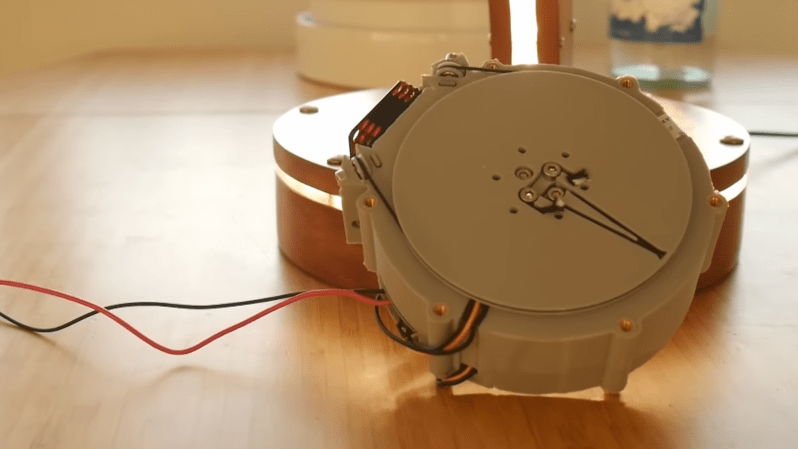
A round, 3D-printed motor housing is shown, with one flattened side holding a fan mount. A circular plate is mounted above the face of the housing, and a cord runs around it and pulleys on the side of the housing.

Tying Up Loose Ends On A Rope-based Robot Actuator

One of the perennial challenges of building robots is minimizing the size and weight of drive systems while preserving power. One established way to do this, at least on robots with joints, is to fit each joint with a quasi-direct-drive motor integrating a brushless motor and gearbox in one device. [The 5439 Workshop] wanted to take this approach with his own robot project, but since commercial drives were beyond his budget, he designed his own powerful, printable actuator.

The motor reducing mechanism was the biggest challenge: most quasi-direct drives use a planetary gearbox, but this would have been difficult to 3D-print without either serious backlash or limited torque. A cycloidal drive was an option, but previous printable cycloidal drives seemed to have low efficiency, and they didn’t want to work with a strain-wave gearing. Instead, he decided to use a rope drive (this seems to be another name for a kind of Capstan drive), which doesn’t require particularly strong materials or high precision. These normally use a rope wound around two side-by-side drums, which are difficult to integrate into a compact actuator, but he solved the issue by putting the drums in-line with the motor, with two pairs of pulleys guiding the rope between them in a “C” shaped path.

The actual motor is a hand-wound stator inside a 3D-printed rotor with magnets epoxied into it. The printed rotor proved problematic when the attraction between the rotor and magnets caused it to flex and scrape against the housing, and it eventually had to be reinforced with some thin metal sheets. After fixing this, it reached five Newton-meters of torque at one amp and nine Newton-meters at five amps. The diminishing returns seem to be because the 3D-printed pulley wheels broke under higher torque, which should be easy to fix in the future.

This looks like a promising design, but if you don’t need the output shaft inline with the motors, it’s probably easier to build a simple Capstan drive, the mathematics of which we’ve covered before. Both makers we’ve previously seen build Capstan drives used them to make robot dogs, which says something for their speed and responsiveness.

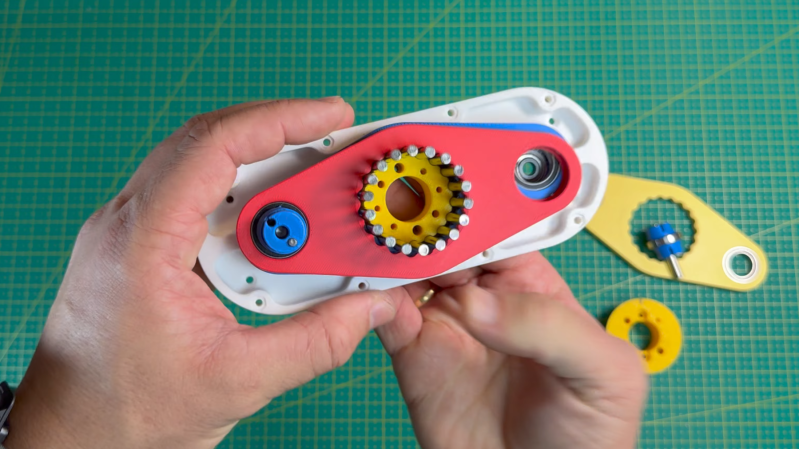
A man's hands are holding an assembly of 3D-printed parts. There is a white backplate, with a yellow circular piece running through the middle. The yellow piece is surrounded by metal rods. Another blue shaft runs through the left side of the assembly. A rougly-diamond shaped plate encompasses both of these shafts.

Designing A Simpler Cycloidal Drive

Cycloidal drives have an entrancing motion, as well as a few other advantages – high torque and efficiency, low backlash, and compactness among them. However, much as [Sergei Mishin] likes them, it can be difficult to 3D-print high-torque drives, and it’s sometimes inconvenient to have the input and output shafts in-line. When, therefore, he came across a video of an industrial three-ring reducing drive, which works on a similar principle, he naturally designed his own 3D-printable drive.

The main issue with 3D-printing a normal cycloidal drive is with the eccentrically-mounted cycloidal plate, since the pins which run through its holes need bearings to keep them from quickly wearing out the plastic plate at high torque. This puts some unfortunate constraints on the size of the drive. A three-ring drive also uses an eccentric drive shaft to cause cycloidal plates to oscillate around a set of pins, but the input and output shafts are offset so that the plates encompass both the pins and the eccentric driveshaft. This simplifies construction significantly, and also makes it possible to add more than one input or output shaft.

As the name indicates, these drives use three plates 120 degrees out of phase with each other; [Sergei] tried a design with only two plates 180 degrees out of phase, but since there was a point at which the plates could rotate just as easily in either direction, it jammed easily. Unlike standard cycloidal gears, these plates use epicycloidal rather than hypocycloidal profiles, since they move around the outside of the pins. [Sergei] helpfully wrote a Python script that can generate profiles, animate them, and export to DXF. The final performance of these drives will depend on their design parameters and printing material, but [Sergei] tested a 20:1 drive and reached a respectable 9.8 Newton-meters before it started skipping.

Even without this design’s advantages, it’s still possible to 3D-print a cycloidal drive, its cousin the harmonic drive, or even more exotic drive configurations. Continue reading “Designing A Simpler Cycloidal Drive”

Volumetric Display Takes A Straight Forward (and Backward) Approach

There’s something delightfully sci-fi about any kind of volumetric display. Sure, you know it’s not really a hologram, and Princess Leia isn’t about to pop out and tell you you’re her only hope, but nothing says “this is the future” like an image floating before you in 3D. [Matthew Lim] has put together an interesting one, using persistence-of-vision and linear motion.

The basic concept is so simple we’re kind of surprised we don’t see it more often. Usually, POV displays use rotary motion: on a fan, a globe, a disk, or even a drone, we’ve seen all sorts of spinning LEDs tricking the brain into thinking there’s an image to be seen. [Matthew’s] is apparently the kind of guy who sticks to the straight-and-narrow, on the other hand, because his POV display uses linear motion.

An ESP32-equipped LED matrix module is bounced up by an ordinary N20 motor that’s equipped with an encoder and driven by a DRV8388. Using an encoder and the motor driver makes sure that the pixels on the LED matrix are synced perfectly to the up-and-down motion, allowing for volumetric effects. This seems like a great technique, since it eliminates the need for slip rings you might have with rotary POV displays. It does of course introduce its own challenges, given that inertia is a thing, but I think we can agree the result speaks for itself.

One interesting design choice is that the display is moved by a simple rack-and-pinion, requiring the motor to reverse 16 times per second. We wonder if a crank wouldn’t be easier on the hardware. Software too, since [matthew] has to calibrate for backlash in the gear train. In any case, the stroke length of 20 mm creates a cubical display since the matrix is itself 20 mm x 20 mm. (That’s just over 3/4″, or about twice the with of a french fry.) In that 20 mm, he can fit eight layers, so not a great resolution on the Z-axis but enough for us to call it “volumetric” for sure. A faster stroke is possible, but it both reduces the height of the display and increases wear on the components, which are mostly 3D printed, after all.

It’s certainly an interesting technique, and the speechless (all subtitles) video is worth watching– at least the first 10 seconds so you can see this thing in action.

Thanks to [carl] for the tip. If a cool project persists in your vision, do please let us know. Continue reading “Volumetric Display Takes A Straight Forward (and Backward) Approach”

Image Recognition On 0.35 Watts

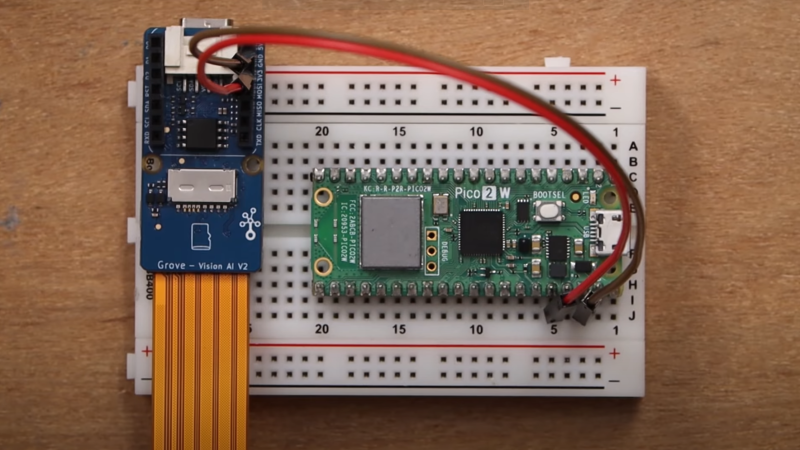
Much of the expense of developing AI models, and much of the recent backlash to said models, stems from the massive amount of power they tend to consume. If you’re willing to sacrifice some ability and accuracy, however, you can get ever-more-decent results from minimal hardware – a tradeoff taken by the Grove Vision AI board, which runs image recognition in near-real time on only 0.35 Watts.

The heart of the board is a WiseEye processor, which combines two ARM Cortex M55 CPUs and an Ethos U55 NPU, which handles AI acceleration. The board connects to a camera module and a host device, such as another microcontroller or a more powerful computer. When the host device sends the signal, the Grove board takes a picture, runs image recognition on it, and sends the results back to the host computer. A library makes signaling over I2C convenient, but in this example [Jaryd] used a UART.

To let it run on such low-power hardware, the image recognition model needs some limits; it can run YOLO8, but it can only recognize one object, runs at a reduced resolution of 192×192, and has to be quantized down to INT8. Within those limits, though, the performance is impressive: 20-30 fps, good accuracy, and as [Jaryd] points out, less power consumption than a single key on a typical RGB-backlit keyboard. If you want another model, there are quite a few available, though apparently of varying quality. If all else fails, you can always train your own.

Continue reading “Image Recognition On 0.35 Watts”

JuiceBox Rescue: Freeing Tethered EV Chargers From Corporate Overlords

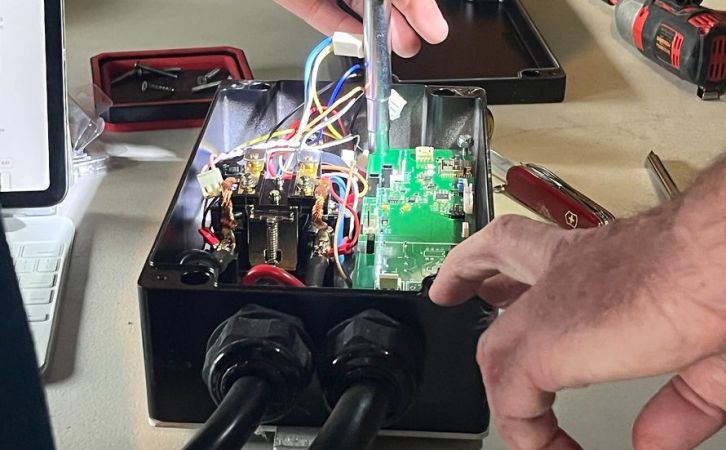
The JuiceBox charger in its natural environment. (Credit: Nathan Matias)

Having a charger installed at home for your electric car is very convenient, not only for the obvious home charging, but also for having scheduling and other features built-in. Sadly, like with so many devices today, these tend to be tethered to a remote service managed by the manufacturer. In the case of the JuiceBox charger that [Nathan Matias] and many of his neighbors bought into years ago, back then it and the associated JuiceNet service was still part of a quirky startup. After the startup got snapped up by a large company, things got so bad that [Nathan] and others saw themselves required to find a way to untether their EV chargers.

The drama began back in October of last year, when the North American branch of the parent company – Enel X Way – announced that it’d shutdown operations. After backlash, the online functionality was kept alive while a buyer was sought.  That’s when [Nathan] and other JuiceBox owners got an email informing them that the online service would be shutdown, severely crippling their EV chargers.

Ultimately both a software and hardware solution was developed, the former being the JuicePass Proxy project which keeps the original hardware and associated app working. The other solution is a complete brain transplant, created by the folk over at OpenEVSE, which enables interoperability with e.g. Home Assistant through standard protocols like MQTT.

Stories like these make one wonder how much of this online functionality is actually required, and how much of it just a way for manufacturers to get consumers to install a terminal in their homes for online subscription services.

telescope mount

DIY Telescope Mount For Stellar Tracking

Pointing at stars may seem easy on the surface—just mount a telescope to a tripod and you’re done, right? As anyone who’s spent time with a telescope can tell you, it’s not that simple, given that the Earth is always spinning. [Sven] set out to make his own mount to compensate for the rotation of the Earth, which led to some pretty amazing results.

In this project, [Sven] designed a GoTo mount, which is a telescope equatorial mount capable of being pointed at specific parts of the sky and tracking them to allow for long-exposure photos with minimal blur due to the Earth’s movement. He first went down the path of finding the correct harmonic gearbox for the steppers used. A harmonic drive system would allow smooth, precise movement without backlash, and the 100:1 stepdown would provide for the slightest of adjustments.

The steppers are controlled by a custom PCB [Sven] designed around an ESP32-S3. The first PCB had a mistake in the power delivery circuit. After a small tweak, V2 boards arrived and work great. The PCB runs OnStepX, a great open-source project centered around pointing telescopes, cutting down a lot of the software workload on this project.

After all the work put in, you may be wondering how well it works. [Sven] was able to get a pointing accuracy of 1-2 arcseconds from his mount. To get an idea of how great that is, 1 arcsecond is about the same as pointing at a penny from 4 km (2.5 miles) away. Fantastic results, [Sven], and thank you for sending in this great project—be sure to head over to his site and read all the details of this impressive build. If you found this interesting, be sure to check out some of our other telescope-related projects.