Custom Firmware Teaches USB Relay Board New Tricks

If you’re looking for a quick and easy way to control a few devices from your computer, a cheap USB relay board might be the ideal solution. These are fairly simple gadgets, consisting of little more than a microcontroller and a handful of relays. But that doesn’t mean there isn’t room for improvement, and as [Michał Słomkowski] recently demonstrated, flashing these boards with a custom firmware allows the user to modify their default functionality.

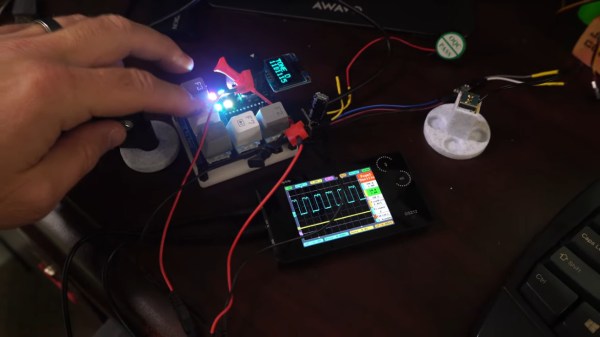
In his case, [Michał] wanted to build a power strip that would cut the power to any devices plugged into it once his computer went to sleep. Unfortunately, he couldn’t just check to see if there was 5 V on the line as his motherboard kept the USB ports powered up all the time. But with some modifications to the relay board’s firmware, he reasoned he should be able to detect if there was any USB activity by watching for the start-of-frame packet that goes out every millisecond when the bus is active.

Wiring up the ATtiny45 for flashing.

Now [Michał] isn’t claiming to be the first person to come up with a custom firmware for one of these boards, in fact, he credits an existing open source firmware project as an inspiration for his work. But he did create an entirely new GPLv3 firmware for these ATtiny45 powered devices, which includes among other improvements the latest version of V-USB. As it so happens, V-USB includes start-of-frame packet detection out of the box, which made it much easier to implement his activity detection code.

With the new firmware flashed to the relay board’s chip, [Michał] put it in an enclosure and wired up the outlets. But there was still one missing piece of the puzzle. It seems that Linux won’t actually send out the start-of-frame packets unless its actively communicating with a USB device, as part of the so-called “selective suspend” power saving feature. Luckily there is support for disabling this feature for specific devices based on their Vendor/Product ID pair, so after a little udev fiddling, everything was working as expected.

We love custom firmware projects here at Hackaday. Not only do they keep proprietary software out of our devices, but they often unlock new and expanded capabilities which otherwise would be hidden behind artificial paywalls.

Digital X-Ray Scanner Teardown Yields Bounty Of Engineering Goodies

We’ll just go ahead and say it right up front: we love teardowns. Ripping into old gear and seeing how engineers solved problems — or didn’t — is endlessly fascinating, even for everyday devices like printers and radios. But where teardowns really get interesting is when the target is something so odd and so specialized that you wouldn’t normally expect to get a peek at the outside, let alone tramp through its guts.

[Mads Barnkob] happened upon one such item, a Fujifilm FCR XG-1 digital radiography scanner. The once expensive and still very heavy piece of medical equipment was sort of a “digital film system” that a practitioner could use to replace the old-fashioned silver-based films used in radiography, without going all-in on a completely new digital X-ray suite. It’s a complex piece of equipment, the engineering of which yields a lot of extremely interesting details.

The video below is the third part of [Mads]’ series, where he zeroes in on the object of his desire: the machine’s photomultiplier tube. The stuff that surrounds the tube, though, is the real star, at least to us; that bent acrylic light pipe alone is worth the price of admission. Previous videos focused on the laser scanner unit inside the machine, as well as the mechatronics needed to transport the imaging plates and scan them. The video below also shows experiments with the PM tube, which when coupled with a block of scintillating plastic worked as a great radiation detector.

We’ve covered a bit about the making of X-rays before, and a few of the sensors used to detect them too. We’ve also featured a few interesting X-ray looks inside of tech, from a Starlink dish to knock-off adapters.

Continue reading “Digital X-Ray Scanner Teardown Yields Bounty Of Engineering Goodies”

Building Blocks: Relating Mechanical Elements To Electronic Components

Ask any electronics hobbyist or professional what the simplest building blocks of electronic circuits are, and they’ll undoubtedly say resistors, capacitors, and inductors. Ask a mechanically-inclined person the same question about their field and the answer will probably be less straightforward. Springs would make the list for sure, but then… hmm. Maybe gears? 80/20 aluminum extrusions?

As it turns out, there are a handful of fundamental building blocks in the mechanisms world, and they’re functionally very similar, and mathematically identical, to the Big Three found in electrical engineering.

Mechanical Equivalents

Before we look at the components themselves, let’s step back a moment and think about voltage and current. Voltage is a potential difference between two points in a circuit, sometimes called electromotive force (EMF). It turns out that EMF is an apt term for it, because it is roughly analogous to, well, force. Voltage describes how “hard” electrons are being “pushed” in a circuit. In much the same vein, current describes the rate of electric charge flow. Continue reading “Building Blocks: Relating Mechanical Elements To Electronic Components”

Today’s Challenge Is All About Work-From-Home Life

You sure do learn a lot when life suddenly makes it impossible to go into the office and asks that you instead do the same work remotely. Sure, there are the obvious challenges like needing a device to do the work on and an internet connection that’s not going to melt down when family or roommates are trying to Zoom at the same time as you one-on-one with the boss. But there’s way more to it. The Refresh Work-From-Home Life challenge takes this on as the next phase of the Hackaday Prize gets under way this morning.

If the global pandemic caused you to find yourself working from home, I’m sure it’s been quite a ride. Maybe you learned what your spine feels like after hunching over a MacBook in bed for 40 hours. Others discovered that the commute had been silently serving as a power-down sequence for your “work brain” — without it you never stopped thinking about, or more likely worrying about, work. And without that change in venue, it’s far too easy to feel like you were now living at work. So let’s invent the things that can make us productive from home while maintaining physical health and preserving our sanity.

Ten entries in this challenge will be awarded with $500 and ushered into the final round where the grand prize of $25,000 and four other top prizes await. What kind of things are we looking for? The best ideas are the ones we haven’t had yet, but I can spitball a bit to get things rolling.

Mirror with a bracket turns a laptop webcam into an overhead project for Zoom classrooms

Furniture and other infrastructure can be a real sore-spot when not a good fit. We’d love to see your design that uses a single sheet of plywood (I know, those cost a bazillion dollars these days but just go with it) to build an adjustable workspace that fits your chair height and needs. Bonus points for one that folds away at quitting time to reassure you that work is done!

Office interruptions from co-works sometimes feel like a distraction. But without them you might not get your body moving for hours on end… not good for you! Design an assistant that watches for your poor sedentary habits and sasses you until you take some time to stretch your old bones. Or show off the gadgets that make living the digital nomad life easier like the awesome document camera hacks we saw from teachers when classrooms were closed last year.

Show off your proof of concept by starting a project page on Hackaday.io and using the dropdown in the left sidebar to enter it into the 2021 Hackaday Prize. You can continue to update it until judging begins at the end of July.

We’re already living in the future. Working or learning remotely is a big part of that. Let’s bend our homes and our habits to find a better way to do it!

Alexa, Bring Me A Beer!

Voice controlled home assistants are the wonder of our age, once you’ve made peace with the privacy concerns of sharing the intimacies of your life with a data centre owned by a massive corporation, anyway. They provide a taste of how the future was supposed to be in those optimistic predictions of decades past: Alexa and Siri can crack jokes, control your lights, answer questions, tell you the news, and so much more.

But for all their electronic conversational perfection, your electronic pals can’t satisfy your most fundamental needs and bring you a beer. This is something [luisengineering] has fixed, an he’s provided the appropriate answer to the question “Alexa: bring mir ein bier!“. The video which we’ve also put below the break is in German with YouTube’s automatic closed captions if you want them, but we think you’ll be able to get the point of it if not all his jokes without needing to learn to speak a bit of Deutsch.

As he develops his beer-delivery system we begin to appreciate that what might seem to be a relatively straightforward task is anything but. He takes an off-the-shelf robot and gives it a beer-bottle grabber and ice hopper, but the path from fridge to sofa still needs a little work. The eventual solution involves a lot of trial and error, and a black line on the floor for the ‘bot to follow. Finally, his electronic friend can bring him a beer!

We like [Luis]’s entertaining presentational style, and the use of props as microphone stands. We’ll be keeping an eye out for what he does next, and you should too. Meanwhile it may not surprise you that this is not the first beer-delivery ‘bot we’ve brought you.

Continue reading “Alexa, Bring Me A Beer!”

Rhisotope: Addressing Poaching By Making Rhinoceros Horns Radioactive

There is no question that poaching has become an existential threat to the five species of rhinoceros alive today. Even the wildlife reserves where most rhinos live struggle to provide protection from the wanton and cruel poaching of the world’s last remaining rhinos.

Poachers are generally looking to sell the horns which consist of pure keratin, the same material that makes up our fingernails and hair. Rhino horns have seen a big rise in demand the past decades, with a black market in Vietnam representing the biggest buyers, primarily for use in fever and other medicines, as well as for processing into carved trinkets. This has contributed to a further rhino population collapse. Statistics from 2017 show about 18,000 white rhinos and fewer than 5,500 black rhinos remaining. Recently, the northern white rhino population in Africa went effectively extinct with the death of the last known male individual.

Clearly, if we wish to prevent extinction, we need to deal with poaching. The latest suggestion here is part of the Rhisotope project. This would make rhino horns radioactive, but how exactly would doing so prevent poaching? Let’s take a look.

Continue reading “Rhisotope: Addressing Poaching By Making Rhinoceros Horns Radioactive”

Game Boy Macro Build Retains DS Compatibility

Building a so-called “Game Boy Macro” is a great way to salvage a Nintendo DS that has a broken hinge or top screen, as the system only needs the lower display to play Game Boy Advance games. Naturally, DS games that were designed to use both screens would no longer be playable. Or at least, that’s what we thought. But as [Facelesstech] shows, it’s actually possible to play DS games on a Game Boy Macro if you do a little extra soldering.

It turns out that there are two test points on the original DS motherboard where you can pick up the signal for the top and bottom screens respectively. With just three wires and a simple switch, you can select which signal gets fed into the bottom screen in real-time with no image degradation. Now, this won’t do you any good on games that make constant use of both the top and bottom DS displays, but for many titles, the bottom screen was used for little more than a map or inventory display that you only need to glance at occasionally.

Installed screen switch. Note USB-C upgrade module.

With the ability to switch between them at will, a large number of DS games are perfectly playable with just one screen. Interestingly, the touch panel still works the same regardless of which video feed is being pipped in; so if you memorize which areas need to be touched to perform different actions, you don’t even need to flip the images. In the video below, [Facelesstech] demonstrates the concept with New Super Mario Bros, which would otherwise be unplayable as the action usually is shown on the top screen.

This hack is only possible because the two displays on the DS are identical beyond the touch overlay, which as we learned during a previous deep-dive into the technology behind this revolutionary handheld, was a trick Nintendo used to squeeze as much performance as they could out of its relatively meager 3D hardware. Unfortunately, it seems like the modification is much harder to pull off on the DS Lite, so it wouldn’t be compatible with the slick Game & Watch styled Game Boy Macro we covered recently. Continue reading “Game Boy Macro Build Retains DS Compatibility”