Stepper Motors Quick And Simple

If you want a simple and easy introduction to stepper motors, check out the [IMSAI Guy]’s short video where he designs a very basic stepper motor controller and packs in a lot of quick lessons along the way. (Embedded below.)

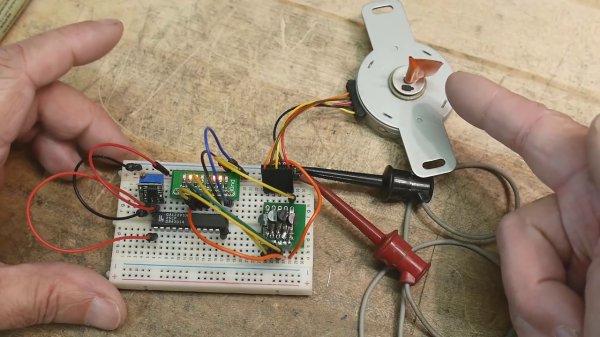
He first goes over the fundamentals of a stepper motor in a practical, hands-on approach, and also shows us how to ring out the connections if the pinout is unknown. Next he demonstrates stepping the motor manually and then makes a simple FET driver circuit. Just when you’re expecting a small microcontroller to appear, the [IMSAI Guy] instead digs deep into his junk box and explains how to drive the motor with a 22V10 GAL (an electrically erasable PAL) and a 555 timer module. Based on a clearly-explained logic table for driving the coils, a sneaky way to introduce Karnaugh maps, he proceeds to write the output equations in WinCUPL.

Mature Readers will recall the “Happy PAL” Character

WinCUPL is the modern version of CUPL (Compiler for Universal Programmable Logic) originally written by a company called Assisted Technology, now owned by Altium. CUPL and peers like PALASM from Monolithic Memories, Inc. (MMI) and ABEL from Data I/O Corporation were basic Hardware Description Languages specifically designed for PALs, GALs, and CPLDs. PALs were small arrays of logic gates with fusible interconnections, and your design is “burned” into the fuses much like a (EE)PROM. When designing with PALs, you could clearly visualize the connections in your mind, something that has since been remedied by the advent of modern FPGAs.

Alas, he cuts out the part where the source code is compiled and the 22V10 is programmed, and jumps directly into testing the circuit on a breadboard. Spoiler alert — it does work. Zooming in close and squinting, the nifty 555 timer breadboard module that he points out is called a TP353, which you can find from your favorite online supplier.

There is a lot to learn in this tutorial, and the [IMSAI Guy] does a great job at making the subject approachable to hobbyists and novices. We also covered another of his tutorials a couple of weeks ago on image sensors. Thanks to [itsevilbert] for the tip.

Continue reading “Stepper Motors Quick And Simple”

Three-Piece Cyberdeck Plays The Role Of Military Computer That Never Was

While we’re not at all sick of the cyberdeck movement yet, we do have to admit that some of the builds we see are starting to fall into categories that are beginning to seem a little familiar. The clamshell aesthetic comes to mind, but really, with spaces for a display and a keyboard, the form factor is pretty much a natural for cyberdecking. Which is why we like this three-piece twist on the cyberdeck concept so much.

Like many cyberdeck builds, inspiration for the awesomely mustachioed [Max]’s deck came from the military surplus world. As the story goes, he has a smallish clamshell case that once held radio tools and supplies for the Bundeswehr. Figuring it would make the perfect case for half of a split keyboard, he tracked down a couple more of the sturdy aluminum cases and got to work. As a mechanical keyboard aficionado, [Max] already had PCBs that would fit into two of the cases, so he populated those with suitably clicky switches, came up with cool-looking faceplates, and connected the two boxes with retractile cables. The third case got a Raspberry Pi 4 with a trimmed-down heatsink, a battery and power management, and a generous touchpad and LCD panel display. A Kali Linux install completes the tacticool look.

The three-piece cyberdeck looks very cool when all wired up together, but [Max] needed one more piece to really sell it. So he 3D-printed a slipcase for all three units; painted in military colors and suitably distressed, the whole thing really just works. We’ve seen a lot of cyberdecks lately in all sorts of styles, but this one really pleases.

Continue reading “Three-Piece Cyberdeck Plays The Role Of Military Computer That Never Was”

Hacking The Classroom

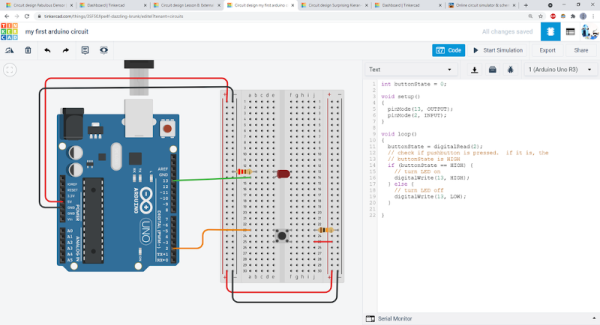
With so many students attending class virtually these days, how can you give kids — or adults — some hands on experience with electronics projects? [Ben Finio] says you can by moving your lab to the virtual world using — of all things — Tinkercad. [Ben] should know something about a classroom since he is a lecturer at Cornell.

Of course, you could do this trick with any online simulator, but Tinkercad is nice because it is easy to use, looks real, and doesn’t cost the students a dime. [Ben] mentions there are some scenarios where it is especially useful like large classes or online classes. There are probably some cases where it doesn’t make sense, like teaching RF design, for example. Even then, maybe you just need a different tool.

Continue reading “Hacking The Classroom”

Someone Get This Minimalist Wooden PC A Martini

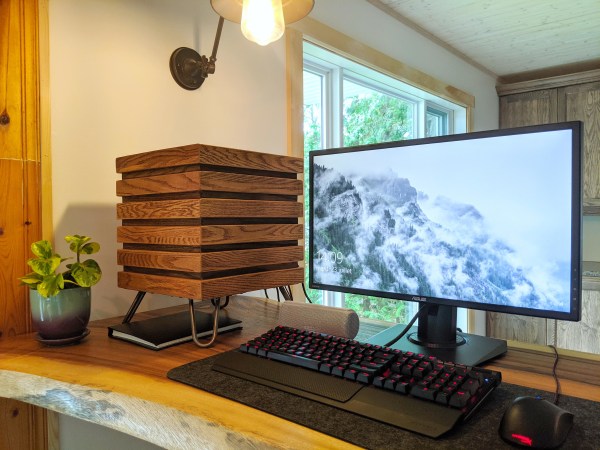
It’s interesting to imagine what computers may have looked like throughout different time periods that precede their portability or even their existence altogether. In the 1950s and ’60s, computers still filled entire rooms, but if the age of the PC had arrived earlier one is left to wonder what might a minimalist mid-century PC might look like.

Well, if we were lucky, it would have looked something like [xmorneau]’s cubical computing creation. This DIY beauty is made of scrap oak and a sexy set of hairpin legs. As hot as it looks, [xmorneau] shouldn’t have to worry about overheating — the bottom is completely open except for an intake fan, there’s another fan at the top that exhausts hot air through a mesh grille, and those lovely little legs elevate it four inches off the desk. Our favorite part (after the legs) has to be the secret lid that blends in beautifully.

The cube measures 32cm³ (~12.6in³), so [xmorneau] went with a mini-ATX motherboard, but was able to fit in a full-size graphics card. Everything is mounted internally to wood except for the mobo, which is mounted on a panel of sheet metal that makes up the back wall.

We love the way this looks and are glad to see that this build changed [xmorneau]’s opinion of RGB a little bit, because we can’t help but like it both ways.

Too sophisticated for your taste? Check out this LEGO-Minecraft mashup.

An Open Source Smart Watch You’d Actually Wear

We’ve seen a number of open source smart watches over the years, and while they’ve certainly been impressive from a technical standpoint, they often leave something to be desired in terms of fit and finish. Exposed PCBs and monochromatic OLED displays might be fine for a trip to the hackerspace, but it wouldn’t be our first choice for date night attire.

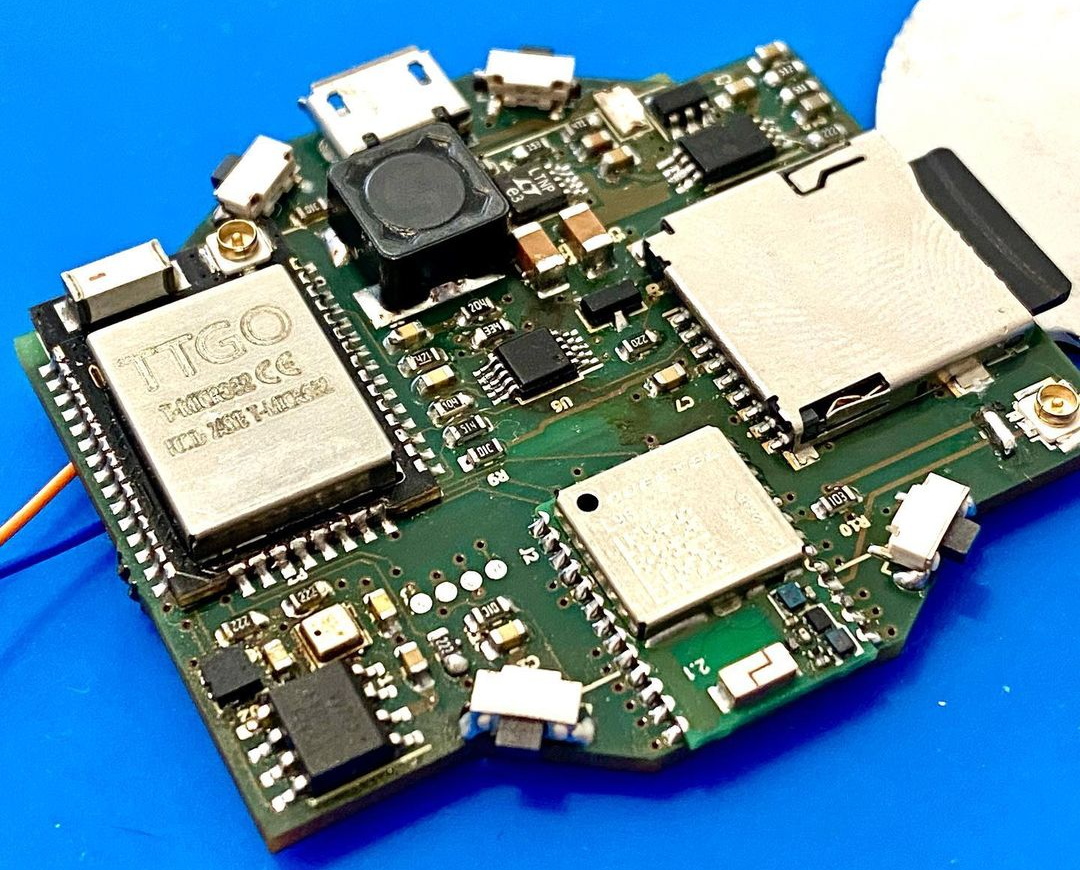
Enter the Open-SmartWatch from [pauls_3d_things]. This ESP32 powered watch packs a gorgeous circular 240×240 TFT display, DS323M RTC, BMA400 three-axis accelerometer, and a 450 mAh battery inside of a 3D printed enclosure that can be produced on your average desktop machine. WiFi and Bluetooth connectivity are a given with the ESP32, but there’s also an enhanced edition of the PCB that adds another 4 MB of RAM, a micro SD slot, and a Quectel L96 GPS receiver.

The GPS edition of the PCB

As it’s an open source project you’re free to download the PCB design files and get the board produced on your own, but [pauls_3d_things] has actually partnered with LILYGO to do a run of the Open-SmartWatch electronics which you can pick up on AliExpress right now for just $24 USD. You’ll still need to order the battery separately and 3D print your own case, but it still seems like a pretty sweet deal to us.

On the software front, things are pretty basic right now. The watch can update the time from NTP using a pre-configured WiFi network, and there’s a Bluetooth media controller and stopwatch included. Of course, as more people get the hardware in their hands (or on their wrists, as the case may be), we’ll likely start seeing more capabilities added to the core OS.

While getting our own code running on commercially produced smartwatches holds a lot of promise, the Open-SmartWatch is arguably the best of both worlds. The partnership with LILYGO brings professional fabrication to the open hardware project, and the GPLv3 licensed firmware is ripe for hacking. We’re very excited to see where the community takes this project, and fully expect to start seeing these watches out in the wild once we can have proper cons again.

Continue reading “An Open Source Smart Watch You’d Actually Wear”

CNC Chainsaw

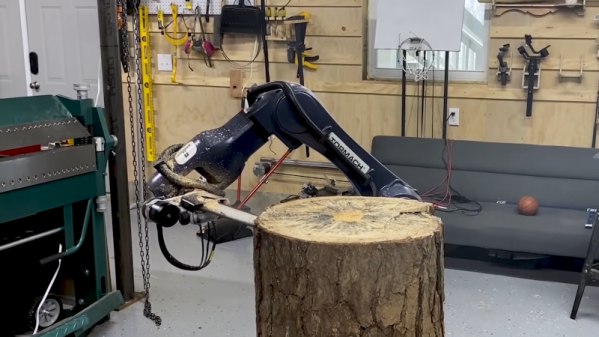
You can spend a lot of time trying to think of a clever title for a post about a CNC chainsaw. But you’ll finally realize, what else can you say but “CNC Chainsaw?” [Stuff Made Here] actually built such a beast, and you can watch it go in the video embedded below. A custom chainsaw on a Tormach robotic arm. So it is more like a robot using a chainsaw than a conventional CNC machine.

Instead of an XY motion, the machine uses what the video calls an “apple peeler” method and uses the Minkowski algorithm to adjust for the size of the chainsaw. The video is an odd juxtaposition of advanced topics like the Minkowski and basic things like G code.

Continue reading “CNC Chainsaw”

Electric Vehicle 1900’s Style: New Leases On Old Tech

Excited about your new electric vehicle? Thomas Edison would be, too. He tried to produce electric vehicles for Ford around 1900. Petroleum-based vehicles dashed his dreams of the electric car, and the battery he wanted to use languished as a technological dead end. The batteries were long-lasting, sure, but they were expensive and had other problems, not the least of which was producing hydrogen gas. But that battery technology is receiving renewed interest today, because some of the things that made it a bad car battery make it good for alternate energy projects.

You wouldn’t think a century-old battery technology that was never very popular would make a comeback. But then again, who thought we’d see the return of bell-bottom pants or vinyl records? Continue reading “Electric Vehicle 1900’s Style: New Leases On Old Tech”