Mike Harrison Knows Everything About LEDs

Driving an LED and making it flash is probably the first project that most people will have attempted when learning about microprocessor control of hardware. The Arduino and similar boards have an LED fitted, and turning it on and off is a simple introduction to code. So it’s fair to say that many of us will think we have a pretty good handle on driving an LED; connect it to a I/O pin via a resistor and that’s it. If this describes you, then Mike Harrison’s talk at the recent Hackaday Superconference (embedded below) will be an education.

Mike has appeared on these pages multiple times as he pushes LEDs and PCB techniques to their limits, even designing our 2017 Superconference badge, and his many years of work in the upper echelons of professional LED installations have given him an unrivaled expertise. He has built gigantic art projects for airports, museums, and cities. A talk billed as covering everything he’s learned about LEDs them promises to be a special one.

If there’s a surprise in the talk, it’s that he’s talking very little about LEDs themselves. Instead we’re treated to a fundamental primer in how to drive a lot of LEDs, how to do so efficiently, with good brightness and colour resolution, and without falling into design traps. It’s obvious that some of his advice such at that of relying on DIP switches rather than software for configuration of multi-part installations has been learned the hard way.
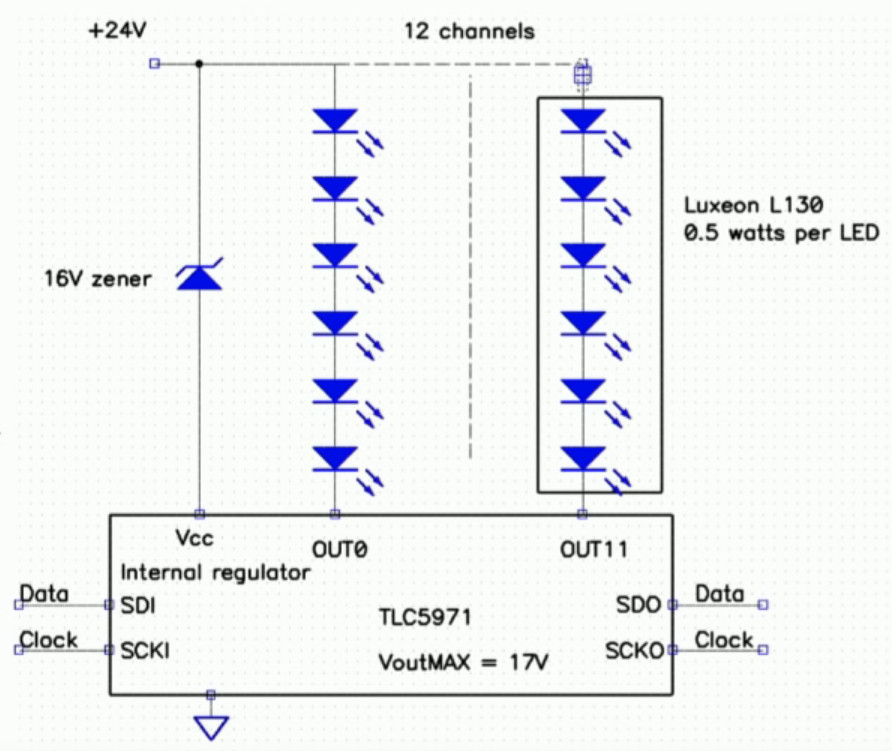
Multiple LEDs at once from your driver chip, using a higher voltage.

We are taken through a bit of the background to perceived intensity and gamma correction for the human eyesight. This segues neatly into the question of resolution, for brightness transitions to appear smooth it is necessary to have at least 12 bits, and to deliver that he reaches into his store of microcontroller and driver tips for how to generate PWM at the right bitrate. His favoured driver chip is the Texas TLC5971, so we’re treated to a primer on its operation. A useful tip is to use multiple smaller LEDs rather than a single big one in the quest for brightness, and he shows us how he drives series chains of LEDs from a higher voltage using just the TI chip.

Given the content of the talk this shouldn’t come as a shock, but at the end he reminds us that he doesn’t use all-in-one addressable LEDs such as the WS2932 or APA102. These are  the staple of so many projects, but as he points out they are designed for toy type applications and lack the required reliability for a multi-thousand LED install.

Conference talks come in many forms and are always fascinating to hear, but it’s rare to see one that covers such a wide topic from a position of experience. He should write it into a book, we’d buy it!

Continue reading “Mike Harrison Knows Everything About LEDs”

New Silicon Carbide Semiconductors Bring EV Efficiency Gains

After spending much of the 20th century languishing in development hell, electric cars have finally hit the roads in a big way. Automakers are working feverishly to improve range and recharge times to make vehicles more palatable to consumers.

With a strong base of sales and increased uncertainty about the future of fossil fuels, improvements are happening at a rapid pace. Oftentimes, change is gradual, but every so often, a brand new technology promises to bring a step change in performance. Silicon carbide (SiC) semiconductors are just such a technology, and have already begun to revolutionise the industry.

Mind The Bandgap

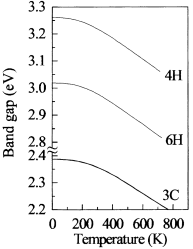
A graph showing the relationship between band gap and temperature for various phases of Silicon Carbide.

Traditionally, electric vehicles have relied on silicon power transistors in their construction. Having long been the most popular semiconductor material, new technological advances have opened it up to competition. Different semiconductor materials have varying properties that make them better suited for various applications, with silicon carbide being particularly attractive for high-power applications. It all comes down to the bandgap.

Electrons in a semiconductor can sit in one of two energy bands – the valence band, or the conducting band. To jump from the valence band to the conducting band, the electron needs to reach the energy level of the conducting band, jumping the band gap where no electrons can exist. In silicon, the bandgap is around 1-1.5 electron volts (eV), while in silicon carbide, the band gap of the material is on the order of 2.3-3.3 eV. This higher band gap makes the breakdown voltage of silicon carbide parts far higher, as a far stronger electric field is required to overcome the gap. Many contemporary electric cars operate with 400 V batteries, with Porsche equipping their Taycan with an 800 V system. The naturally high breakdown voltage of silicon carbide makes it highly suited to work in these applications.

Continue reading “New Silicon Carbide Semiconductors Bring EV Efficiency Gains”

Patrol The Sprawl With This Battle Ready Cyberdeck

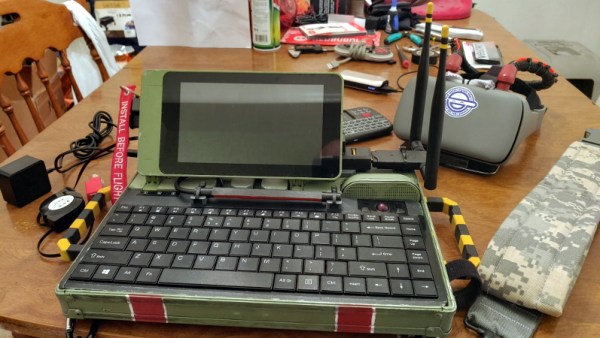
The recent crop of cyberdeck builds are inspired, at least tangentially, by William Gibson’s novel Neuromancer and its subsequent sequels. In the novels, the decks are used as mobile terminals to access the virtual reality of cyberspace. In our world, they’re usually just quasi-retro boxes with Raspberry Pis in them. Artistic license and all that. But the “XMT-19 Cutlass”, a deck built by [CaptNumbNutz], attempts to hew more closely to the source material than most builds we’ve seen.

Of course it won’t be transporting you into the matrix, and ultimately it’s still just a casemod for the Raspberry Pi. But at least it does a fantastic job of fitting the Neuromancer motif. The design is supposed to look like the XMT-19 was a piece of high-tech military hardware that was later co-opted by a cyberspace cowboy operating in the urban megatropolis that Gibson called the Sprawl, with exposed wiring and a visual mish-mash of components.

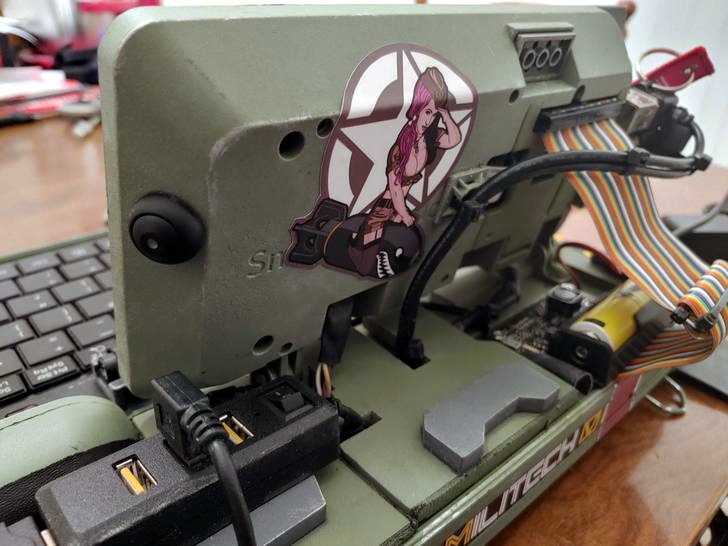
If you can believe it, the build started out as a locking clipboard of all things. From there, [CaptNumbNutz] started layering on the hand-cut foam greebles and spraying on the WWII inspired color scheme. We especially like the yellow tips on the antennas that invoke the propellers of vintage airplanes, and the serial number stenciled onto the bottom. In a departure from basically every other cyberdeck we’ve seen to date, there appear to be no 3D printed elements on the XMT-19; all the parts are hand made with nothing more than an a sharp knife and a heap of patience.

In terms of the electronics, the whole build has been greatly simplified by the use of a SmartiPi Touch case, which integrates the Pi and touch screen into a single hinged unit that just needed to get bolted to the top of the deck. Plus it gave him an excuse to put a big rainbow ribbon cable on the back of it to reach the Pi’s GPIO ports, which as you know, instantly makes everything look more retro-futuristic.

It might not be packing the raw power of the Intel NUC cyberdeck we covered last year, or have the convincingly vintage look of the VirtuScope, but we’d take the XMT-19 Cutlass into the matrix any day.

Tales From The Sysadmin: Dumped Into The Grub Command Line

Today I have a tale of mystery, of horror, and of hope. The allure of a newer kernel and packages was too much to resist, so I found myself upgrading to Fedora 30. All the packages had downloaded, all that was left was to let DNF reboot the machine and install all the new packages. I started the process and meandered off to find a cup of coffee: black, and darker than the stain this line of work leaves on the soul. After enough time had elapsed, I returned, expecting the warming light of a newly upgraded desktop. Instead, all that greeted me was the harsh darkness of a grub command line. Something was amiss, and it was bad.

(An aside to the reader, I had this experience on two different machines, stemming from two different root problems. One was a wayward setting, and the other an unusual permissions problem.)

How does the fledgling Linux sysadmin recover from such a problem? The grub command line is an inscrutable mystery to the uninitiated, but once you understand the basics, it’s not terribly difficult to boot your system and try to restore the normal boot process. This depends on what has broken, of course. If the disk containing your root partition has crashed, then sorry, this article won’t help.

In order to get a system booting, what exactly needs to happen? How does booting Linux work, even? Two components need to be loaded into memory: the kernel, and the initramfs. Once these two elements are loaded into memory, grub performs a jump into the kernel code, which takes over and finishes the machine’s boot. There is one more important detail that we care about — the kernel needs to know where to find the root partition. This is typically part of the kernel parameters, specified on the kernel boot line.

When working with an unfamiliar shell, the help command is a good starting point. grub runs in a very limited environment, and running the help command scrolls most of the text off the screen. There is an environment variable that helps out here, enabling output paging:set pager=1.
Continue reading “Tales From The Sysadmin: Dumped Into The Grub Command Line”

Wipe Your Nozzle To Avoid Stringing

[Design Prototype Test] likes his Ender 3 printer. There was only one problem. When printing PETG — which is notorious for stringing — the hot end would pick up material and eventually ruin the print. The answer was to mount a cheap Harbor Freight brush somewhere and make the head pass over it after each layer. You can see the video of the design, below.

It sounds as though it worked well and after explaining the concept, he dives into the details of how he designed the fixture and how he mounted it. There’s a lot of good information in there about his particular toolchain and workflow.

Continue reading “Wipe Your Nozzle To Avoid Stringing”

Incredibly Tiny RF Antennas For Practical Nanotech Radios

Researchers may have created the smallest-ever radio-frequency antennas, a development that should be of interest to any nanotechnology enthusiasts. A group of scientists from Korea published a paper in ACS Nano that details the fabrication of a two-dimensional radio-frequency antenna for wearable applications. Most antennas made from metallic materials like aluminum, cooper, or steel which are too thick to use for nanotechnology applications, even in the wearables space. The newly created antenna instead uses metallic niobium diselenide (NbSe2) to create a monopole patch RF antenna. Even with its sub-micrometer thickness (less than 1/100 the width of a strand of human hair), it functions effectively.

The metallic niobium atoms are sandwiched between two layers of selenium atoms to create the incredibly thin 2D composition. This was accomplished by spray-coating layers of the NbSe2 nanosheets onto a plastic substrate. A 10 mm x 10 mm patch of the material was able to perform with a 70.6% radiation efficiency, propagating RF signals in all directions. Changing the length of the antenna allowed its frequency to be tuned from 2.01-2.80 GHz, which includes the range required for Bluetooth and WiFi connectivity.

Within the ever-shrinking realm of sensors for wearable technologies, there is sure to be a place for tiny antennas as well.

[Thanks Qes for the tip!]

AI Phone App Learns Baseball Signals

Watching a sport can be a bit odd if you aren’t familiar with it. Most Americans, for example, would think a cricket match looked funny because they don’t know the rules. If you were not familiar with baseball, you might wonder why one of the coaches was waving his hands around, touching his nose, his ears, and his hat seemingly at random. Those in the know however understand that this is a secret signal to the player. The coach might be telling the player to steal a base or bunt. The other team tries to decode the signals, but if you don’t know the code that is notoriously difficult. Unless you have the machine learning phone app you can see in the video below.

If you are not a baseball fan, it works like this. The coach will do a number of things. Perhaps touch his cap, then his nose, brush his left forearm, and touch his lips. However, the code is often as simple as knowing one attention signal and one action signal. For example, the coach might tell you that if they touch their nose and then their lips, you should steal. Touching their nose and then their ear is a bunt. Touching their nose and then the bill of their cap is something else. Anything they do that doesn’t start with touching their nose means nothing at all. If the signal is this easy, you really don’t even need machine learning to decode it. But if it were more complicated — say, the gesture that occurs third after they touch their nose unless they also kick dirt at which point it means nothing — it would be much harder for a human to figure out.

Continue reading “AI Phone App Learns Baseball Signals”