A Custom Milled Jig For Smart Bulb Programming

Who would have thought that some day we’d need programming jigs for our light bulbs? But progress marches on, and as there’s currently a number of affordable Internet-controlled bulbs powered by the ESP8266 on the market, we’re at the point where a tool to help update the firmware on the light over your kitchen sink might be something nice to have. Which is why [cperiod] created this programming jig for AiLight smart bulbs.
Flashing the AiLight bulbs is easy enough, there’s a series of test points right on the face of the PCB that you can hook up to. But if you’re updating more than one of them, you don’t want to have to solder your programmer up to each bulb individually. That’s where the jig comes in. [cperiod] says there are already some 3D printed designs out there, but they proved to be a bit finicky.

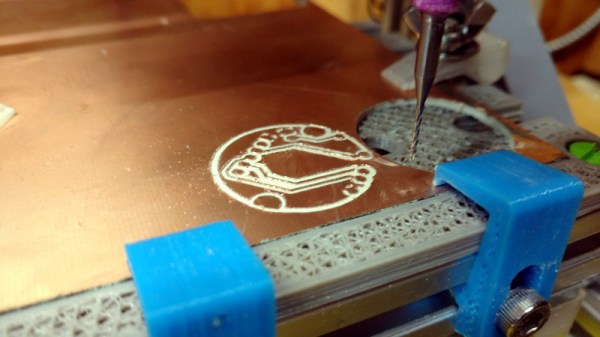
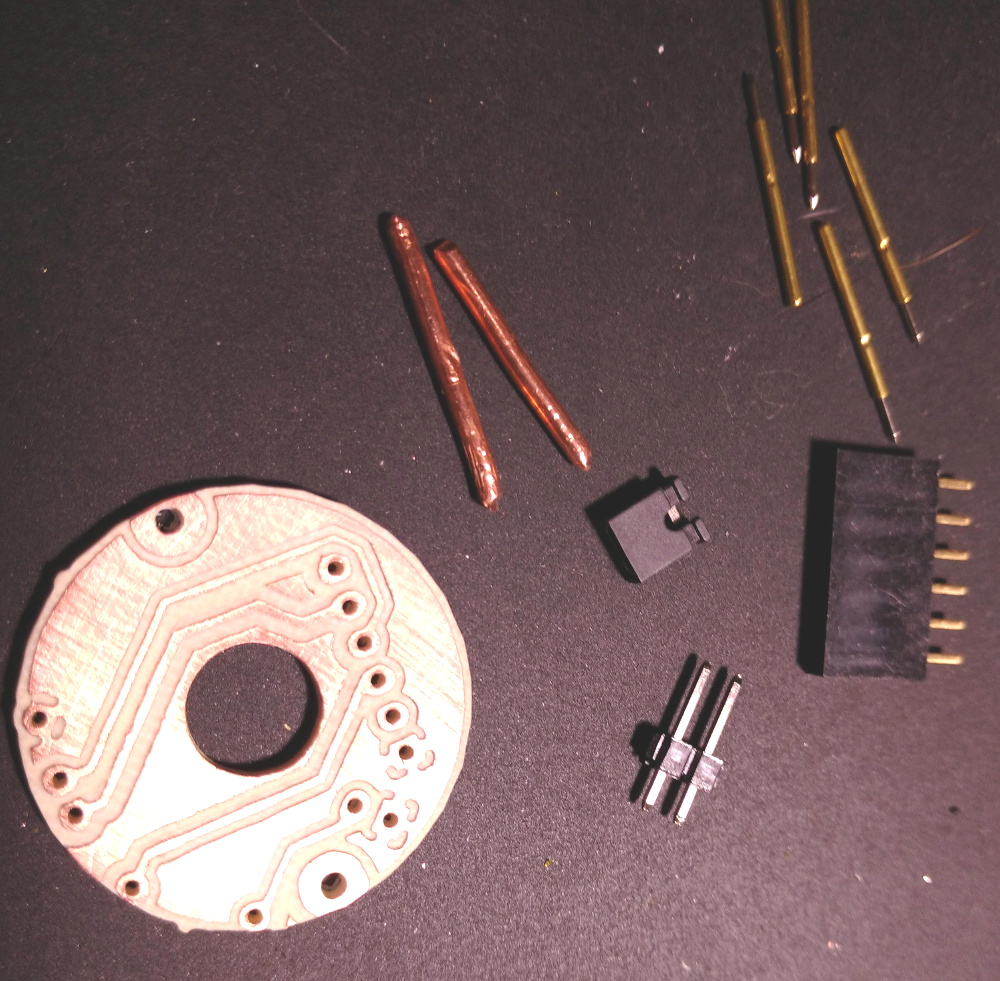
The design that [cperiod] came up with and eventually milled out on a 1610 CNC router is quite simple. It’s effectively just a holder to keep the five pogo pins where they need to be, and a jumper that lets you toggle the chip’s programming mode (useful for debugging).

The neat trick here are the “alignment pins”, which are actually two pieces of 14 gauge copper wire that have had their ends rounded off. It turns out these will slip perfectly into holes on the AliLight PCB, ensuring that the pogo pins end up on target. It works well enough that you can hold the bulb and jig in one hand while programming, it just needs a little downwards pressure to make good contact.

We’ve previously seen how easily you can replace the firmware on some of these ESP8266 bulbs. While there’s certainly a downside to these bulbs being so simple to modify, it’s hard to deny their hackability makes them very appealing for anyone looking to roll their own network-controlled lighting system.
Perfecting A Bluetooth N64 Controller

Love it or hate it, the Nintendo 64 controller doesn’t seem to be going anywhere. Dedicated fans are still looking for ways to use the unique trilobed controller with modern systems, and they won’t be satisfied until they perfectly replicate the original experience. [Shyri Villar] has been working on perfecting a blend of original and modern hardware that looks very promising.

The project started when [Shyri] found that you could take the internals from a modern third party Bluetooth N64 controller made by 8BitDo and put them into the original controller’s case. This would give you the original buttons back, and overall a more authentic weight and feel. Unfortunately, this usually means dumping the original N64 joystick for the 8BitDo’s.

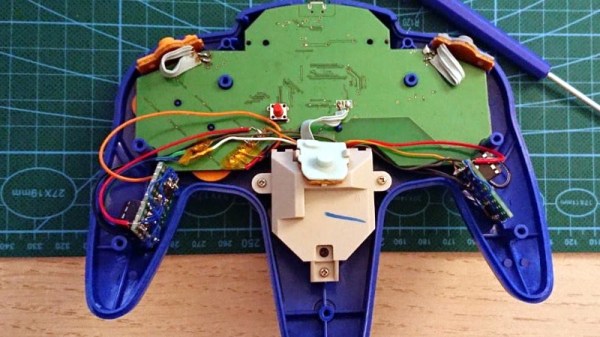
What [Shyri] wanted to do was install the 8BitDo PCB into an original N64 controller, but adapt Nintendo’s joystick to communicate with it. Unfortunately, since the original joystick used optical encoders and the 8BitDo version uses potentiometers, there’s something of a language gap.

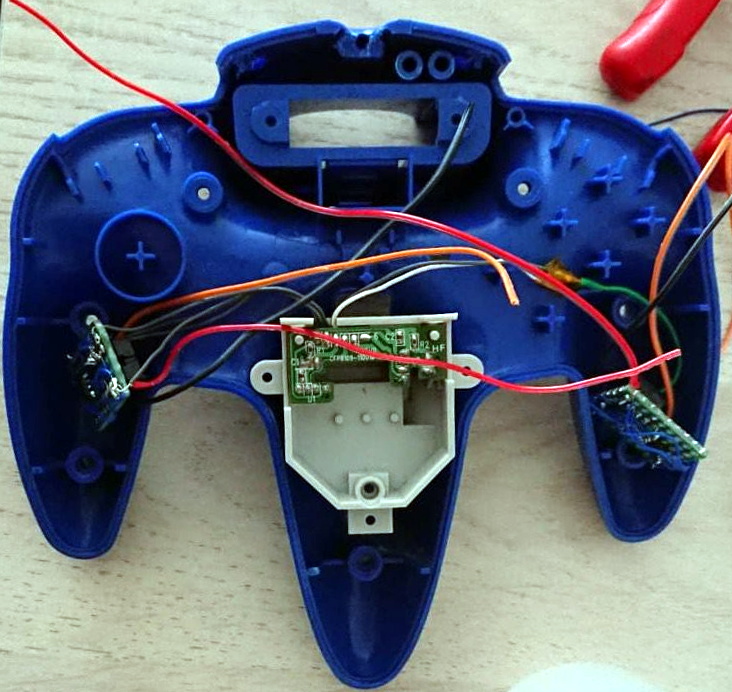
To bridge the divide, both the X and Y dimensions of the joystick get their own PIC12F675 microcontroller and X9C103S digital potentiometer. The microcontrollers read the X and Y values from the original joystick’s encoders, and use the digital potentiometers to provide the 8BitDo with the expected analog input. Right now the electronics are held on two scraps of perfboard tucked into the side “wings” of the controller, but hopefully we’ll see a custom PCB in the future.

If you’re more interested in going back in time with your trusty N64 controller, then you might be interested in learning more about how one hacker managed to hook it up to the MSX.

Cruising GitHub For Slack Webhook Tokens

GitHub is an incredibly powerful tool for sharing source code, and its value to the modern hacker can’t be overstated. But there’s at least one downside to effortlessly sharing your source: it’s now much easier for the whole world to find out when you screw up. Back in the day, if you accidentally left a username or password in a tarball hosted on your site, you could pull it down before anyone noticed. But push something like that up to GitHub, and you’ve got a problem on your hands.

For an example, look no farther than this tool that crawls GitHub for Slack webhooks written by [Michele Gruppioni]. Exploiting the fact that Slack webhook links have a predictable format, the tool searches repositories to find code that erroneously includes the authentication token. With the token in hand, an attacker now has the ability to send unsolicited messages into that channel.

But [Michele] restrained himself and didn’t Rickroll the over 6,500 Slack channels he had access to after searching GitHub with his tool. Instead, he sent them all a friendly message explaining their webhook tokens were available on GitHub, and gave them a link to where they could get more information about his project.

Most of the people who contacted him after the fact appreciated that he sent a gentle warning and not something unsavory. Still, we’d recommend caution to anyone looking to expose a vulnerability in this manner. While [Michele] had honorable intentions, it’s certainly not unheard of for an embarrassed administrator to blame the messenger.

When used properly, webhooks can be a very handy way of pushing data into your chat platform of choice. We’ve previously looked at a practical example of a weather station that pushes current conditions into a Discord channel. Just try not to accidentally commit your authentication token to the world’s largest database of open source projects, or you might receive more than you bargained for.

An (Almost) Free Apollo-Era Rocket

According to recent news reports, NASA’s Marshall Space Flight Center in Huntsville Alabama wants to give away a piece of history — an engineering test article of a Saturn I Block I booster. The catch? You’ll need to pay to haul it off, which will cost about $250,000. According to C|Net, the offer appears to be for museums and schools, but it’s likely that price tag would probably scare most private buyers off anyway.

On the other hand, if you are a museum, library, school, or university, you can score cheap or free NASA stuff using their GSAXcess portal. In general, you do have to pay shipping. For example, a flexible thermal blanket from the shuttle costs $37.28. A heat tile runs about $25.

Continue reading “An (Almost) Free Apollo-Era Rocket”

A Real All-In-One Printer Should Have A Computer In It, Too

With printers generally being cheaper to replace than re-ink, there are plenty of cast-offs around to play with. They’re a great source for parts, but they’re also tempting targets for repurposing for entirely new uses. Sure, you could make a printer into a planter, but slightly more useful is this computer built into a printer that still prints.

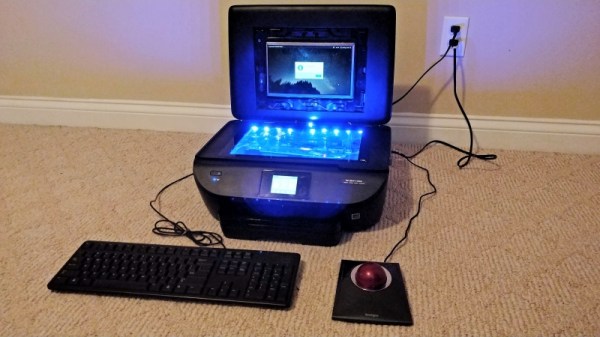
This build is [Mason Stooksbury]’s earlier and admittedly useless laptop-in-a-printer build, which we covered a few months back. It’s easy to see where he got his inspiration, since the donor printer’s flip-up lid is a natural for mounting a display, and the capacious, glass-topped scanner bed made a great place to show off the hybrid machine’s guts. But having a printer that doesn’t print didn’t sit well with [Mason], so Comprinter II was born. This one follows the same basic approach, with a Toshiba Netbook stuffed into an H-P ENVY all-in-one. The laptop’s screen was liberated and installed in the printer’s lid, the motherboard went into the scanner bay along with a fair number of LEDs. This killed the scanner but left the printer operational, after relocating a power brick that was causing a paper jam error.

[Mason]’s Comprinter II might not be the next must-have item, but it certainly outranks the original Comprinter on the utility spectrum. Uselessness has a charm of its own, though; from a 3D-printed rotary dial number pad to a useless book scanner, keep the pointless projects coming, please.

Cramming Dual SIMs & A Micro SD Card Into Your Phone

There are plenty of dual SIM phones on the market these days, but most of them are a hamstrung by packaging issues. Despite their dual SIM capability, this usually comes at the expense of the microSD card slot. Of course, hackers don’t accept such nonsense, and [Tweepy] went about crafting a solution. Sadly the make and model of phone aren’t clear.

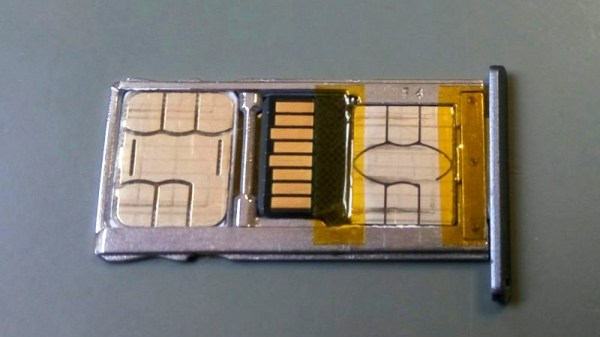
It’s a simple case of very carefully shaving both the microSD card and the nano-SIM down until both can fit in the card tray. The SIM is slimmed down with the application of a heat gun helping to remove its plastic backing, saving precious fractions of a millimeter. The SD card is then filed down to make just enough space for the SIM to fit in underneath. Thanks to the springiness of the contacts in the phone, it’s just barely possible to squeeze both in, along with some Kapton tape to hold everything in place.

Your mileage may vary, depending on the construction of your SD card. Overall though, it’s a tidy hack that should prove useful to anyone with a dual SIM phone and limited storage. We saw a similar hack a few years ago, too.

[Thanks to Timothy for the tip!]

You Need A Cyberdeck, This Board Will Help

In 1984, William Gibson’s novel Neuromancer helped kick off the cyberpunk genre that many hackers have been delighting in ever since. Years before Tim Berners-Lee created the World Wide Web, Gibson was imagining worldwide computer networks and omnipresent artificial intelligence. One of his most famous fictional creations is the cyberdeck, a powerful mobile computer that allowed its users to navigate the global net; though today we might just call them smartphones.

While we might have the functional equivalent in our pockets, hackers like [Tillo] have been working on building cyberdecks that look a bit more in line with what fans of Neuromancer imagined the hardware would be like. His project is hardly the first, but what’s particularly notable here is that he’s trying to make it easier for others to follow in his footsteps.

There’s a trend to base DIY cyberdecks on 1980s vintage computer hardware, with the logic being that it would be closer to what Gibson had in mind at the time. Equally important, the brutalist angular designs of some of those early computers not only look a lot cooler than anything we’ve got today, but offer cavernous internal volume ripe for a modern hardware transfusion. Often powered by the Raspberry Pi, featuring a relatively small LCD, and packed full of rechargeable batteries, these cyberdecks make mobile what was once anchored to a desk and television.

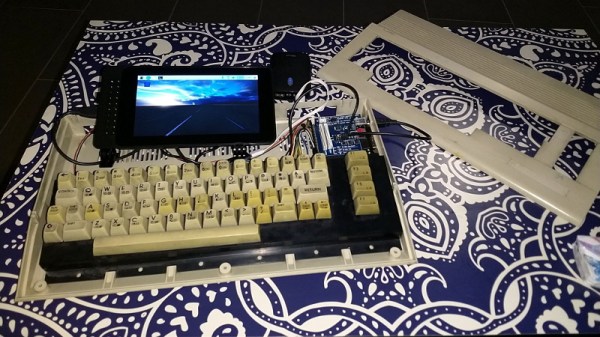
[Tillo] based his cyberdeck on what’s left of a Commodore C64c, reusing the original keyboard for that vintage feel. That meant he needed to adapt the keyboard to something the Raspberry Pi could understand, for which some commercially available options existed already. But why not take the idea farther for those looking to create their own C64c cyberdecks?

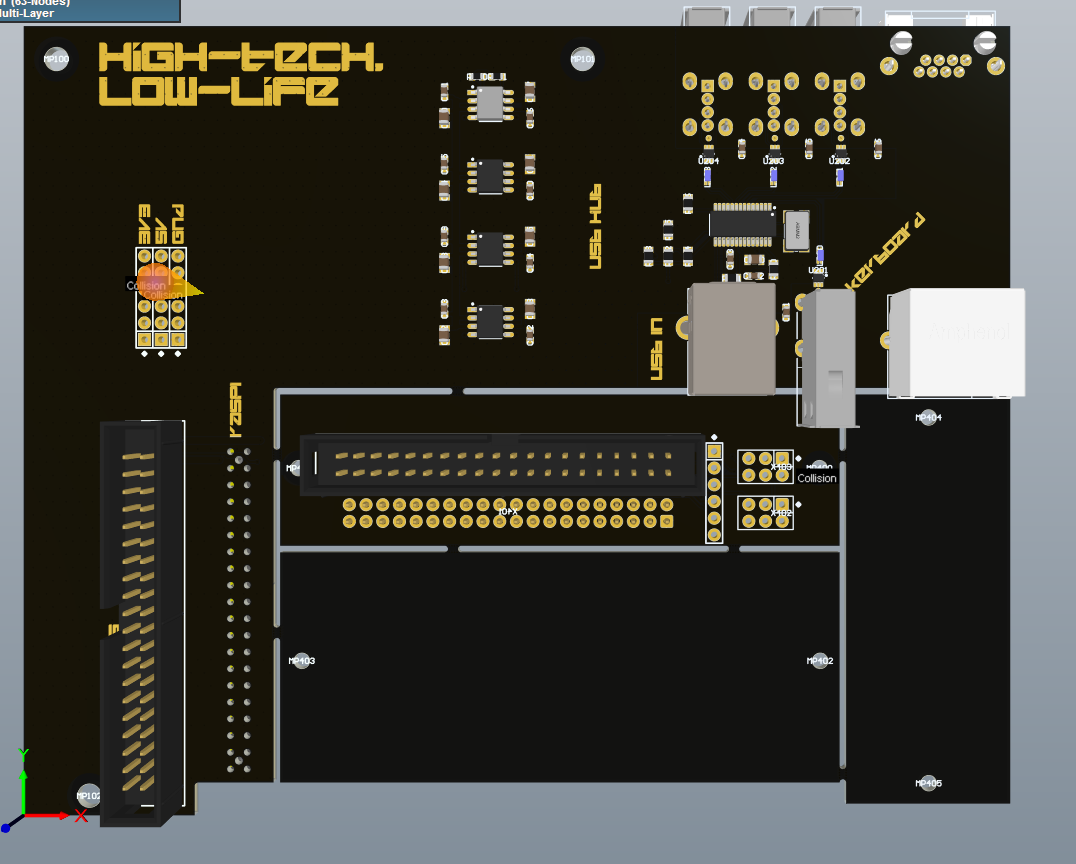
He’s currently working on a new PCB specifically designed for retrofitting one of these classic machines with a Raspberry Pi. The board includes niceties like a USB hub, and should fill out some of those gaping holes left in the case once you remove the original electronics. [Tillo] has already sent the first version of his open source board out for fabrication, so hopefully we’ll get an update soon.

In the meantime, you might want to check out some of the other fantastic cyberdeck builds we’ve covered over the last couple of years.