
Making A Pole Balance Itself With Propellers

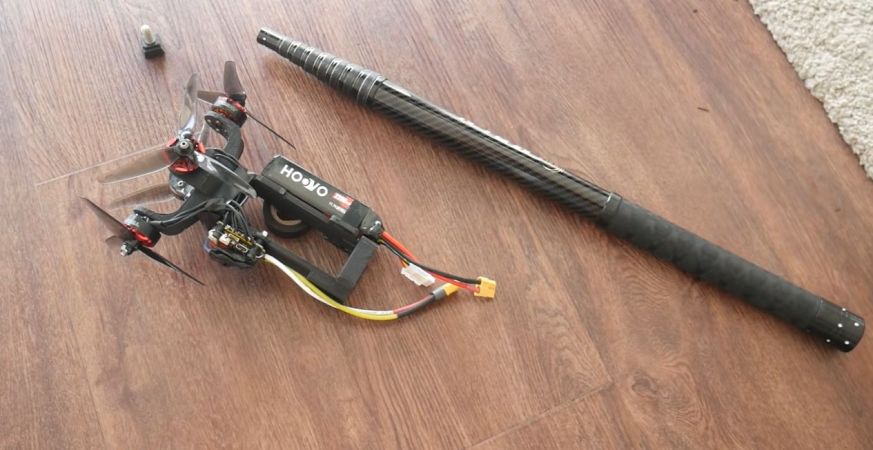
A fun trick with a pole is to try to balance it so that it can stand on one end. This can be done in a few ways, such as by exerting a force on either end to counterbalance any force that threatens to make it fall over. The approach that [Peter Ryseck] chose was to cobble together what is effectively a flying drone for on top of a standing pole, without cheating such as by simply lifting it off the ground.

Getting to the point where the drone could react quickly enough to changes in the pole’s orientation was the hardest part, as the quieter, larger propellers also have a lot more inertia. This ruled out using 10″ blades, while triple 5″ blades seemed to work well enough. For the avionics a standard quadcopter control board and software is used, with the programming such that it’ll react appropriately without causing additional instabilities.

Naturally making this work took some trial and error, with issues like oscillations plaguing the system. One unexpected problem was that the pole – taken from a pool fishing net – was flexible enough to add its own instabilities to the system. In the video all these issues and their solutions are explained in detail, along with the ultimate result. One very neat solution here for example is to have the pole lean into the wind, which is a more stable configuration than insisting on having the pole be at a perfect ninety degrees with the ground.

Continue reading “Making A Pole Balance Itself With Propellers”
Repairing Traces On A Delidded Pentium III CPU Gone Wrong

Delidding a CPU involves removing the integrated heat spreader (IHS) that’s put over the bare die and the substrate that it is mounted on. The reason for this is usually to improve cooling performance, as the IHS is effectively a small heatsink between the die and the large heatsink, adding more problematic thermal interfaces. If delidding is done improperly it can cause severe damage to the substrate, as in the case of a very nice 1.3 GHz Tualatin Pentium III CPU that [Bits und Bolts] got in an eBay lot with nasty delidding damage.

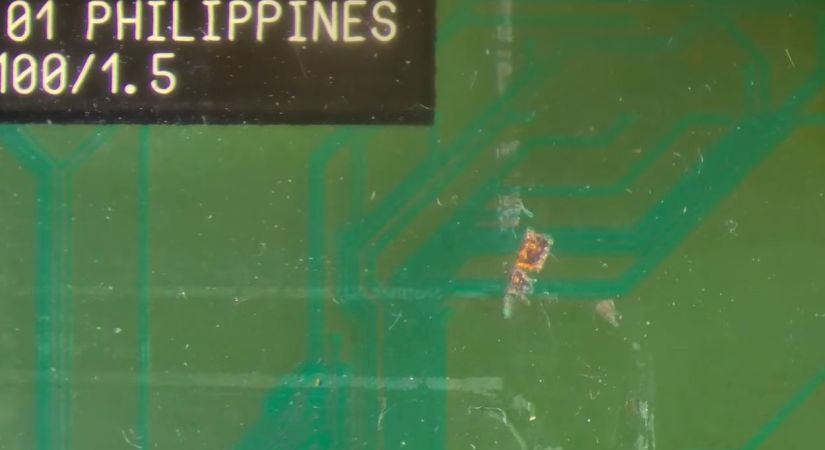
With the delidding enthusiast presumably having used brute force and ignorance combined with a prying implement, around a dozen of tiny traces on the substrate got severed, requiring tedious trace repair to fix. After confirming that with the severed traces the CPU is indeed busted, enough of the soldermask is removed to make a repair.

Any traces that were still good got covered with soldermask, while for the remainders the thinnest available copper wire was used to create new traces. Although very much doable with a good microscope and a steady hand, this is definitely one of those things that’s much easier to prevent than to fix.

With IHSes having become standard on CPUs, delidding continues to this day, with increasing risks of severed traces and ripped-off capacitors should it go wrong. Although those newer CPU substrates are probably not repairable, repairing these older CPUs instead of tossing them as e-waste seems plausible at least.

Continue reading “Repairing Traces On A Delidded Pentium III CPU Gone Wrong”

Hackaday Podcast Ep 385: 3D Printers With Lasers, Wicked RAM Prices, And Reverse Polish Notation

As the calendar turns a leaf into September, Elliot Williams is joined by Jenny List for our weekly look at all things Hackaday.

In the news, our retrocomputing competition is well under way, but there’s plenty of time to get an entry in if you’ve got a cool old-style project to show us. And then Elliot’s been chasing seismic surveyors in Munich, where they’re looking for geothermal energy.

In the stand-out hacks there’s a discussion of smoothing 3D prints using frickin’ lasers, the effect of unreasonably high RAM and storage prices on the single board computer ecosystem, and an unfortunate air conditioning system that’s tricked into believing it’s a hot day. Finally, we look in depth at PETG, and take a dive into reverse Polish notation.

Download your own personal version of the podcast right here.

Continue reading “Hackaday Podcast Ep 385: 3D Printers With Lasers, Wicked RAM Prices, And Reverse Polish Notation”

3D Printed Cubes Provide Passive Cooling

Passive evaporative cooling has been used for centuries to reduce temperatures. Heat is drawn off as water evaporates, which in turn reduces temperature. The more efficiently this process happens the greater the temperature differential, and that’s exactly what the 3D-printed structure pictured above aims for. Created at the Graz University of Technology in Austria, the cubes noticeably reduce surrounding air temperature thanks to their careful construction. As long as they’re kept wet, anyway.

The key is exposing the maximum amount of water to the maximum amount of airflow, and there are two ways the prototype cooling wall — which is 3D printed from a special clay mixture — does this.

First, the macro design of the 3D-printed blocks maximizes surface area. If the cube in the image above looks familiar, that’s because it’s the gyroid infill pattern. Gyroid is a porous pattern with no “dead ends” or closed sections, and the fact that it 3D prints cleanly with no supports also makes it an ideal structural candidate.

The second advantage is the clay used for the blocks themselves. Firing clay at a low temperature keeps it porous, but this particular mixture goes even further. It’s a bio-inspired formulation of clay, fungal mycelium, and wood chips. After printing, the cubes are fired and the fungus and wood chips burn away, leaving a network of thread-like capillaries with occasional larger pockets throughout.

The result is a porous ceramic cube with a massive evaporative surface area relative to its size. A practical test in a hot attic showed the air near a water-laden cube was nearly 7º C lower, a noticeable difference.

A home experimenter might not have access to fancy mycelium-laced clay mixtures, but it still strikes us as something that could be tried out at home. After all, clever hackers have successfully made DIY versions of passive cooling paint.

This Week In Security: Baked-in Malware, Freezers Not Freezing, Zoom Snoops Clipboards, And AI Makes Things Worse, Faster

The AI platform ServiceNow which offers both hosted and on-premises versions just patched a trifecta of CVSS-10 vulnerabilities.

CVSS rankings are determined by the severity of a flaw, the ease of exploiting the bug, if authentication is required for exploitation, if the vulnerability exposes confidential data, and other criteria. A CVSS of 10 is as bad as it gets, and having three of them at once is certainly attention-getting. Of the three vulnerabilities fixed, one allowed unauthenticated modification of data in the hosted instance, a second allowed arbitrary code execution via the GraphQL interface, and the third allowed arbitrary SQL commands that could modify the database.

ServiceNow claims Adobe, Lenovo, Fedex, and Fujitsu among their high-profile customers. With luck, the vulnerabilities were patched before significant public exploitation could happen.

Router Malware

Previously in 2026 the US Government warned against embedded malware found in consumer routers, which may be linked to the FCC enacting bans against certification and import of foreign-made consumer devices. This week, the NVD (National Vulnerability Database) reported specific embedded malware in the Zbtlink and MoreQuick brands of devices.

Multiple versions of the firmware, for multiple lines of products, contain a backdoor service that uses unencrypted UDP to connect to a command and control (C2) service. The service, or anyone able to intercept the network traffic, since it’s unencrypted, can execute commands as root, allowing them to change configurations, open tunnels, or steal ISP credentials.

The malware is baked into the firmware, so removing it is impossible for most users: a factory reset wouldn’t do. In theory if third-party firmware like OpenWRT supports these devices, the hardware could be made safer with a custom install.

Given how commonly the same device is marketed under dozens of names, likely the same devices and firmware have yet to be identified under other brands. Continue reading “This Week In Security: Baked-in Malware, Freezers Not Freezing, Zoom Snoops Clipboards, And AI Makes Things Worse, Faster”

Take Tool Photo, Generate Custom Gridfinity Bin

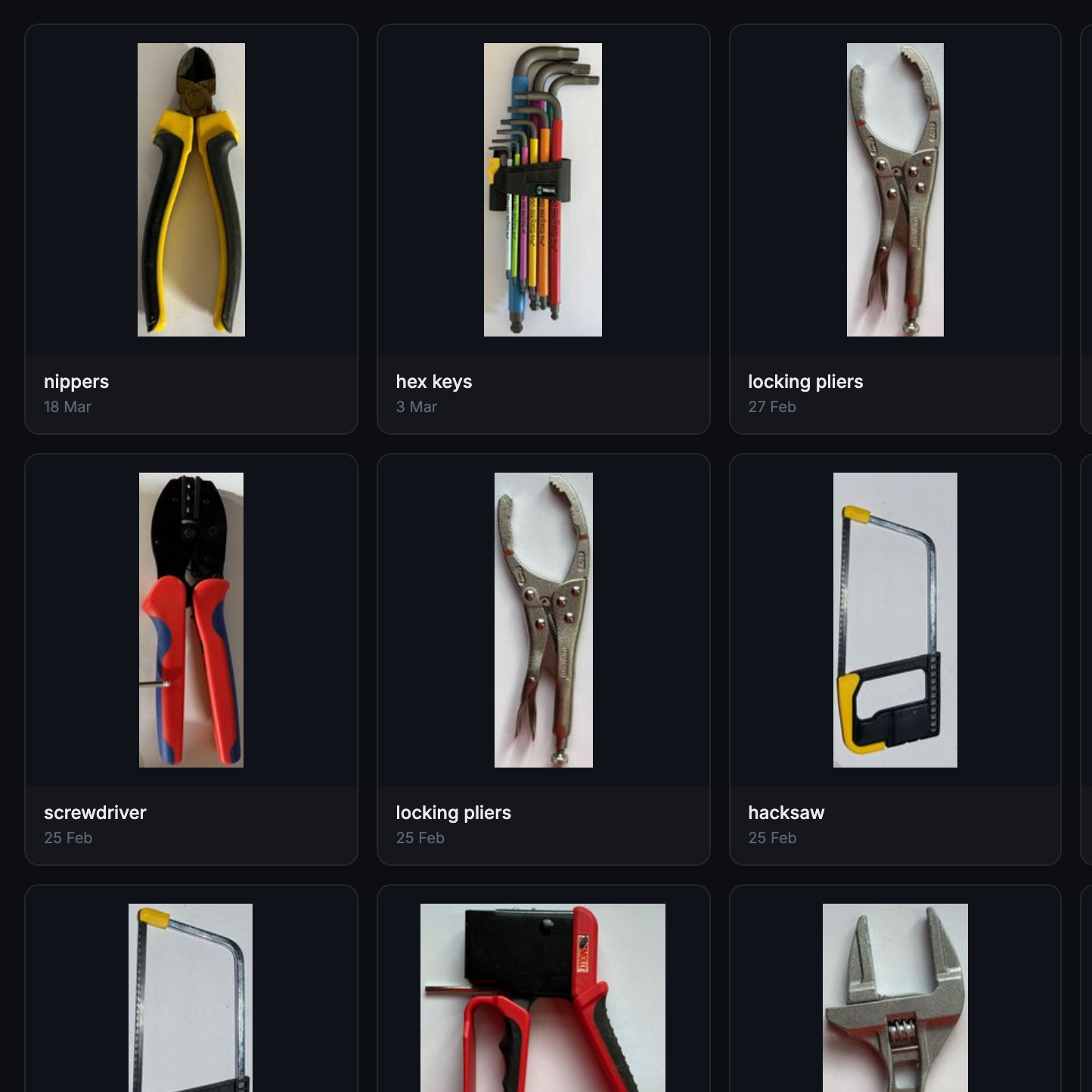
What if the organization and storage benefits of tool shadowing could be had and improved with a modular, semi-automated process? Tracefinity attempts that by generating custom Gridfinity bins from photos of tools, and has quite a few nifty features that are worth a look.

Maintaining a library of tools makes it easy to create project-based custom layouts.

The basic workflow is this: place one or more tools on a sheet of paper, take a photo, then upload the photo and have the system trace and save the outline and add it to a private tool library. When one is ready to create some bins, use the library of saved tool outlines to generate custom Gridfinity layouts.

If you’re unfamiliar, Gridfinity is a modular system of standardized bins and baseplates designed with 3D printing in mind, making it an ideal match for highly-customized organization tasks and a particularly natural fit for a tool-tracing system like this one.

The idea of taking a photo of a tool and generating a custom bin is a compelling one, and a couple years ago we covered a project that did just that. Tracefinity seems like a natural evolution of the idea, and includes handy features like easy design adjustments, optional magnet holes, and we really like the concept of a tool library from which individual tools are scanned once then later selected to create specific, project-based layouts.

Tracefinity takes advantage of new software capabilities like machine learning to improve and streamline the tracing process, but that doesn’t mean it relies on any external services. It can be entirely self-hosted and by default uses a local, CPU-friendly object detection model for tool tracing. There is an option to provide a API key to use Google Gemini instead, but it’s not required. It can come in handy for especially complex tool outlines or dealing with non-ideal source photos, however.

The Birds Outside, Drawn For You Automatically

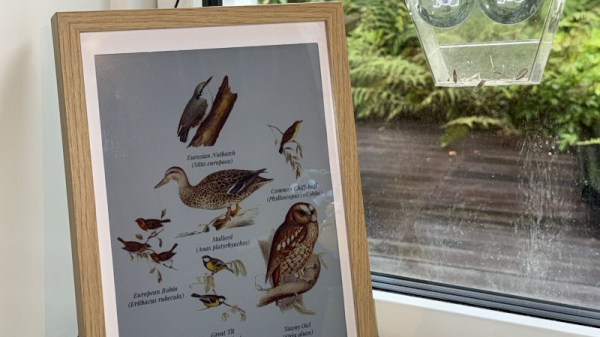
With artificial intelligence being the bête noir of the moment, there are some projects using it which maybe don’t bring much to the table. So it’s nice to see one that uses it in a creative way, and delivers something new. [arnegiacomo]’s e-paper screen is a great example, as it draws a picture in real time of whatever birds are outside.

Behind the quite large screen sits a Raspberry Pi 5, and on that is BirdNet-Go, an AI-powered birdsong classifier. A USB microphone catches the birdsong, and Birdnet comes up with the species. The birds on the display are then those species as pictures from 19th century bird spotters guides, assembled into a collage. You can even see what the current set of birds it hears are, live, and they are a representative cross section of the European birds you’d find in Norway where it’s located.

We like this project, both for the bird book vibe it gives, and the creative use of machine classification. Surprisingly this isn’t the first project in this field we have seen over the years.