Hackaday Links Column Banner

Hackaday Links: May 12, 2024

Don’t pack your bags for the trip to exoplanet K2-18b quite yet — it turns out that the James Webb Space Telescope may not have detected signs of life there after all. Last year, astronomers reported the possible presence of dimethyl sulfide there, a gas that (at least on Earth) is generally associated with phytoplankton in the ocean. Webb used its infrared spectrometer instruments to look at the light from the planet’s star, a red dwarf about 111 light-years away, as it passed through the hydrogen-rich atmosphere. The finding was sort of incidental to the discovery of much stronger signals for methane and carbon dioxide, but it turns out that the DMS signal might have just been overlap from the methane signal. It’s too bad, because K2-18b seems to be somewhat Earth-like, if you can get over the lack of oxygen and the average temperature just below freezing. So, maybe not a great place to visit, but it would be nice to see if life, uh, found a way anywhere else in the universe.

Attention Fortran fans: your favorite language isn’t quite dead yet. In fact, it cracked the top ten on one recent survey, perhaps on the strength of its numerical and scientific applications. The “Programming Community Index” is perhaps a bit subjective, since it’s based on things like Google searches for references to particular languages. It’s no surprise then that Python tops such a list, but it’s still interesting that there’s enough interest in a 67-year-old programming language to make it onto the list. We’d probably not advise building a career around Fortran, but you never know.

Continue reading “Hackaday Links: May 12, 2024”

Software Bug Results In Insulin Pump Injuries, Spurs Recall

Managing Type 1 diabetes is a high-stakes balancing act — too much or too little insulin is a bad thing, resulting in blood glucose levels that deviate from a narrow range with potentially dire consequences on either side. Many diabetics choose to use an insulin pump to make managing all this easier, but as a recent recall of insulin pump software by the US Food and Drug Administration shows, technology isn’t foolproof.

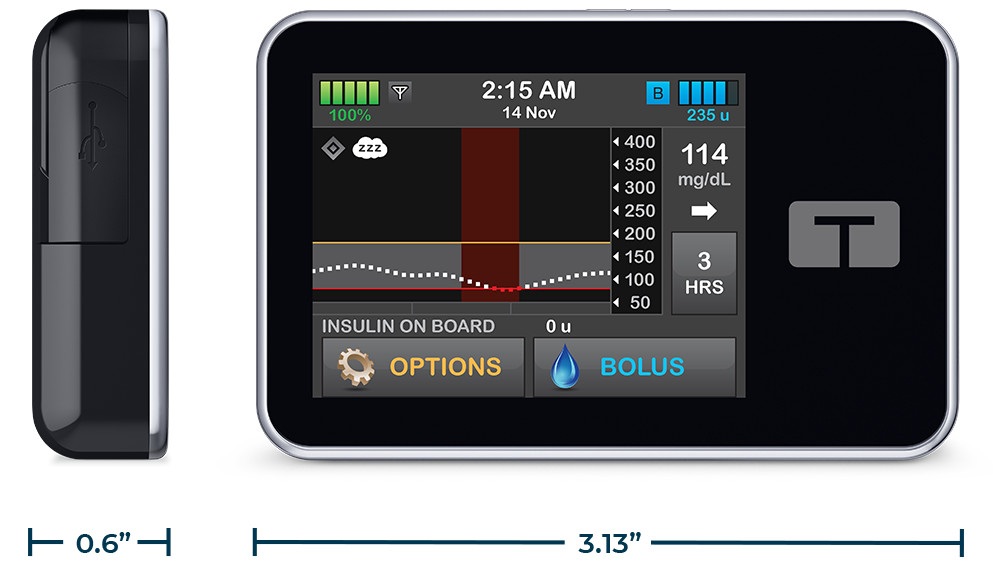
Thankfully, the recall is very narrow in scope. It’s targeted at users of the Tandem t:slim X2 insulin pump, and specifically the companion application running on iOS devices. The mobile app is intended to run on the user’s phone to monitor and control the pump. The pump itself is a small, rechargeable device that users often keep on their belt or tucked into a pocket that delivers a slow, steady infusion of insulin during the day, plus larger bolus doses to compensate for meals.

The t:slim X2 insulin pump.

But version 2.7 of the t:connect mobile app can crash unexpectedly, and on iOS devices, that can lead to the OS continually relaunching it. Each time it does this, the app tries to reconnect with the pump via Bluetooth, which eventually runs down the battery in the pump. Once the battery is dead, no more insulin can be delivered, potentially leading to a condition called hyperglycemia (“hyper” meaning an excess, “gly” referring to sugar, and “emia” meaning presence in blood — excess sugar in the blood.)

Untreated hyperglycemia can progress to a much more serious state called diabetic ketoacidosis, which can lead to coma and death. Thankfully, nobody has suffered that fate from this bug, but the FDA has received over 200 reports of injuries, hence the recall. Tandem sent out a notice to all affected customers back in March to update their apps, but it’s still possible that some users didn’t get the message.

Apart from the human cost of this bug, there’s a lesson here about software design and unintended consequences. While it intuitively seems like a great idea to automatically relaunch a crashed app, especially one with a critical life-safety function, in hindsight, the better course might have been to just go into a safe mode and alert the user with an alarm. That’s a lesson we’ve learned by exploring space, and it seems to apply here as well.

Images: AdobeStock, Tandem Diabetes

Protoboard Z80 Computer Teaches The Basics

As curious people, we’re all incredibly fortunate to live in an age where information can so easily be obtained. If you want to learn how something works, from a cotton gin to an RBMK reactor, you’re just a few keystrokes away from articles, diagrams, and videos on the subject. But as helpful as all of that information can be, we also know that there’s no substitute for hands-on experience.

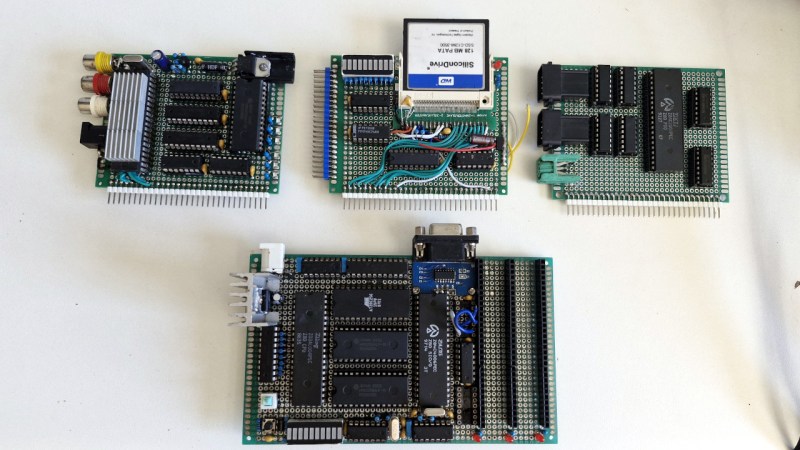
While we can’t recommend you try building a miniature graphite-moderated nuclear reactor, there’s plenty of other devices that you can study by constructing your own functioning model. For example, when [Jorisclayton] wanted to really know what was going on inside a computer, they decided to go back to basics and build their own Z80 machine. To maximize the experience, they skipped any of the existing kit designs and instead wired the whole thing up by hand across a few perfboards.

The main board contains a 4 MHz Z80 processor, paired with 32K ROM and 64K RAM. Here you’ll also find the clock generator, I/O decoder, serial port, voltage regulator, and a trio of expansion slots that use a long strip of 2.54 mm pin headers as the interface. In the first expansion slot you’ve got a primordial “graphics card” based around the TMS9918 video display controller (VDC) and 16K of additional RAM. The second expansion card has a CompactFlash reader and an LED array mapped to I/O address 0x00h so it can be used for various notifications.

[Jorisclayton] says the final expansion board is still being worked on, but the idea is for it to handle user input through a PS/2 keyboard connector, as well as provide ports for a pair of Super Nintendo (or compatible) controllers. Everything is held together with a minimalist 3D printed frame to show off all that careful soldering.

Obviously there’s no PCB design files to share for this one, but [Jorisclayton] has posted a schematic for wiring everything up if you’re looking for resources to build your own Z80 computer. Sure the chips themselves might no longer be in production, but that doesn’t mean this venerable CPU is going anywhere just yet.

An Umbrella Can Teach A Thing Or Two About Product Longevity

This time of year always brings a few gems from outside Hackaday’s usual circle, as students attending industrial design colleges release their final year projects, The worlds of art and engineering sit very close together at times, and theirs is a discipline which sits firmly astride that line. This is amply demonstrated by the work of [Charlie Humble-Thomas], who has taken an everyday object, the umbrella, and used it to pose the question: How long should objects last?

He explores the topic by making three different umbrellas, none of which we are guessing resemble those you could buy. The first is not particularly durable but is completely recyclable, the second is designed entirely with repairability in mind, while the third is hugely over-engineered and designed for durability. In each case the reader is intended to think about the impact of the umbrella before them.

What strikes us is how much better designed each one is than the typical cheap umbrella on sale today, with the polypropylene recyclable one being flimsy by design, but with a simplicity missing from its commercial counterpart. The durable one meanwhile is full of CNC parts, and carbon fiber.

If you’re hungry for more student work in this vein, we recently brought you this toasty typewriter.

Hackaday Podcast Episode 270: A Cluster Of Microcontrollers, A Rocket Engine From Scratch, And A Look Inside Voyager

Join Hackaday Editors Elliot Williams and Tom Nardi as they get excited over the pocket-sized possibilities of the recently announced 2024 Business Card Challenge, and once again discuss their picks for the most interesting stories and hacks from the last week. There’s cheap microcontrollers in highly parallel applications, a library that can easily unlock the world of Bluetooth input devices in your next project, some gorgeous custom flight simulator buttons that would class up any front panel, and an incredible behind the scenes look at how a New Space company designs a rocket engine from the ground up.

Stick around to hear about the latest 3D printed gadget that all the cool kids are fidgeting around with, a brain-computer interface development board for the Arduino, and a WWII-era lesson on how NOT to use hand tools. Finally, learn how veteran Hackaday writer Dan Maloney might have inadvertently kicked off a community effort to digitize rare documentation for NASA’s Voyager spacecraft.

Check out the links below if you want to follow along, and as always, tell us what you think about this episode in the comments!

Download your very own copy of the podcast right about here.

Continue reading “Hackaday Podcast Episode 270: A Cluster Of Microcontrollers, A Rocket Engine From Scratch, And A Look Inside Voyager”

Reflecting On The State Of Game Boy Emulation In 2024

Considering the decades that have passed since Nintendo’s Game Boy was considered the state-of-the-art in mobile gaming, you’d imagine that the community would have pretty much perfected the emulation of the legendary family of handhelds — and on the whole, you’d be right. Today, you can get open source emulators for your computer or even smartphone that can play the vast majority of games that were released between the introduction of the original DMG-1 “brick” Game Boy in 1989 through to the final games published for the Game Boy Advance in the early 2000s.

But not all of them. While all the big name games are handled at this point, there’s still a number of obscure titles (not all of which are games) that require specialized hardware accessories to properly function. To bring the community up to speed on where work is still required, [Shonumi] recently provided a rundown on the emulation status of every commercial Game Boy accessory.

Continue reading “Reflecting On The State Of Game Boy Emulation In 2024”

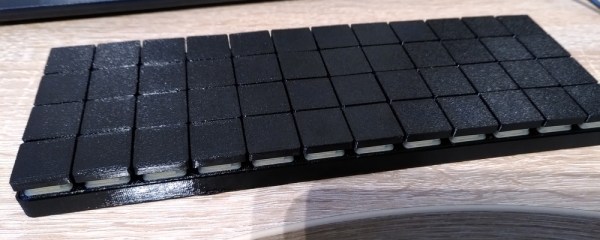
A Planck-inspired 40% ortholinear keyboard.

DIY Keyboard Can Handle Up To Three Host Devices

Here’s a story that may be familiar: [der-b] is a Linux developer who is forced two carry two laptops — one for work with unavoidable work stuff on it, and one for software development. Unfortunately this leads to keyboard confusion between the two when one is connected to an external display.

In an attempt to overcome this, [der-b] designed a keyboard that can be connected to more than one device at a time, despite ultimately thinking that this will lead to another layer of confusion. The point was to try to make something as lightweight as possible, since carrying two laptops is already a struggle. As a bonus, this project was a learning experience for soldering SMD parts.

The keyboard itself is based on the Planck and uses an ATMega32u4 running QMK firmware, so that means it’s a 40% ortholinear with 48 keys total. [der-b] used low-profile Cherry MX switches to keep things sleek.

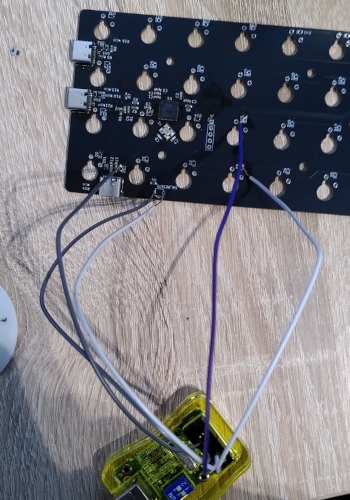
In order to switch between different host devices, [der-b] uses shortcuts as you’ll see in the short video after the break. This is accomplished with a FSUSB36 IC on the USB connections between the ATMega and the host.

[der-b] encountered a spate of issues while building this keyboard, which you can read all about in the blog post. We love to see transparency when it comes to your write-ups, especially when the projects become learning experiences. (Aren’t they all?) But if 48 keys aren’t nearly enough for you, check out this learning-experience keyboard build.

Continue reading “DIY Keyboard Can Handle Up To Three Host Devices”