How The Image-Generating AI Of Stable Diffusion Works

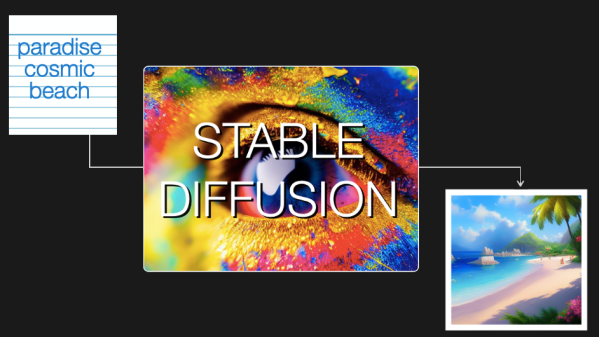
[Jay Alammar] has put up an illustrated guide to how Stable Diffusion works, and the principles in it are perfectly applicable to understanding how similar systems like OpenAI’s Dall-E or Google’s Imagen work under the hood as well. These systems are probably best known for their amazing ability to turn text prompts (e.g. “paradise cosmic beach”) into a matching image. Sometimes. Well, usually, anyway.

‘System’ is an apt term, because Stable Diffusion (and similar systems) are actually made up of many separate components working together to make the magic happen. [Jay]’s illustrated guide really shines here, because it starts at a very high level with only three components (each with their own neural network) and drills down as needed to explain what’s going on at a deeper level, and how it fits into the whole.
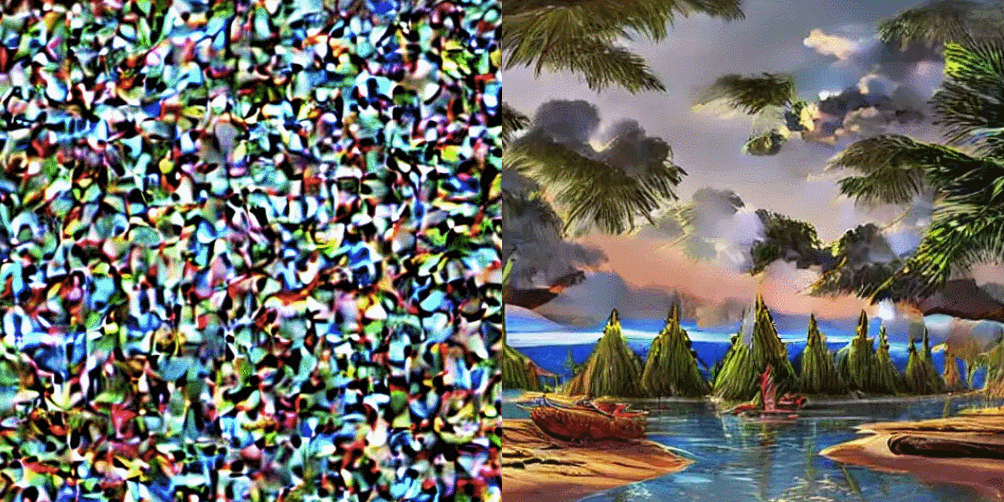
Spot any similar shapes and contours between the image and the noise that preceded it? That’s because the image is a result of removing noise from a random visual mess, not building it up from scratch like a human artist would do.

It may surprise some to discover that the image creation part doesn’t work the way a human does. That is to say, it doesn’t begin with a blank canvas and build an image bit by bit from the ground up. It begins with a seed: a bunch of random noise. Noise gets subtracted in a series of steps that leave the result looking less like noise and more like an aesthetically pleasing and (ideally) coherent image. Combine that with the ability to guide noise removal in a way that favors conforming to a text prompt, and one has the bones of a text-to-image generator. There’s a lot more to it of course, and [Jay] goes into considerable detail for those who are interested.

If you’re unfamiliar with Stable Diffusion or image-creating AI in general, it’s one of those fields that is changing so fast that it sometimes feels impossible to keep up. Luckily, our own Matthew Carlson explains all about what it is, and why it matters.

Stable Diffusion can be run locally. There is a fantastic open-source web UI, so there’s no better time to get up to speed and start experimenting!
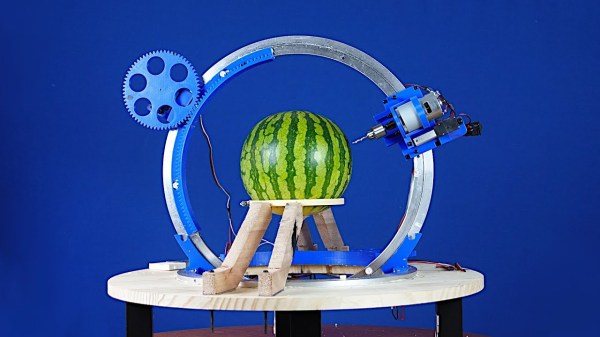

Watermelon CNC Uses Lazy Susan

It is the time of year when a lot of people in certain parts of the world carve pumpkins. [Gonkee] is carving a watermelon, which we assume is similar. He decided to make a CNC machine to do the carving for him. The unusual part is the use of two lazy Susans to make a rotary carving machine. You can see the result in the video below.

The hardware is clever and there is software that lets you do drawings, although we were hoping for something that would process gcode or slice STL. That would be a worthy add-on project. There were a few iterations required before the Melon Carver 3000 worked satisfactorily. Seeing a carving tool operating on two circles gives us a lot of ideas. We aren’t sure how sturdy the mounts are, so don’t plan on carving aluminum without some changes, but we suspect it is possible.

Then again, a laser head mounted on the frame would have probably made short work of the melon, and wouldn’t require much mechanical stiffness. It would, however, take a little effort to keep it in focus. So many ideas to try!

Watermelon is a popular hacking medium, apparently. There’s even one that holds a GameBoy.

front and back of the Jolly Wrencher SAO

Jolly Wrencher SAO, And How KiCad 6 Made It Easy

If you plan to attend Supercon or some other hacker conference, know that you’re going to get a badge with a SAO (Simple Add-On) connector, a 4-pin or 6-pin connector that you can plug an addon board onto. There’s myriads of SAOs to choose from, and if you ever felt like your choice paralysis wasn’t intense enough, now you have the option of getting a Jolly Wrencher SAO board!

This board gives you an SMD prototyping space, with 1.27mm (0.05″ pitch) pads, suitable for many passive components, ICs and even modules like the ESP32 WROOM. Those pads are diagonally interspersed with ground-fill-connected pads – if you want to bodge something on the spot, you don’t need to pull separate GND wires. Given the Supercon badge specifics, the SAO-standard SDA and SCL pins have RX and TX labels as well. For bonus points, the eyes are transparent, with LED footprints behind them – it’s my first time designing a PCB where the LED shines through the FR4, and I hope that the aesthetics work out!

This design is open with gerber files available for download, so if you thought of making a quick PCB order, I’m giving you one more .zip file to add to it. Otherwise, it’s possible that you will find a Wrencher board lying around at Supercon! Now, I’d like to tell you how KiCad 6 made it super easy to design this PCB – after all, there’s never enough SAOs, and it’s quite likely you’ll want to design your own special SAO, too.

Continue reading “Jolly Wrencher SAO, And How KiCad 6 Made It Easy”

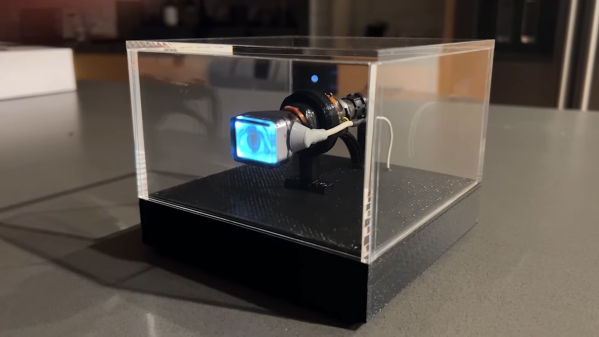
A tiny CRT showing an eye, inside a plexiglass enclosure

This Eye Is Watching You From Its Tiny CRT

The days of cathode ray tubes, or CRTs, are firmly behind us, and that’s generally a good thing. Display tubes were heavy, bulky and fragile, and needed complicated high-voltage electronics in order to work. But not all of them were actually large: miniature display tubes were also produced, for things like camcorder viewfinders, and [Tavis] from Sideburn Studios decided to turn one of those into a slightly creepy art project.

The heart of this build is a one-inch CRT that was salvaged from an RCA video camera. [Tavis] mounted the tiny tube inside an acrylic box on a 3D printed base. Inside that base sits a Raspberry Pi along with a high-voltage driver and a power management board. The Pi continuously plays a video that shows a human eye blinking and looking in various directions. Just an eye, floating in space, looking at the world around it.

The magic is briefly lost when the Pi starts up, because it then shows a microscopic version of the Pi’s standard bootup sequence, but once the thing is running it adds a weird vibe to a room. It actually looks like something you’d find in an avant-garde art exhibition — in the video (embedded below) it’s accompanied by eerie music that gives it an even more unsettling feel. Electronic eyes are always a bit scary, especially when they’re actually looking at you.

Continue reading “This Eye Is Watching You From Its Tiny CRT”

Flux: A Forty Foot Long Kinetic Art Piece

No office space is complete without some eye-catching art piece to gawp at whilst you mull over your latest problem. But LED-based displays are common enough to be boring these days. Kinetic art pieces are where it’s at, and this piece called Flux is a perfect example.

Commissioned for the Toronto office of a very popular e-commerce platform and constructed by [Nicholas Stedman], Flux consists of twenty identical planks on the ceiling, arranged in a line forty feet long. Each plank has a pair of rotating prisms, constructed from a stack of foam sheets, finished with metallic paint. The prisms are spun by individual stepper motors, each of which is driven by a TMC2160-based module, making them whisper-quiet.

A simple 3D printed bracket holds a small PCB holding an AMS AS5600 rotary magnetic encoder, onto the rear of the stepper motor. This allows for closed-loop feedback to the shared Arduino, which is very important for a sculpture such as this. Each Arduino is hooked up to a Raspberry Pi, running a simple application written in node.js which is responsible for coordinating movement, as well as uploading updated firmware images as required. A simple, but very effective build, we think!

Even more fun are kinetic art installations that are reactive to some data source, such as Adad, which visualizes lightning strike data. If these builds are just too big and complex, we’ve seen many examples of smaller desktop toys, such as this 3D printed tumbling chain demo for example.

Continue reading Flux: A Forty Foot Long Kinetic Art Piece”

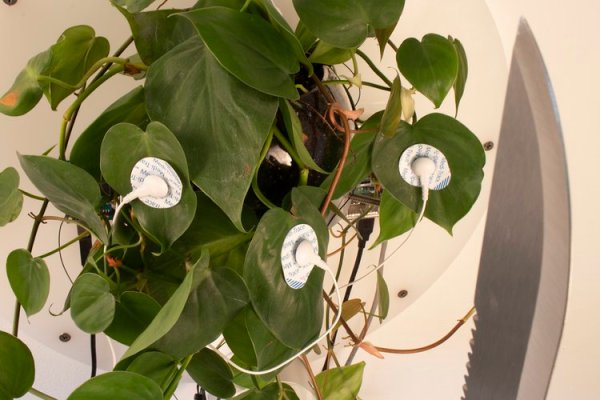
close-up image of a philodendron houseplant with electrodes attached, connected to a robot arm holding a machete

(Mostly) Harmless Houseplant Wields Machete

In a straight fight between a houseplant and a human, you might expect the plant to be at a significant disadvantage. So [David Bowen] has decided to even the odds a little by arming this philodendron with a robot arm and a machete.

The build is a little short on details but, from the video, it appears that adhesive electrodes have been attached to the leaves of the recently-empowered plant and connected directly to analog inputs of an Arduino Uno.  From there, the text tells us that the signals are mapped to movements of the industrial robot arm that holds the blade.

It’s not clear if the choice of plant is significant, but an unarmed philodendron appears to be otherwise largely innocuous, unless you happen to be a hungry rodent. We hope that there is also a means of disconnecting the power remotely, else this art installation could defend itself indefinitely! (or until it gets thirsty, at least.) We at Hackaday welcome our new leafy overlords.

We have covered the capabilities of plants before, and they can represent a rich seam of research for the home hacker.  They can tell you when they’re thirsty, but can they bend light to their will?  We even held a Plant Communication Hack Chat in 2021.

Continue reading “(Mostly) Harmless Houseplant Wields Machete”

In A Way, 3D Scanning Is Over A Century Old

In France during the mid-to-late 1800s, one could go into François Willème’s studio, sit for a photo session consisting of 24 cameras arranged in a circle around the subject, and in a matter of days obtain a photosculpture. A photosculpture was essentially a sculpture representing, with a high degree of exactitude, the photographed subject. The kicker was that it was both much faster and far cheaper than traditional sculpting, and the process was remarkably similar in principle to 3D scanning. Not bad for well over a century ago.

This article takes a look at François’ method for using the technology and materials of the time to create 3D reproductions of photographed subjects. The article draws a connection between photosculpture and 3D printing, but we think the commonality with 3D scanning is much clearer.

Continue reading “In A Way, 3D Scanning Is Over A Century Old”