Program Your Brain, Hack Your Way To Productivity

Most people wish they were more productive. Some buckle down and leverage some rare facet of their personality to force the work out. Some of them talk with friends. Some go on vision quests. There are lots of methods for lots of types of people. Most hackers, I’ve noticed, look for a datasheet. An engineer’s reference. We want to solve the problem like we solve technical problems.
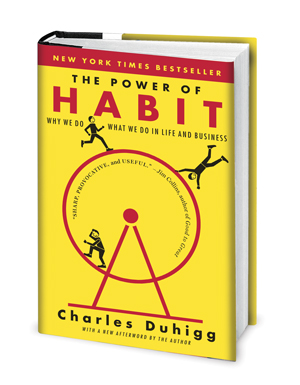
It's got the cover equivalent of click-bait, but the centimeter thick bibliography listing research sources at the back won me over.
It’s got the cover equivalent of click-bait, but the centimeter thick bibliography listing research sources at the back won me over.

There were three books that gave me the first hints at how to look objectively at my brain and start to hack on it a little. These were The Power of Habit by Charles Duhigg, Flow By Mihaly Csikszentmihalyi, and Getting Things Done By David Allen.

I sort of wandered into these books in a haphazard path. The first I encountered was The Power of Habit which I found to be a bit of a revelation. It presented the idea of habits as functions in the great computer program that makes up a person. The brain sees that you’re doing a task over and over again and just learns to do it. It keeps optimizing and optimizing this program over time. All a person needs to do is trigger the habit loop and then it will run.

For example: Typing. At first you either take a course or, if your parents left you alone with a computer for hours on end, hunt-and-peck your way to a decent typing speed. It involves a lot of looking down at the keyboard. Eventually you notice that you don’t actually need to look at the keyboard at all. Depending on your stage you may still be “t-h-i-n-k-i-n-g”, mentally placing each letter as you type. However, eventually your brain begins to abstract this away until it has stored, somewhere, a combination of hand movements for every single word or key combination you typically use. It’s only when you have to spell a new word that you fall back on older programs.

Continue reading “Program Your Brain, Hack Your Way To Productivity”

Li-Ion Tech Staring Into The Abyss With Note 7 Failure

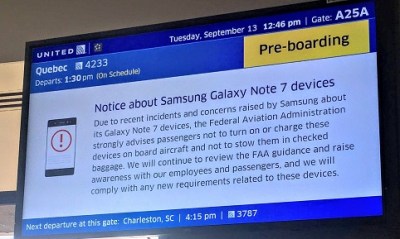
Unless you’ve been living under a high voltage transformer, you’ve heard about the potential for Samsung’s latest phone, the Note7, to turn into a little pocket grenade without warning. With over 2.5 million devices in existence, it’s creating quite a headache for the company and its consumers.

They quickly tied the problem to faulty Li-ion batteries and started replacing them, while issuing a firmware update to stop charging at 60 percent capacity. But after 5 of the replacement phones caught fire, Samsung killed the Note7 completely. There is now a Total Recall on all Note7 phones and they are no longer for sale.  If you have one, you are to turn it off immediately. And don’t even think about strapping it into a VR headset — Oculus no longer supports it. If needed, Samsung will even send you a fireproof box and safety gloves to return it.

note_01
Every airline has been broadcasting warnings not to power on or charge a Note 7 on a plane. Image Source: CNET

It should be noted that the problem only affects 0.01% of the phones out there, so they’re not exactly going to set the world on fire. However, it has generated yet another discussion about the safety of Li-ion battery technology.

It was just a few months ago we all heard about those hoverboards that would catch fire. Those questionably-engineered (and poorly-named) toys used Li-ion batteries as well, and they were the source of the fire problem. In the wake of this you would think all companies manufacturing products with Li-ion batteries in them would be extra careful. And Samsung is no upstart in the electronics industry — this should be a solved problem for them.

Why has this happened? What is the deal with Li-ion batteries? Join me after the break to answer these questions.

Continue reading “Li-Ion Tech Staring Into The Abyss With Note 7 Failure”

Skynet Takes Over…Academia?

A telescope isn’t an unusual thing to own if you are technically inclined. You might have even made one, at some point. However, despite improvements in optical technology and computer aiming devices, your four to twenty-inch instrument is never going to show you images like you see from big giant telescopes. The problem is, going really big requires a lot of investment in time, money, and sometimes even real estate. The big scopes get buildings constructed for them, and in exotic locations; why would you build a 24-inch scope only to try to see through the light pollution in your backyard?

Here’s an idea: take an astronomy class at a college and use their big telescope. Well, who has the time and money for that? Actually, you do. Skynet is a global network of telescopes headquartered at the University of North Carolina. As part of their mandate, they offer several tuition-free astronomy classes over the Internet. The best part? You also get free time on Skynet’s telescopes to complete your class assignments. There is a small fee (between $45 and $65) to a “benefit corporation” to administer assignments. You do get a certificate upon graduation. If you don’t want to do the assignments and you don’t want a certificate, you can still “take” the classes by simply watching them on YouTube. You can see one of the classes in the video below.

Continue reading “Skynet Takes Over…Academia?”

Too Good To Throw Away: Dealing With An Out-Of-Control Junk Hoard

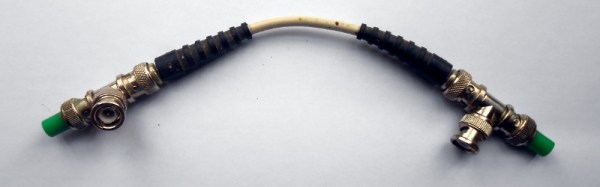
There it was, after twenty minutes of turning the place over, looking through assorted storage boxes. A Thinwire Ethernet network. About the smallest possible Thinwire Ethernet network as it happens, a crimped BNC lead about 100mm long and capped at each end by a T-piece and a 50 ohm terminator. I’d been looking for a BNC T-piece on which to hook up another terminator to a piece of test equipment, and I’d found two of them.

As I hooked up the test I wanted to run I found myself considering the absurdity of the situation. I last worked somewhere with a Thinwire network in the mid 1990s, and fortunately I am likely to never see another one in my life. If you’ve never encountered Thinwire, be thankful. A single piece of co-ax connecting all computers on the network, on which the tiniest fault causes all to fail.

So why had I held on to all the parts to make one, albeit the smallest possible variant? Some kind of memento, to remind me of the Good Old Days of running round an office with a cable tester perhaps? Or was I just returning to my past as a hoarder, like a Tolkienic dragon perched atop a mountain of electronic junk, and not the good kind of junk?

Continue reading “Too Good To Throw Away: Dealing With An Out-Of-Control Junk Hoard”

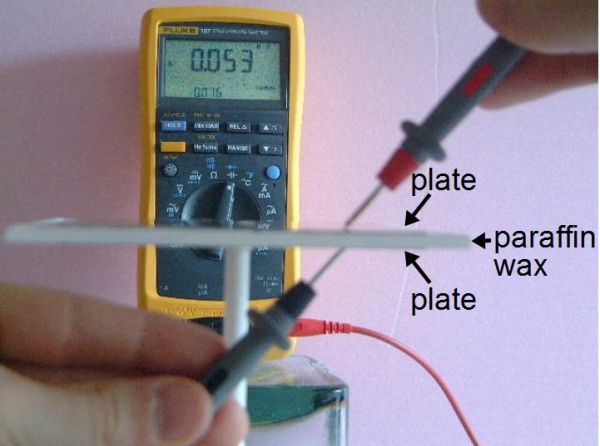
Measuring capacitance with wax dielectric

How To Measure The Dielectric Constant For DIY Capacitors

Every now and then you need to make your own capacitor. That includes choosing a dielectric for it, the insulating material that goes between the plates. One dielectric material that I use a lot is paraffin wax which can be found in art stores and is normally used for making candles. Another is resin, the easiest to find being automotive resin used for automotive body repairs.

The problem is that you sometimes need to do the calculations for the capacitor dimensions ahead of time, rather than just throwing something together. And that means you need to know the dielectric constant of the dielectric material. That’s something that the manufacturer of the paraffin wax that makes it for art stores won’t know, nor will the manufacturers of automotive body repair resin. The intended customers just don’t care.

It’s therefore left up to you to measure the dielectric constant yourself, and here I’ll talk about the method I use for doing that.

Continue reading “How To Measure The Dielectric Constant For DIY Capacitors”

Ask Hackaday: DIY Handwriting Recognition

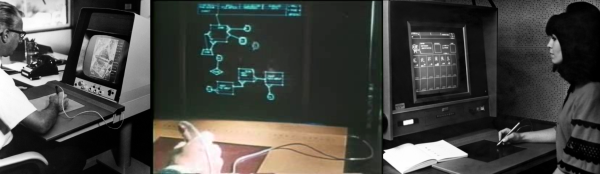
Computer handwriting recognition is very cool by itself, and it’s something that we’d like to incorporate into a project. So we went digging for hacker solutions, and along the way came up with an interesting bit of history and some great algorithms. We feel like we’ve got a good start on that front, but we’re stuck on the hardware tablet sensor itself. So in this Ask Hackaday, we’re going to make the case for why you could be using a tablet-like device for capturing user input or doing handwriting recognition, and then we’re going to ask if you know of any good DIY tablet designs to make it work.

Continue reading “Ask Hackaday: DIY Handwriting Recognition”

Creating A PCB In Everything: Friends Don’t Let Friends Use Fritzing

This week, we’re continuing our Creating A PCB In Everything series, where we go through the steps to create a simple, barebones PCB in different EDA suites. We’re done with Eagle, and now it’s time to move onto Fritzing.

fritzing-logoFritzing came out of the Interaction Design Lab at the University of Applied Sciences of Potsdam in 2007 as a project initiated by Professor Reto Wettach, André Knörig and Zach Eveland. It is frequently compared to Processing, Wiring, or Arduino in that it provides an easy way for artists, creatives, or ‘makers’ to dip their toes into the waters of PCB design.



I feel it is necessary to contextualize Fritzing in the space of ‘maker movement’, DIY electronics, and the last decade of Hackaday. Simply by virtue of being an editor for Hackaday, I have seen thousands of homebrew PCBs, and tens of thousands of amateur and hobbyist electronics projects. Despite what the Fritzing’s Wikipedia talk page claims, Fritzing is an important piece of software. The story of the ‘maker movement’ – however ill-defined that phrase is – cannot be told without mentioning Fritzing. It was the inspiration for CircuitLab, and the Fritzing influence can easily be seen in Autodesk’s 123D Circuits.

Just because a piece of software is important doesn’t mean it’s good. I am, perhaps, the world’s leading expert at assessing poorly designed and just plain shitty PCBs. You may scoff at this, but think about it: simply due to my vocation, I look at a lot of PCBs made by amateurs. EE professors, TAs, or Chris Gammell might beat me on volume, but they’re only looking at boards made by students using one tool. I see amateur boards built in every tool, and without exception, the worst are always designed in Fritzing. It should be unacceptable that I can even tell they’re designed in Fritzing.

Fritzing has its place, and that place is building graphical representations for breadboard circuits. Fritzing has no other equal in this respect, and for this purpose, it’s an excellent tool. You can also make a PCB in Fritzing, and here things aren’t as great. I want to do Fritzing for this Creating A PCB In Everything series only to demonstrate how bad PCB design can be.

For the next few thousand words, I am going to combine a tutorial for Fritzing with a review of Fritzing. Fritzing is an important piece of software, if only for being a great way to create graphics of breadboard circuits. As a PCB design tool, it’s lacking; creating parts from scratch is far too hard, and there’s no way to get around the grid snap tool. No one should ever be forced to create a PCB in Fritzing, but it does have its own very limited place.

Continue reading “Creating A PCB In Everything: Friends Don’t Let Friends Use Fritzing”