Blackhat and DEF CON both just wrapped, and Patch Tuesday was this week. We have a bunch of stories to cover today.
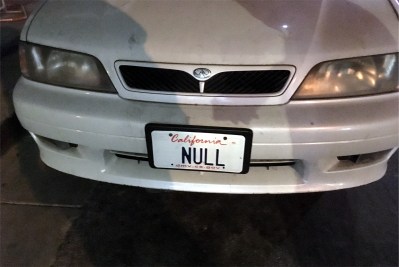 First some light-hearted shenanigans. Obviously inspired by Little Bobby Tables, Droogie applied for the vanity plate “NULL”. A year went by without any problems, but soon enough it was time to renew his registration. The online registration form refused to acknowledge “NULL” as a valid license plate. The hilarity didn’t really start until he got a parking ticket, and received a bill for $12,000. It seems that the California parking ticket collection system can’t properly differentiate between “NULL” and a null value, and so every ticket without a license plate is now unintentionally linked to his plate.
In the comments on the Ars Technica article, it was suggested that “NULL” simply be added to the list of disallowed vanity plates. A savvy reader pointed out that the system that tracks disallowed plates would probably similarly choke on a “NULL” value.
Hacking an F-15
In a surprising move, Air Force officials brought samples of the Trusted Aircraft Information Download Station (TADS) from an F-15 to DEF CON. Researchers were apparently able to compromise those devices in a myriad of ways. This is a radical departure from the security-through-obscurity approach that has characterized the U.S. military for years.
Next year’s DEF CON involvement promises to be even better as the Air Force plans to bring researchers out to an actual aircraft, inviting them to compromise it in every way imaginable.
Patch Tuesday
Microsoft’s monthly dump of Windows security fixes landed this week, and it was a doozy. First up are a pair of remotely exploitable Remote Desktop vulnerabilities, CVE-2019-1222 and CVE-2019-1226. It’s been theorized that these bugs were found as part of an RDP code review launched in response to the BlueKeep vulnerability from earlier this year. The important difference here is that these bugs affect multiple versions of Windows, up to and including Windows 10.
What the CTF
Remember Tavis Ormandy and his Notepad attack? We finally have the rest of the story! Go read the whole thing, it’s a great tale of finding something strange, and then pulling it apart looking for vulnerabilities.
Microsoft Windows has a module, MSCTF, that is part of the Text Services Framework. What does the CTF acronym even stand for? That’s not clear. It seems that CTF is responsible for handling keyboard layouts, and translating keystrokes based on what keyboard type is selected. What is also clear is that every time an application builds a window, that application also connects to a CTF process. CTF has been a part of Microsoft’s code base since at least 2001, with relatively few code changes since then.
CTF doesn’t do any validation, so an attacker can connect to the CTF service and claim to be any process. Tavis discovered he could effectively attempt to call arbitrary function pointers of any program talking to the same CTF service. Due to some additional security measures built into modern Windows, the path to an actual compromise is rather convoluted, but by the end of the day, any CFT client can be compromised, including notepad.
The most interesting CFT client Tavis found was the login screen. The exploit he demos as part of the write-up is to lock the computer, and then compromise the login in order to spawn a process with system privileges.
The presence of this unknown service running on every Windows machine is just another reminder that operating systems should be open source.
Biostar 2
Biostar 2 is a centralized biometric access control system in use by thousands of organizations and many countries around the globe. A pair of Israeli security researchers discovered that the central database that controls the entire system was unencrypted and unsecured. 23 Gigabytes of security data was available, including over a million fingerprints. This data was stored in the clear, rather than properly hashed, so passwords and fingerprints were directly leaked as a result. This data seems to have been made available through an Elasticsearch instance that was directly exposed to the internet, and was found through port scanning.
If you have any exposure to Biostar 2 systems, you need to assume your data has been compromised. While passwords can be changed, fingerprints are forever. As biometric authentication becomes more widespread, this is an unexplored side effect.


 There’s a reason why people use “rocket science” as a metaphor for things that are hard to do. Getting stuff from here to there when there is a billion miles away and across a hostile environment of freezing cold, searing heat, and pelting radiation isn’t something that’s easily accomplished. It takes a dedicated team of scientists and engineers working on machines that can reach out into the vastness of space and work flawlessly the whole time, and as much practice and testing as an Earth-based simulation can provide.
 Our Hack Chats are live community events in the Hackaday.io Hack Chat group messaging. This week we’ll be sitting down on Wednesday, August 21 at 12:00 PM Pacific time. If time zones have got you down, we have a handy time zone converter.