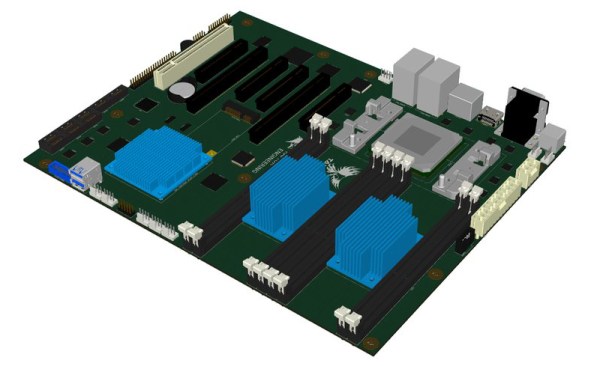
New Part Day: A Truly Secure Workstation

There is a chain of trust in every modern computing device that starts with the code you write yourself, and extends backwards through whatever frameworks you’re using, whatever OS you’re using, whatever drivers you’re using, and ultimately whatever BIOS, UEFI, Secure Boot, or firmware you’re running. With an Intel processor, this chain of trust extends to the Intel Management Engine, a system running independent of the CPU that has access to the network, USB ports, and everything else in the computer.

Needless to say, this chain of trust is untenable. Any attempt to audit every line of code running in a computer will only be met with frustration. There is no modern Intel-based computer that is completely open source, and no computer that can be verified as secure. AMD is just as bad, and recent attempts to create an open computing platform have met with frustration. [Bunnie]’s Novena laptop gets close, but like any engineering task, designing the Novena was an exercise in compromise. You can get around modern BIOSes, coreboot still uses binary blobs, and Libreboot will not be discussed on Hackaday for the time being. There is no modern, completely open, completely secure computing platform. They’re all untrustworthy.

The Talos Secure Workstation, from Raptor Engineering, an an upcoming  Crowd Supply campaign is the answer to the untrustworthiness of modern computing. The Talos is an effort to create the world’s first libre workstation. It’s an ATX-compatible motherboard that is fully auditable, from schematics to firmware, without any binary blobs.

Continue reading “New Part Day: A Truly Secure Workstation” →

Hackaday Links: September 18, 2016

No Star Trek until May, 2017, at which time you’ll have to pay $5/month to watch it with ads. In the meantime, this is phenomenal and was shut down by Paramount and CBS last year ostensibly because Star Trek: Discovery will be based around the same events.

Tempest in a teacup. That’s how you cleverly introduce the world’s smallest MAME cabinet. This project on Adafruit features a Pi Zero, a 96×64 pixel color OLED display, a few buttons, a tiny joystick, and a frame made out of protoboard. It’s tiny — the height of this cabinet just under two wavelengths of the radiation corresponding to the transition between the two hyperfine levels of the ground state of the cesium 133 atom. Being based on the Pi Zero, it’s a capable arcade cabinet, although we would struggle to find a continuous rotation pot small enough to play Tempest the way it should be played. Check out the video.

[Graham] sent an interesting observation in on the tip line. It’s an election year in the US, and that can mean only one thing. It’s coroplast season. Coroplast is that strange material used for political signage, famous for its light weight, being waterproof, and reasonably strong, depending on how you bend it. There is a severe lack of coroplast builds, but if you have some be sure to send them in.

The ESP32, the followup to the hugely popular ESP8266 , is shipping. [Elliot] got his hands on one and found it to be a very promising chip, but the ESP3212 modules I bought from Seeed haven’t arrived yet. That hasn’t stopped [Ptwdd] from making a breakout board for the ESP3212, though. We don’t know if it works, but it’s just a breakout board, anyway.

The usual arguments for drones involve remote sensing, inspection, and generally flying around for a very long time. Quadcopters don’t do this, but fixed wings can. Over on DIYDrones, [moglos] just flew 425km on a single charge. The airframe is a 3 meter Vigilant C1 V tail, using the stock 300kV motor. The battery is a bunch of Panasonic 18650 cells arranged in 6S 9P configuration for 30600mAh. The all-up weight is 5.7kg. This is significant, and we’re seeing the first glimmer of useful tasks like pipeline monitoring, search and rescue, and mapping being done with drones. It is, however, less than half the range a C172 can fly, but batteries are always getting better. Gas goes further because it gets lighter as you fly.

Ask Hackaday: Are Gaming PCs Hard To Build?

No. No they’re not. But let’s talk about it anyway.

The endless trenches of digital worlds are filled with hardcore gamers from all walks of life. They can be found exploring post-apocalyptic Boston in Fallout 4, and commanding Sgt. Recker through a war-torn landscape in Battlefield 4 for hours on end. Their portal into these vast digital worlds come via some sort of computer system.

What type of computer system used is a point of contention between many gamers, and is typically divided between console versus PC. I will not dare to drag you into the captious arguments between the two, but instead we will focus on something that has something in common with our world — how does a previously non-technical console enthusiast cross over and build a gaming PC?

Many hackers have built computers from scratch and [Adam Fabio] just covered a bunch of custom laptop builds this morning. People with such skills can easily build a high-end gaming PC. But what about people without such skills? Can a console gamer with no technical background build a high-end PC gaming system?

Inspiration for this article came after reading something [Emanuel Maiberg] published over the summer on Motherboard. Why someone writing for a publication called Motherboard would have trouble building a gaming rig is beyond me. Certainly I think his starting assumptions are questionable. He asserts that you need an unreasonable amount of time and money to attempt one of these projects. But gaming rigs can be purchased fully-assembled — those that build them are doing it out of passion.

The question is this:  How far should engineers go to make a technical product easier to use for a non-technical person?  If I order an engine for a hot rod, it can be assumed that I know to hook up the gas line without specifically being told to do so. After all, a person who’s going to put an engine in a hot rod probably knows a thing or two about engines.

I think that building a desktop PC has never been easier. We’ve now had 30 years of evolution to help weed out the “slow learners” when it comes to manufacturers. The Internet is a lot easier to use for answers than it used to be, and we have faster means of connecting with communities of experts than ever before.

That said, the neighborhood computer store is beginning to go the way of the dodo. There is an entire generation of “mobile-first” users who will give you a blank stare if you start talking about “desktop computing”. And familiarity with the fact that computer customization is even possible is beginning to fade; if all you’ve ever used are tablets and smartphones “upgrade” and “customization” are software terms, not hardware possibilities.

So we turn it over to you. Are gaming PCs hard to build? Have engineering practices and design choices made it easier than it used to be to get into it? What do you think is happening with the average skill level for working with computers now compared to when you had to open the case to add a modem to your machine? Let us know what you think in the comments below.

Hacklet 125 – DIY Laptops

In the old days of the 1970’s, the only way to get your own computer was to build one from scratch. Thanks to an army of hackers like [Woz], PC’s are no commodity objects that can be bought for a couple of hundred dollars. The magic of building your own still is there though – especially when we’re talking about portable machines. Laptops, notebooks, netbooks take quite a bit of skill to assemble. Stuffing a keyboard, screen, and battery into a small clamshell case takes a bit of planning. Our last look at DIY laptops was exactly 100 Hacklets ago, so it’s time for a refresh. This week we’re checking out some of the best DIY laptops and portable computers on Hackaday.io!

piberryWe start with [Sahas Dinesh Chitlange] and Pi-Berry Laptop. [Sahas] found just the right mix of simple and elegant with this build. A Raspberry Pi 2 is the brains of the operation. The Pi sits in a case built from a mix of MDF and regular wood. The display is a 10.1″ HDMI LCD. The keyboard was pulled from a tablet case. Power was easy — a USB power bank provides enough for 4-5 hours of runtime. [Sahas] covered his laptop in Italian leather for a polished look. He planned out his parts layout well enough that the power-hungry Pi stays cool without a fan.
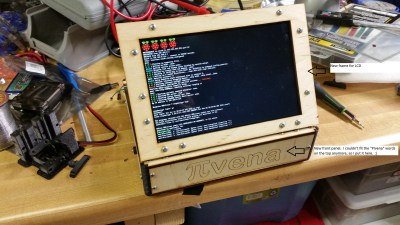
pivenaNext up is [Tim] with PIvena. [Tim] took his inspriation from [Bunnie Huang’s] Novena open laptop. Rather than roll his own ARM board, [Tim] went with a Raspberry Pi. His original design was for the Raspberry Pi model B. Last time we looked at PIvena, the model B+ was still pretty new. As we hoped, [Tim] modified his design to accept the new Pi layouts. This means it will physically work with the B+, Pi 2, and Pi 3 boards. [Tim] didn’t stop there though. He also upgraded from an 800 x 480 LCD to an 1200 x 800 LCD. He managed to do that while keeping the same bolt pattern on the travel cover. Nice work [Tim]!
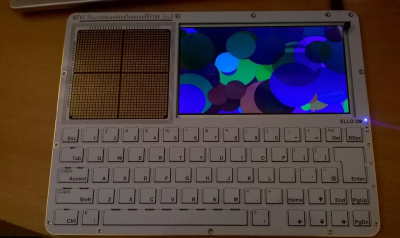
elloNext we have [KnivD] with ELLO 2M. The most striking thing about ELLO 2M is the construction. The entire laptop is made from 6 PCBs which sandwich all the other parts. The keyboard is PCB material with keys routed out. The processor is a Microchip PIC32MX470-120. Software is loaded from one of 3 microSD cards. The 7 inch touchscreen LCD and 4500 mAh LiPo battery are nestled in between PCB layers. A true hacker, [KnivD] included a generous pin grid for debugging add-on circuits. The whole setup looks great with white silkscreen. As [Mark Sherman] mentioned in the comments, this machine reminds us of a modern-day TRS-80 Model 100.
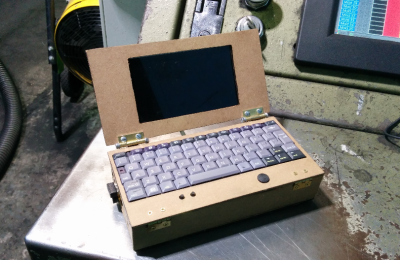
pipdaFinally we have [pdrift86] with Mini rpi2 laptop. Palmtop might be a better name for this. [pdrift86] took his inspiration (and his keyboard) from the old HP Jornada Personal Digital Assistant (PDA). The housing is Masonite, cut from a clipboard. A Raspberry Pi 2 hides inside, along with a 4 cell 18650 Li-Ion battery. The screen is a 5″ LCD with a composite input. The display isn’t a touchscreen, so a Playstation Portable analog stick is on-board, and will eventually be connected for mouse control. [pdrift86] even managed to sneak the Pi camera on the back of his machine, so it can take pictures cellphone style.

If you want to see more DIY laptop projects, check out our new DIY Laptops notebooks, and portables list. Notice a project I might have missed? Don’t be shy, just drop me a message on Hackaday.io. That’s it for this week’s Hacklet, As always, see you next week. Same hack time, same hack channel, bringing you the best of Hackaday.io!

Retrotechtacular: Railroads In The Jet Age

The front of the Soviet jet train on a monument in Tver, Russia. By Eskimozzz [PD], via Wikimedia Commons.
It started with one of those odd links that pop up from time to time on Hacker News: “The strange and now sadly abandoned Soviet Jet Train from the 1970s“. Pictures of a dilapidated railcar with a pair of jet engines in nacelles above its cab, forlorn in a rusty siding in the Russian winter. Reading a little further on the subject revealed a forgotten facet of the rivalry between Russians and Americans at the height of the Cold War, and became an engrossing trawl through Wikipedia entries, rail enthusiast websites, and YouTube videos.

Continue reading “Retrotechtacular: Railroads In The Jet Age” →

A Better Way To Measure Your Impact On The World

Close your eyes and think of an electric wheelchair. What do you see? Is it sleek, futuristic, and elegant… worthy of the moniker: iChair? No, no it is not. It’s a boxy tank-like thing with grey knobbed wheels that is powered with lead-acid batteries. Why is that?

Obviously there are alternatives. Just yesterday I came across UPnRIDE (that name is sore on the eyes but speak it aloud and you’ll get it). It’s an electric wheelchair that converts into a standing position. And it looks comparatively sleek and modern. And it’s not the first time I’ve seen the idea before. One of my favorite articles over the years is still our coverage of Tek RMD, a similar standing robotic wheelchair design. So why is it I don’t see these in the wild? Why is it I only remember seeing the concept twice in four years?

Continue reading “A Better Way To Measure Your Impact On The World” →

3D Printering: Aramid And Carbon Fiber Infused ABS

Last week, we had a look at a carbon-infused PETG filament. This week, I’d like to show you two composites based on a more common thermoplastic in 3D printing: ABS. Among a whole lot of other engineering plastics, the french company Nanovia manufactures Kevlar-like aramid-fiber-infused and carbon-fiber-infused ABS 3D printing filaments. These materials promise tougher parts with less warping while being just as easy to print as regular ABS. Let’s check them out!

Continue reading “3D Printering: Aramid And Carbon Fiber Infused ABS” →